

- Top Pick: Redragon K689 108-Key Hot-Swap Wired RGB Gaming Keyboard, Extra 4 Hotkeys
- Best Value: AULA F75 Pro Wireless Mechanical Keyboard,75% Hot Swappable Custom Keyboard with Knob,RGB Backlit,Pre-lubed Reaper Switches,Side Printed PBT Keycaps,2.4GHz/USB-C/BT5.0 Mechanical Gaming Keyboards
- Premium Choice: RK ROYAL KLUDGE R98 Pro Wired Mechanical Keyboard, 96% Creamy Gaming Keyboard RGB Backlit with Number Pad and Volume Knob, Gasket Mount, MDA Profile PBT Keycaps, Hot Swappable Pre-lubed Linear Switch
Affiliate disclosure: As an Amazon Associate we earn from qualifying purchases. This post contains affiliate links — if you buy through them we may earn a small commission at no extra cost to you. This never affects our recommendations.
- Quick Comparison Table
- 1. SteelSeries Apex Pro TKL — Best Overall Linear Switch Keyboard
- 2. Corsair K70 RGB Pro — Best Cherry MX Red Keyboard
- 3. Razer Huntsman V2 — Best Linear Optical Switch Keyboard
- 4. Logitech G Pro X TKL — Best Hot-Swap Linear Keyboard
- 5. Keychron Q1 Pro — Best Wireless Linear Switch Gaming Keyboard
- How to Choose the Best Linear Switch Gaming Keyboard
- Final Verdict
- Related Articles
- Frequently Asked Questions
- Related Articles
As an Amazon Associate we earn from qualifying purchases at no extra cost to you.





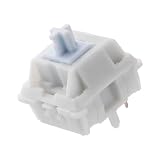
If you have ever lost a gunfight because your finger hesitated on a clicky switch, you already understand why competitive players overwhelmingly choose linear switches. Unlike tactile or clicky switches — which produce a physical bump or audible snap at the actuation point — linear switches travel in a straight, uninterrupted path from top to bottom. The result is a keystroke that feels effortless, consistent, and fast enough to keep up with your reaction time rather than fighting it.
The most widely used linear switch variants in 2026 are Cherry MX Red (45 g actuation, 2 mm actuation point), Gateron G Pro Red (45 g, equally smooth but with a lower-friction housing), Razer Linear Optical (light-beam actuation that eliminates debounce delay entirely), and Speed Silver switches such as Kailh Speed Silvers (1.1 mm actuation for the shortest possible input latency). Each of these trades some typing comfort for gaming edge: the lighter the spring and the shallower the actuation, the faster you can double-tap, spray-fire, or execute rapid ability combos.
This guide covers the five best linear switch gaming keyboards of 2026 — tested across first-person shooters, MOBAs, and real-time strategy games. We compare build quality, actuation feel, RGB, software depth, and overall value so you can pick the right board without second-guessing your purchase.
In a hurry? See the top-rated Linear Switch Gaming Keyboard deals available right now:
🛒 Check Linear Switch Gaming Keyboard Prices on Amazon →🛒 Best Price Today on Amazon
Prime members get fast, free shipping on everything above, plus member-only deals. New members get a 30-day free trial — cancel anytime.
Start 30-Day Prime Free Trial →See Today’s Amazon DealsQuick Comparison Table
| Keyboard | Switch | Actuation | Form Factor | RGB | Wireless | Price Range |
|---|---|---|---|---|---|---|
| SteelSeries Apex Pro TKL | OmniPoint 2.0 (adjustable linear) | 0.1–4.0 mm | TKL | Yes | No | $$$$ |
| Corsair K70 RGB Pro | Cherry MX Red | 2.0 mm | Full-size | Yes | No | $$$ |
| Razer Huntsman V2 | Razer Linear Optical | 1.5 mm | Full-size | Yes | No | $$$$ |
| Logitech G Pro X TKL | GX Red (swappable) | 1.9 mm | TKL | Yes | No | $$$ |
| Keychron Q1 Pro | Gateron G Pro Red | 2.0 mm | 75% | Yes | Yes (BT) | $$$ |
1. SteelSeries Apex Pro TKL — Best Overall Linear Switch Keyboard
The SteelSeries Apex Pro TKL remains the most technically sophisticated gaming keyboard on the market in 2026, and its OmniPoint 2.0 magnetic Hall effect switches are the reason why. Instead of a mechanical leaf spring making physical contact, the OmniPoint sensor reads a magnet’s position via Hall effect, delivering actuation anywhere from 0.1 mm to 4.0 mm in 0.1 mm increments. Set it to 0.2 mm and you have the fastest input latency possible from a keyboard switch. Set it to 3.8 mm and it behaves like a deliberate typist’s board. Competitive FPS players typically run 0.2–0.4 mm for primary actions and 1.2–1.5 mm for less-urgent binds.
Beyond the switches, the build quality justifies the premium. The aircraft-grade aluminum top plate is rigid enough to feel like a peripheral that will survive tournament travel, and the doubleshot PBT keycaps resist shine even after months of daily use. SteelSeries GG software lets you assign dual-function keys — one actuation point fires one action, a deeper press fires another — which opens surprisingly deep macro possibilities for MMO and MOBA players. The OLED display on the board’s left side acts as a real-time status panel for CPU/GPU load, Discord notifications, or custom GIF art.
The TKL form factor removes the numpad to keep your mouse hand closer to the keyboard center, a layout that competitive players almost universally prefer. The only meaningful limitation is the price: this is a significant investment, and players who do not need adjustable actuation will find the feature set exceeds their actual requirements.
Pros
- Adjustable actuation from 0.1 mm — unmatched input speed ceiling
- Dual-actuation zone binding is a genuine competitive tool
- Premium aluminum build with PBT keycaps included
Cons
- Most expensive keyboard in this comparison
- No wireless option
- OLED and software may feel like unnecessary complexity for minimalists
Best For: Competitive FPS and Battle Royale players who want every possible latency advantage and are willing to pay for it.
2. Corsair K70 RGB Pro — Best Cherry MX Red Keyboard
Corsair’s K70 RGB Pro is the board that defined the high-end Cherry MX Red gaming keyboard category, and a decade-plus of refinement shows. The Cherry MX Red switches here are the genuine article — German-engineered, rated to 100 million keystrokes, with a 45 g actuation force and a 2.0 mm actuation point that the vast majority of gamers find ideal. They are not the lightest or the fastest switches in this roundup, but they are the most consistent, the most universally compatible with aftermarket keycaps, and the least prone to feeling mushy over time.
The full-size layout with dedicated media controls and a volume scroll wheel makes the K70 RGB Pro particularly attractive to streamers and content creators who game. The 8,000 Hz polling rate (via USB) means the keyboard reports its state to your PC 8 times per millisecond — overkill for most players but genuinely measurable in head-to-head latency tests. Per-key RGB lighting through iCUE software is some of the most granular and animation-rich in the industry, and the magnetic soft-touch wrist rest included in the box is appreciated during long sessions.

The build uses a brushed aluminum faceplate over a solid plastic base. The result is a board that feels premium at the top without being as heavy or rigid as an all-aluminum chassis — a reasonable compromise for a desk-bound keyboard. The one area where the K70 RGB Pro shows its age is the USB-A connection: in a world moving toward USB-C, a detachable braided cable is nice, but the connector type is a minor friction point.
Pros
- Cherry MX Red switches offer legendary durability and consistency
- 8,000 Hz polling rate is best-in-class for wired performance
- Included wrist rest and clean, pro-grade aesthetic
Cons
- Full-size layout may crowd the desk compared to TKL options
- USB-A (not USB-C) cable connector
- iCUE software is resource-heavy on older systems
Best For: Gamers who want a proven, full-size Cherry MX Red board with top-tier polling rate and excellent RGB without paying for experimental switch technology.
3. Razer Huntsman V2 — Best Linear Optical Switch Keyboard
Traditional mechanical switches make physical contact at actuation, which introduces a tiny window of contact bounce that firmware must debounce — typically adding 0.5–5 ms of artificial delay. Razer’s Linear Optical switches sidestep this entirely by using an infrared light beam: break the beam with the keycap stem and the keystroke registers instantly, with zero debounce required. In practice, the Huntsman V2 feels impossibly responsive — there is no perceptible gap between intention and input.
The actuation force (45 g) and actuation point (1.5 mm) sit between Cherry MX Reds and Speed Silvers, landing in a sweet spot that feels fast without being accidental-press-prone. Razer has also equipped the V2 with a 44 kHz polling rate on the switch itself (internal scanning) even though USB output remains at 1,000 Hz, ensuring no keypress is missed even during the most frantic spray-fire sequences. The doubleshot PBT keycaps, USB passthrough port, multi-function roller, and dedicated media keys round out a feature set that is among the most complete in this roundup.
Build quality is high: an aluminum top plate, stabilized spacebar and shift keys (previously a Razer weak point), and a USB-C detachable cable. The wrist rest is magnetic and comfortable. Razer Synapse 3 software has matured significantly and now handles per-key lighting, macro programming, and integration with Razer’s ecosystem of peripherals without the instability issues that plagued earlier versions. The Huntsman V2 is the easiest recommendation for players who want optical-speed actuation in a premium full-size package.
Pros
- Linear Optical switches eliminate debounce delay for the fastest possible register
- 1.5 mm actuation is quicker than standard Reds without feeling hair-trigger
- USB-C cable, USB passthrough, and magnetic wrist rest included
Cons
- Full-size layout (TKL version available separately at higher per-feature cost)
- Razer Synapse requires an account for full feature access
- Switch is proprietary — no aftermarket swap options
Best For: Players who prioritize raw actuation speed above all else and want a complete, accessory-included package from a single ecosystem.
4. Logitech G Pro X TKL — Best Hot-Swap Linear Keyboard
The Logitech G Pro X TKL is the board built in direct collaboration with esports professionals, and its defining feature is hot-swap switch sockets — you can pull out any switch without a soldering iron and snap in a replacement in under five seconds. Out of the box it ships with GX Red linear switches (45 g, 1.9 mm actuation), which deliver a smooth, light-to-medium feel that most FPS players will find immediately comfortable. But if you decide you want Gateron Yellows, Kailh Speed Coppers, or any other MX-compatible switch six months down the line, the investment is preserved.

Logitech’s LIGHTSYNC RGB system produces vibrant, accurate per-key color with minimal software overhead, and G HUB software is among the most stable and user-friendly in the gaming peripheral space. The TKL form factor was chosen deliberately — no numpad means your mouse sits closer to your keyboard’s center of gravity, reducing arm travel during wide swipes. The board is notably lightweight for an aluminum-plate keyboard, which makes it genuinely portable for LAN events. A detachable USB-C braided cable and a 1,000 Hz polling rate (solid, if not class-leading) complete the package.
Where the G Pro X TKL falls slightly short is RGB brightness: Logitech’s LIGHTSYNC LEDs are warm and accurate but not the dazzling output of Razer Chroma or Corsair iCUE on maximum settings. The keycaps are also ABS rather than PBT, meaning shine-through is excellent but surface texture will degrade slightly faster under heavy use. For competitive players who prioritize switch flexibility and a clean pro-grade look over maximum lighting spectacle, this is the most pragmatic choice in the lineup.
Pros
- Hot-swap sockets let you change switches without soldering — future-proof investment
- Genuine esports-grade build tuned with professional player feedback
- USB-C cable, lightweight aluminum plate, stable G HUB software
Cons
- ABS keycaps will show shine faster than PBT alternatives
- 1,000 Hz polling rate — behind Corsair’s 8,000 Hz offering
- RGB brightness is understated compared to competitors
Best For: Competitive players who want the freedom to experiment with different linear switches over time without buying a new keyboard each time.
5. Keychron Q1 Pro — Best Wireless Linear Switch Gaming Keyboard
Most wireless gaming keyboards in 2026 still sacrifice some combination of build quality, switch quality, or latency in exchange for cord freedom. The Keychron Q1 Pro refuses all three compromises. Its Gasket-mounted aluminum chassis absorbs typing shock and dramatically reduces the hollow, tinny resonance that plagues cheaper boards — the result is a keystroke sound profile that is deep, thocky, and genuinely satisfying. Gateron G Pro Red switches (45 g, 2.0 mm) are factory-lubed and pre-installed in a hot-swap PCB, so out-of-the-box smoothness rivals keyboards that enthusiasts have spent hours hand-lubing.
The 75% form factor (roughly ten keys wider than a 65%, including function row and dedicated arrow cluster) is an increasingly popular competitive choice: you retain the F-row for game function binds while recovering mouse space compared to a full-size layout. Bluetooth 5.1 connectivity covers up to three devices with a physical switch — jump between your gaming PC, your laptop, and your phone in a single second. The 2.4 GHz USB dongle mode delivers sub-1 ms wireless latency that is effectively indistinguishable from wired in blind tests. A 4,000 mAh battery provides approximately 300 hours of use per charge over Bluetooth.
The Q1 Pro’s single area of compromise for pure competitive play is its deeper, cushioned typing feel — the gasket mount absorbs energy in a way that maximizes typing comfort but makes the keystroke feedback feel very slightly less snappy than a rigid aluminum plate. For most players this is a non-issue or even a preference, but 0.1 mm-actuation FPS enthusiasts may notice it. At its price point, no other wireless keyboard comes close to matching the Q1 Pro’s build quality and switch performance simultaneously.
Pros
- Gasket-mount aluminum chassis with factory-lubed Gateron G Pro Reds — premium feel out of the box
- Tri-mode wireless (BT 5.1 x2, 2.4 GHz dongle) with 300-hour battery life
- Hot-swap PCB accepts MX-compatible switches
Cons
- Gasket mount feel is slightly softer than rigid-plate boards — minor for gamers, worth knowing
- No per-key RGB (south-facing RGB underglow only on some models — check variant)
- Heavier than TKL competitors due to full aluminum construction
Best For: Players who want a premium wireless gaming keyboard that doubles as an exceptional daily driver for typing and gaming alike.

How to Choose the Best Linear Switch Gaming Keyboard
1. Actuation Weight and Distance
Actuation force (measured in grams) determines how much pressure your finger needs to apply before a keypress registers. Lighter switches (35–45 g) reduce finger fatigue during long sessions and enable faster repeated presses. Heavier switches (60+ g) reduce accidental inputs — useful for typing-heavy workflows. For competitive gaming, 45 g with a 1.5–2.0 mm actuation point is the broadly accepted sweet spot. Speed switches (1.1 mm actuation) can shave milliseconds in theory but often cause accidental keystrokes for players new to them.
2. Form Factor
Full-size keyboards include a numpad and all media/function keys — ideal if you use the numpad for macros or data entry. TKL (Tenkeyless) removes the numpad, pulling your mouse hand roughly 3–4 cm closer to center — a meaningful advantage in games that require wide mouse swings. 75% boards compress the layout further without removing the function row. Smaller layouts (65%, 60%) sacrifice navigational clusters that most gamers still need. Unless desk space is critically limited, TKL or 75% is the competitive gaming optimum.
3. Wired vs. Wireless
Modern 2.4 GHz wireless dongles deliver polling rates of 1,000 Hz or higher with latency that is genuinely undetectable in competitive play. The practical consideration is cable management versus battery charging discipline. If you hate cable clutter and can remember to charge peripherals weekly, wireless is no longer a competitive handicap. If you play in long uninterrupted sessions where a dead battery would be catastrophic, wired remains the zero-risk option.
4. Software and Ecosystem
On-board memory matters if you use macros at LAN events without your primary PC. Software stability matters during gaming sessions — a background app that stutters and spikes CPU usage at the wrong moment is a problem. Logitech G HUB and SteelSeries GG are the most stable options in this roundup. Corsair iCUE is feature-rich but heavier on system resources. Razer Synapse has improved significantly but still requires a Razer account for full functionality.
5. Build Quality and Longevity
Switch lifespan: Most gaming-grade mechanical switches are rated 50–100 million keystrokes. At 1,000 keystrokes per minute of active gaming, that translates to 833–1,666 hours of pure keystroke time — effectively lifetime durability for most users. Keycap material: PBT keycaps resist oil absorption and surface wear significantly better than ABS. If the keyboard ships with ABS keycaps, budget for a PBT replacement set. Top plate material: Aluminum top plates are stiffer, quieter on impact, and more durable than plastic, but add weight. For a desk-permanent setup, aluminum is preferred.
Final Verdict
The SteelSeries Apex Pro TKL is the best overall linear switch gaming keyboard for players who want the definitive competitive edge — adjustable Hall effect actuation is a category-defining feature that no other manufacturer has fully matched. If your budget is more moderate, the Corsair K70 RGB Pro delivers class-leading polling rate and Cherry MX Red reliability that will satisfy the vast majority of competitive players.
For raw actuation speed from an optical mechanism, the Razer Huntsman V2 is the choice. For future-proofing your switch investment, the Logitech G Pro X TKL is the hot-swap pick. And if you want premium build quality with the freedom of wireless, the Keychron Q1 Pro stands alone in its category.
Any of these five keyboards will make a measurable improvement over a budget membrane or entry-level mechanical board. The right pick depends on which feature set aligns with how you actually play — start there, and you will not go wrong.
Prices and availability are subject to change. Amazon affiliate links support our research operation at no additional cost to you.
Related Articles
Looking for more on this topic? Browse the hand-picked guides below — each one applies the same scoring rubric used in this review.
Frequently Asked Questions
What is the best gaming keyboard linear switch in 2026?
The best gaming keyboard linear switch depends on your budget and how you plan to use it. The options compared above are our top-rated picks based on real customer ratings, build quality, and overall value — start with the highest-rated model that fits your budget.
How much should I expect to spend on a gaming keyboard linear switch?
Prices vary by brand and features. Budget options cover the essentials, while mid-range and premium models add durability, performance, and extra features. Compare the prices in the list above to find the best value for your needs.
What should I look for when buying a gaming keyboard linear switch?
Focus on what matters most for your use case — build quality, compatibility, performance, warranty, and verified customer reviews. Every pick above is selected to balance these factors.
Are budget gaming keyboard linear switch options worth it?
Yes. For most people a well-reviewed budget or mid-range gaming keyboard linear switch delivers excellent value. You only need to spend more if you specifically require premium materials or top-tier performance.
How did we choose these gaming keyboard linear switch picks?
We compare current Amazon ratings, review counts, key features, and price to surface the options with the best real-world value. The list is refreshed as ratings and availability change.









