

- Top Pick: Logitech G413 SE Full-Size Mechanical Gaming Keyboard, Black Aluminum | Backlit keyboard with tactile mechanical switches, anti-ghosting, and compatible with Windows and macOS
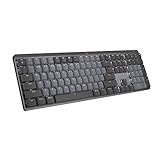
- Best Value: Logitech MX Mechanical Wireless Illuminated Keyboard Tactile – Graphite | Low-profile full-size, 3 device Bluetooth pairing, Smart backlight auto-adjusts, USB-C rechargeable, Up to 15 day battery
- Premium Choice: Logitech G213 Prodigy Gaming Keyboard, Wired Keyboard – Black | Mech-Dome Keys, Palm Rest, Adjustable Feet, Media Controls, LIGHTSYNC RGB, USB, Compatible with Windows
Logitech sells mechanical keyboards under two quite different banners. The G line is built for gaming, with RGB lighting, quick-polling wired or LIGHTSPEED wireless connections and compact layouts. The MX line is built for office desks, with low-profile switches, multi-device Bluetooth and a calmer look. Anyone searching for the best Logitech mechanical keyboard is usually deciding between those two personalities before they ever compare switches. A third question hides underneath: whether you want to plug in and forget it, or build a setup you can modify with new switches and keycaps over the years.
This 2026 guide lines up seven mechanical models and sorts them by layout, switch feel and connection style. It is written for gamers choosing between a tenkeyless board and a full-size one, for typists who want a quieter low-profile board, and for people who switch between a laptop, tablet and desktop during the day. Notes come from the specs written in each title, so check the listing for exact switch type and cable details before buying. Four of the seven are variants of just two models, with linear and tactile versions of one and tactile and clicky versions of another, which makes the switch decision the real fork in the road for those boards.
Quick Picks
As an Amazon Associate we earn from qualifying purchases at no extra cost to you.



| Product | Best for | Key spec from the title |
|---|---|---|
| Logitech G413 SE | Straightforward full-size gaming | Tactile switches, aluminum top, anti-ghosting |
| MX Mechanical (Tactile) | Quiet office typing | 3-device Bluetooth, up to 15 day battery |
| G316 X 98 (Linear) | Fast, smooth keystrokes | Hot-swappable linear switches, gasket design |
| MX Mechanical (Clicky) | Audible feedback | Clicky switches, USB-C rechargeable |
| G316 X 98 (Tactile) | Gaming with a bump | Hot-swappable tactile switches, PBT keycaps |
| G515 LIGHTSPEED TKL | Wireless tenkeyless play | Low profile, double-shot PBT keycaps |
| G PRO TKL (Clicky) | Portable esports board | Detachable Micro USB cable |
How to Choose
Layout: full-size, 98-key or tenkeyless
A full-size board keeps the number pad, which suits spreadsheets and data entry. A tenkeyless layout removes the pad and frees roughly the width of a hand for mouse movement, which low-sensitivity players appreciate. The G316 X 98 sits between the two by name, so confirm the exact key count on its listing. Measure your desk if space is tight, and leave room for a wrist rest if you plan to use one.
Switch feel: linear, tactile or clicky
Linear switches slide straight down with no bump and are popular for rapid inputs, such as strafing or double-tapping in shooters. Tactile switches add a bump at the actuation point, helping typists avoid bottoming out. Clicky switches add an audible click, which some enjoy and shared offices dislike. This lineup offers all three, and several models appear in more than one variant, so pick the feel first. If you cannot decide, a hot-swappable board such as the G316 X 98 lets you start with one type and change it without replacing the whole keyboard.
Wireless, battery and connection type
Bluetooth with multi-device pairing, as on the MX Mechanical boards, suits switching between a laptop and a tablet. LIGHTSPEED wireless on the G515 targets gaming latency. Wired boards avoid battery management entirely. Check whether the cable is detachable, like the G PRO’s Micro USB cable, or USB-C, which is easier to replace today. Battery life figures in titles describe best-case use, so heavy backlight use will shorten them, and a wired fallback is handy for any wireless board.
Hot-swap, keycaps and where budget boards cut corners
Hot-swappable switches let you change switch types without soldering. PBT keycaps resist shine and wear better than thin ABS. Lower-end boards use membrane-like feel or plain plastic caps, and some skip metal top plates. Mechanical does not guarantee a premium feel, so read the switch and keycap lines in each title closely. Also note that a metal top plate, as on the G413 SE, adds rigidity that a plastic shell cannot match, which many buyers notice as less flex under hard typing.
The 7 Best Options
Logitech G413 SE
The G413 SE is a full-size mechanical gaming keyboard with a black aluminum top, backlit keys, tactile mechanical switches and anti-ghosting. It lists compatibility with Windows and macOS, which gives it wider use than a strictly Windows-focused gaming board. For a first mechanical keyboard, the plain feature set is easy to understand and has few settings to manage.
- Full-size layout keeps the number pad for work and games.
- Tactile switches add a bump that helps accuracy while typing.
- Trade-off: the title lists no wireless connection or hot-swap switches.
Skip it if you want a compact tenkeyless design or want to change switches later, or if you expect software-heavy lighting scenes, since the title only mentions a simple backlight.
MX Mechanical (Tactile)
This low-profile, full-size wireless keyboard lists three-device Bluetooth pairing, a smart backlight that auto-adjusts, USB-C charging and up to 15 days of battery. Tactile switches give a measured typing feel for long writing sessions, and the quiet styling suits a home office or a shared workspace.
- Multi-device pairing switches between a laptop, tablet and phone.
- Smart backlight adjusts itself to the room, so there are no lighting menus to learn.
- Trade-off: the low-profile design feels different from tall gaming switches.
Skip it if you want gaming-style RGB effects and hot-swappable switches, because the title describes an illuminated office board rather than a customizable gaming one.
G316 X 98 (Linear)
The G316 X 98 lists hot-swappable linear mechanical switches, a gasket design, PBT keycaps, a polling figure written as under 8kHz, LIGHTSYNC RGB, a dot-matrix style LED display and a USB-C connection. The 98 in the name points to a layout shorter than a classic full-size board.
- Hot-swap switches allow later experimentation without soldering.
- Gasket design and PBT caps point to a more refined typing feel.
- Trade-off: linear switches have no tactile bump, which some typists miss.
Skip it if you want a wireless connection, since the title lists only USB-C.
MX Mechanical (Clicky)
The clicky version of the MX Mechanical keeps the same low-profile, full-size design, three-device Bluetooth, smart backlight, USB-C charging and up to 15 days of battery, but adds an audible click. It suits someone who wants a typewriter-like signal without giving up a modern wireless setup.
- Audible clicks provide a clear typing signal.
- Wireless Bluetooth keeps the desk clean and portable.
- Trade-off: clicks carry in quiet or shared rooms.
Skip it if you work near others, record audio or spend much of the day on calls, because the click is part of the sound of every key.
G316 X 98 (Tactile)
This variant lists hot-swappable tactile switches with the same gasket design, PBT keycaps, LIGHTSYNC RGB, LED display and USB-C. It is the tactile twin of the linear version, aimed at players who also type a lot and want feedback under the finger.
- Tactile bump aids typing accuracy and deliberate presses.
- Hot-swap sockets allow switch changes down the line.
- Trade-off: the title lists a wired connection only.
Skip it if you need Bluetooth or a low-profile design, or if you want the smoothest possible keystroke, in which case the linear sibling is the closer match.
G515 LIGHTSPEED TKL
A thin tenkeyless wireless gaming keyboard with a low-profile design, LIGHTSYNC RGB, double-shot PBT keycaps and tactile brown-style switches. It combines a slim body with LIGHTSPEED wireless, so the desk stays free of cables while the mouse gets extra room.
- Tenkeyless layout gives the mouse more space.
- Double-shot PBT keycaps resist wear and shine.
- Trade-off: low-profile switches have shorter travel than full-height ones.
Skip it if you prefer full-height switches or need a number pad, or if you would rather keep the tenkeyless shape but stay wired and avoid charging.
G PRO TKL (Clicky)
The G PRO is an ultra-portable tenkeyless mechanical board with clicky switches, a detachable Micro USB cable and 16.8 million color Lightsync backlit keys. It is the esports-style traveler of the group, built to slip into a bag and be set up quickly on a borrowed table.
- Detachable cable makes carrying and replacing it easier.
- Compact layout suits tournament bags and tight desks.
- Trade-off: Micro USB is an older connector than USB-C.
Skip it if you want a wireless connection or a quiet switch, since clicky switches announce every press to anyone sitting nearby.
Which One Fits Your Situation
You game competitively on a small desk
The G PRO TKL and the G515 LIGHTSPEED TKL both remove the number pad. Pick the G PRO for a wired clicky board and the G515 for low-profile wireless. Either way, the tenkeyless shape lets you keep the mouse closer to the body, which reduces shoulder strain during long sessions.
You write all day and switch devices
The MX Mechanical tactile keeps typing measured and pairs with three devices, so a single board can follow you from a work laptop to a tablet for notes. Choose the clicky version only if the room tolerates noise, and remember the listing mentions up to 15 days of battery.
You like tinkering with switches
The two G316 X 98 models list hot-swappable switches, so you can start with the linear or tactile variant and change later.
You want a no-fuss full-size board
The G413 SE offers a full layout, tactile switches and an aluminum top without wireless complexity. It is also the board to pick if you share a computer between Windows and macOS users, since the title lists both.
Common Mistakes
- Choosing clicky switches for a shared office or call-heavy workday.
- Assuming every Logitech gaming board is wireless.
- Ignoring layout and buying a tenkeyless board while needing a number pad.
- Skipping the switch type because the model name looks the same across variants.
- Forgetting that low-profile boards need a different wrist angle than tall switches, which can feel strange for the first few days.
Related guides
- Battery Operated Smoke And Carbon Monoxide Detectors
- Combination Smoke And Carbon Monoxide Detectors
- Aio Liquid Coolers For High Performance Gaming
Frequently Asked Questions
What is the difference between tactile and linear switches?
Tactile switches have a bump partway through the press; linear switches travel smoothly without one. Gamers often like linear for speed, while typists often like tactile for feedback. Neither is objectively better, and the choice mostly comes down to habit and how much noise your room allows.
Are MX Mechanical keyboards good for gaming?
They are designed for productivity, with multi-device Bluetooth and a low profile. They can game, but the G line offers gaming-first features such as LIGHTSYNC effects and tenkeyless layouts. If your day is mostly documents and calls with occasional games, the MX line is the calmer fit.
What does hot-swappable mean?
The switches plug into sockets rather than being soldered, so you can replace them with others without tools beyond a puller. It also means a damaged switch can be fixed on its own instead of ending the life of the board, which is a quiet benefit of the design.
Do I need wireless?
Not necessarily. Wired boards avoid charging and are simple. Wireless helps with clean desks and switching between devices, but it adds charging to your routine. If you travel often, pair a wireless board with a short backup cable so a flat battery never stops work.















