Ark: Survival Ascended asks a lot of a keyboard. You juggle a ten-slot hotbar, inventory and crafting menus, building pieces, whistle commands for tames, and the admin console, often mid-fight or mid-storm. A keyboard that keeps up makes those inputs fast and reliable, while a cramped or sluggish one turns a routine tame into a scramble.
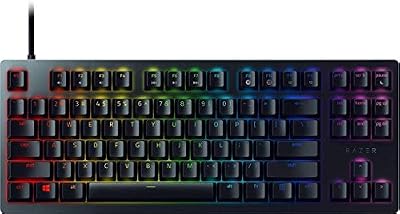

The five keyboards below cover the layouts that work best for Ark, from compact 60% boards that free up mouse space to full-size boards with macro keys. Each is described from its published specifications and grouped by price tier.
As an Amazon Associate, we earn from qualifying purchases.
Quick Answer
For most Ark players, the Logitech G PRO X TKL Lightspeed Wireless is the best all-round pick. Its tenkeyless layout keeps the function row for hotkeys, GX Brown tactile switches suit long sessions, and wireless freedom helps when you lean back between tames. Compact players should look at the SteelSeries Apex Pro Mini Gen 2, while builders who want a numpad and macro keys should consider the Logitech G915 X.
1. Razer Huntsman Mini (Purple Switch)
The Razer Huntsman Mini is the compact pick, giving your mouse as much room as possible. Its 60% form factor drops the numpad, function row, and navigation cluster, leaving a small board that is easy to angle for comfort. That extra desk space matters when aiming a bow or checking for threats.
Under the keycaps sit Razer Clicky Optical Purple switches, actuating at 1.5 mm with 45 g of force. Optical switches register with light instead of metal contact, giving a fast feel and a rated lifespan of 100 million keystrokes. The clicky feedback confirms every press, which suits combat and harvesting. Doubleshot PBT keycaps resist shine from heavy use, and per-key Chroma RGB lets you color-code key groups.
The trade-off is the missing keys: function keys and arrows live on a function layer, so frequent commands need FN combinations. The clicky switches are also loud enough to carry through an open microphone. For a budget player who wants a fast, compact board and does not mind the noise, this is a strong starting point.
Specs
- Layout: 60% form factor, 61 keys
- Switches: Razer Clicky Optical Purple
- Actuation: 1.5 mm, 45 g
- Keycaps: Doubleshot PBT
- Lighting: Per-key Chroma RGB
- Connection: Detachable USB-C cable, wired
- Price tier: Budget
2. SteelSeries Apex Pro Mini Gen 2 (Wired)
The SteelSeries Apex Pro Mini Gen 2 is the performance pick, built around tunable switches. Its OmniPoint 2.0 Adjustable HyperMagnetic switches let you set each key’s actuation point from 0.1 mm to 4.0 mm, so combat keys can trigger with the lightest touch while keys you hit by accident, such as whistle or dismount, get a deeper press. Rapid Trigger resets a key as soon as you lift it, which helps repeated inputs like harvesting and attacking.
This wired version, model 64820, connects through a detachable braided USB-C cable. The 60% form factor keeps the footprint small for wide mouse sweeps, and the 5000-series aircraft-grade aluminum top plate gives the board a rigid, premium feel. Double-shot PBT keycaps, per-key PrismSync RGB, five onboard profiles, and 2-in-1 action keys complete the package.
As with any 60% board, there is no dedicated function row or numpad, so some commands sit on layers, and the adjustability takes software setup time before it pays off. For players who want the fastest, most customizable input for Ark combat, this wired board is hard to beat.
Specs
- Layout: 60% form factor, 61 keys
- Switches: OmniPoint 2.0 Adjustable HyperMagnetic
- Actuation: 0.1–4.0 mm per key
- Connection: Wired, detachable braided USB-C cable
- Frame: Aluminum top plate
- Keycaps: Double-shot PBT
- Lighting: Per-key RGB
- Model number: 64820
- Price tier: Premium
3. Logitech G PRO X TKL Lightspeed Wireless

The Logitech G PRO X TKL Lightspeed Wireless is the balanced pick for most Ark players. Its tenkeyless layout keeps the function row and arrow keys while dropping the numpad, so you keep direct access to function-key binds and still gain desk space. GX Brown tactile switches give a gentle bump without the loud click of a clicky switch, suiting long sessions and voice chat.
Connectivity covers LIGHTSPEED wireless, Bluetooth, and USB. LIGHTSYNC RGB lighting, dual-shot PBT keycaps, media controls, and a volume roller cover the everyday extras, and game mode locks out keys that could ruin a session. Its standard layout keeps bindings familiar if you swap between keyboards.
There is no numpad, so players who bind building pieces or admin commands to numpad keys will need to remap them. For Ark players who want one board that does everything well, this is the safest recommendation in the roundup.
Specs
- Layout: Tenkeyless (TKL)
- Switches: GX Brown tactile
- Connection: LIGHTSPEED wireless, Bluetooth, USB
- Keycaps: Dual-shot PBT
- Lighting: LIGHTSYNC RGB
- Extras: Media controls, volume roller, game mode
- Price tier: Mid-range
4. ASUS ROG Strix Scope II (RX Red)
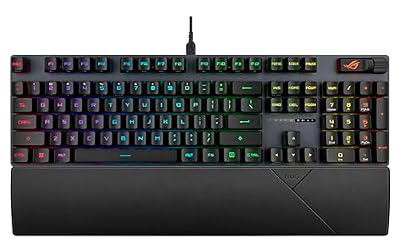
The ASUS ROG Strix Scope II is the full-size wired pick, and it suits Ark players who stream or record their sessions. Its F1 to F5 keys come pre-programmed as Xbox Game Bar hotkeys, so starting a recording is a single press. A multi-function button and wheel control media, volume, and lighting without leaving the game, and a wrist rest is included for long sessions.
Pre-lubed ROG RX Red linear optical switches press smoothly with no tactile bump and almost no debounce delay. Sound-dampening foam softens keystroke noise, and PBT doubleshot keycaps hold up to heavy use. An IP57 rating for water and dust resistance protects the board when a drink sits nearby during long taming sessions. Being full-size and wired, it keeps the numpad and every function key within reach for players who bind building pieces, emotes, and admin commands.
The full-size footprint is the trade-off: it takes the most desk space of any board here and leaves less room for low-sensitivity mouse movement. For streamers and builders who want every key available and a quiet, smooth feel, it is a strong mid-range option.
Specs
- Layout: Full-size
- Switches: Pre-lubed ROG RX Red linear optical
- Connection: Wired USB
- Keycaps: PBT doubleshot
- Extras: Streaming hotkeys, multi-function wheel, wrist rest
- Price tier: Mid-range
5. Logitech G915 X Lightspeed (GL Brown)
The Logitech G915 X Lightspeed is the premium full-size pick for builders who spend hours in Ark. This low-profile board stands only 23 mm high, with GL Brown tactile switches actuating at 1.3 mm over 3.2 mm of total travel. The short throw keeps inputs quick and reduces finger fatigue, while the tactile bump helps avoid mis-presses when placing building pieces.
Nine programmable G keys and KEYCONTROL, which assigns up to 15 functions per key, make this the best macro board here. Put building pieces, crafting shortcuts, and whistle commands on dedicated keys. Tri-mode connectivity covers LIGHTSPEED wireless, Bluetooth, and USB-C wired play, and LIGHTSYNC RGB offers a wide range of colors.
Battery life is rated at up to 36 hours with RGB at full brightness, up to 90 hours at half brightness, and up to 800 hours with RGB off, and it plays while charging over USB-C. The full-size layout takes up desk space, and the low-profile keycaps may take a session to adjust to. For serious builders who want macro keys, a numpad, and a slim premium board, this is the top pick.
Specs
- Layout: Full-size
- Switches: GL Brown tactile, low-profile
- Actuation: 1.3 mm, 3.2 mm total travel
- Connection: LIGHTSPEED, Bluetooth, USB-C
- Keycaps: Double-shot PBT
- Lighting: LIGHTSYNC RGB
- Extras: 9 G keys, KEYCONTROL, media controls, volume roller
- Battery life: Up to 36 hours with RGB on, up to 800 hours with RGB off
- Price tier: Premium
How to Choose
Start with layout, which decides which keys are always within reach. A 60% board maximizes mouse space for combat-heavy play, but it hides function keys behind a layer. A tenkeyless board keeps the function row and arrows while saving space, which fits most Ark players. A full-size board keeps the numpad and every key, which suits builders.
Next, pick a switch feel. Clicky switches give the clearest feedback and the most noise. Tactile switches give a bump without the click, a good middle ground. Linear switches press smoothly with no bump, suiting rapid inputs and quieter rooms. Adjustable switches let you tune each key, but they need setup time.
Then decide on connection: wired boards never need charging, while wireless boards keep the desk clean. If you go wireless, check that the board also works over a cable, so a flat battery never ends a session. Finally, weigh extras that match your play style: macro keys for builders, streaming hotkeys for creators, PBT keycaps for durability, and a wrist rest.
Who Should Skip
Players who rely on the numpad should skip the two 60% boards and the tenkeyless board, since none has one. If you share a room or record voice chat, skip the clicky Razer Huntsman Mini and choose a tactile or linear switch instead. If you dislike charging a keyboard, skip the wireless boards and pick a wired model. If you want a board that works out of the box, skip the adjustable SteelSeries board. And if your desk is small, skip the two full-size boards.
Frequently Asked Questions
Do I need a numpad to play Ark: Survival Ascended?
No. Ark maps its ten-slot hotbar to the number row, and core commands sit on standard letter and function keys, so a 60% or tenkeyless board covers the essentials. A numpad is useful for extra binds, and the two full-size boards in this roundup keep one.
Is a 60% keyboard good for Ark?
Yes, for players who value mouse space. Combat, aiming, and camera control benefit from a small board that leaves room for wide sweeps. The trade-off is that function keys and arrows move to a function layer, so frequent commands must be learned as combinations or rebound.
Are clicky switches too loud for voice chat?
They can be. Clicky switches produce a sharp sound an open microphone may pick up, which can annoy tribemates on long sessions. Tactile switches are quieter while keeping feedback, and linear switches are the quietest option here.
Should I pick a wired or wireless keyboard for Ark?
Both work well. A wired board never needs charging, which suits long sessions. A modern wireless board is responsive enough for Ark combat, and the wireless boards here also work over a cable.
Final Verdict
Most players should start with the Logitech G PRO X TKL Lightspeed Wireless, which keeps the function row, uses quiet tactile switches, and works wirelessly or over a cable. For the fastest input and per-key tuning, choose the SteelSeries Apex Pro Mini Gen 2. Builders and streamers who want macro keys and a numpad should choose the Logitech G915 X or the ASUS ROG Strix Scope II, and budget buyers get fast optical switches in the Razer Huntsman Mini.
Product and ASIN Reference
| Product | ASIN |
|---|---|
| Razer Huntsman Mini (Purple Switch) | B089QP4QNB |
| SteelSeries Apex Pro Mini Gen 2 (Wired) | B0B16HXVVQ |
| Logitech G PRO X TKL Lightspeed Wireless | B0BQBSH6NQ |
| ASUS ROG Strix Scope II (RX Red) | B0CLHLLFBP |
| Logitech G915 X Lightspeed (GL Brown) | B0DB1WNZJY |