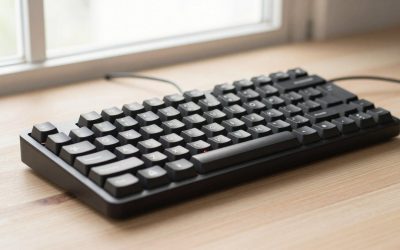
- Top Pick: SteelSeries Apex 3 RGB Gaming Keyboard – 10-Zone RGB Illumination – IP32 Water Resistant – Premium Magnetic Wrist Rest (Whisper Quiet Gaming Switch)
- Best Value: Razer Ornata V3 TKL Gaming Keyboard, Low-Profile Keys, Black
- Premium Choice: RK ROYAL KLUDGE R98 Pro Wired Mechanical Keyboard, 96% Creamy Gaming Keyboard RGB Backlit with Number Pad and Volume Knob, Gasket Mount, MDA Profile PBT Keycaps, Hot Swappable Pre-lubed Linear Switch
Affiliate disclosure: As an Amazon Associate we earn from qualifying purchases. This post contains affiliate links — if you buy through them we may earn a small commission at no extra cost to you. This never affects our recommendations.
- Watch: Mechanical vs Membrane Keyboard in 2026 — Which Is Right for Gaming? — Video Review
- Top Gaming Keyboards — Mechanical and Membrane
- How Mechanical Switches Work
- How Membrane Keyboards Work
- Gaming Performance Comparison
- When Membrane Makes Sense
- Frequently Asked Questions
- Related Articles
- Related Articles
The mechanical vs membrane debate has a clear winner for gaming — but understanding why helps you decide if the premium is worth it. In 2026, mechanical keyboards are dominant in gaming, but high-quality membrane keyboards have their place for specific users.
As an Amazon Associate we earn from qualifying purchases at no extra cost to you.


In a hurry? See the top-rated Mechanical vs Membrane Keyboard deals available right now:
⚡ Save on Your Next PC — Amazon Prime
Prime members get fast free shipping on the systems above, plus early access to Prime Day & Black Friday PC deals. New members get a 30-day free trial.
Watch: Mechanical vs Membrane Keyboard in 2026 — Which Is Right for Gaming? — Video Review
Top Gaming Keyboards — Mechanical and Membrane


How Mechanical Switches Work
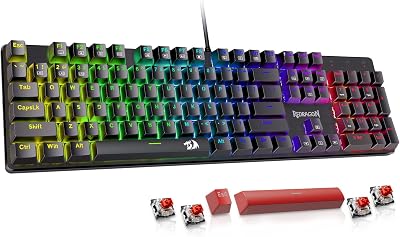
Each key has an individual mechanical switch — a physical mechanism with a spring, stem, and metal contacts. When pressed, the stem travels down until contacts meet and register the keystroke. The switch type determines the feel:
- Linear (Red/Yellow): Smooth keystroke, no tactile bump, quietest. Preferred by gamers for fast, repeatable keypresses.
- Tactile (Brown/Clear): Subtle bump at actuation point without click sound. Balance of typing and gaming.
- Clicky (Blue/Green): Audible click + tactile bump. Satisfying to type on, loud — not ideal for shared spaces or late-night gaming.
How Membrane Keyboards Work
Membrane keyboards use a pressure pad system — pressing a key compresses three layers of membrane to complete a circuit. There are no individual switches. The feel is mushy and uniform across all keys. Manufacturing is simpler and cheaper.
Gaming Performance Comparison
Actuation Force and Distance
Mechanical switches have consistent, defined actuation points (typically 1.5–2.0mm). Membrane keyboards vary significantly — the actuation pressure and distance aren’t standardized, leading to inconsistent keypress registration. In fast-paced gaming, mechanical switches register more reliably.
N-Key Rollover
Quality mechanical keyboards support N-key rollover — every key pressed simultaneously is registered. Budget membrane keyboards often support only 6-key rollover, which can miss simultaneous keypresses in complex gaming scenarios.
Durability
Mechanical switches are rated for 50–100 million keystrokes. Quality membrane keyboards last 5–10 million keystrokes. For heavy gaming use (5+ hours/day), mechanical keyboards last 3–5× longer.
When Membrane Makes Sense
- Strict budget (quality membrane keyboards cost $15–30; entry mechanical starts at $40)
- Quiet environments where any keyboard noise is disruptive
- Casual gaming (1–2 hours/day) where durability matters less
- Shared computers where personalized switches aren’t practical
Frequently Asked Questions
Does keyboard type affect gaming performance?
Marginally. Mechanical switches with consistent actuation points reduce missed inputs in theory, but the human reaction time (150–300ms) vastly outpaces any switch speed difference. The bigger benefit is tactile feedback and durability — not raw input speed.
Are expensive mechanical keyboards worth it?
A $50–80 mechanical keyboard delivers 90% of the experience of a $200 enthusiast board. Entry-level mechanical keyboards with Outemu or Gateron switches feel excellent. The diminishing returns above $100 are real — you’re paying for premium materials, switches, and build quality rather than gaming performance.
Can membrane keyboards have N-key rollover?
Some premium membrane keyboards (like Razer’s Ornata series) include N-key rollover and enhanced features, blurring the line. However, the fundamental actuation feel remains membrane. These are better than cheap membrane boards but still inferior to mechanical for gaming feel and durability.
Related Articles
Looking for more on this topic? Browse the hand-picked guides below — each one applies the same scoring rubric used in this review.