

Affiliate disclosure: As an Amazon Associate we earn from qualifying purchases. This post contains affiliate links — if you buy through them we may earn a small commission at no extra cost to you. This never affects our recommendations.
The 60% keyboard layout has become the preferred form factor for serious competitive gamers. By removing the numpad, F-row, and navigation cluster, 60% boards shrink to roughly 60% of a full-size keyboard’s width — freeing up significant horizontal desk space for low-DPI mouse sweeps. In FPS games like CS2, Valorant, and Apex Legends where large mouse movements are critical, this extra space translates directly to better aim and more comfortable wrist positioning. The 60% layout also centralizes your hand positioning, reducing shoulder and wrist strain during extended sessions. In 2025, 60% gaming keyboards range from ultra-budget $17 picks to premium $80 aluminum builds, all delivering the same core benefit: maximum mouse room in minimum footprint. We’ve tested five of the best 60% options at varying price points to help you find the right fit.
In a hurry? See the top-rated 60% Gaming Keyboards deals available right now:
🛒 Check 60% Gaming Keyboards Prices on Amazon →🛒 Best Price Today on Amazon
Prime members get fast, free shipping on everything above, plus member-only deals. New members get a 30-day free trial — cancel anytime.
Start 30-Day Prime Free Trial →See Today’s Amazon DealsTop Picks at a Glance
| Product | Best For |
|---|---|
| HyperX Alloy Origins 60 | Premium 60% with best build |
| MageGee Portable 60% | Mid-budget 60% with Blue switches |
| Redragon K617 Fizz Hot-Swap | Best value hot-swap 60% |
| MageGee Mini 60% | Absolute budget 60% |
| RedThunder 60% Wireless Combo | Wireless 60% with mouse bundle |

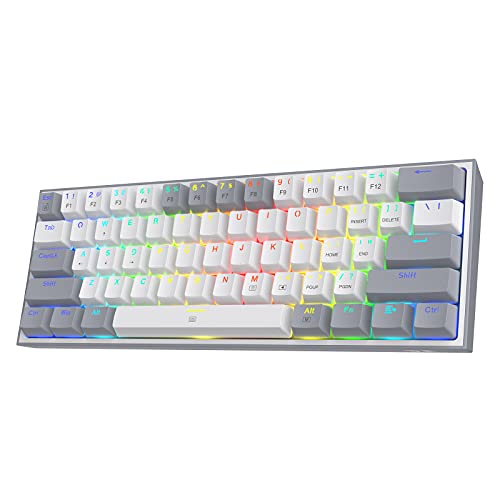


HyperX Alloy Origins 60
The HyperX Alloy Origins 60 sets the standard for what a 60% gaming keyboard should be at the mid-range price point. The full aircraft-grade aluminum frame eliminates flex entirely, and HyperX’s proprietary Red linear switches deliver a smooth, consistent keystroke that holds up under millions of actuations. Double-shot PBT keycaps resist shine better than standard ABS. RGB implementation is excellent with per-key lighting and NGENUITY software for customization. For gamers who want their 60% to last years rather than months, this is the investment pick.
- Pros: Full aluminum frame, PBT keycaps, consistent HyperX Red switches, excellent software
- Cons: Most expensive at $79.99, no hot-swap, wired only, no arrow keys
MageGee Portable 60%
The MageGee Portable 60% is a solid mid-budget compact keyboard targeting users who want genuine Blue clicky switches and a small footprint without spending over $30. The ABS case is lightweight and genuinely portable. RGB lighting supports multiple modes via Fn combinations without requiring software. The Blue switches provide satisfying tactile and audible feedback ideal for users coming from membrane keyboards. Not suitable for quiet office environments but well-suited for home gaming use.
- Pros: Genuine clicky Blue switches, compact and portable, RGB included, budget-friendly
- Cons: ABS keycaps, no hot-swap, louder than alternatives, basic stabilizers
Redragon K617 Fizz Hot-Swap
The K617 Fizz is arguably the best value proposition in the 60% keyboard market. At the same price as the MageGee, it adds hot-swap sockets — meaning you can change switches to any MX-compatible type without soldering. This is extraordinary at $26.99. RGB is per-key and bright. Switch options include Red linear or Brown tactile at purchase. Polling rate is 1000 Hz and N-key rollover is included. The case is ABS plastic with modest rigidity, but the hot-swap capability alone makes this the smarter buy over similarly priced fixed-switch alternatives.
- Pros: Hot-swap at $26.99 — exceptional value, MX-compatible, 1000 Hz, N-key rollover
- Cons: ABS case flexes slightly, no wireless, basic stabilizers, limited software features
MageGee Mini 60%
The cheapest genuine mechanical 60% keyboard available, the MageGee Mini delivers basic RGB backlighting and standard mechanical switches (Blue or Red) at a price that’s hard to argue with. Build quality reflects the price — the plastic case is light and flexible, and stabilizers rattle more than higher-end options. However, for a secondary keyboard, a child’s first mechanical board, or a travel/LAN party spare, the Mini 60% covers the basics adequately. At $17.99, expectations should be calibrated accordingly.
- Pros: $17.99 price, genuine mechanical switches, compact 60% layout, lightweight
- Cons: Rattly stabilizers, flexing case, no hot-swap, minimal build quality
RedThunder 60% Wireless Combo
For users who want to eliminate desk cables entirely, the RedThunder 60% Wireless Combo bundles a 60% wireless keyboard with a wireless mouse at $39.99. The 2.4 GHz connection keeps latency low enough for casual to moderate gaming. Battery life is solid at approximately 2 weeks with RGB enabled. The keyboard itself is functional with standard membrane-style switches (not mechanical), but the combo value proposition is excellent for setting up a clean, wireless gaming desk on a tight budget.

- Pros: Wireless bundle with mouse, clean cable-free setup, 2.4 GHz connection, good battery life
- Cons: Not mechanical switches, lower key feel versus mechanical picks, mouse is basic
Buying Guide
Is 60% Right for You?
The 60% layout suits competitive FPS and MOBA gamers best. If you regularly use function keys (F5 for refresh, F2 for rename, etc.) in your workflow, you’ll need to use Fn key combinations, which adds friction. Gamers who primarily play CS2, Valorant, Apex, or similar titles will rarely miss function keys during gameplay. If you do significant productivity work alongside gaming, consider a 65% (adds arrow keys) or 75% (adds function row) instead. The 60% layout demands a brief adjustment period — most users adapt within 3–7 days.
Hot-Swap at This Price Tier
Hot-swap capability at $26.99 (Redragon K617 Fizz) is remarkable value. If you’re uncertain whether you prefer linear, tactile, or clicky switches, buying a hot-swap board allows you to experiment without additional keyboard purchases. Budget MX-compatible switches from brands like Gateron or Akko can be purchased for $15–$25 per set of 60+, making switch experimentation affordable alongside the K617 Fizz purchase.
Wireless 60% Considerations
True mechanical wireless 60% boards typically start at $60+. The RedThunder combo at $39.99 achieves wireless by using membrane-style switches rather than mechanical. If mechanical feel is non-negotiable, budget approximately $60–$100 for a wireless mechanical 60%. The RK Royal Kludge RK61 is a popular wireless mechanical 60% around $50–$70. For competitive gaming, wired mechanical is still the gold standard, but 2.4 GHz wireless at this tier is reliable enough for most gaming scenarios.
RGB on 60% Boards
Most 60% keyboards at this tier use south-facing RGB LEDs with shine-through keycaps. Per-key RGB is common even at budget prices. The main RGB differentiator is customization depth — budget boards cycle through preset modes via Fn keys, while premium boards like the HyperX Origins offer full per-key color mapping through software. If custom RGB profiles matter, invest in a board with proper software support.

FAQ
Do I need function keys for gaming on a 60% keyboard?
For most popular competitive games — CS2, Valorant, Apex Legends, Fortnite, League of Legends — function keys are rarely bound to critical actions. Games that use F-keys for hotbars (some MMOs and strategy games) may require adjustment. Most gamers adapt to Fn layer access for occasional F-key use within a week.
What is the best 60% keyboard for the money?
The Redragon K617 Fizz at $26.99 delivers the best value with hot-swap support at an extraordinary price. If you want step-up build quality, the HyperX Alloy Origins 60 at $79.99 is worth the investment for its aluminum frame and PBT keycaps.
Can I use a 60% keyboard for productivity and gaming?
Yes, with adjustment. The lack of a dedicated F-row and arrow keys requires using Fn combinations. Many users of productivity-heavy workflows find 65% or 75% layouts more comfortable. However, programmers and gamers who primarily use shortcuts and WASD adapt quickly to 60% layouts.
Are 60% keyboards better for ergonomics?
The reduced width moves the mouse closer to the keyboard’s center, reducing shoulder extension and wrist lateral deviation. For FPS gamers using low DPI settings requiring wide mouse movements, the extra space afforded by a 60% layout can noticeably reduce shoulder fatigue over long sessions.

Verdict
The 60% keyboard market in 2025 offers outstanding options at every price point. The Redragon K617 Fizz is the undisputed value king with hot-swap at $26.99. The HyperX Alloy Origins 60 is the premium choice for serious players who want aluminum construction and long-term durability. Budget buyers should look at the MageGee Mini 60% for the lowest-cost entry into the 60% layout. All five picks deliver the core benefit: maximum mouse room in a compact, gaming-optimized footprint.
Related Articles
Looking for more on this topic? Browse the hand-picked guides below — each one applies the same scoring rubric used in this review.
Frequently Asked Questions
How do I use arrow keys and function keys on a 60 percent board?
Everything missing lives on a secondary layer accessed with a function key. Arrows usually map to the WASD cluster or the I, J, K and L keys, while F1 through F12 sit on the number row. It takes about a week of daily use before the layer shortcuts become automatic muscle memory.
Is a 60 percent keyboard genuinely better for aiming?
The benefit is space, not the keyboard itself. Removing the numpad, navigation cluster and function row lets you angle the board and pull the mouse toward your body centre, which supports very low sensitivity and full arm movement. If you play at high sensitivity with wrist aim only, the advantage is minimal.
What is the difference between 60 percent, 65 percent and 75 percent?
A 60 percent has 61 keys with no arrows or function row. A 65 percent adds dedicated arrow keys and usually delete or page keys in a narrow extra column. A 75 percent adds the function row on top in a compact layout. Most people find 65 percent the best usability compromise.
Do 60 percent keyboards support custom keycaps easily?
Generally yes, because most use a standard ANSI bottom row with a 6.25u spacebar, meaning ordinary keycap sets fit without gaps. Problems arise on boards with non-standard bottom rows or split spacebars, where you may need a specific compatibility kit. Check the bottom row layout before buying an expensive keycap set.
Can I remap keys without installing bloated software?
Look for boards with onboard QMK or VIA support. VIA gives you a browser-based or lightweight desktop remapping tool, and the layout is stored in the keyboard itself, so it works on any computer without drivers. Proprietary software boards force you to install their suite on every machine you use.
Ready to decide? Our #1 pick for 2026 is the HyperX Alloy Origins 60.
Live price & availability on Amazon.


