

Affiliate disclosure: As an Amazon Associate we earn from qualifying purchases. This post contains affiliate links — if you buy through them we may earn a small commission at no extra cost to you. This never affects our recommendations.
The $50–$100 gaming keyboard bracket is where build quality, features, and performance converge meaningfully. At this price tier you gain access to genuine hot-swap sockets, wireless connectivity, premium aluminum frames, and switches from reputable manufacturers like HyperX’s own HyperX Red linear or Gateron. The mid-range in 2025 is fiercely competitive — brands like RK Royal Kludge, Womier, and RedThunder are shipping feature-rich boards that challenge much more expensive competitors from Corsair and Razer. Whether you’re upgrading from a budget board or building your first serious gaming setup, the keyboards in this roundup deliver performance and features that would have cost $150–$200 just three years ago. We evaluated five top contenders on build quality, switch feel, feature set, software, wireless reliability, and overall gaming performance.
In a hurry? See the top-rated Gaming Keyboards Under $100 deals available right now:
🛒 Check Gaming Keyboards Under $100 Prices on Amazon →🛒 Best Price Today on Amazon
Prime members get fast, free shipping on everything above, plus member-only deals. New members get a 30-day free trial — cancel anytime.
Start 30-Day Prime Free Trial →See Today’s Amazon DealsTop Picks at a Glance
| Product | Best For |
|---|---|
| HyperX Alloy Origins 60 | Premium compact build quality |
| Redragon K556 104-Key Hot-Swap | Best value hot-swap full-size |
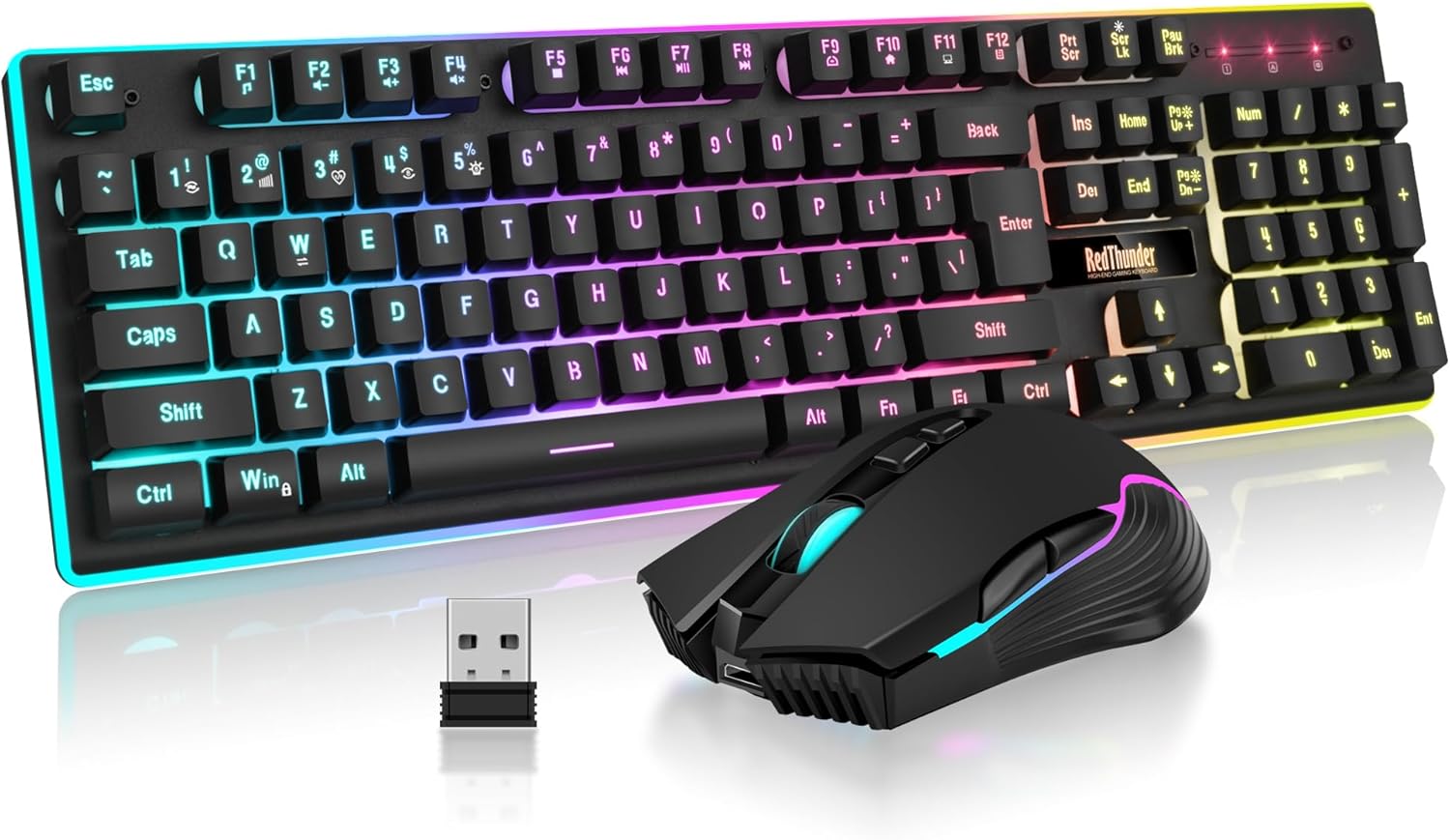
| RedThunder K10 Wireless Combo | Budget wireless + mouse bundle |
| RK Royal Kludge R65 with Knob | Feature-packed 65% with volume knob |
| Womier SK80 75% with Display | 75% with smart display screen |




HyperX Alloy Origins 60
HyperX’s compact flagship brings aircraft-grade aluminum construction, HyperX Red linear switches, and per-key RGB to the 60% form factor. The build quality is noticeably premium — zero flex, satisfying typing sound, and keycaps that stay shine-free longer than most ABS competitors. HyperX NGENUITY software is clean and intuitive. At $79.99 it’s the priciest pick in this roundup but justifies the premium with longevity and switch consistency. For competitive players who want a compact board that lasts years without degradation, this is the pick.
- Pros: Aircraft-grade aluminum frame, excellent HyperX Red switches, clean software, durable keycaps
- Cons: No hot-swap, wired only, 60% layout requires Fn layer adjustment
Redragon K556 104-Key Hot-Swap
The K556 packs hot-swap sockets into a full-size 104-key layout at an aggressive $46.99 price. Hot-swap support lets you change switches without soldering — just pull and insert. Redragon includes a switch puller in the box. The aluminum top plate adds rigidity, and the per-key RGB is bright and customizable through Redragon’s software. Switch selection is flexible since any MX-compatible switch fits. For users who want to experiment with different switch feels without committing to one type, the K556 is outstanding value.
- Pros: Hot-swap sockets at budget price, aluminum top plate, full-size layout, MX-compatible
- Cons: Case bottom is plastic, software is dated, stabilizers benefit from aftermarket lubing
RedThunder K10 Wireless Combo
The RedThunder K10 bundles a TKL wireless keyboard with a wireless mouse for under $50, making it exceptional value for users setting up an entire peripherals package. The keyboard connects via 2.4 GHz USB dongle with low enough latency for casual gaming. Battery life is strong at around 2 weeks on a charge with RGB on. Switch feel is average but functional. This combo makes the most sense for users transitioning from a wired setup or building a clean, cable-free desk without spending separately on keyboard and mouse.
- Cons: Switch quality is average, no hot-swap, basic RGB, mouse is entry-level
- Pros: Exceptional bundle value, wireless freedom, TKL layout, strong battery life
RK Royal Kludge R65 with Knob
The RK R65 packs an impressive feature set into its 65% frame: a tactile volume knob, hot-swap sockets, wireless tri-mode connectivity (2.4 GHz, Bluetooth, wired), and per-key RGB. Build quality uses an aluminum top plate over a plastic bottom, giving it a premium feel without the full-aluminum price. Switch options include Red, Brown, or Blue. The 65% layout retains arrow keys while cutting the F-row, making it more versatile than a pure 60%. At $59.99 this board competes with products double its price in feature density.
- Pros: Tri-mode wireless, volume knob, hot-swap, 65% with arrows, aluminum top plate
- Cons: Battery life moderate with RGB on, software less refined than HyperX, plastic bottom
Womier SK80 75% with Display
The Womier SK80 stands out with a built-in mini display screen that shows system stats, time, or custom GIFs — a unique differentiator at this price. The 75% layout keeps function keys while ditching the numpad. Hot-swap sockets are included, and the RGB lighting is vibrant. The display is a genuine conversation piece and genuinely useful for monitoring CPU/GPU temps during gaming sessions. Build quality is above average for the price bracket with a gasket-style mounting that softens typing feel.

- Pros: Built-in display screen, gasket mounting, hot-swap, full 75% layout, unique aesthetics
- Cons: Display setup requires software, heavier than non-display boards, wired only
Buying Guide
Hot-Swap vs. Fixed Switches
Hot-swap sockets are one of the most valuable features available under $100. They allow you to pull switches out with a puller tool and insert new ones without any soldering — meaning you can move from Red linear to Brown tactile switches in minutes, or try premium third-party switches like Gateron Yellow or Boba U4 without buying a new keyboard. If you’re unsure which switch type you prefer, prioritize hot-swap capability. The Redragon K556 and RK R65 both offer this at well under $100.
Wireless vs. Wired Under $100
Wireless gaming keyboards at this price point primarily use 2.4 GHz RF dongle connections, which deliver polling rates of 125–1000 Hz with latency indistinguishable from wired in most gaming scenarios. Bluetooth is also available on some boards (like the RK R65) for multi-device connectivity, though Bluetooth polling rates are lower and not recommended for competitive play. Battery life ranges from 2 weeks to 3 months depending on RGB usage. If cable management is important for your setup aesthetic or if you game from the couch, wireless at this tier is now genuinely viable.
Layout: 60% vs 65% vs 75% vs TKL
The mid-range tier spans all compact layouts. A 60% like the HyperX Origins gives maximum mouse space. A 65% like the RK R65 adds arrow keys for better navigation in productivity tasks. A 75% like the Womier SK80 keeps function keys for software shortcuts, game hotkeys, and media controls. A TKL drops only the numpad while keeping everything else. For pure gaming, 60–65% is optimal. For gamers who also do significant productivity work, 75% or TKL is more comfortable daily.
RGB and Acoustics
Per-key RGB is standard across this price bracket. What differentiates mid-range boards acoustically is stabilizer quality and case dampening. The HyperX Alloy Origins and Womier SK80 (gasket mounted) both sound notably better than entry-level boards. If sound profile matters to you, look for gasket or gasket-adjacent mounting and boards with foam dampening mentioned in their specs. Pre-lubed stabilizers are increasingly common at this tier, reducing the rattly clunk of cheap spacebar and shift key stabilizers.

FAQ
Is $100 enough for a serious gaming keyboard?
Absolutely. Under $100 in 2025 you can get aluminum frames, hot-swap sockets, wireless connectivity, and premium switches. The diminishing returns above $100 are significant — most keyboards above that price offer minor refinements in sound profile and keycap material rather than meaningful performance gains.
What’s the best wireless gaming keyboard under $100?
The RK Royal Kludge R65 at $59.99 is the best wireless gaming keyboard under $100. It offers tri-mode connectivity (2.4 GHz, Bluetooth, wired), hot-swap sockets, and a volume knob — a feature set that usually costs $120–$150 from major brands.
Should I get hot-swap even if I don’t plan to swap switches?
Yes. Hot-swap adds minimal cost at the sub-$100 tier and provides future flexibility. If you later want to try a different switch type, you’ll save yourself from buying an entirely new keyboard. Consider it insurance against preference change.
Is the HyperX Alloy Origins 60 worth the premium over budget boards?
If build longevity and consistent switch feel matter to you, yes. The aluminum frame won’t flex or creak over years of use, and HyperX Red switches maintain consistent actuation. Budget boards are excellent value but typically show wear in case flex and switch wobble after 12–18 months of heavy use. The Origins 60 is built to last significantly longer.
Verdict
The sub-$100 gaming keyboard market in 2025 is exceptional. The HyperX Alloy Origins 60 leads on build quality and switch performance for those who value longevity. The RK R65 is the most feature-packed pick at $59.99 with wireless, hot-swap, and a knob. Budget-conscious buyers getting a full setup should consider the RedThunder K10 combo. Any of these boards outperforms legacy $150 offerings from major brands just a few years ago.
Related Articles
Looking for more on this topic? Browse the hand-picked guides below — each one applies the same scoring rubric used in this review.
Frequently Asked Questions
What features should I expect at the under $100 price point?
Around this budget you should get genuine mechanical or Hall effect switches, per-key RGB, N-key rollover, a detachable USB-C cable and often hot-swap sockets. Aluminium top plates, gasket mounting and sound-dampening foam appear on the better models. What you generally give up is premium wireless, dual foam layers and screen or dial modules.
Is it worth paying more than $100 for a gaming keyboard?
For raw competitive performance, no. Sub-$100 boards already offer fast switches, adjustable actuation and full rollover. Higher spending buys build quality, acoustics, wireless with long battery life and premium materials. Those are comfort and enjoyment upgrades that you feel every day, but they will not raise your rank or reaction time.
Should I prioritise hot-swap or wireless in this budget?
Pick hot-swap if you are still discovering which switch feel you enjoy, since it lets you change the typing experience later for the cost of a switch set. Pick wireless if desk cable clutter genuinely bothers you or you move the board between machines. Under $100 you usually cannot get both done well.
Do budget mechanical keyboards sound bad?
Older cheap boards were hollow and pingy because of empty plastic cases and unlubed stabilisers. Many current models under $100 include case foam, plate foam and factory-lubed stabilisers, producing a muted thock. If yours sounds hollow, adding cheap foam and lubricating the spacebar stabiliser costs a few dollars and helps enormously.
Are gasket-mounted boards worth it at this price?
Gasket mounting suspends the plate on rubber or silicone strips instead of screwing it rigidly to the case, giving a softer, slightly bouncy typing feel and a deeper sound. Several sub-$100 boards now offer it. It is a comfort improvement for long sessions rather than anything that affects gaming responsiveness.
Ready to decide? Our #1 pick for 2026 is the HyperX Alloy Origins 60.
Live price & availability on Amazon.


