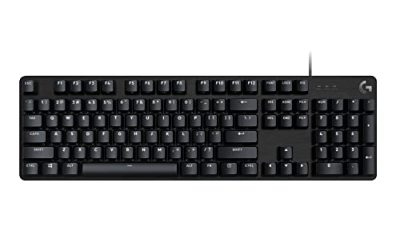
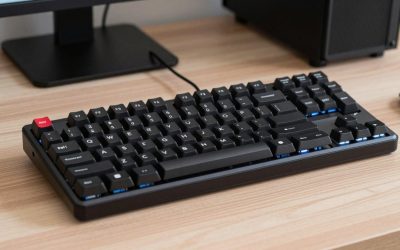
Fallout 76 is a game of long sessions, and a keyboard that feels good at hour one can feel very different by hour four. You spend your time moving across Appalachia, managing a camp, sorting loot, crafting supplies, and fighting through events with other players, so the board under your fingers matters. Movement, sprinting, jumping, reloading, and opening the Pip-Boy all run through the same keys, and a mushy board makes each one feel worse.
The right keyboard for Fallout 76 does not need to be the flashiest board on the market. It needs comfortable switches, a layout that fits your desk and your hands, keys you can find without looking down, and a build that holds up to daily play. This guide covers five boards that meet those needs, so you can match the pick to how you play.
As an Amazon Associate, we earn from qualifying purchases.
Quick Answer
For most Fallout 76 players, the HyperX Alloy Rise 75 is the strongest overall pick, with a comfortable 75% layout, hot-swappable switches, and a gasket-mounted design that feels smooth during long sessions. If you want a smaller board, the HyperX Alloy Origins 65 is a solid budget choice, while the Logitech G515 Lightspeed TKL is the slim wireless pick.
1. HyperX Alloy Origins 65

The HyperX Alloy Origins 65 is the most compact board in this guide, and it fits players who want more mouse space without giving up the arrow keys. Its 65% form factor keeps the navigation keys that Fallout 76 players use often, while dropping the number pad and the function row. That smaller footprint leaves more room for mouse movements, which helps when you are aiming or turning quickly during a public event.
The tactile Aqua switches give each press a clear bump without a loud click, so you get feedback on every movement input. Double shot PBT keycaps resist shine and wear, and the aircraft-grade aluminum body gives the board a solid feel. RGB backlighting runs through HyperX NGENUITY software.
Specs
- Layout: 65% form factor with dedicated arrow keys
- Switches: HyperX Tactile Aqua switches
- Keycaps: Double shot PBT keycaps
- Body: Aircraft-grade aluminum body
- Backlighting: RGB LED backlit with NGENUITY software support
- Dimensions: 12.4 x 4.2 x 1.5 inches
- Tier: Budget
2. Razer BlackWidow V4 X

The Razer BlackWidow V4 X is the full-size option in this guide, and it is the pick for players who want every key within reach. Fallout 76 uses a wide spread of keys for movement, weapons, consumables, emotes, and the Pip-Boy, and a full-size board means nothing is hidden behind a function layer. The six dedicated macro keys let you bind camp actions, favorite weapons, or emotes to keys apart from the main cluster.
The Green switches are tactile and clicky, with a distinct bump and an audible click on each press. That feedback suits players who like to feel every keystroke land. Doubleshot ABS keycaps keep the legends crisp, and Chroma RGB lighting lets you highlight the keys you use most. A roller and media keys make it easy to adjust volume without leaving the game.
Specs
- Layout: Full-size layout with dedicated macro keys
- Switches: Razer Green switches, tactile and clicky
- Macro keys: 6 dedicated macro keys
- Keycaps: Doubleshot ABS keycaps
- Backlighting: Chroma RGB lighting
- Switch durability: Rated for 100 million keystrokes
- Connectivity: Wired
- Tier: Mid-range
3. HyperX Alloy Rise 75

The HyperX Alloy Rise 75 is the best overall keyboard for Fallout 76 in this guide, because it balances size, comfort, and customization better than any other board here. Its 75% layout keeps the function row and the arrow keys while dropping the number pad, so you get a compact board that still covers the keys Fallout 76 actually uses. That matters when you move between combat, crafting, and camp building, because you never have to hunt for a key on a second layer.
The gasket-mounted design gives the board a softer, more cushioned feel than a rigid tray-mounted board, and the pre-installed HyperX Linear switches actuate smoothly during long sessions. An ambient light sensor adjusts the RGB backlighting to match your room. The board is also hot-swappable, so you can change switches later without soldering.
Specs
- Layout: 75% layout with function row and arrow keys
- Switches: HyperX Linear switches, hot-swappable
- Mounting: Gasket-mounted design
- Keycaps: PBT keycaps
- Backlighting: RGB with smart ambient light sensor
- Dimensions: 13 x 5.6 x 1.9 inches
- Connectivity: Wired
- Tier: Premium
4. Logitech G515 Lightspeed TKL

The Logitech G515 Lightspeed TKL is the wireless pick in this guide, and it is also the slimmest board here. At only 22 mm high, with a tenkeyless layout and low-profile switches, it sits close to the desk and feels fast under the fingers. The low-profile GL tactile switches are factory-lubed, with a short 1.3 mm actuation distance, so movement and weapon swaps register quickly. That suits players who share a room or play late at night.
Tri-mode connectivity gives you LIGHTSPEED wireless, Bluetooth, and a wired USB-C mode, so you can play wirelessly and switch to a wired connection when you want a direct link. Battery life runs up to 36 hours with lighting on. LIGHTSYNC RGB lighting works through G HUB software, where you can also remap keys with KEYCONTROL.
Specs
- Layout: Tenkeyless low-profile design
- Switches: Low-profile GL tactile switches, factory-lubed
- Actuation distance: 1.3 mm
- Keycaps: Double-shot PBT keycaps with anti-oil finish
- Backlighting: LIGHTSYNC RGB with G HUB software support
- Connectivity: LIGHTSPEED wireless, Bluetooth, and USB-C wired
- Battery life: Up to 36 hours
- Tier: Premium
5. Keychron K8 Max

The Keychron K8 Max is the most flexible board in this guide, and it suits players who split their time between Fallout 76 and other work on the same desk. Its 80% layout keeps 87 keys, including the function row and a full navigation cluster, in a tenkeyless frame that leaves room for a mouse. The pre-installed Keychron Super Brown switches are tactile without being loud, giving you a clear bump that helps with movement timing.
Wireless connectivity is a strength here, with 2.4 GHz wireless, Bluetooth 5.1, and a wired USB-C mode, so you can pair the board with more than one device. The 2.4 GHz mode runs at a 1000 Hz polling rate, which keeps input responsive during combat, and the 4000 mAh battery supports long sessions away from a cable. QMK support opens up remapping and macro options for fine-tuning your Fallout 76 keybinds.
Specs
- Layout: 80% tenkeyless layout, 87 keys
- Switches: Keychron Super Brown switches, tactile
- Switch durability: Rated for up to 50 million clicks
- Keycaps: Double-shot PBT keycaps
- Backlighting: RGB with more than 22 lighting modes
- Connectivity: 2.4 GHz wireless, Bluetooth 5.1, and USB-C wired
- Battery: 4000 mAh rechargeable battery
- Customization: QMK support and Keychron Launcher web app
- Tier: Mid-range
How to choose
Start with layout, because it shapes everything else about how the board feels. A 65% board like the Alloy Origins 65 gives you the most mouse space and keeps the arrow keys, but it hides the function row behind a layer. A 75% board like the Alloy Rise 75 keeps the function row and the arrows in a compact frame, which is the best balance for most Fallout 76 players. A tenkeyless board keeps the full navigation cluster and the function row, while a full-size board adds the number pad and macro keys.
Next, think about switches. Linear switches feel smooth and consistent, which suits long sessions of movement and combat, while tactile switches give you a bump that confirms each press, which helps with deliberate inputs like reloading. Clicky switches add sound to that bump, which some players love and others find tiring. If you are unsure, a tactile switch is a safe middle ground, and a hot-swappable board like the Alloy Rise 75 lets you change switches later. For connectivity, wired boards are simple, while wireless boards keep your desk clean, so look for a 2.4 GHz mode and a battery that lasts several sessions.
Who should skip
Players who already own a comfortable mechanical keyboard with switches they like may not need a new board for Fallout 76 at all, because the game does not demand specialized hardware. If your current board has a layout you know well and keys that feel good, a replacement is unlikely to change how the game plays. The picks in this guide are for players whose current board is uncomfortable, unreliable, or the wrong size for their desk.
Quiet typists should also think twice before choosing a clicky board like the BlackWidow V4 X, since a board that sounds great in a short session can wear thin across a long night. Skip the 65% option too if you rely on the function row or the number pad without wanting to use a function layer.
Frequently Asked Questions
Do I need a gaming keyboard to play Fallout 76?
No, Fallout 76 runs well on any standard keyboard, and the game does not require macro keys or any specialized feature to play well. A gaming keyboard helps because mechanical switches feel more consistent, keycaps last longer, and remapping and macro keys make long sessions more comfortable.
Is a 65% keyboard good for Fallout 76?
Yes, a 65% keyboard works well for Fallout 76, as long as you are comfortable using a function layer for the function row. The layout keeps the arrow keys and the core movement cluster while freeing up desk space for your mouse. Players who use the function row often may prefer a 75% or tenkeyless layout instead.
Are wireless keyboards good for Fallout 76?
Yes, modern wireless gaming keyboards work well for Fallout 76, especially models with a 2.4 GHz mode and a high polling rate, like the Logitech G515 Lightspeed TKL and the Keychron K8 Max in this guide. A 2.4 GHz connection keeps input responsive during combat.
What switch type is best for Fallout 76?
There is no single best switch type for Fallout 76, because the right choice depends on how you like your keys to feel. Linear switches feel smooth and are easy on the fingers during long sessions, tactile switches give a bump that confirms each press, and clicky switches add sound to that feedback. Tactile switches are a good starting point.
Final verdict
The best keyboard for Fallout 76 for most players is the HyperX Alloy Rise 75, because its 75% layout, smooth linear switches, and gasket-mounted design stay comfortable through the long sessions this game encourages. It keeps the keys you need on the surface and leaves room for your mouse.
If you want something smaller, the HyperX Alloy Origins 65 is a solid budget pick with a sturdy aluminum body and tactile switches. If you want a full-size board with macro keys, the Razer BlackWidow V4 X is the clear choice. Wireless players should look at the Logitech G515 Lightspeed TKL and the Keychron K8 Max.
Product and ASIN Reference
| Product | ASIN |
|---|---|
| HyperX Alloy Origins 65 | B09RBB2VJJ |
| Razer BlackWidow V4 X Green Switches | B0C8QTMK43 |
| HyperX Alloy Rise 75 | B0CYNYGKRT |
| Logitech G515 Lightspeed TKL | B0D1DSW8TF |
| Keychron K8 Max Super Brown | B0DYHCM1GM |