

An anti-ghosting keyboard is one designed so that pressing several keys at once never produces a “ghost” key you did not press, and ideally never drops a key you did press. On most modern mechanical and Hall Effect gaming keyboards this is done with diodes or per-key sensing, and the best boards pair it with N-key rollover (NKRO), which means every key registers no matter how many are held. The important catch: “anti-ghosting” on a box can mean anything from full NKRO down to protection on only a handful of gaming keys such as WASD. Below you will find how ghosting happens, how anti-ghosting and rollover differ, how to check any keyboard in two minutes, and what to look for when buying.
Disclosure: this page contains affiliate product cards. We may earn a commission if you buy through them, at no extra cost to you.
What Is Keyboard Ghosting?
Inside most keyboards, keys are not wired individually to the controller. Instead they sit on a grid, or matrix, of rows and columns. The controller scans the grid rapidly and works out which key is pressed by checking where a row and a column connect. This keeps the wiring cheap and simple.
The problem appears when three keys that share rows and columns are held at once, forming three corners of a rectangle on the grid. Electricity can then find a path through those pressed switches to the fourth corner, so the controller sees a fourth key that you never touched. That phantom key is a ghost.
Because a stray key in a game or a password field is worse than a missing one, many basic keyboards use blocking instead. When the controller detects a combination that could create a ghost, it simply ignores the newest key. The ghost disappears, but now a real press is dropped. In games, this is the classic moment where you hold W and Shift to sprint, press Space to jump and nothing happens.
So when people say a keyboard “ghosts”, they usually mean one of two failures:
- Phantom input: a key registers that you did not press.
- Dropped input (blocking): a key you did press is ignored when used with others.
How Anti-Ghosting Works
The most common fix on mechanical keyboards is a diode on every switch. A diode lets current flow in only one direction, which breaks the backward path that causes the phantom fourth key. With a diode per key, the matrix can read any combination accurately, and the keyboard can support full rollover.
Cheaper keyboards, especially membrane boards, often use a partial approach. The maker arranges the matrix so that common gaming clusters such as WASD, Shift, Ctrl, Space and the number row sit on separate rows and columns, so those particular combinations do not ghost. Microsoft described exactly this trade-off when it introduced anti-ghosting on its SideWinder keyboards: a keyboard labelled anti-ghosting may only guarantee that a specific subset of keys works well together.
Hall Effect and other analog keyboards take a different route. Each switch has its own magnetic sensor that the controller reads individually, so the classic matrix ghosting problem does not arise in the same way. These boards are generally sold with full rollover, but as always, the spec sheet or a quick test is the final word.
Anti-Ghosting vs N-Key Rollover (NKRO)
The two terms are related but not identical. Anti-ghosting is about accuracy: no fake keys. Rollover is about quantity: how many simultaneous keys the keyboard will report.
| Term | What it means | Typical label | What to check |
|---|---|---|---|
| Ghosting | Phantom key appears when certain 3+ key combos are pressed | None (a flaw) | Common on cheap membrane boards |
| Blocking | Extra key ignored to avoid a ghost | Often hidden behind “anti-ghosting” | Dropped keys in multi-key combos |
| Partial anti-ghosting | Specific clusters (e.g. WASD) protected | “19-key anti-ghosting”, “gaming keys anti-ghosting” | Which keys are covered |
| 6-key rollover (6KRO) | Up to 6 normal keys plus modifiers reported at once | “6KRO” | Usually enough for gaming; limit of the standard USB boot protocol |
| N-key rollover (NKRO) | Every key reported independently, any number at once | “NKRO”, “Full-key rollover”, “100% anti-ghosting” | Whether it works over USB by default or needs a toggle |
The 6-key figure comes from the USB HID boot keyboard format, a simple report that BIOS screens and basic operating system drivers understand. It holds six regular keys plus modifiers such as Shift, Ctrl and Alt. Keyboards that offer NKRO over USB use a different report format; some switch to it automatically, others need a key combination or software toggle, and a few fall back to 6KRO in the BIOS for compatibility.
Do You Actually Need Anti-Ghosting?
For most typing, no. Even fast typists rarely hold more than two or three keys at once. For gaming and some creative work, it matters more:
- Shooters and action games: moving diagonally (two keys), sprinting (Shift), crouching (Ctrl) and jumping or using an ability can easily add up to four or five keys.
- Local multiplayer on one keyboard: two players sharing a board is the most common way to hit ghosting on cheap keyboards.
- Rhythm games and fighting games on keyboard: chords and fast overlapping presses benefit from full rollover.
- Stenography and music software: steno chords can involve many keys at once and need NKRO.
For these uses, 6KRO without ghosting is usually enough, and NKRO removes any doubt. What you want to avoid is a board that blocks ordinary gaming combos.
How to Test a Keyboard for Ghosting
You can check any keyboard in a couple of minutes with a free browser-based key rollover or keyboard tester (search for “keyboard ghosting test” or “key rollover test”). The test page highlights each key as the operating system receives it.
- Open a rollover test page and click inside it so it captures keystrokes.
- Test your real game binds. Hold W, A, Shift and Space together, then add Ctrl, R or your ability keys one at a time. Every key you hold should light up.
- Test the corners of the board. Ghosting often appears in less-protected areas, so try combinations like Q, W, E plus A, S, D, and the arrow keys with Right Shift and Right Ctrl.
- Count the maximum. Lay your hand flat across the letter rows and see how many keys register. If it stops at six regular keys, the board is 6KRO; if every key lights up, it is NKRO.
- Look for extra keys. If a key lights up that you are not touching, the keyboard ghosts.
- Check the NKRO toggle. If the count seems low on a board advertised as NKRO, look in the manual for a mode switch or software setting.
Run the test with the keyboard on the computer you game on, connected the way you normally use it. Some wireless and Bluetooth modes report fewer simultaneous keys than the wired mode of the same keyboard.
What to Look for in an Anti-Ghosting Keyboard
Clear rollover wording
The most reliable spec lines read “NKRO”, “full-key rollover” or “full key (NKRO)”. Phrases like “anti-ghosting keys”, “19-key conflict-free” or “gaming-grade anti-ghosting” usually mean partial coverage. If the listing only says “anti-ghosting”, check reviews or the manual for which keys are covered.
Mechanical or Hall Effect switches
Mechanical boards with a diode per switch and Hall Effect boards with per-key sensors are the easiest way to get full rollover. Membrane boards can be fine for casual play, but they are where partial anti-ghosting is most common.
Wired mode for competitive play
Wired connections typically deliver the full rollover and the highest polling rate. If you buy a wireless keyboard, check that its 2.4 GHz mode supports NKRO, not just its USB mode.
Features that matter beyond rollover
For competitive games, look at polling rate (1,000 Hz is standard, 8,000 Hz on some newer boards), adjustable actuation and Rapid Trigger on Hall Effect boards, and SOCD handling for strafing. These do not replace good rollover but build on it.
Anti-Ghosting Keyboards Worth a Look
These two keyboards represent the two main routes to reliable multi-key input: a mechanical board with a stated NKRO spec and a magnetic Hall Effect board with per-key sensing.
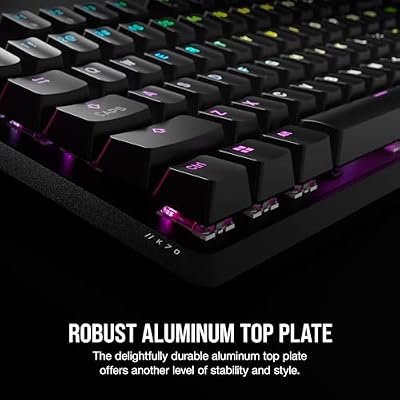
Corsair K70 CORE RGB: Mechanical with Stated Full-Key NKRO

Corsair K70 CORE RGB Mechanical Wired Gaming Keyboard – Pre-Lubed MLX Red Linear Switches, SOCD, ABS Double-Shot Keycaps, Sound Dampening, Media Control Dial, 1000Hz Polling, QWERTY NA – Black




As an Amazon Associate we earn from qualifying purchases. Product prices and availability are accurate as of the date/time indicated.
- Rollover: Full key (NKRO), as listed in Corsair’s specifications
- Switches: pre-lubricated Corsair MLX Red linear
- Layout: full size, 104 keys
- Polling: 1,000 Hz
- Build: aluminum top plate, onboard memory for up to five profiles
The K70 CORE is a straightforward choice if you want a full-size mechanical board where full NKRO is stated plainly in the maker’s specs, rather than implied by an “anti-ghosting” sticker. Linear switches suit gaming, and the full layout keeps the number pad for work. Trade-off: it uses a wired USB Type-A cable and a standard 1,000 Hz polling rate, so it lacks the adjustable actuation of magnetic boards.
SteelSeries Apex Pro TKL Gen 3: Hall Effect with Per-Key Sensing

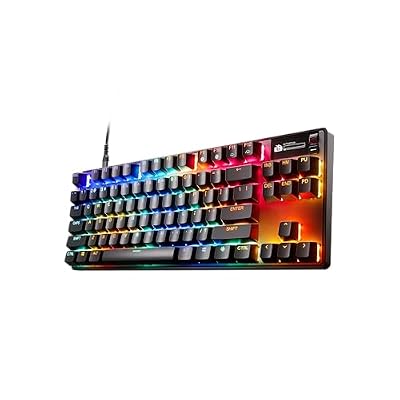
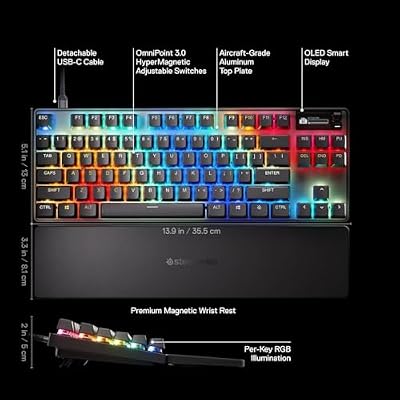
SteelSeries Apex Pro TKL Gen 3 - HyperMagnetic Gaming Keyboard - OmniPoint 3.0 Switches - Adjustable Response - Rapid Trigger - Rapid Tap/SOCD - OLED - PBT Keycaps - USB-C - US Layout QWERTY





As an Amazon Associate we earn from qualifying purchases. Product prices and availability are accurate as of the date/time indicated.
- Switches: OmniPoint 3.0 HyperMagnetic (Hall Effect)
- Actuation: adjustable from 0.1 mm to 4.0 mm
- Features: Rapid Trigger, Rapid Tap, Protection Mode, 2-in-1 Action Keys
- Layout: tenkeyless, OLED smart screen, detachable USB-C cable
- Keycaps: double-shot PBT
Magnetic keyboards like the Apex Pro Gen 3 read each switch individually, so they sidestep classic matrix ghosting and add competitive features on top: Rapid Trigger resets a key the moment it starts to rise, and Rapid Tap prioritises the last key pressed in an opposing pair such as A and D. Trade-off: it sits in the premium price tier, and SteelSeries’ product page does not print a rollover figure, so run the quick test above after setup.
Common Myths About Anti-Ghosting
- “Anti-ghosting means every key works together.” Not always. It can mean only certain key clusters are protected.
- “6KRO is useless for gaming.” For most players, six regular keys plus modifiers covers every realistic combination.
- “NKRO makes you faster.” Rollover prevents missed input; it does not reduce latency. Polling rate, switch type and actuation point affect speed.
- “All mechanical keyboards have NKRO.” Most gaming mechanical boards do, but budget models and some wireless modes may be limited. Check the spec.
FAQ
What does anti-ghosting mean on a keyboard?
Anti-ghosting means the keyboard prevents phantom keypresses when several keys are held at once. Depending on the model, it may cover every key or only a gaming cluster such as WASD. Look for NKRO or full-key rollover if you want every key protected.
Is anti-ghosting the same as NKRO?
No. Anti-ghosting stops fake keys from appearing, while NKRO means every key is reported no matter how many are pressed. A keyboard with full NKRO is also free of ghosting, but a keyboard labelled anti-ghosting may only support six keys or protect only certain keys.
How many keys of rollover do I need for gaming?
Six-key rollover plus modifiers is enough for nearly all games, since realistic combinations rarely exceed five keys. NKRO is worth having for local multiplayer on one keyboard, rhythm games, steno or simply peace of mind, and it costs little extra on mechanical boards.
Do membrane keyboards have anti-ghosting?
Some membrane keyboards have anti-ghosting, but it is usually partial and limited to common gaming keys. Full NKRO is much more common on mechanical and Hall Effect keyboards, which use per-key diodes or per-key sensors to read every switch independently.
Can I fix ghosting on my current keyboard?
You usually cannot fix ghosting in software, because it comes from the keyboard’s wiring. You can rebind game controls to keys that do not conflict, switch the keyboard to its NKRO mode if it has one, use a wired connection, or replace it with a keyboard that lists NKRO.
Why does my keyboard only register six keys?
Your keyboard is probably using the standard USB boot protocol, which reports up to six regular keys plus modifiers. Many NKRO keyboards default to this mode for compatibility. Check the manual for an NKRO toggle, often a function-key combination or a setting in the companion software.
The Bottom Line
For gaming, buy a keyboard whose spec sheet says NKRO or full-key rollover, then confirm it in a minute with an online rollover test. Treat a bare “anti-ghosting” label as a starting point, not a guarantee. A mechanical board with stated NKRO, such as the Corsair K70 CORE, covers the basics, while a Hall Effect board like the SteelSeries Apex Pro TKL Gen 3 adds per-key sensing and competitive features like Rapid Trigger.
Last updated: October 2026







