

- Top Pick: Corsair K70 CORE RGB Mechanical Wired Gaming Keyboard – Pre-Lubed MLX Red Linear Switches, SOCD, ABS Double-Shot Keycaps, Sound Dampening, Media Control Dial, 1000Hz Polling, QWERTY NA – Black
- Best Value: Corsair K70 CORE RGB Mechanical Wired Gaming Keyboard with Palmrest – Black | QWERTY US, Pre-Lubed MLX Red Linear Switches, SOCD Flashtap, ABS Double-Shot Keycaps, Quiet, Media Control Dial, Full Size
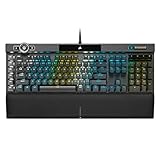
- Premium Choice: Corsair K100 RGB Mechanical Gaming Keyboard – Cherry MX Speed RGB Silver Keyswitches – PBT Double-Shot Keycaps – Elgato Stream Deck and iCUE Compatible – QWERTY NA Layout – Black
Corsair sells keyboards in almost every format a PC gamer could ask for, and the lineup splits into two families that are easy to confuse. Membrane boards, such as the K55 series, use rubber domes and are left out here. Mechanical boards use individual switches under each key, and that is the family this guide covers: the K70 CORE variants, the K100, the Galleon 100 SD, and the Vanguard 96. The real decision is which size, which switch feel, and which extras justify moving up from the basic K70 CORE.
The guide is written for buyers who already know they want a Corsair board and need to narrow six candidates in 2026. It leans only on what each listing spells out, such as switch names, polling rates, layouts, and extras like a media dial or Stream Deck integration. Start with the Quick Picks table to see how the six differ, then read the buying criteria to learn which specs deserve your attention and which are marketing noise. Four of the six share the K70 or K-series naming, so small wording differences, such as TKL, Palmrest, or SD, carry real meaning on the shopping page.
Quick Picks
As an Amazon Associate we earn from qualifying purchases at no extra cost to you.




| Product | Best for | Key spec from the title |
|---|---|---|
| Corsair K70 CORE RGB | Full-size starter board | Pre-lubed MLX Red linear, 1000Hz polling |
| Corsair K70 CORE RGB with Palmrest | Long sessions with wrist support | Palmrest, SOCD Flashtap, full size |
| Corsair K100 RGB | Creators who also game | Cherry MX Speed RGB Silver, PBT keycaps |
| Corsair K70 CORE TKL | Compact desks and wide mouse movement | Tenkeyless, MLX Red v2 linear |
| Corsair Galleon 100 SD | Streamers and tinkerers | Stream Deck-integrated, hotswappable, 8000Hz |
| Corsair Vanguard 96 | 96% layout with dedicated extras | MLX Fusion Tactile, LCD screen, G-Keys |
How to Choose
Pick the layout before the switch
Layout shapes your desk more than any other spec. A full-size board, like the K70 CORE, includes a number pad and measures roughly 17 to 18 inches wide. A tenkeyless layout drops the number pad and recovers about four inches of mouse room, which low-sensitivity shooter players value. The Vanguard 96 sits between the two with a 96% layout, keeping the number cluster in a tighter footprint. If you enter data often, keep the number pad. If your mouse arm keeps bumping the keyboard, go tenkeyless. Measure your desk depth and width before ordering, because a wrist rest or a wider body can change how far the keyboard sits from the edge.
Understand the switch family named in the title
Corsair’s MLX Red is a linear switch described as pre-lubed, which means a smooth straight press with no bump. MLX Pulse is marketed as “thocky,” a deeper sound profile, while MLX Fusion is a tactile design with a bump that helps typists feel actuation. Cherry MX Speed Silver on the K100 is a linear switch built around a short travel distance. Match the feel to your habit: linear for rapid taps and strafing, tactile for typing-heavy work. Ignore sound claims unless noise matters in a shared room, and remember that a listing’s wording about sound reflects design intent rather than a measured decibel figure.
Polling rate, hotswap, and keycaps
Standard 1000Hz polling reports key presses once per millisecond, which is enough for nearly everyone. The Galleon 100 SD and Vanguard 96 list 8000Hz, which cuts the reporting interval to a fraction of that. It matters mostly if your monitor, mouse, and games already run at very high rates. Hotswap support, listed on those two models, lets you change switches without soldering, a real advantage if you like to experiment. PBT double-shot keycaps, named on the K100, Galleon, and others, resist shine better over time than ABS, which appears on the K70 CORE models. Double-shot construction means the legend is molded into the cap rather than printed on it, so lettering should not wear away as quickly.
Extras that add weight to the decision
Media dials, wrist rests, LCD panels, and Stream Deck keys all improve convenience, but each adds bulk and a layer of software. SOCD Flashtap, listed on several of these boards, resolves conflicting left and right inputs in a way some competitive players prefer. If you never use macros or on-keyboard displays, a simpler board leaves more room in the setup and fewer features to configure through software. Also confirm the layout code in the title, since QWERTY US and QWERTY NA indicate a North American key arrangement, which matters if you prefer an ANSI-style Enter key and a standard shift length.
The 6 Best Options
Corsair K70 CORE RGB
The K70 CORE RGB is the baseline mechanical board in this group. The title lists pre-lubed MLX Red linear switches, SOCD support, ABS double-shot keycaps, sound dampening, a media control dial, and 1000Hz polling in a wired, black, QWERTY NA layout. It suits gamers who want a full-size board without extras they will never use, such as a first upgrade from a membrane keyboard that came with a prebuilt PC.
- Strength: linear switches with factory lubrication are listed, which suits fast, repeated presses.
- Strength: the media dial puts volume control at your fingertips.
- Trade-off: ABS keycaps are named, and ABS tends to develop shine sooner than PBT.
Skip it if you want hotswap switches, a wrist rest in the box, or higher polling rates.
Corsair K70 CORE RGB with Palmrest
This variant keeps the same MLX Red linear switch, ABS double-shot keycaps, and media control dial, and adds a palmrest to the full-size, wired, black layout. SOCD Flashtap and a quiet design are named as well. It suits players who spend long evenings at the desk and want wrist support included, particularly those who mix gaming with typing for school or work.
- Strength: the included palmrest means one less accessory to hunt down.
- Strength: it carries the same switch type as the base K70 CORE.
- Trade-off: the palmrest widens the footprint on a smaller desk.
Skip it if you already own a wrist rest you like, or if your desk is tight and the base version would suffice.
Corsair K100 RGB
The K100 RGB is the flagship-style entry, with Cherry MX Speed RGB Silver key switches, PBT double-shot keycaps, and compatibility with Elgato Stream Deck and iCUE software. The title also lists a QWERTY NA layout in black. It is aimed at buyers who want durable keycaps and a creator-friendly ecosystem as well as gaming performance, including anyone who already owns Elgato hardware.
- Strength: PBT keycaps are named, a step up in surface durability.
- Strength: Cherry MX Speed Silver is a recognized linear switch with a short travel path.
- Trade-off: the listing mentions no hotswap support and no palmrest.
Skip it if you want to swap switches later or prefer a compact layout.
Corsair K70 CORE TKL
The TKL drops the number pad and keeps the K70 CORE’s character: pre-lubricated MLX Red v2 linear switches, dual-layer sound dampening, and ABS double-shot keycaps in a black QWERTY NA layout. It fits players who want a compact board for low-sensitivity mouse play or for small desks, and it keeps the same core switch family as its full-size sibling.
- Strength: tenkeyless layout frees up desk space for mouse movement.
- Strength: dual-layer sound dampening is named in the title.
- Trade-off: no number pad, which slows spreadsheet work.
Skip it if you type numbers often or want a media dial or wrist rest named in the listing.
Corsair Galleon 100 SD
The Galleon 100 SD stacks a long list: Stream Deck integration, pre-lubed MLX Pulse “thocky” switches, SOCD Flashtap, hotswappable switches, PBT double-shot keycaps, and 8000Hz polling, all in a wired black QWERTY US layout. It suits streamers and enthusiasts who treat the keyboard as part of a larger workflow, with scene switching and shortcuts a keypress away.
- Strength: hotswap support allows switch changes over time.
- Strength: 8000Hz polling and PBT caps appear in the same listing.
- Trade-off: the Stream Deck integration adds a feature set that casual players may never touch.
Skip it if you want a simple plug-and-play board or a compact layout.
Corsair Vanguard 96
The Vanguard 96 uses a 96% layout with MLX Fusion Tactile switches, a Stream Deck key, SOCD Flashtap, hotswap support, 8000Hz polling, a quiet design, an LCD screen, and G-Keys. It is the most feature-heavy board in the group and targets users who want macros and information at a glance without adding a separate macro pad to the desk.
- Strength: the 96% layout keeps a number cluster in a smaller footprint.
- Strength: tactile switches suit mixed typing and gaming.
- Trade-off: the LCD and G-Keys need software setup before they earn their place.
Skip it if you prefer linear switches or a minimalist desk.
Which One Fits Your Situation
You want a first mechanical board for an FPS rig
Choose the Corsair K70 CORE TKL. Linear switches with sound dampening and a compact body leave space for broad mouse swipes, which is why shooter players favor the format. The listing also names pre-lubricated switches, so the keys arrive ready to use.
You split your day between gaming and spreadsheets
Choose the Corsair K70 CORE RGB with Palmrest. A full-size layout keeps the number pad, and the palmrest supports wrists through long work sessions that mix play and tasks. It is the safest all-rounder when one keyboard must serve both a school or office role and an evening gaming role.
You stream or build macros for editing
Choose the Corsair Galleon 100 SD. Stream Deck integration, hotswappable switches, and 8000Hz polling give you room to grow into a personalized setup. If you later want a different switch feel, hotswap sockets mean you can change it without replacing the board.
You type more than you game
Choose the Corsair Vanguard 96. MLX Fusion Tactile switches provide a bump for typing, and the 96% layout keeps the number cluster you need for data work. The tactile bump is also useful if you want physical confirmation of each press when typing quickly.
Common Mistakes
- Buying a full-size board for a desk where the mouse already collides with the keyboard edge.
- Assuming every Corsair K-series board is mechanical, when the K55 line is membrane.
- Paying attention to 8000Hz polling without checking that the rest of the setup can use it.
- Choosing a linear switch for heavy typing and then missing the tactile bump.
- Ignoring keycap material and being surprised by shine on ABS caps after months of use.
Related guides
- Combination Smoke And Carbon Monoxide Detectors
- Aio Liquid Coolers For High Performance Gaming
- Graphics Cards For Low Wattage Power Supplies
Frequently Asked Questions
What does pre-lubed mean on a switch?
It means the switch ships with lubricant already applied at the factory, which aims to smooth the key press and reduce rattle. It saves you from hand-lubing switches, a task enthusiasts often do themselves.
Are linear or tactile switches better for gaming?
Linear switches press down smoothly with no bump, so many gamers prefer them for repeated taps. Tactile switches add a bump that confirms actuation, which suits typing and slower-paced games.
Do I need 8000Hz polling?
Most players will not notice the difference over 1000Hz. It is a bonus for those with high-refresh monitors and fast mice who want the shortest reporting interval available.
Which Corsair boards in this guide support hotswap?
The Galleon 100 SD and Vanguard 96 are the two listed with hotswappable switches. The K70 CORE models and the K100 do not mention hotswap in their titles.
















