

- Top Pick: Logitech G PRO Mechanical TKL Tenkeyless Gaming Keyboard (Clicky) – Black
- Best Value: Logitech G Pro TKL Mechanical Wired Gaming Keyboard GX Blue Clicky Switch and LIGHTSYNC RGB Backlit Keys, 12 programmable F-key macros, Black – 920-009388 (Renewed)
- Premium Choice: Logitech G413 TKL SE Mechanical Gaming Keyboard – Black
The Logitech G PRO TKL is a tenkeyless mechanical gaming keyboard designed with competitive play firmly in mind. By dropping the number pad it adopts a compact layout that frees valuable desk space for sweeping mouse movements, and it pairs that with clicky GX Blue mechanical switches and a detachable cable for portability. Priced at around $89, it sits in the mid-range and comes from Logitech’s competition-focused G PRO line. This Logitech G PRO TKL review covers the design, the typing feel, the gaming credentials and whether an esports-minded keyboard suits the everyday gamer too.
- Logitech G PRO TKL at a Glance
- Design and Build Quality
- Switches and Typing Feel
- Gaming Performance and Features
- Connectivity, Software and Everyday Use
- Who Is the Logitech G PRO TKL For?
- Pros and Cons
- Is the Logitech G PRO TKL Worth It?
- Frequently Asked Questions
- More Gaming Gear Reviews
- Related Articles
- Related Articles
- Related Guides

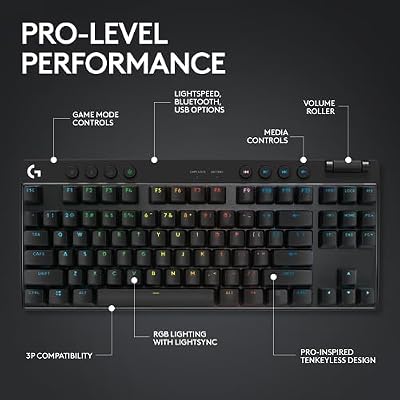
Logitech G PRO Mechanical TKL Tenkeyless Gaming Keyboard (Clicky) - Black | Ultra portable, detachable Micro USB cable, 16.8 million color Lightsync backlit keys




As an Amazon Associate we earn from qualifying purchases. Product prices and availability are accurate as of the date/time indicated.
🛒 Best Price Today on Amazon
Prime members get fast, free shipping on everything above, plus member-only deals. New members get a 30-day free trial — cancel anytime.
As an Amazon Associate we earn from qualifying purchases.






Logitech G PRO TKL at a Glance
| Component | Specification |
|---|---|
| Type | Wired mechanical gaming keyboard |
| Layout | Tenkeyless (TKL), compact |
| Switches | Logitech GX Blue clicky mechanical |
| Connection | Wired, detachable Micro-USB cable |
| Keycaps | ABS |
| Backlighting | RGB LIGHTSYNC with onboard memory |
| Notable features | Compact TKL layout, detachable cable, built for esports |
| Price | Around $89 |
Design and Build Quality
The defining feature of the Logitech G PRO TKL is its tenkeyless layout. By removing the number pad the keyboard becomes noticeably narrower than a full-size board, and that compactness is the whole point: it clears desk space so the mouse hand has more room to move, which matters greatly for players who use low sensitivity settings. The build is solid and the styling is restrained, with the focus placed on function rather than decoration.
Portability is part of the design brief too. The cable is detachable, connecting via Micro-USB, so the keyboard can be unplugged and packed away neatly for travel to tournaments, LAN events or a friend’s setup. The keycaps are ABS, the usual choice in this segment. Overall the G PRO TKL feels purpose-built — a keyboard shaped by the practical needs of competitive players rather than by a desire to stand out.
Switches and Typing Feel
The G PRO TKL uses Logitech’s GX Blue clicky mechanical switches. Clicky switches combine a tactile bump with an audible click at the actuation point, giving both a clear feel and an unmistakable sound when a key registers. Many players enjoy this feedback because it leaves no doubt that an input has been made, and the crisp click gives typing a lively, engaging character. It is the most expressive of the common switch types.
That audible click is also the switch’s main consideration. Clicky switches are louder than linear or tactile ones, so the G PRO TKL is best suited to a private space or anyone who is not bothered by — or actively enjoys — the sound. For gaming, the clear actuation point helps with precise, deliberate inputs. For typing, the GX Blue switches make for a satisfying, tactile experience, provided the noise is not an issue in your environment.
Gaming Performance and Features
The G PRO TKL is built for esports, and its gaming credentials reflect that. The compact tenkeyless layout is itself a competitive feature, giving the mouse more room and encouraging a more comfortable arm position during long matches. The GX Blue switches provide a defined actuation point for precise inputs, and the wired connection ensures direct, dependable response with no wireless variables to consider.
RGB LIGHTSYNC lighting handles personalisation, and crucially it is backed by onboard memory. That means lighting profiles and settings are stored on the keyboard itself, so they travel with it — plug the G PRO TKL into a different machine at a tournament and your configuration comes along without needing software installed. It is a thoughtful, competition-minded touch that fits the keyboard’s purpose, and a clear sign of where the G PRO line’s priorities lie.
Connectivity, Software and Everyday Use
Connectivity centres on a wired connection through a detachable Micro-USB cable. The wired link guarantees consistent, lag-free input, and the detachable design makes the keyboard easy to transport — the cable can be removed for a tidier pack-down and reconnected in seconds. For a keyboard built with tournaments in mind, this portability is a genuine practical benefit rather than a marketing line.
RGB LIGHTSYNC lighting can be configured to taste, and the onboard memory means those settings persist across machines without fuss. As an everyday keyboard the G PRO TKL is comfortable, and the compact footprint that helps in games also leaves a cleaner, roomier desk for general use. The main thing to weigh for daily use is the volume of the clicky switches in a shared space. Otherwise, with the trusted Logitech name behind it, this is an easy keyboard to live with.
Who Is the Logitech G PRO TKL For?
The Logitech G PRO TKL is for the competitive or aspiring competitive gamer who wants a compact keyboard that frees desk space for the mouse. If you play at lower sensitivities, value a tenkeyless layout, want clicky switches with a defined actuation point and like the idea of a portable board with onboard lighting memory, the G PRO TKL is built for you. It also suits anyone who simply prefers a tidier, more compact desk.
It is less suited to buyers who regularly need a number pad for data entry, since the TKL layout removes it, and to anyone who needs a quiet keyboard, as the clicky GX Blue switches are audible. Those users should look at a full-size or linear-switch alternative. For the space-conscious, competition-minded gamer, however, the G PRO TKL is well judged.
Pros and Cons
Pros: Compact tenkeyless layout frees desk space for the mouse; crisp clicky GX Blue switches; detachable cable for portability; RGB LIGHTSYNC with onboard memory; built for esports; trusted Logitech brand.
Cons: No number pad, a drawback for data entry; clicky switches are loud and unsuited to shared spaces; ABS keycaps; uses an older Micro-USB cable connector.
Is the Logitech G PRO TKL Worth It?
At around $89 the Logitech G PRO TKL is a focused, well-conceived keyboard for its intended buyer. The tenkeyless layout is a real competitive advantage for players who want more mouse room, the GX Blue switches are crisp and satisfying, and the detachable cable plus onboard lighting memory make it a practical companion for tournament use.
For the competitive gamer or anyone who wants a compact, portable keyboard from a trusted brand, the G PRO TKL earns a recommendation. The missing number pad and the noise of the clicky switches mean it will not suit everyone, and those are the points to weigh before buying. But as an esports-minded keyboard that delivers on its specific brief, it is a sound choice.
Frequently Asked Questions
Why does the Logitech G PRO TKL not have a number pad?
It uses a tenkeyless (TKL) layout, which deliberately removes the number pad to make the keyboard more compact. This frees desk space for mouse movement, a benefit for competitive players who use low sensitivity settings.
Are the Logitech G PRO TKL switches loud?
Yes, somewhat. It uses clicky GX Blue switches, which produce an audible click at the actuation point. They are louder than linear or tactile switches, so they are best suited to a private space.
Can you remove the cable on the Logitech G PRO TKL?
Yes. The keyboard has a detachable Micro-USB cable, which makes it easier to pack away and transport to tournaments, LAN events or another setup.
Does the Logitech G PRO TKL keep its lighting settings without software?
Yes. RGB LIGHTSYNC settings are stored in onboard memory, so your lighting profile travels with the keyboard and works on a different machine without needing software installed.
More Gaming Gear Reviews
- Razer Huntsman V3 Pro Gaming Keyboard Review
- Corsair K100 RGB Optical-Mechanical Keyboard Review
- Razer DeathAdder Essential Gaming Mouse Review
- Logitech G502 HERO Gaming Mouse Review
- Logitech G305 LIGHTSPEED Wireless Mouse Review
- Razer Basilisk V3 Gaming Mouse Review
- Logitech G PRO X SUPERLIGHT 2 Wireless Mouse Review
- Razer DeathAdder V3 Pro Wireless Mouse Review
Affiliate Disclosure: As an Amazon Associate, we earn from qualifying purchases. If you click a link and make a purchase, we may earn a small commission at no extra cost to you. Prices and availability are accurate as of publication and may change.
Related Articles
Looking for more on this topic? Browse the hand-picked guides below — each one applies the same scoring rubric used in this review.










