PCIe 4.0 remains the sweet spot for gaming storage in 2026. It is fast enough that no current game can truly saturate it, it runs cooler than PCIe 5.0, and it is supported by a huge range of motherboards — which means you get near-flagship load times without the price premium or thermal demands of a Gen5 drive. For the overwhelming majority of gamers and creators building or upgrading a PC this year, a high-quality Gen4 NVMe SSD is the right choice.
This guide compares 14 PCIe 4.0 drives, spanning the capacities most gamers care about, from 1TB up to a massive 4TB for big libraries and creative work. The lineup is led by Samsung’s 990 PRO and WD_BLACK’s SN850X, with value-focused alternatives from Crucial, Lexar, Kingston and others. We compared capacity, rated speeds and value from manufacturer specifications rather than running synthetic benchmarks, since real-world gaming differences between top Gen4 drives are minimal. Below is an at-a-glance table, then a closer look at each option, buying advice, and answers to common questions.
Updated October 2026 – drives and capacity tiers rechecked against current manufacturer specifications.
Quick answer: the best PCIe 4.0 SSDs for gaming in 2026 are the Samsung 990 PRO (best overall), the WD_BLACK SN850X (best alternative, heatsink version available) and the Crucial T500 (best for big 4TB libraries). On a budget, the Lexar NM790, Crucial P310 and Kingston NV3 deliver Gen4 load times for much less. For most gaming PCs, 2TB is the capacity to buy.
Best PCIe 4.0 SSDs by Budget and Use
| Use case | Pick | Spec line |
|---|---|---|
| Best overall | Samsung 990 PRO 2TB | PCIe 4.0 x4 · M.2 2280 · up to 7,450 MB/s |
| Best with heatsink | WD_BLACK SN850X 2TB | PCIe 4.0 x4 · up to 7,300 MB/s read · heatsink included |
| Best value 2TB | Lexar NM790 2TB | PCIe Gen 4×4 · 7,400/6,500 MB/s · M.2 2280 |
| Best budget | Kingston NV3 2TB | PCIe 4.0 Gen 4×4 · up to 6,000 MB/s |
| Best 4TB | Crucial T500 4TB | PCIe Gen4 · TLC NAND · up to 7,000 MB/s |
🛒 Best Price Today on Amazon
Prime members get fast, free shipping on everything above, plus member-only deals. New members get a 30-day free trial — cancel anytime.
Best Picks at a Glance
| Product | Best For | Standout Spec | Approx Price |
|---|---|---|---|
| Samsung 990 PRO 1TB | Best value Gen4 flagship | Up to 7,450 MB/s read | $200-$300 |
| Samsung 990 PRO 2TB | Best all-round gaming | PCIe 4.0, 2TB | $350-$450 |
| WD_BLACK SN850X 2TB | Proven Gen4 performer with heatsink | Up to 7,300 MB/s read | $350-$450 |
| WD_BLACK SN850X 4TB | Huge gaming library | Up to 7,300 MB/s read | $600-$800 |
| Crucial T500 4TB | Large library, TLC NAND | Up to 7,000 MB/s | $600-$900 |
| Samsung 990 PRO 4TB | Creator + gaming | Up to 7,450 MB/s read | $700-$900 |
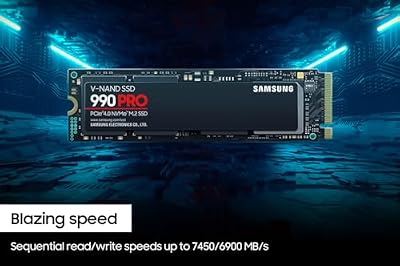
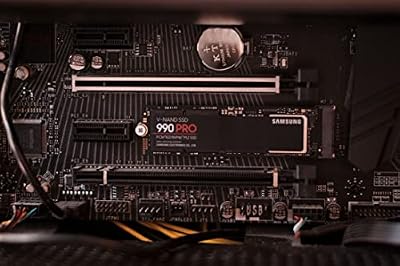
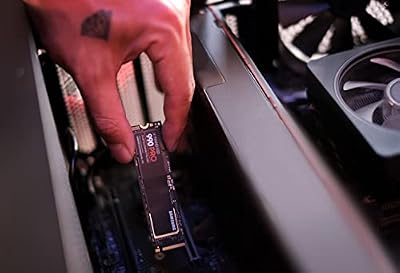
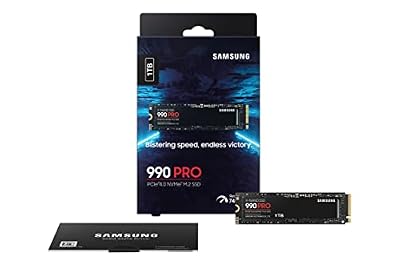
1. Samsung 990 PRO 1TB

Samsung SSD 990 PRO 1TB, PCIe 4.0 M.2 2280, Up to 7,450 MB/s | NVMe Internal Solid State Hard Drive for High End Computing, Gaming, and Heavy Duty Workstations (MZ-V9P1T0B/AM)




As an Amazon Associate we earn from qualifying purchases. Product prices and availability are accurate as of the date/time indicated.
The 1TB Samsung 990 PRO is the most affordable way into Samsung’s flagship Gen4 line, and it is an outstanding boot and primary gaming drive. With rated reads up to 7,450 MB/s it delivers the same class-leading speed as its larger siblings, simply with less capacity. For a build where you will keep a focused library of installed games, or where you plan to add storage later, the 1TB version offers flagship performance at a sensible price.
It carries all the strengths of the 990 PRO family: excellent endurance, Samsung Magician software, and a reputation as one of the best gaming SSDs of its generation. In the $200-$300 tier it is the budget-friendly entry to the range, and a great choice if you want top-tier speed without paying for capacity you may not need immediately.
Pros: Flagship 990 PRO speed at the lowest price in the range; excellent reliability and software; ideal boot/primary drive.
Cons: 1TB fills quickly with modern games; cost-per-gigabyte is higher than the larger models.
2. Samsung 990 PRO 2TB

Samsung SSD 990 PRO 2TB, PCIe 4.0 M.2 2280, Up to 7,450 MB/s | NVMe Internal Solid State Hard Drive for High End Computing, Gaming, and Heavy Duty Workstations, (MZ-V9P2T0B/AM)


As an Amazon Associate we earn from qualifying purchases. Product prices and availability are accurate as of the date/time indicated.
The 2TB Samsung 990 PRO is, for many builders, the single best gaming SSD you can buy. It combines the family’s class-leading Gen4 speed with the 2TB capacity we consider ideal for a 2026 gaming PC — enough room for a substantial library of large AAA titles plus your operating system. It is the drive we would point most gamers toward by default.
Everything that makes the 990 PRO line excellent applies here: proven endurance, strong software support, and real-world performance indistinguishable from far pricier Gen5 drives in games. In the $350-$450 tier it is a premium purchase, but it is a known quantity that suits any high-end build and removes storage worries for years. If you buy one drive for a gaming PC, this is the safe, excellent default.
Pros: Ideal 2TB gaming capacity; class-leading Gen4 speed; superb reliability; the default choice for most gaming builds.
Cons: Premium price for the capacity; no bundled heatsink in the standard model.
3. WD_BLACK SN850X 2TB
The WD_BLACK SN850X 2TB (heatsink version) is the closest rival to the Samsung 990 PRO 2TB. It is rated for reads up to 7,300 MB/s and writes up to 6,300 MB/s, and its gaming-tuned firmware has made it a long-running favorite for dedicated gaming PCs. In real-world gaming the gap to the 990 PRO is negligible.
The included heatsink makes it an easy fit for PCs and for consoles with an M.2 slot that lacks its own cooler. It is a mature product with wide compatibility, and the 2TB capacity is the sweet spot for a modern game library. Pricing usually sits in the same band as the 990 PRO 2TB, so pick whichever is cheaper when you shop.
Pros: Reads up to 7,300 MB/s; heatsink included; gaming-tuned firmware; 2TB is the ideal capacity for most builds.
Cons: Slightly lower peak speed than the 990 PRO; the heatsink may not fit under some low-profile motherboard covers.
4. WD_BLACK SN850X 4TB

WD_BLACK SN850X 4TB NVMe SSD - M.2 2280, Up to 7,300 MB/s Read speeds, Up to 6,300 MB/s write speeds, Gaming Expansion, High Performance Internal Solid State Drive - WDS400T2X0E


As an Amazon Associate we earn from qualifying purchases. Product prices and availability are accurate as of the date/time indicated.
The 4TB WD_BLACK SN850X is built for gamers who refuse to uninstall anything. It pairs top-tier Gen4 speed — rated reads up to 7,300 MB/s — with a huge 4TB capacity, enough to hold an enormous library of modern titles on a single drive. WD_BLACK’s gaming-tuned Game Mode firmware makes it especially well suited to a dedicated gaming PC.
For a high-end build where storage management is a chore you want to avoid, this is one of the most appealing drives available: flagship performance plus the space to install dozens of large games at once. In the $600-$800 tier it is a significant investment, but the cost-per-gigabyte is reasonable for a 4TB flagship, and it future-proofs your storage for years of growing game sizes.
Pros: Massive 4TB capacity; top-tier Gen4 reads up to 7,300 MB/s; gaming-tuned firmware; ends storage-management headaches.
Cons: High up-front price; standard model has no heatsink, so it relies on motherboard M.2 cooling.
5. Crucial T500 4TB
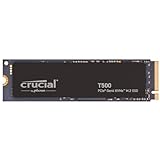
The Crucial T500 4TB is a PCIe Gen4 NVMe drive with TLC NAND, rated for up to 7,000 MB/s. It is a strong choice for a gamer who wants a very large library on a single drive and does not need the very top peak speed of the Samsung and WD_BLACK flagships.
It suits creators too: the 4TB capacity leaves room for a big game library plus project files. Its speeds are comfortably beyond what any current game demands, and it works in desktops and laptops with a free M.2 2280 slot. Pricing usually lands in the same band as the other 4TB drives in this guide, so compare before buying.
Pros: 4TB capacity; TLC NAND; up to 7,000 MB/s; fits standard M.2 2280 slots.
Cons: Slightly lower peak rating than the 990 PRO and SN850X; expensive for gaming-only users.
6. Samsung 990 PRO 4TB

Samsung SSD 990 PRO 4TB, PCIe 4.0 M.2 2280, Up to 7,450 MB/s | NVMe Internal Solid State Hard Drive for High End Computing, Gaming, and Heavy Duty Workstations (MZ-V9P4T0B/AM)


As an Amazon Associate we earn from qualifying purchases. Product prices and availability are accurate as of the date/time indicated.
The 4TB Samsung 990 PRO brings the flagship line’s speed to a creator-grade capacity. With rated reads up to 7,450 MB/s and writes around 6,900 MB/s, it is fast enough for the most demanding workloads, and 4TB is enough to combine a large game library with substantial creative projects on one drive.
It inherits the 990 PRO family’s endurance and software strengths (Samsung Magician), scaled up to maximum capacity. It is aimed at users who genuinely need both top performance and large space, and it sits at the top of the price range in this guide.
Pros: Flagship speed at 4TB; strong write performance for creators; one drive for gaming plus content work.
Cons: Highest price tier in this guide; overkill for gaming-only users.
7. WD_BLACK SN7100 2TB – Best Efficient Gen4 Drive
WD_BLACK SN7100 2TB – Best for cool, efficient builds

The WD_BLACK SN7100 2TB targets gamers who want near-flagship Gen4 speed in a mainstream price band, and it is also sold for handheld PCs. It is a good fit for compact builds where heat and power draw matter.
- PCIe Gen4 NVMe, 2TB
- Reads up to 7,250 MB/s
- M.2 form factor for desktops and laptops
- Gaming-oriented WD_BLACK line
Pros: Near-flagship speed; mainstream pricing; suits compact and handheld builds.
Cons: Newer than the SN850X, so less long-term history; peak speed trails the 990 PRO slightly.
Skip it if you want a bundled heatsink or the largest 4TB capacity.
8. Lexar NM790 2TB – Best Value 2TB
Lexar NM790 2TB – Best for value

The Lexar NM790 2TB is the drive to look at when you want flagship-class numbers without the Samsung price. It is a straightforward M.2 2280 drive for desktops, laptops and consoles with a free slot.
- PCIe Gen 4×4 NVMe, 2TB
- Rated 7,400 MB/s read, 6,500 MB/s write
- M.2 2280
- Compatible with PS5 per the maker
Pros: Very high rated speeds for the price tier; broad compatibility; simple installation.
Cons: No bundled software suite like Samsung Magician; no heatsink on this version.
Skip it if you want a brand with a long record of firmware updates and utilities.
9. Samsung 990 EVO Plus 2TB – Best Efficient Samsung
Samsung 990 EVO Plus 2TB – Best for laptops and mixed use

The Samsung 990 EVO Plus 2TB is a step below the 990 PRO in peak speed but keeps Samsung’s software and support, usually at a lower price. It works well in laptops and in desktops that do not need maximum write speed.
- PCIe Gen 4×4 (also 5×2 capable) NVMe, 2TB
- Reads up to 7,250 MB/s
- M.2 2280
- Samsung Magician software support
Pros: Samsung software and warranty; lower price tier than the 990 PRO; strong all-round speed.
Cons: Lower sustained write performance than the 990 PRO; not a heatsink model.
Skip it if you do heavy video editing or large sustained transfers.
10. Crucial P310 2TB – Best Budget Crucial
Crucial P310 2TB – Best for budget Gen4

The Crucial P310 2TB keeps game load times in the Gen4 range at a budget price. It is aimed at laptops, desktops and handheld gaming consoles.
- PCIe Gen4 NVMe, 2TB
- Reads up to 7,100 MB/s
- M.2 2280
- Works in laptops, desktops and handhelds
Pros: Budget price tier; fast enough for any current game; wide compatibility.
Cons: Not aimed at heavy creative workloads; no heatsink on this version.
Skip it if you want the highest sustained write speeds.
11. Kingston NV3 2TB – Best Entry Level
Kingston NV3 2TB – Best for tight budgets

The Kingston NV3 2TB is the entry point into 2TB Gen4 storage. It will not match the flagships on paper, but it is far faster than any SATA drive and fine for loading games.
- PCIe 4.0 Gen 4×4 NVMe, 2TB
- Reads up to 6,000 MB/s
- M.2 2280
Pros: Lowest price tier in this guide; plenty of speed for gaming; easy upgrade.
Cons: Lowest rated speed here; not for sustained heavy writes.
Skip it if you edit large video files or want maximum benchmarks.
12. Seagate FireCuda 530R 2TB – Best with Heatsink and Long Endurance
Seagate FireCuda 530R 2TB – Best for heavy writers

The Seagate FireCuda 530R 2TB ships with a heatsink and targets users who write a lot of data, such as gamers who also capture and edit footage.
- PCIe Gen4 x4 NVMe 1.4, 2TB
- Speeds up to 7,400 MB/s
- Heatsink included
- M.2 2280
Pros: Heatsink included; high rated speed; suited to heavy workloads.
Cons: Higher price tier than value drives; heatsink adds height.
Skip it if your motherboard already provides an M.2 heatsink and you want to save money.
13. Sabrent Rocket 4 Plus 2TB – Best Enthusiast Alternative
Sabrent Rocket 4 Plus 2TB – Best for enthusiasts

The Sabrent Rocket 4 Plus 2TB comes with a matching M.2 heatsink in this bundle and is popular with enthusiasts who want an alternative to the big brands.
- NVMe 4.0 Gen4 PCIe M.2, 2TB
- Heatsink combo bundle
- High-performance line from Sabrent
Pros: Heatsink included; high-performance line; an alternative to mainstream brands.
Cons: Higher price tier than value drives; less widespread support than Samsung.
Skip it if you want the simplest, most widely supported choice.
14. Corsair MP600 Elite 2TB – Best Corsair Option
Corsair MP600 Elite 2TB – Best for Corsair builds

The Corsair MP600 Elite 2TB is a mid-tier Gen4 drive that suits builds already using Corsair parts and software.
- PCIe Gen4 x4 NVMe, 2TB
- Up to 7,000 MB/s sequential read
- High-density 3D TLC NAND
- M.2 2280
Pros: 3D TLC NAND; fast enough for any game; mid price tier.
Cons: Not faster than cheaper rivals such as the NM790.
Skip it if you only care about price per terabyte.
How to Choose
For most gamers and creators in 2026, a PCIe 4.0 SSD is the right choice over a Gen5 drive — it is fast enough that no current game can saturate it, it runs cooler, and it is supported by virtually every modern motherboard. The decision, then, comes down mainly to capacity and brand preference. The Samsung 990 PRO is our default recommendation across the range, with the WD_BLACK SN850X as an equally excellent rival, particularly at larger capacities.
Start with capacity, because it is the spec that affects your daily experience most. A 1TB drive like the 990 PRO 1TB suits a focused library or a boot drive; 2TB, as in the 990 PRO 2TB or SN850X 2TB, is the sweet spot for most gaming PCs; and 4TB, as in the SN850X 4TB, T500 4TB or 990 PRO 4TB, is for gamers who want a huge library on one drive, or creators handling large files. Modern AAA installs routinely exceed 100GB, so it is easy to justify going larger than you think you need.
On performance, do not over-index on peak sequential numbers. The 990 PRO, SN850X and T500 are all so fast that load times in games are effectively identical. Prioritise capacity, reliability and price instead. If you are torn between two drives of the same capacity, simply pick whichever is cheaper. Match the drive to your capacity needs and budget, and any option in this guide will serve a high-end gaming or creator build for years.
More Gen4 SSD Questions
Which PCIe 4.0 SSD is best for PS5 storage?
Pick a Gen4 drive rated at 5,500 MB/s or faster with a heatsink, such as the WD_BLACK SN850X with heatsink or the Seagate FireCuda 530R. Check the console maker’s current slot-size and cooling requirements before buying.
Is a Gen4 SSD worth it over SATA?
Yes for new builds. Gen4 drives read at up to 7,000 MB/s or more against roughly 550 MB/s for SATA, and 2TB Gen4 models now sit in a similar price tier to older SATA drives.
Should I buy PCIe 5.0 instead?
Only if you also handle very large file transfers. Games do not use the extra bandwidth today, and Gen5 drives run hotter. See our PCIe 5.0 guide for the fastest options.
Are cheaper Gen4 drives like the Kingston NV3 good enough?
For loading games, yes. They trail the flagships in sustained writes, which matters mainly if you edit video or move very large files often.
Frequently Asked Questions
Is PCIe 4.0 fast enough for gaming in 2026?
Yes. No current game can saturate PCIe 4.0 bandwidth, so a quality Gen4 drive delivers load times effectively identical to a Gen5 drive, while running cooler and costing less. It is the sweet spot for the vast majority of gaming builds.
What capacity SSD should I buy for gaming?
We recommend 2TB as the sweet spot, since modern AAA games can each exceed 100GB. Choose 1TB for a focused library or boot drive, and 4TB if you want a huge library on a single drive or you also do content creation.
Is the Samsung 990 PRO better than the WD_BLACK SN850X?
The 990 PRO has slightly higher rated speeds (up to 7,450 MB/s versus 7,300 MB/s), but in real-world gaming the difference is negligible. If the SN850X is cheaper at the same capacity, it is a smart buy.
Do I need a heatsink for a PCIe 4.0 SSD?
Usually not for everyday gaming, since Gen4 drives run cooler than Gen5 and most motherboards include an M.2 heatsink. For heavy sustained writes, such as large file transfers, a heatsink helps maintain performance.
Related Guides
- Best PCIe 5.0 SSDs
- Best High FPS Gaming PCs
- Best RTX 5070 Gaming Laptops
- Best RTX 5080 Gaming Laptops
- Best OLED Gaming Laptops
- Best Gaming Laptops Under $1,200
Affiliate Disclosure: As an Amazon Associate, we earn from qualifying purchases. If you click a link and make a purchase, we may earn a small commission at no extra cost to you. Prices and availability are accurate as of publication and may change.