

🛒 Best Price Today on Amazon
Prime members get fast, free shipping on everything above, plus member-only deals. New members get a 30-day free trial — cancel anytime.
- Top High Performance Cases Picks for 2026
- Best High Performance PC Cases at a Glance
- 1. CORSAIR 4000D RS ARGB Frame Modular Mid-Tower ATX PC Case, High Airflow
- 2. Corsair iCUE 220T RGB Airflow Tempered Glass Mid-Tower Smart ATX Case
- 3. Corsair iCUE 220T RGB Airflow Tempered Glass Mid-Tower Smart Case (White)
- 4. CORSAIR iCUE Link 3500X RGB Mid-Tower ATX PC Case, Panoramic Tempered Glass
- 5. Fractal Design Define R5 – Mid Tower Computer Case – ATX – Optimized for High Airflow
- 6. Corsair Crystal Series 680X RGB High Airflow Tempered Glass ATX Smart Case, Black
- How to Choose a High Performance PC Case
- Frequently Asked Questions
- Related Guides
- Related Articles
Top High Performance Cases Picks for 2026
Here are our current top high performance cases picks, compared on real Amazon owner reviews, price, and features. Live prices update below.
As an Amazon Associate we earn from qualifying purchases at no extra cost to you.


A high performance PC case is the foundation every other component sits on, and its real job is to move air. The fastest CPU and GPU in the world will throttle and run loud inside a sealed, restrictive box, so a chassis built for maximum airflow, generous radiator support, and ample clearance keeps your hardware cool, quiet, and running at its full potential. This guide rounds up the best high performance PC cases in 2026 across the styles enthusiasts actually shop for: mesh-front airflow mid-towers, RGB showcase chassis, radiator-ready dual-chamber designs, and proven silent-and-airflow classics.
Our picks were chosen on what genuinely defines a high performance case: front and top airflow, room for thick radiators and tall air coolers, GPU clearance for today’s long graphics cards, build quality, and value. We have included a deliberate price spread — from around $99 up to around $275 — because the best case is the one that fits your cooling ambitions, your components, and your budget. Whether you want an affordable mesh airflow workhorse, a panoramic tempered-glass showpiece, or a cavernous dual-chamber chassis for a big custom loop, there is an option here. Below you will find an at-a-glance comparison, then a closer look at each case and a buyer’s guide covering the airflow, clearance and radiator factors that truly matter.
Best High Performance PC Cases at a Glance
| Case | Best For | Standout Spec | Approx Price |
|---|---|---|---|
| Corsair 4000D RS ARGB Frame | Best airflow value | High-airflow frame, 3 ARGB fans | around $99 |
| Corsair iCUE 220T RGB Airflow (Black) | Airflow plus RGB | Mesh front, 3 RGB fans included | around $180 |
| Corsair iCUE 220T RGB Airflow (White) | White-build airflow | Mesh front, white finish, RGB | around $170 |
| Corsair iCUE Link 3500X RGB | Panoramic showcase build | Dual tempered glass, iCUE Link | around $160 |
| Fractal Design Define R5 | Airflow and silence | Optimized airflow, sound-damped | around $148 |
| Corsair Crystal 680X RGB | Big dual-chamber loops | Dual-chamber, high airflow ATX | around $275 |
1. CORSAIR 4000D RS ARGB Frame Modular Mid-Tower ATX PC Case, High Airflow
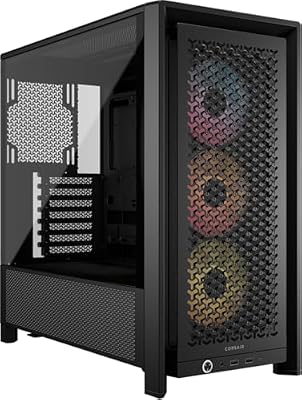
CORSAIR 4000D RS ARGB Frame Customizable Mid-Tower PC Case – Black | 3x Pre-Installed Fans, High Airflow, Fully Modular, Easy InfiniRail Fan Mounting, GPU Anti-Sag, Reverse Motherboard Support


As an Amazon Associate we earn from qualifying purchases. Product prices and availability are accurate as of the date/time indicated.
The Corsair 4000D RS ARGB Frame is the airflow value champion of this list and the place most performance builders should start. It uses an open, high-airflow frame design with a mesh-led front that lets fresh air pour straight onto your components, and it ships with three pre-installed ARGB fans so you have intake working out of the box. At around $99 it is the most affordable case here and an outstanding foundation for a cool, quiet build.
For maximum airflow on a sensible budget this is exactly the intent it serves. The modular frame and unobstructed front prioritise raw air movement over a solid decorative panel, which is precisely what high-performance hardware wants, and the bundled ARGB fans mean you are not immediately spending more on cooling. The 4000D platform is well known for tidy cable routing and easy building, and there is room for a front radiator if you move to liquid cooling later. If you want the best thermal value in the lineup, this is the obvious pick.
Pros: Excellent high-airflow frame, three ARGB fans included, easy cable management, best value here.
Cons: Open frame is less dust-shielded; mid-tower size limits the very largest loops.
2. Corsair iCUE 220T RGB Airflow Tempered Glass Mid-Tower Smart ATX Case
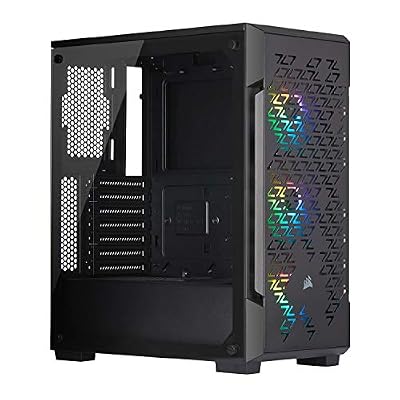
Corsair iCUE 220T RGB Airflow Tempered Glass Mid-Tower Smart ATX Case - High Airflow - Three Included SP120 RGB PRO Fans - Black


As an Amazon Associate we earn from qualifying purchases. Product prices and availability are accurate as of the date/time indicated.
The Corsair iCUE 220T RGB Airflow pairs a true high-airflow design with a full RGB lighting package. Its standout feature is a steel mesh front panel built to feed cool air to your components, combined with three included RGB fans and a tempered-glass side to show off the build. At around $180 it is the pick for anyone who refuses to choose between strong thermals and a vivid, coordinated look.
This is the case to choose when airflow comes first but you also want the lighting and presentation of a modern showcase build. The mesh front keeps intake high so your CPU and GPU stay cool under load, the three RGB fans tie into Corsair’s iCUE software for synchronised effects, and the tempered-glass panel makes the most of it. It supports radiators and tall coolers comfortably for a mid-tower. If you want a balanced, airflow-first RGB chassis from a trusted brand, the 220T Airflow is a dependable, well-rounded choice.

Pros: Mesh airflow front, three RGB fans, tempered glass, iCUE lighting control.
Cons: Pricier than the bare-frame 4000D; RGB controller adds setup steps.
3. Corsair iCUE 220T RGB Airflow Tempered Glass Mid-Tower Smart Case (White)

Corsair iCUE 220T RGB Airflow Tempered Glass Mid-Tower Smart Case - White


As an Amazon Associate we earn from qualifying purchases. Product prices and availability are accurate as of the date/time indicated.
This is the white edition of the iCUE 220T RGB Airflow, and it brings the same airflow-first engineering to builders planning a clean, light-themed system. It keeps the steel mesh front panel for strong intake, the three included RGB fans, and the tempered-glass side, all wrapped in a crisp white finish. At around $170 it is a touch cheaper than the black model and the natural choice for a white build.
The intent here is identical in performance but distinct in style: maximum airflow for a white-themed showcase PC. The mesh front delivers the same cool intake that keeps high-performance parts in check, the RGB fans glow beautifully against the white interior, and iCUE coordinates the lighting with the rest of a white-and-RGB setup. White cases show dust a little more readily, so the mesh filters earn their keep. For anyone building a bright, airflow-focused machine, this white 220T Airflow is the matching pick.
Pros: Same mesh airflow design in white, three RGB fans, tempered glass, slightly lower price.
Cons: White finish shows dust sooner; otherwise mirrors the black model’s limits.
4. CORSAIR iCUE Link 3500X RGB Mid-Tower ATX PC Case, Panoramic Tempered Glass

CORSAIR iCUE Link 3500X RGB Mid-Tower ATX PC Case – Panoramic Tempered Glass – Reverse Connection Motherboard Compatible – 3X CORSAIR iCUE Link RX120 RGB Fans Included – Black


As an Amazon Associate we earn from qualifying purchases. Product prices and availability are accurate as of the date/time indicated.
The Corsair iCUE Link 3500X RGB is the panoramic showcase pick that still takes thermals seriously. It uses a wrap-around dual tempered-glass front and side for an almost unobstructed view of the interior, and it is built around Corsair’s iCUE Link ecosystem to simplify fan and lighting cabling. At around $160 it is the case for builders who want a striking display piece with room to breathe.
This is the choice when presentation and airflow need to coexist. The panoramic glass shows off components and RGB from two sides, while the chassis leaves generous space for fans and radiators to keep a high-performance system cool. The iCUE Link system reduces cable clutter for a cleaner internal look, which matters in a case this visible. Note that with a glass front you will want to load it with quality intake fans to maintain airflow. For an eye-catching, performance-capable showpiece, the 3500X is a compelling pick.
Pros: Stunning panoramic dual-glass design, roomy for fans and radiators, tidy iCUE Link cabling.
Cons: Glass front needs strong intake fans for best airflow; fans not all included.
5. Fractal Design Define R5 – Mid Tower Computer Case – ATX – Optimized for High Airflow
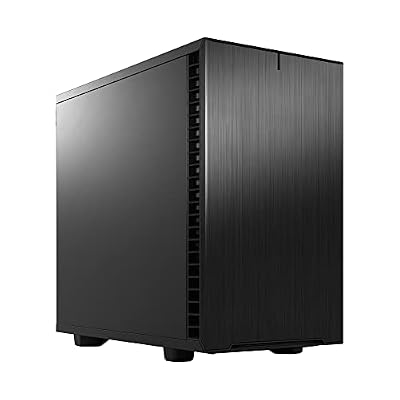
Fractal Design Define 7 Nano Black Solid Mini ITX PC Case with 5 USB Ports, Compatible with Desktops
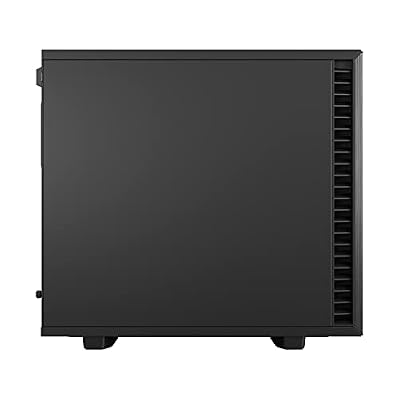


As an Amazon Associate we earn from qualifying purchases. Product prices and availability are accurate as of the date/time indicated.
The Fractal Design Define R5 is the airflow-and-silence pick, a long-revered ATX chassis engineered to balance strong cooling with quiet operation. It pairs optimized airflow paths and ample fan mounts with sound-dampening material and a solid, premium build, giving you cool temperatures without the noise. At around $148 it is a proven, no-nonsense case for a refined high-performance system.
This is the case for the builder who wants serious cooling capacity but also values a quiet, understated machine rather than an RGB spectacle. The R5’s airflow design and generous fan and radiator support keep demanding hardware cool, while the dampened panels and thoughtful layout keep the system whisper-quiet under load. Its spacious, well-built interior makes assembly and cable management a pleasure, and it accommodates large coolers and storage with ease. For a high-airflow case that prizes silence and craftsmanship, the Define R5 remains a benchmark.
Pros: Optimized airflow with sound damping, excellent build quality, roomy and quiet, great for big air coolers.
Cons: Solid front trades some raw airflow for silence; classic styling lacks RGB flash.
6. Corsair Crystal Series 680X RGB High Airflow Tempered Glass ATX Smart Case, Black
CORSAIR iCUE Link 3500X RGB Mid-Tower ATX PC Case – Panoramic Tempered Glass – Reverse Connection Motherboard Compatible – 3X CORSAIR iCUE Link RX120 RGB Fans Included – Black
As an Amazon Associate we earn from qualifying purchases. Product prices and availability are accurate as of the date/time indicated.
Rounding out the list is the Corsair Crystal 680X RGB, the premium dual-chamber pick for ambitious cooling. It separates the motherboard and power-supply areas into two chambers, dedicating one side to airflow and radiators while the other hides cables and drives, and it wraps the showcase side in tempered glass. At around $275 it is the most expensive case here, and the extra space and cooling potential are why.
This is the case for the enthusiast planning a big custom loop or a multi-radiator setup, or anyone who wants maximum cooling headroom and a clean, cable-free showcase. The dual-chamber layout keeps the main compartment open for thick radiators and plentiful fans, supporting serious thermals, while the second chamber tidies away everything that would otherwise clutter the view. The high-airflow design and generous internal volume make it ideal for high-wattage hardware. For the most demanding high-performance builds, the 680X is the spacious, capable flagship of this lineup.

Pros: Spacious dual-chamber layout, superb radiator and fan capacity, clean cable hiding, showcase glass.
Cons: Highest price and largest footprint here; bigger than many desks need.
How to Choose a High Performance PC Case
Choosing a high performance case starts with airflow, because that is the whole point. Look first at the front panel: a mesh front, like the iCUE 220T Airflow and the open 4000D RS frame, lets cool air pour straight onto your components, whereas a solid or fully glass front restricts intake and traps heat unless you compensate with strong fans. If raw cooling is your priority, favour mesh; if you choose a glass-fronted showcase like the 3500X, plan to load it with quality intake fans to keep air moving.
Radiator and fan support is the next decision, and it dictates how far you can push your cooling. Confirm how many fans the case mounts and where, and check the maximum radiator sizes it accepts in the front, top and rear. A mid-tower like the 4000D or 220T handles a 240mm or 360mm radiator comfortably and suits most builds, while a large dual-chamber chassis like the Crystal 680X is the one to pick if you are planning a big custom loop or multiple thick radiators. Match the cooling capacity to the heat your CPU and GPU actually produce.
Clearance is the detail that quietly makes or breaks a build. Modern graphics cards are long and thick, and high-end air coolers are tall, so verify the case’s stated GPU length and CPU cooler height limits against the parts you intend to fit. Roomy cases like the Define R5 and Crystal 680X swallow big coolers and long cards with ease, while a tidy mid-tower may demand a closer look at the spec sheet. Measure before you buy rather than discovering a clearance problem mid-assembly.
Finally, balance noise, dust and presentation against your goals. A sound-dampened case like the Define R5 keeps a powerful system quiet, dust filters keep airflow-focused cases clean over time, and tempered glass plus RGB fans turn a build into a showpiece — but every solid or glass panel is a small trade against pure airflow. Decide whether silence, looks, or maximum cooling leads your priorities, set a budget, and pick the case on this list that best matches how you want your high-performance system to run and look.
Frequently Asked Questions
What makes a PC case ‘high performance’ for airflow?
It comes down to how freely the chassis moves air. A high-airflow case uses an unobstructed intake — typically a mesh front like the iCUE 220T Airflow or the open 4000D RS frame — plus plenty of fan mounts and good exhaust routing so cool air reaches your CPU and GPU and hot air leaves quickly. The less the front panel restricts intake, the cooler and quieter a demanding build runs.
Do I need a mesh front, or is a glass front okay?
Both can work, but they behave differently. A mesh front maximises raw intake and is the safest choice for the coolest temperatures, which is why airflow-focused builders favour it. A glass front, like the panoramic 3500X, looks stunning but restricts air, so you should pair it with strong intake fans to keep airflow healthy. If pure cooling is the goal choose mesh; if presentation leads, glass is fine with good fans.
How much radiator support do I need?
It depends on your cooling plans. For a single all-in-one liquid cooler, a mid-tower like the 4000D, 220T or 3500X that accepts a 240mm or 360mm radiator is plenty. If you intend to build a large custom loop with multiple thick radiators, a spacious dual-chamber case like the Crystal 680X gives you the room and mounting options that smaller chassis cannot. Always check the case’s stated maximum radiator sizes first.
Will a long graphics card and tall air cooler fit?
Check the case’s published GPU length and CPU cooler height limits against your parts before buying. Roomy cases like the Fractal Design Define R5 and Corsair Crystal 680X comfortably fit long modern GPUs and tall air coolers, while tidy mid-towers may need a closer look at the spec sheet. Measuring your components against the clearance figures avoids an awkward surprise during assembly.
Related Guides
- Best Gaming PCs
- Best CPU Coolers
- Best Power Supplies
- Best Case Fans for Airflow
- Best GPUs for Your Build
- Best Budget Gaming Setup
Affiliate Disclosure: As an Amazon Associate, we earn from qualifying purchases. If you click a link and make a purchase, we may earn a small commission at no extra cost to you. Prices and availability are accurate as of publication and may change.










