

- Top Pick: Cooler Master Q300L V1 Micro-ATX PC Case, High Airflow, Transparent Panel
- Best Value: MUSETEX Y6 PC Case, Pre-Installed 4 Non-LED Fans, ATX Mid Tower Case, Computer Case with Type-C, 270° Full View Tempered Glass, Black
- Premium Choice: DARKROCK EC2 ATX Mid Tower Gaming Computer PC Case, Type-C Ready
🛒 Best Price Today on Amazon
Prime members get fast, free shipping on everything above, plus member-only deals. New members get a 30-day free trial — cancel anytime.
- Top Cases Beginners Picks for 2026
- Best PC Cases for Beginners at a Glance
- 1. Cooler Master MasterBox Q300L Micro-ATX PC Case, Ventilated
- 2. NZXT H6 Flow CC-H61FW-01 Compact Dual-Chamber Mid-Tower Airflow Case
- 3. S200 Plus TG ARGB Mid Tower Computer Chassis, 4x 120mm ARGB Fans Pre-Installed
- 4. CORSAIR 4000D RS ARGB Frame Modular Mid-Tower ATX PC Case, High Airflow
- 5. Fractal Design Focus G Mid Tower Computer Case, ATX, High Airflow, USB 3.0
- 6. ASUS TUF Gaming GT501 Mid-Tower Gaming Case, EATX Support, 4 Fans
- How to Choose a PC Case for Beginners
- Frequently Asked Questions
- Related Guides
- Related Articles
Top Cases Beginners Picks for 2026
Here are our current top cases beginners picks, compared on real Amazon owner reviews, price, and features. Live prices update below.
As an Amazon Associate we earn from qualifying purchases at no extra cost to you.


For a first-time builder, the case is the part that decides how stressful — or how enjoyable — assembling a PC actually is. The best beginner cases make the job easy: they offer plenty of room to work, sensible cable-management routing and tie-down points, good airflow so you do not have to think hard about cooling, and a forgiving layout that does not punish small mistakes. This guide rounds up the best PC cases for beginners in 2026, prioritising chassis that are roomy, well-ventilated and easy to build in, across a range of sizes and budgets.
Our picks were chosen on what genuinely makes a first build go smoothly: build-friendliness and interior space, cable-management features, airflow and included fans, and value. We have led with the easiest, most beginner-friendly options and included a deliberate spread, with prices from around $40 up to around $160, because a great first case does not have to be expensive. The list spans a compact, affordable mATX case, several airflow-focused mid-towers with pre-installed fans, and roomier options for those who want maximum space. Below is an at-a-glance comparison of all six, then a closer look at each and a buyer’s guide built around size, airflow and build-friendliness — the things that actually matter for a first build.
Best PC Cases for Beginners at a Glance
| Case | Best For | Standout Spec | Approx Price |
|---|---|---|---|
| Cooler Master MasterBox Q300L | Easiest compact first build | Compact mATX, value, ventilated | around $40 |
| NZXT H6 Flow | Beginner-friendly airflow build | Dual-chamber, panoramic glass | around $80 |
| S200 Plus TG ARGB Mid Tower | Pre-cooled value build | 4x 120mm ARGB fans included | around $80 |
| Corsair 4000D RS ARGB Frame | Easy cable management | 3x ARGB fans, high airflow | around $100 |
| Fractal Design Focus G | Simple high-airflow ATX | High airflow, USB 3.0, clean layout | around $100 |
| ASUS TUF Gaming GT501 | Roomy premium first build | EATX support, 4 fans, spacious | around $160 |
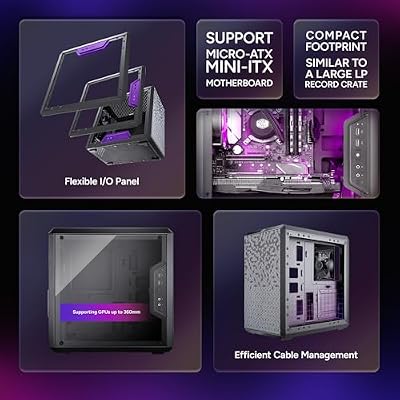
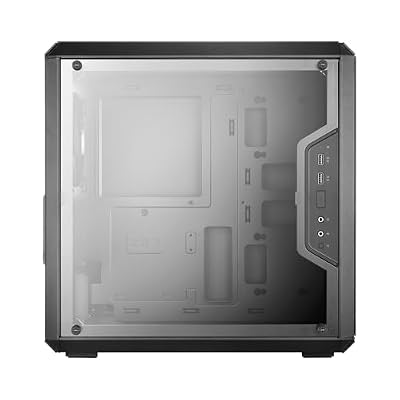
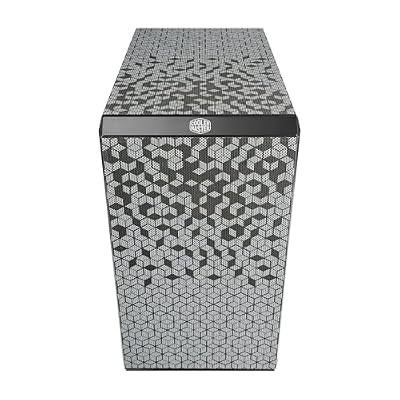
1. Cooler Master MasterBox Q300L Micro-ATX PC Case, Ventilated

Cooler Master Q300L V1 Micro-ATX PC Case, High Airflow, Transparent Panel | 360mm Graphics Card Support, 240mm AIO Support, Micro-ATX Motherboard, Magnetic Dust Filters, Modular I/O Panel







As an Amazon Associate we earn from qualifying purchases. Product prices and availability are accurate as of the date/time indicated.
The Cooler Master MasterBox Q300L is the easiest, most affordable first-build pick on this list. It is a compact Micro-ATX case with a ventilated design, a magnetic dust-filter top panel and clever cable-routing channels, all for around $40 — making it one of the best-value beginner cases you can buy. Its small size and low price make it a friendly, low-stakes place to learn.
This is the case for a beginner who wants a compact, budget-friendly build without feeling overwhelmed. The Micro-ATX size keeps the footprint and the parts list manageable, the ventilated panels help airflow without extra thought, and the routing channels and tie points make first-time cable management approachable rather than intimidating. A smaller case can be a little tighter to work in than a full mid-tower, but the Q300L’s sensible layout keeps it accessible. For an affordable, easy introduction to building, it is an excellent starting point.
Pros: Very affordable, compact mATX, ventilated, magnetic dust filter, helpful cable routing.
Cons: Compact interior is tighter for large GPUs and coolers; mATX motherboards only.
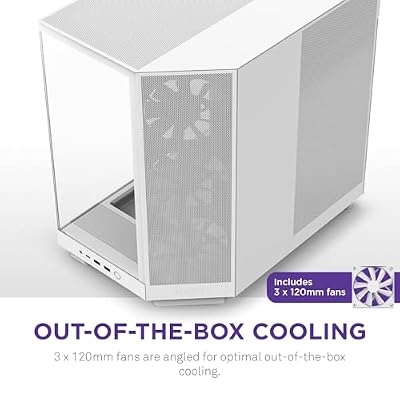
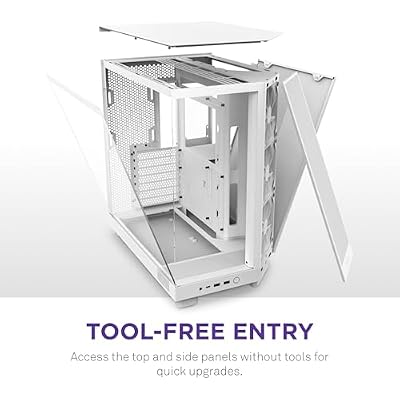
2. NZXT H6 Flow CC-H61FW-01 Compact Dual-Chamber Mid-Tower Airflow Case

NZXT H6 Flow - Compact Dual-Chamber ATX PC Case - White | Compact dual-chamber ATX case with panoramic glass and 3 included 120mm fans. Airflow-optimized for clean, cool builds.





As an Amazon Associate we earn from qualifying purchases. Product prices and availability are accurate as of the date/time indicated.
The NZXT H6 Flow is the beginner-friendly airflow pick, and one of the most approachable cases to build a clean, good-looking system in. It is a compact dual-chamber mid-tower with a high-airflow front, a panoramic glass corner for a great view of your parts, and a layout that separates the messy hardware from the showcase side. At around $80 it pairs an easy build with strong looks.
This is the case for a first-timer who wants a tidy, attractive result with minimal fuss. The dual-chamber design hides the power supply, drives and most of the cabling in a separate compartment, so the main chamber stays clean and the build looks professional even on a first attempt. The high-airflow front keeps temperatures in check, and the panoramic glass shows off your components. For a beginner who cares about both ease of building and the finished aesthetic, the H6 Flow is a standout.

Pros: Dual-chamber layout hides cables, high-airflow front, panoramic glass, easy clean builds.
Cons: No fans confirmed in the listing — budget for case fans; mid-tower footprint.
3. S200 Plus TG ARGB Mid Tower Computer Chassis, 4x 120mm ARGB Fans Pre-Installed

S200 Plus TG ARGB Snow Mid Tower Computer Chassis; 4 x 120mm ARGB Fans Pre-Installed; Mesh Front Panel; TG Side Window; CA-1X2-00M6WN-01; 3 Year Warranty


As an Amazon Associate we earn from qualifying purchases. Product prices and availability are accurate as of the date/time indicated.
The S200 Plus TG is the pre-cooled value pick. It is a tempered-glass ARGB mid-tower that ships with four 120mm ARGB fans already installed, so a beginner gets airflow and lighting out of the box without buying or fitting extra fans. At around $80 it offers a lot of equipped value for a first build that wants to look the part.
This is the case for a beginner who wants strong airflow and RGB lighting without the extra step of selecting and installing fans. The four pre-installed 120mm ARGB fans deliver good cooling and a vivid glow from the moment you finish building, the tempered-glass panel shows it all off, and the mid-tower size leaves comfortable room to work. Fewer purchase decisions and less fan wiring make the build simpler. For an affordable, fully-equipped ARGB case that takes some guesswork out of cooling, the S200 Plus is a smart beginner buy.
Pros: Four 120mm ARGB fans pre-installed, tempered glass, good airflow and lighting out of the box, great value.
Cons: Lesser-known brand; pre-wiring multiple ARGB fans can mean some cable tidying.
4. CORSAIR 4000D RS ARGB Frame Modular Mid-Tower ATX PC Case, High Airflow
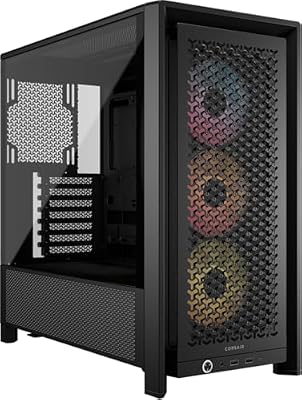
CORSAIR 4000D RS ARGB Frame Customizable Mid-Tower PC Case – Black | 3x Pre-Installed Fans, High Airflow, Fully Modular, Easy InfiniRail Fan Mounting, GPU Anti-Sag, Reverse Motherboard Support


As an Amazon Associate we earn from qualifying purchases. Product prices and availability are accurate as of the date/time indicated.
The Corsair 4000D RS ARGB is the easy-cable-management pick, building on one of the most beginner-recommended case lines around. It is a high-airflow ATX mid-tower with three pre-installed ARGB fans and Corsair’s renowned cable management — generous routing channels, a roomy rear cavity and plenty of tie-down points. At around $100 it makes a tidy first build genuinely achievable.
This is the case for a beginner who wants the cleanest possible result with the least frustration. The 4000D line is famous precisely because its cable management is so forgiving — there is ample space behind the motherboard tray and clear channels to route everything neatly, which is exactly where first-timers usually struggle. The three included ARGB fans cover airflow and lighting from the start, and the high-airflow frame keeps temperatures low. For a beginner who values an easy, tidy build above all, the 4000D RS is hard to beat.

Pros: Excellent forgiving cable management, three ARGB fans included, high airflow, roomy ATX layout.
Cons: Mid-tower footprint; a little pricier than the most basic options.
5. Fractal Design Focus G Mid Tower Computer Case, ATX, High Airflow, USB 3.0
The Fractal Design Focus G is the simple high-airflow pick. It is a clean, well-regarded ATX mid-tower with a high-airflow front, front USB 3.0, and Fractal’s reputation for sensible, no-nonsense layouts that are easy to build in. At around $100 it offers a straightforward, well-ventilated chassis without unnecessary complexity — a calm choice for a first build.
This is the case for a beginner who wants a tidy, well-ventilated build without flashy extras or a fiddly layout. Fractal cases are known for uncluttered interiors with logical routing, so the Focus G keeps assembly approachable, while the high-airflow front design helps cooling without thought. The front USB 3.0 covers modern connectivity, and the understated styling suits those who do not want heavy RGB. For a simple, dependable, well-cooled mid-tower to learn on, the Focus G is a sensible, level-headed pick.
Pros: High-airflow design, clean easy-to-build Fractal layout, front USB 3.0, understated styling.
Cons: Confirm included fan count on the listing; minimal RGB and extras.
6. ASUS TUF Gaming GT501 Mid-Tower Gaming Case, EATX Support, 4 Fans

ASUS TUF Gaming GT501 E-ATX Full-Tower PC Case | Pre-Installed Three Front 120mm RGB Case Fans and One Rear 140mm PWM Case Fan, Dual 360mm Radiators and 420mm Graphics Cards


As an Amazon Associate we earn from qualifying purchases. Product prices and availability are accurate as of the date/time indicated.
Rounding out the list is the ASUS TUF Gaming GT501, the roomy premium pick. It is a spacious mid-tower with E-ATX motherboard support, four pre-installed case fans, tempered-glass side panel and sturdy carry handles, all for around $160 — the most expensive case here. Its generous interior makes it a comfortable, if pricier, place to build.
This is the case for a beginner who wants maximum room to work and a premium, robust build, and does not mind paying for it. The spacious E-ATX-capable interior gives plenty of clearance for large GPUs, big coolers and easy hand access, which makes a first build far less cramped, while the four included fans cover cooling from the start. The tempered glass and solid construction lend it a high-end feel. It costs more than the others, but for a roomy, well-built first case with space to grow, the GT501 is a strong premium option.

Pros: Spacious E-ATX-capable interior, four fans included, tempered glass, sturdy premium build.
Cons: Most expensive here; large footprint needs desk or floor space.
How to Choose a PC Case for Beginners
For a first build, start with size, because it sets how much room you have to work and what parts will fit. A roomy mid-tower like the Corsair 4000D, Fractal Focus G or ASUS GT501 gives generous clearance for large GPUs and coolers and plenty of hand access, which makes assembly far less stressful. A compact case like the Cooler Master Q300L keeps the footprint and cost down but is tighter to work in and limits you to smaller motherboards. Pick a size that matches your motherboard and leaves comfortable room to build.
Airflow is the next priority, and it keeps your components cool with the least effort. Look for a case with a high-airflow design — mesh or ventilated front panels, like the H6 Flow, Focus G and 4000D — and ideally pre-installed fans so cooling works out of the box. Cases such as the S200 Plus with four fans, the GT501 with four, and the 4000D RS with three save you from buying and fitting extra fans on a first build. Good airflow means you do not have to think hard about cooling, which is exactly what a beginner wants.
Cable management is where first-timers most often get frustrated, so a forgiving case makes a real difference. Look for generous routing channels, a roomy gap behind the motherboard tray and plenty of tie-down points — the Corsair 4000D line is recommended precisely because its cable management is so easy, and a dual-chamber design like the NZXT H6 Flow hides cables and the power supply in a separate compartment for an effortlessly clean look. The tidier the case makes routing, the better your first build will look and breathe.
Finally, weigh features, looks and budget together. Decide whether you want tempered glass and ARGB lighting — the S200 Plus, 4000D RS and GT501 deliver that — or prefer an understated build like the Focus G. Confirm front-panel connectivity such as USB 3.0, check the case clears your chosen GPU and cooler, and set a realistic budget; a great beginner case can cost as little as $40. Match the size, airflow, cable-friendliness and style to how you want to build and what you can spend, and pick the case on this list that fits your first project best.
Frequently Asked Questions
What size PC case should a beginner choose?
A roomy mid-tower is usually the easiest place to learn, because cases like the Corsair 4000D, Fractal Focus G and ASUS GT501 give plenty of clearance and hand access, so assembly is far less cramped. A compact case like the Cooler Master Q300L keeps cost and footprint down but is tighter to work in and limits you to smaller motherboards. Match the case size to your motherboard and the space on your desk.
Do beginner cases come with fans included?
Many do, which is a real help for a first build. The S200 Plus and ASUS GT501 ship with four fans, and the Corsair 4000D RS includes three ARGB fans, so you get airflow out of the box without buying and fitting extras. Others, like the NZXT H6 Flow, may need fans added — check the listing and budget for case fans if cooling is not pre-installed.
Which case is easiest for cable management?
The Corsair 4000D RS is a standout, as the 4000D line is widely recommended for its forgiving cable management — generous routing channels, a roomy rear cavity and plenty of tie points. The NZXT H6 Flow also makes things easy with a dual-chamber design that hides the power supply and most cabling in a separate compartment, keeping the visible side clean even on a first attempt.
Is a more expensive case worth it for a first build?
Not necessarily. A great beginner case can cost as little as $40, like the Cooler Master Q300L, and value mid-towers around $80 to $100 cover airflow, cable management and looks well. A premium case like the ASUS GT501 buys extra room, build quality and included fans, which some beginners value, but it is not required. Spend on size, airflow and cable-friendliness first, then on extras if your budget allows.
Related Guides
- Best PC Cases
- Best CPU Coolers
- Best Power Supplies
- Best Case Fans for Airflow
- Best Motherboards
- Best Pre-Built Gaming PCs
Affiliate Disclosure: As an Amazon Associate, we earn from qualifying purchases. If you click a link and make a purchase, we may earn a small commission at no extra cost to you. Prices and availability are accurate as of publication and may change.










