

Bluetooth is what lets a single keyboard talk to your phone, tablet and computer without a dongle taking up a port. The best Bluetooth keyboards pair in seconds, remember your devices, and — on the standout models — switch between several of them at the press of a key, all while running for months on a charge or a set of batteries. The catch is that plenty of ‘wireless’ keyboards actually use a 2.4GHz USB receiver, not Bluetooth at all, so this guide is careful to separate the genuine Bluetooth boards from the dongle-based ones. Below are the best Bluetooth keyboards in 2026, with the true-Bluetooth, multi-device picks leading the way.
- Best Bluetooth Keyboards at a Glance
- 1. Logitech K480 Wireless Multi-Device Keyboard for Windows, macOS, iPadOS, Android
- 2. OMOTON Ultra-Slim Bluetooth Keyboard for iPad and Tablets
- 3. Redragon S101M-KS Gaming Keyboard and Mouse Wireless with Tri-Mode RGB
- 4. Logitech K400 Plus Wireless Touch TV Keyboard with Built-In Touchpad
- 5. Arteck 2.4G Wireless Keyboard, Stainless Steel Ultra-Slim Full-Size
- 6. Logitech K270 Wireless Keyboard for Windows, Full-Size, Number Pad
- How to Choose a Bluetooth Keyboard
- Frequently Asked Questions
- Related Guides
- Related Articles
Our picks were chosen on what matters for a real Bluetooth keyboard: genuine Bluetooth pairing (ideally multi-device), strong battery life, a comfortable layout, and value. Crucially, we flag every product honestly — some popular boards on this list connect only through a 2.4GHz receiver and are not Bluetooth, so we say so plainly and rank the true-Bluetooth options first. Prices run from around $16 to around $54. Below is an at-a-glance comparison of all six, then a closer look at each and a buyer’s guide built around Bluetooth versus 2.4GHz, multipoint switching and battery life — the things that decide a Bluetooth keyboard.
As an Amazon Associate we earn from qualifying purchases at no extra cost to you.


🛒 Best Price Today on Amazon
Prime members get fast, free shipping on everything above, plus member-only deals. New members get a 30-day free trial — cancel anytime.
Best Bluetooth Keyboards at a Glance
| Keyboard | Best For | Standout Spec | Approx Price |
|---|---|---|---|
| Logitech K480 Multi-Device | Phone + tablet + PC switching | True BT, 3-device dial, cradle | around $32 |
| OMOTON Ultra-Slim Bluetooth | Slim tablet typing | True BT, ultra-slim, lightweight | around $16 |
| Redragon S101M-KS Tri-Mode Combo | Bluetooth + 2.4GHz + wired | Tri-mode incl. Bluetooth, RGB | around $54 |
| Logitech K400 Plus (2.4GHz) | Living-room media (not BT) | Touchpad, 2.4GHz receiver | around $24 |
| Arteck Stainless Slim (2.4GHz) | Slim looks (not BT) | Stainless, slim, 2.4GHz | around $29 |
| Logitech K270 Wireless (2.4GHz) | Full-size value (not BT) | Full-size numpad, 2.4GHz | around $24 |
1. Logitech K480 Wireless Multi-Device Keyboard for Windows, macOS, iPadOS, Android

Logitech K480 Wireless Multi-Device Keyboard for Windows, macOS, iPadOS, Android or Chrome OS, Bluetooth, Compact, Compatible with PC, Mac, Laptop, Smartphone, Tablet - Black


As an Amazon Associate we earn from qualifying purchases. Product prices and availability are accurate as of the date/time indicated.
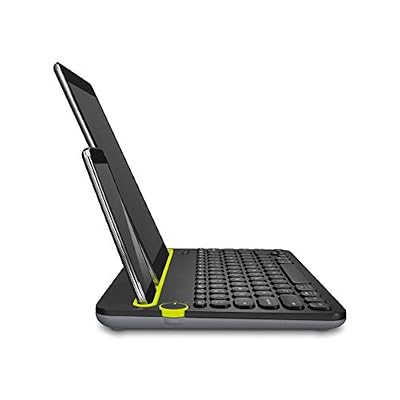
The Logitech K480 is the best true-Bluetooth pick on this list and the standout for multi-device use. It is a genuine Bluetooth keyboard that pairs with up to three devices at once — say a Windows PC, an iPad and an Android phone — and switches between them with a simple dial. A built-in cradle along the top holds a phone or tablet upright while you type. At around $32 it is superb value for what it does.
This is the keyboard to choose if Bluetooth multi-device switching is the whole point. The integrated dial lets you flip from typing an email on your computer to replying to a message on your phone to taking notes on a tablet without re-pairing anything, and the cross-platform support covers Windows, macOS, iPadOS, ChromeOS and Android. The cradle is a genuinely useful touch for tablets and phones, and battery life runs into years on a couple of AAAs. For anyone who juggles several devices over Bluetooth, the K480 is the clear winner here.
Pros: Genuine Bluetooth, switches between three devices via a dial, built-in device cradle, great value.
Cons: Bulky and heavy for travel; flat keys are functional rather than plush.
2. OMOTON Ultra-Slim Bluetooth Keyboard for iPad and Tablets
The OMOTON Ultra-Slim is the slim true-Bluetooth pick and the most portable board here. It is a thin, lightweight Bluetooth keyboard built for iPads and tablets that pairs wirelessly with no dongle, and at around $16 it is the cheapest option on this list. For a genuine, grab-and-go Bluetooth keyboard, it is hard to beat on price.
This is the keyboard for tablet and phone typing where slimness matters most. The true Bluetooth connection pairs with an iPad, iPhone or other tablet in seconds, the ultra-slim and lightweight body slips into any bag, and the layout is tuned for comfortable on-the-go typing rather than desk marathons. It pairs with one device at a time rather than offering the K480’s three-device dial, so it is best for a single tablet or phone. As an affordable, genuinely wireless Bluetooth board for mobile typing, the OMOTON earns its spot near the top.
Pros: True Bluetooth, ultra-slim and light, pairs in seconds with tablets, very affordable.
Cons: Single-device pairing (no multipoint); shallow keys suit short sessions.
3. Redragon S101M-KS Gaming Keyboard and Mouse Wireless with Tri-Mode RGB

Redragon S101M-KS Gaming Keyboard and Mouse Wireless with Tri-Mode, RGB Keyboard and 4800 DPI Gaming Mouse, 10 Independent Multimedia Keys for Wins, PC, Computer, Wireless S101 Ideal for Gamer



As an Amazon Associate we earn from qualifying purchases. Product prices and availability are accurate as of the date/time indicated.
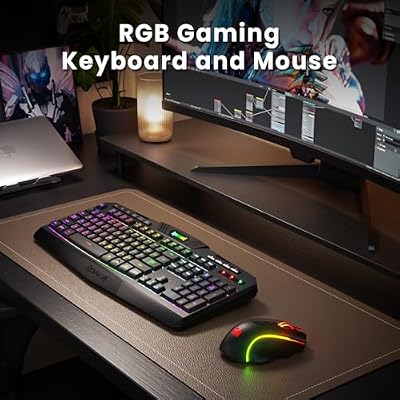
The Redragon S101M-KS is the pick for people who want Bluetooth plus more flexibility. It is a tri-mode wireless keyboard-and-mouse combo, meaning it offers a genuine Bluetooth connection alongside a low-latency 2.4GHz mode and a wired option, with a full-size RGB board and a matching mouse. At around $54 it is the priciest pick here and the most versatile in how it connects.
This is the combo to choose when you want a Bluetooth keyboard for a laptop or tablet but also a faster 2.4GHz link for a gaming desktop, all in one device. The Bluetooth mode handles cable-free everyday typing across devices, the 2.4GHz mode delivers lower latency for gaming, and the wired option is there as a fallback. The full-size RGB board and bundled mouse make it a complete desk setup. For a Bluetooth-capable keyboard that does not lock you into a single connection type, the S101M-KS is the most adaptable option on the list.
Pros: Includes genuine Bluetooth plus 2.4GHz and wired modes, full-size RGB, matched mouse.
Cons: RGB combo is desk-oriented, not slim; software is fairly basic.
4. Logitech K400 Plus Wireless Touch TV Keyboard with Built-In Touchpad

Logitech K400 Plus Wireless Touch TV Keyboard for PC-Connected TV - Black | Easy media control, built-in touchpad, HTPC for PC-connected TV, compatible with Windows, Android, Chrome OS, Laptop, Tablet





As an Amazon Associate we earn from qualifying purchases. Product prices and availability are accurate as of the date/time indicated.
The Logitech K400 Plus is a popular living-room keyboard, but here it comes with an important honesty note: it connects through Logitech’s 2.4GHz USB receiver, not Bluetooth. It is a compact wireless board with a large built-in touchpad, designed to control a TV-connected PC or media center from the sofa. At around $24 it is well-priced for that job — just not a Bluetooth device.
We include it because shoppers often confuse 2.4GHz wireless with Bluetooth, and it is worth being clear: the K400 Plus needs its little USB dongle plugged into the host, so it will not pair with a phone or tablet that has no USB port the way a true Bluetooth board would. Within that limit it is excellent — the integrated touchpad means no separate mouse for couch browsing, the layout is compact, and the receiver gives a stable link across a room. If you specifically need Bluetooth, look to the K480 or OMOTON instead; if a 2.4GHz HTPC keyboard with a touchpad is what you want, the K400 Plus is a fine choice.
Pros: Handy built-in touchpad, compact, stable 2.4GHz link, great for a living-room PC.
Cons: Not Bluetooth — uses a 2.4GHz USB receiver, so it needs a USB port on the host.
5. Arteck 2.4G Wireless Keyboard, Stainless Steel Ultra-Slim Full-Size

Arteck 2.4G USB Wireless Keyboard Full Size Keyboard for Computer/PC/Laptop


As an Amazon Associate we earn from qualifying purchases. Product prices and availability are accurate as of the date/time indicated.
The Arteck Stainless Steel keyboard looks every bit a sleek Bluetooth slab, but the honest detail is in the name: it is a 2.4G wireless keyboard, not Bluetooth. It is an attractive ultra-slim full-size board with a stainless steel frame and a rechargeable battery, connecting through a 2.4GHz USB receiver. At around $29 it is a stylish, well-built wireless keyboard — just not a Bluetooth one.
We list it because its slim, premium looks lead many shoppers to assume Bluetooth, so the distinction matters. The 2.4GHz receiver gives a stable, low-latency link and the stainless build feels more upmarket than typical budget boards, with a rechargeable battery saving you on AAAs. But because it relies on a USB dongle, it cannot pair directly with a tablet or phone that lacks a USB port, which is exactly where true Bluetooth shines. If you want the slim look and only use it with a computer, it is a tidy pick; if you need genuine Bluetooth, choose the OMOTON or K480.
Pros: Sleek stainless full-size design, rechargeable battery, stable 2.4GHz link.
Cons: Not Bluetooth — connects via a 2.4GHz USB receiver despite its slim, modern look.
6. Logitech K270 Wireless Keyboard for Windows, Full-Size, Number Pad

Logitech K270 Full Size Wireless Keyboard for Windows - Black | Full-size keyboard with number pad, 8 multimedia keys, includes USB-A receiver, 2-year battery, compatible with PC, laptop






As an Amazon Associate we earn from qualifying purchases. Product prices and availability are accurate as of the date/time indicated.
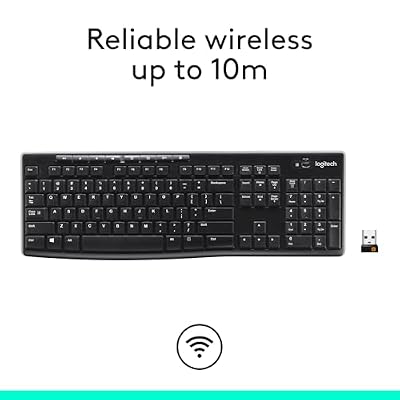
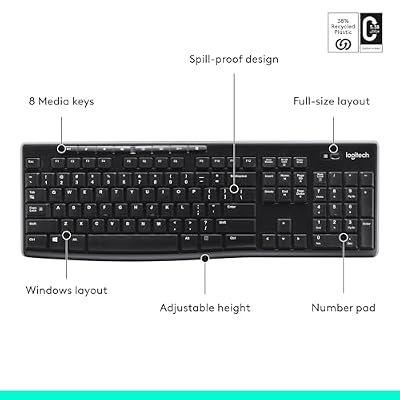
Rounding out the list is the Logitech K270, included with the same honest caveat: it is a 2.4GHz wireless keyboard, not Bluetooth. It is a dependable full-size board with a number pad and a handful of shortcut keys, connecting through Logitech’s tiny USB receiver. At around $24 it is an affordable, reliable full-size wireless keyboard — but a dongle-based one.
We include it because it frequently appears in ‘wireless keyboard’ shortlists and buyers should know it will not pair over Bluetooth with a phone or tablet. What it does well, it does dependably: the full-size layout and number pad suit everyday computer work, the shortcut keys cover search and volume, and the long battery life and stable 2.4GHz link make it a fuss-free desk companion. Just plan to plug its receiver into a USB port. For a true Bluetooth full-size experience you would look elsewhere, but as a low-cost 2.4GHz workhorse, the K270 is a solid, sensible choice.
Pros: Reliable full-size layout with number pad, long battery life, stable 2.4GHz link, low price.
Cons: Not Bluetooth — requires its 2.4GHz USB receiver in a host port.
How to Choose a Bluetooth Keyboard
The first and most important step is making sure a keyboard is actually Bluetooth, because the term ‘wireless’ hides two very different technologies. True Bluetooth boards, like the Logitech K480 and OMOTON here, pair directly with phones, tablets and computers with no dongle. Many popular ‘wireless’ keyboards — including the K400 Plus, Arteck and K270 on this list — actually use a 2.4GHz USB receiver, which needs a free USB port and will not connect to a device that lacks one. Always confirm the connection type before you buy.
If you want one keyboard for several devices, prioritise multi-device (multipoint) Bluetooth. The K480’s standout feature is a dial that switches between three paired devices instantly, so you can move from computer to tablet to phone without re-pairing — ideal if you split your day across gadgets. Single-device Bluetooth boards like the OMOTON pair with one device at a time, which is fine for a dedicated tablet keyboard. Decide how many devices you genuinely need to switch between and let that guide the model.
Battery life and power type are worth checking, since Bluetooth boards either recharge or run on replaceable cells. Some keyboards use AAA batteries that last many months to years, others have a rechargeable pack you top up over USB. Neither is strictly better — replaceable batteries mean no downtime if you carry spares, while rechargeable saves you buying cells. Look for a board that lasts long enough between top-ups that you rarely think about it, and you will avoid the frustration of a keyboard dying mid-task.
Finally, match the layout and form to where you will use the keyboard. A multi-device board with a tablet cradle like the K480 suits a desk where you juggle gadgets; a slim, light board like the OMOTON suits travel and tablet typing; and the tri-mode Redragon adds Bluetooth to a full-size gaming combo for people who want both worlds. If a model you like turns out to be 2.4GHz rather than Bluetooth, decide whether a dongle is acceptable for your use — for couch or single-PC use it often is. Confirm it is truly Bluetooth if that is what you need, then pick the board on this list that fits your devices and layout.
Frequently Asked Questions
How can I tell if a keyboard is really Bluetooth or just 2.4GHz wireless?
Check the connection type in the specs, not just the word ‘wireless’. A true Bluetooth keyboard pairs directly with phones, tablets and computers and mentions Bluetooth explicitly — the Logitech K480 and OMOTON here are examples. A 2.4GHz keyboard ships with a small USB receiver (dongle) that must plug into the host; the K400 Plus, Arteck and K270 on this list are 2.4GHz, not Bluetooth, so they cannot pair with a device that has no USB port.
What is multipoint and which keyboard here has it?
Multipoint (or multi-device) Bluetooth lets one keyboard stay paired with several devices and switch between them instantly. The Logitech K480 is the standout for this — its dial flips between three paired devices, such as a PC, a tablet and a phone, with no re-pairing. If you regularly type across multiple gadgets, a multipoint board like the K480 is far more convenient than a single-device keyboard.
Do Bluetooth keyboards have noticeable lag for gaming?
Bluetooth can introduce slightly more latency than a wired or 2.4GHz connection, so for fast competitive gaming a 2.4GHz or wired mode is usually preferable. That is exactly why the tri-mode Redragon S101M-KS offers a 2.4GHz mode alongside Bluetooth — you use Bluetooth for everyday typing across devices and switch to 2.4GHz or wired when you game. For office work, browsing and typing, Bluetooth latency is a non-issue.
Can I use a Bluetooth keyboard with my phone and tablet, not just a PC?
Yes — that is one of Bluetooth’s biggest advantages. Genuine Bluetooth boards like the OMOTON and Logitech K480 pair directly with iPhones, iPads, Android phones and tablets with no dongle required. The K480 even switches between three such devices via its dial. Just remember that 2.4GHz keyboards (the K400 Plus, Arteck and K270 here) need a USB port and so generally will not work with a phone or tablet.
Related Guides
- Best Wireless Keyboards
- Best Mechanical Keyboards
- Best Wireless Gaming Mouse
- Best Portable Monitors
- Best Gaming Headsets
- Best Budget Gaming Setup
Affiliate Disclosure: As an Amazon Associate, we earn from qualifying purchases. If you click a link and make a purchase, we may earn a small commission at no extra cost to you. Prices and availability are accurate as of publication and may change.










