

- Top Pick: KOTIN Gaming PC Desktop, Ryzen 7 8700F, RTX 5060 Ti 8GB, 16GB DDR5, 1TB SSD
- Best Value: KOTIN Gaming PC Desktop Ryzen 7 8700F, RTX 5060 Ti 8G, 32GB DDR5, 1TB SSD
- Premium Choice: ACEMAGICIAN S3A Gaming Mini PC, Ryzen 7 H 255 (Up to 4.9GHz, 8C/16T), Radeon 780M Graphics, 16GB RAM, 512GB PCIe4.0 SSD, Mini Desktop Computer for Content Creation, Programming, Gaming & Home Office
Gaming is only half the job for a lot of people. The modern setup runs a game while OBS encodes a stream, a browser holds twenty tabs, Discord stays open, Spotify plays, and maybe Premiere or a code editor sits in the background. That kind of load is not about raw frame rate — it is about having enough CPU cores, threads, and RAM to keep everything responsive at the same time. A multitasking machine needs headroom: more cores so background work does not steal cycles from your game, and enough memory so nothing has to swap to disk.
- Best Gaming PCs for Multitasking at a Glance
- 1. Skytech Gaming O11 Vision, AMD Ryzen 7 7800X3D 4.2GHz, NVIDIA RTX 5060
- 2. Skytech Gaming Azure 3 Desktop PC, Ryzen 7 7700X 4.5 GHz (5.4GHz), NVIDIA RTX 50
- 3. Skytech Gaming Azure 3 Gaming PC, AMD Ryzen 7 5700 3.7GHz, NVIDIA RTX 5060, 1TB
- 4. Skytech Gaming Archangel Gaming PC, Intel i5 14400F 2.5GHz, NVIDIA RTX 5060, 1TB
- 5. ASUS ROG Strix G700 Desktop 24TB Storage + SSD 128GB DDR5 RAM Win 11 Pro NVIDIA
- 6. STGAubron Gaming PC Desktop Computer, Intel Core i7 up to 3.9GHz, Radeon RX 580
- How to Choose a Gaming PC for Multitasking
- Frequently Asked Questions
- Related Guides
- Related Articles
This guide rounds up the best gaming PCs for multitasking in 2026, judged first on core and thread count, then on RAM capacity, and finally on overall value for a do-everything build. We have included a wide spread — from an eight-core Ryzen 7 powerhouse with a huge memory pool down to a budget six-core box and a balanced mid-range build — with prices from around $471 to around $4,299. The best multitasking PC is the one whose CPU and memory match how many things you genuinely run at once. Below is an at-a-glance comparison, then a closer look at each system and a buyer’s guide focused on cores, threads, and RAM.
As an Amazon Associate we earn from qualifying purchases at no extra cost to you.




🛒 Best Price Today on Amazon
Prime members get fast, free shipping on everything above, plus member-only deals. New members get a 30-day free trial — cancel anytime.
Best Gaming PCs for Multitasking at a Glance
| Gaming PC | Best For | Standout Spec | Approx Price |
|---|---|---|---|
| Skytech O11 Vision (Ryzen 7 7800X3D) | Game + stream + create | 8-core 7800X3D, RTX 5060 | around $1,900 |
| Skytech Azure 3 (Ryzen 7 7700X) | Eight-core all-rounder | 8-core 7700X, RTX 50-series | around $1,800 |
| Skytech Azure 3 (Ryzen 7 5700) | Value eight-core | 8-core Ryzen 7 5700, RTX 5060 | around $1,300 |
| Skytech Archangel (i5 14400F) | Balanced mid-range | 10-core i5 14400F, RTX 5060 | around $1,200 |
| ASUS ROG Strix G700 (workstation) | Extreme multitasking | 128GB DDR5, 24TB storage | around $4,299 |
| STGAubron (Core i7 + RX 580) | Budget multitasker | Quad-core i7, RX 580 | around $471 |
1. Skytech Gaming O11 Vision, AMD Ryzen 7 7800X3D 4.2GHz, NVIDIA RTX 5060
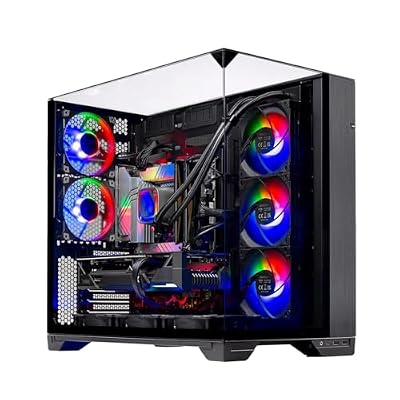
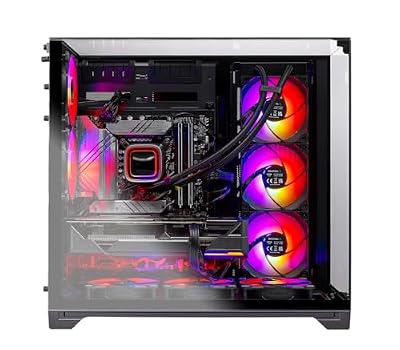
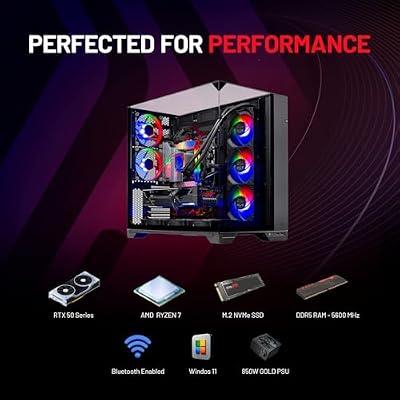
Skytech Gaming O11 Vision Gaming PC, AMD Ryzen 7 7700X 4.5GHz, NVIDIA RTX 5070 12GB, X670 Board, 1TB Gen4 NVMe SSD, 32GB DDR5 RAM 5600, 850W Gold ATX 3 PSU, 360 ARGB AIO, Wi-Fi, Win 11, Desktop







As an Amazon Associate we earn from qualifying purchases. Product prices and availability are accurate as of the date/time indicated.
The Skytech O11 Vision is our top multitasking pick because it is built around the AMD Ryzen 7 7800X3D — an eight-core, sixteen-thread CPU that pairs a large stacked 3D V-Cache with strong all-round throughput. Those sixteen threads are exactly what a do-everything setup wants: plenty of parallel headroom so a game, an encoder, a browser, and chat apps can all run without fighting over the processor. Paired with an RTX 5060 GPU, it is the most capable balance of gaming and heavy background work on this list, at around $1,900.
This is the machine to choose if you stream while you play, keep creative apps open, or simply hate watching the system stutter when you alt-tab. The eight cores and sixteen threads absorb encoding and background tasks while the game keeps running, and the V-Cache helps the CPU stay snappy under mixed loads. Confirm the RAM the listing ships with and top it up to 32GB if you push many apps at once — but the CPU foundation here is ideal for serious multitasking.
Pros: Eight cores and sixteen threads for game-plus-stream loads, strong RTX 5060 pairing, premium do-everything build.
Cons: Premium price; verify shipped RAM and add more for the heaviest multitasking.
2. Skytech Gaming Azure 3 Desktop PC, Ryzen 7 7700X 4.5 GHz (5.4GHz), NVIDIA RTX 50

Skytech Gaming PC Azure 3, Ryzen 7, RTX 5070 Ti, 32GB RAM, 1TB SSD | Windows 11, AMD 7800X3D, NVIDIA 5070 Ti, Gen4 NVMe SSD, DDR5 5600, 850W GOLD ATX 3 PSU, 360 ARGB AIO , Wi-Fi 5


As an Amazon Associate we earn from qualifying purchases. Product prices and availability are accurate as of the date/time indicated.
The Skytech Azure 3 with the Ryzen 7 7700X is the eight-core all-rounder of this list. The 7700X is a current-generation eight-core, sixteen-thread chip that boosts to 5.4GHz, giving you both the parallel headroom multitasking loves and the high single-thread speed that keeps individual apps feeling instant. Backed by an RTX 50-series GPU, it is a do-everything desktop at around $1,800.
This is the pick for the user who wants a modern eight-core platform without stepping up to the V-Cache flagship. Sixteen threads keep a stream, a game, and a stack of browser tabs running smoothly side by side, while the high boost clock makes foreground tasks responsive. The current-gen platform also leaves room to expand memory down the line. For balanced gaming and multitasking with plenty of thread count to spare, the 7700X Azure 3 is an excellent choice.
Pros: Modern eight-core, sixteen-thread 7700X, high 5.4GHz boost, RTX 50-series GPU, expandable platform.
Cons: Slightly pricier than the value eight-core; confirm RAM capacity on order.
3. Skytech Gaming Azure 3 Gaming PC, AMD Ryzen 7 5700 3.7GHz, NVIDIA RTX 5060, 1TB
The Skytech Azure 3 with the Ryzen 7 5700 is the value eight-core multitasker. It delivers eight cores and sixteen threads — the same generous parallel headroom as the pricier picks — on a more affordable platform, paired with an RTX 5060 and 1TB of storage. At around $1,300 it is the cheapest way on this list to get a true eight-core CPU for running many apps at once.
This is the machine for the multitasker on a tighter budget who refuses to give up thread count. Those sixteen threads still let you game while an encoder, Discord, and a browser run in the background, and the 5060 keeps gaming smooth. Single-thread speed is a touch behind the newest chips, but for parallel workloads — the heart of multitasking — eight cores at this price is hard to beat. If you want maximum cores per dollar for a do-everything build, start here.
Pros: Eight cores and sixteen threads at a value price, RTX 5060, 1TB storage, strong cores-per-dollar.
Cons: Older CPU generation; single-thread speed trails the newest chips.
4. Skytech Gaming Archangel Gaming PC, Intel i5 14400F 2.5GHz, NVIDIA RTX 5060, 1TB

Skytech Gaming PC Desktop, Intel i5 14400F, RTX 5060, 16GB RAM, 1TB SSD | Windows 11, NVMe SSD, DDR5 6000, 750W GOLD PSU, Wi-Fi 5, Archangel 5 Series


As an Amazon Associate we earn from qualifying purchases. Product prices and availability are accurate as of the date/time indicated.
The Skytech Archangel with the Intel Core i5 14400F is the balanced mid-range pick. The 14400F is a ten-core chip (six performance cores plus four efficient cores) with sixteen threads, an arrangement that suits multitasking well: the efficiency cores quietly handle background apps while the performance cores focus on your game. With an RTX 5060 and 1TB of storage, it lands at around $1,200.
This is the system for someone who multitasks moderately — a game plus chat, music, and a browser, with the occasional stream — and wants a sensible price. The hybrid core layout is genuinely handy for mixed workloads, parking light background tasks on the E-cores so the P-cores stay free. The RTX 5060 keeps gaming smooth at mainstream resolutions. For a well-rounded build that handles everyday multitasking without overspending, the Archangel is a smart middle ground.
Pros: Ten cores (6P+4E) with sixteen threads, efficient background handling, RTX 5060, sensible price.
Cons: E-cores are slower than P-cores; best for moderate rather than extreme loads.
5. ASUS ROG Strix G700 Desktop 24TB Storage + SSD 128GB DDR5 RAM Win 11 Pro NVIDIA
The ASUS ROG Strix G700 is the extreme-multitasking machine on this list, and its numbers explain why: a colossal 128GB of DDR5 memory and 24TB of storage. If your bottleneck is RAM — dozens of browser tabs, multiple virtual machines, huge timelines, and a game all resident at once — this is the system that simply does not run out of room. At around $4,299 it is the flagship, aimed at power users whose workload would choke a normal build.
This is the PC for the heaviest multitaskers and prosumers: streamers who also render, developers running containers and VMs, or creators juggling 4K projects beside a game. 128GB of DDR5 is far more than gaming alone needs, but it is exactly the headroom that keeps an overloaded system from swapping to disk, and the 24TB of storage holds enormous libraries and project files. If money is no object and you genuinely run everything at once, the ROG Strix G700 is the no-compromise choice — for most gamers, though, it is more than they need.
Pros: Enormous 128GB DDR5 memory, 24TB storage, Win 11 Pro, no-compromise headroom for extreme loads.
Cons: Far more memory than most gamers need; by far the most expensive here.
6. STGAubron Gaming PC Desktop Computer, Intel Core i7 up to 3.9GHz, Radeon RX 580
Rounding out the list is the STGAubron desktop, the budget multitasker. It pairs an Intel Core i7 (boosting up to 3.9GHz) with a Radeon RX 580 graphics card at around $471, by far the cheapest system here. Be honest about what this is: it uses an older quad-core class i7 and a previous-generation GPU, so it is an entry-level box rather than a high-thread workhorse. But for light multitasking on a tight budget, it covers the basics.
This is the machine for a first build, a younger gamer, or a secondary PC where the goal is running a game alongside a browser, music, and chat — not encoding a stream while editing video. The i7 handles everyday multitasking and the RX 580 plays older and less demanding titles at 1080p. If your real workload is modest and the budget is the priority, it is a reasonable entry point; just do not expect it to keep pace with the eight-core systems above when you pile on heavy parallel tasks.
Pros: Very affordable entry point, capable i7 for light multitasking, RX 580 for 1080p, lowest price here.
Cons: Older quad-core-class CPU and previous-gen GPU; limited for heavy parallel loads.
How to Choose a Gaming PC for Multitasking
Multitasking is a CPU story before it is a graphics story, so start with cores and threads. Each core (and each thread, via simultaneous multithreading) is a lane your system can use to run work in parallel, which is precisely what happens when a game, an encoder, a browser, and chat apps all run at once. An eight-core, sixteen-thread chip like the Ryzen 7 models here gives generous headroom so background tasks do not steal cycles from your game, while a six-core box is fine only for lighter loads.
RAM is the second pillar, and it is the one people under-spec most often. Every open application holds data in memory, so the more you run simultaneously, the more RAM you need to avoid the system swapping to disk — which causes the stutter you feel when you alt-tab. For a game plus a stream and a stack of apps, 32GB is the comfortable target; lighter setups manage on 16GB, and extreme prosumer loads are why the ROG Strix G700 carries 128GB. Always confirm the RAM a pre-built ships with, and treat it as the easiest upgrade if you push your system hard.
Single-thread speed and core architecture still matter for how snappy individual apps feel. A high boost clock, as on the 7700X, keeps the foreground task responsive, while Intel’s hybrid layout on the i5 14400F parks light background work on efficiency cores so the performance cores stay free for your game. Both approaches help mixed workloads; the key is enough total threads first, then good per-thread speed on top.
Finally, match the build to how you actually multitask, and do not overbuy. If you stream and create alongside gaming, prioritise the eight-core picks and 32GB of RAM. If you multitask moderately, the ten-core i5 build is a sensible, cheaper fit. Only the rare power user juggling VMs, huge projects, and a game at once needs the 128GB flagship — and budget-focused buyers should be clear-eyed that the entry-level box suits light loads only. Decide your real workload, set your cores and RAM accordingly, and pick the system on this list that matches it.
Frequently Asked Questions
How many CPU cores do I need to game and multitask at the same time?
For serious multitasking — gaming while streaming, recording, or running creative apps — aim for an eight-core, sixteen-thread CPU like the Ryzen 7 models here. The extra threads give your system parallel lanes so background work does not steal performance from your game. Six cores, as on entry-level builds, is fine for lighter loads like a game plus a browser and music, but it tightens up quickly when you add an encoder.
How much RAM do I need for heavy multitasking?
For a game alongside a stream, a browser with many tabs, Discord, and background apps, 32GB is the comfortable sweet spot. Lighter setups get by on 16GB, while extreme prosumer workloads — many virtual machines, huge timelines, and a game at once — are exactly why the ASUS ROG Strix G700 here carries 128GB. More RAM stops the system swapping to disk, which is the stutter you feel when you switch between apps.
Is the Ryzen 7 7800X3D good for streaming while gaming?
Yes. The Ryzen 7 7800X3D in the Skytech O11 Vision is an eight-core, sixteen-thread chip whose large 3D V-Cache and strong throughput suit mixed loads well. The thread count lets an encoder and background apps run while your game keeps going, and the cache helps the CPU stay responsive under that combined pressure, making it our top multitasking pick on this list.
Can a budget PC handle multitasking?
It can handle light multitasking. A budget machine like the STGAubron i7 box runs a game alongside a browser, music, and chat reasonably well, which suits a first build or a secondary PC. What it cannot do comfortably is heavy parallel work like encoding a stream while editing video, because its older quad-core-class CPU has far fewer threads than the eight-core systems above. Match the machine to how much you genuinely run at once.
Related Guides
- Best Gaming PCs
- Best PCs for Streaming
- Best RAM for Gaming
- Best CPUs for Gaming
- Best NVMe SSDs
- Best Budget Gaming PCs
Affiliate Disclosure: As an Amazon Associate, we earn from qualifying purchases. If you click a link and make a purchase, we may earn a small commission at no extra cost to you. Prices and availability are accurate as of publication and may change.










