

Video editing is a precision task that you perform for hours at a time, and the mouse you use has a real impact on both speed and comfort. Scrubbing a timeline frame by frame, dragging clips to the millisecond, nudging keyframes and reaching for tool shortcuts all reward a sensor that tracks accurately and buttons you can remap to your editor of choice. A good editing mouse is not necessarily an expensive one, but it should track reliably, sit comfortably under your hand through long sessions, and ideally offer extra buttons you can bind to cut, ripple-delete or zoom.
- Best Mouse for Video Editing at a Glance
- 1. Logitech G502 Hero
- 2. Logitech G305 Lightspeed
- 3. Logitech M510 Wireless Mouse
- 4. Logitech M510 (Unifying Receiver)
- 5. Redragon M602 Gaming Mouse
- 6. Logitech M185 Wireless Mouse
- How to Choose a Mouse for Video Editing
- Frequently Asked Questions
- Related Guides
- Related Articles
- Related Guides
We have pulled together six mice that work well for video editing across Premiere Pro, DaVinci Resolve, Final Cut and Adobe Premiere Elements. They range from a feature-packed wired gaming mouse with eleven programmable buttons to slim wireless models built for comfort and travel. Below you will find an at-a-glance comparison, a closer look at each pick, and a buying guide focused specifically on what matters when you edit video. Prices are approximate and change often, so treat them as a guide rather than a fixed figure.
As an Amazon Associate we earn from qualifying purchases at no extra cost to you.




🛒 Best Price Today on Amazon
Prime members get fast, free shipping on everything above, plus member-only deals. New members get a 30-day free trial — cancel anytime.
Best Mouse for Video Editing at a Glance
| Product | Best For | Standout Spec | Approx Price |
|---|---|---|---|
| Logitech G502 Hero | Power editors who want buttons | 11 programmable buttons, 25K sensor | around $32 |
| Logitech G305 Lightspeed | Wireless precision on a budget | HERO sensor, Lightspeed wireless | around $37 |
| Logitech M510 Wireless Mouse | Comfort-first long sessions | Contoured shape, side buttons | around $26 |
| Logitech M510 (Unifying Receiver) | Multi-device desk setups | Unifying receiver, 1000 DPI | around $28 |
| Redragon M602 Gaming Mouse | Buttons and RGB on a budget | 7 buttons, up to 7200 DPI | around $20 |
| Logitech M185 Wireless Mouse | Simple, compact, ultra-affordable | 12-month battery, plug-and-play | around $14 |
1. Logitech G502 Hero

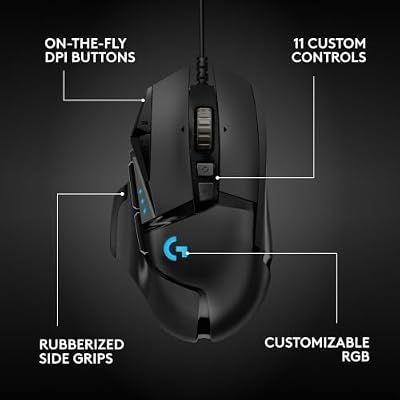
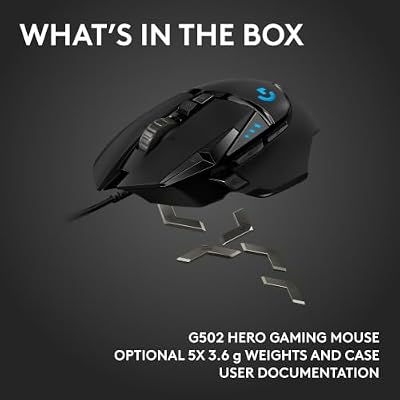
Logitech G502 Hero Wired Gaming Mouse - Black | High performance, 25,600 DPI, RGB, adjustable weights, 11 programmable buttons, on-board memory, PC/Mac





As an Amazon Associate we earn from qualifying purchases. Product prices and availability are accurate as of the date/time indicated.
The Logitech G502 Hero is a wired mouse that has earned a strong reputation among power users, and its feature set translates neatly to video editing. It carries eleven programmable buttons, which is the headline draw for an editor: you can bind frequently used actions such as cut, ripple delete, zoom timeline, or jump to the next edit point, and keep your other hand free for the keyboard. The HERO 25K sensor tracks with high accuracy at up to 25,600 DPI, so cursor movements on a dense timeline feel precise and predictable.
Beyond the buttons, the G502 Hero has adjustable weights so you can tune the feel to your preference, and an ergonomic right-handed shape that supports the hand well over long sessions. As a wired mouse there is no battery to manage and no wireless latency to think about, which suits a desk-bound editing workstation. For an editor who wants the most control and is happy to invest a little time setting up button bindings, it is the standout pick here.
Pros: Eleven programmable buttons; accurate 25K sensor; adjustable weights; durable wired connection. Cons: Wired only; on the heavier side; the button count can feel like a lot at first.
2. Logitech G305 Lightspeed

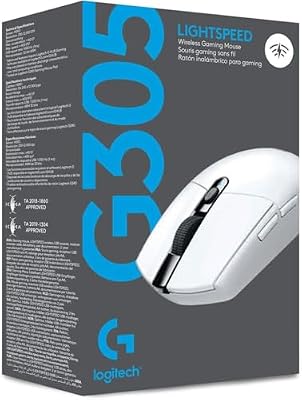
Logitech G305 Lightspeed Wireless Gaming Mouse - White | 12,000 DPI, Lightweight, 6 Programmable Buttons, 250h Battery, On-Board Memory, Compatible with PC and Mac





As an Amazon Associate we earn from qualifying purchases. Product prices and availability are accurate as of the date/time indicated.
The Logitech G305 Lightspeed brings genuine low-latency wireless to an affordable price, which makes it a smart choice for editors who want a clean desk without sacrificing responsiveness. It uses Logitech’s Lightspeed wireless technology, which is designed to feel as responsive as a wired connection, paired with a HERO sensor that tracks accurately at up to 12,000 DPI. For timeline work that is more than enough precision, and the lack of a cable means nothing tugs at your hand as you scrub back and forth.
It is a lightweight, compact mouse with a simple, ambidextrous-leaning shape and a small set of buttons rather than a dense control cluster. Battery life is strong on a single AA cell, so you are not tethered to a charging routine. For an editor who values a tidy, wireless setup and accurate tracking over a large bank of programmable buttons, the G305 is an easy recommendation at this price.
Pros: Low-latency Lightspeed wireless; accurate HERO sensor; long AA battery life; lightweight. Cons: Fewer programmable buttons than the G502; AA battery rather than rechargeable.
3. Logitech M510 Wireless Mouse

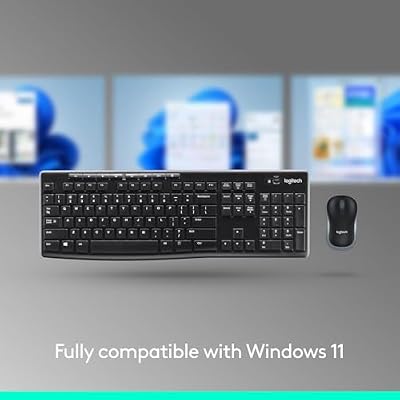
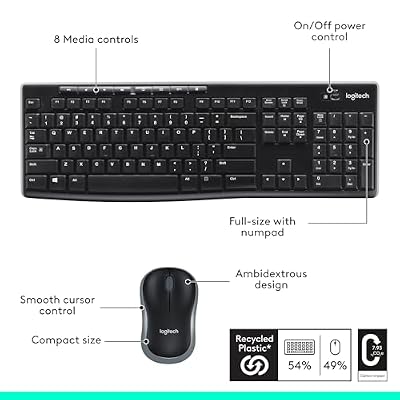
Logitech MK270 Full Size Wireless Keyboard and Mouse Combo - Black | Full size keyboard with spill-resistant design, compact ambidextrous mouse, connect via single included USB-A Nano Receiver






As an Amazon Associate we earn from qualifying purchases. Product prices and availability are accurate as of the date/time indicated.
The Logitech M510 is a comfort-focused wireless mouse that suits editors who prioritise all-day ease over gaming-grade specifications. Its contoured, full-size shape is designed to support the whole hand, with a soft rubber grip on the sides, which makes a real difference across the long sessions that editing involves. It connects over Logitech’s reliable 2.4GHz wireless with a USB receiver, so setup is plug-and-play.
Usefully for editors, the M510 includes back and forward side buttons plus a couple of extra controls that you can put to work for navigation and common actions through Logitech’s software. It is not a high-DPI precision instrument in the gaming sense, but for the cursor work of a typical edit it tracks cleanly and dependably. If your priority is a comfortable, fuss-free wireless mouse you can use all day, the M510 is a sensible choice.
Pros: Comfortable full-size contoured shape; reliable 2.4GHz wireless; handy side buttons; long battery life. Cons: Modest sensor versus gaming mice; larger size will not suit small hands.
4. Logitech M510 (Unifying Receiver)

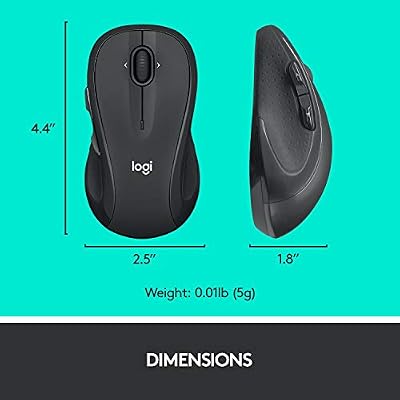
Logitech M510 Full Size Ambidextrous 2.4 GHz Wireless Mouse | 2.4 GHz USB-A Nano Receiver, tilt-to-scroll function, 2-year battery life, Windows Mac Linux compatible, certified for Chrome





As an Amazon Associate we earn from qualifying purchases. Product prices and availability are accurate as of the date/time indicated.
This version of the Logitech M510 pairs the same comfortable, full-size contoured body with Logitech’s Unifying receiver, which is the appeal for an editor running several Logitech peripherals. A single Unifying receiver can connect multiple compatible devices, so you can pair this mouse alongside a Logitech keyboard on one USB port and keep your editing workstation tidy. It tracks at 1000 DPI over a dependable 2.4GHz connection.
Like its sibling it offers back and forward side buttons that are well suited to navigation and timeline scrubbing, and the curved shape supports the hand well through long edits. Battery life is generous, so it largely stays out of your way. For an editor who already lives in the Logitech ecosystem and wants a comfortable, receiver-friendly mouse for a multi-device setup, this M510 variant fits neatly.
Pros: Unifying receiver for multi-device setups; comfortable contoured shape; useful side buttons; long battery life. Cons: 1000 DPI is modest for high-resolution displays; large footprint.
5. Redragon M602 Gaming Mouse
![Redragon M602 Gaming Mouse, Ergonomic RGB Gaming Mouse Wired with 7200 Adjustable DPI, 9 Programmable Buttons, Professional Software for Gamer Office [Black]](https://m.media-amazon.com/images/I/4189L2UBl9L._SL400_.jpg)
Redragon M602 Gaming Mouse, Ergonomic RGB Gaming Mouse Wired with 7200 Adjustable DPI, 9 Programmable Buttons, Professional Software for Gamer Office [Black]


As an Amazon Associate we earn from qualifying purchases. Product prices and availability are accurate as of the date/time indicated.
The Redragon M602 is a wired gaming mouse that delivers a generous feature set for a very modest price, which makes it a value pick for editors who want extra buttons without spending much. It carries seven programmable buttons, several of which you can bind to editing shortcuts, and an adjustable sensor that reaches up to 7200 DPI with on-the-fly DPI switching. For an editor on a tight budget, that is a lot of useful control for the money.
It has an ergonomic right-handed shape with RGB lighting, and as a wired mouse it is ready to go with no battery to manage. The build is plainly budget-oriented rather than premium, but the core experience — accurate enough tracking, remappable buttons and a comfortable grip — covers the essentials of timeline editing well. If you want programmable buttons and reliable wired tracking at the lowest sensible price, the M602 is worth a look.
Pros: Seven programmable buttons; adjustable DPI up to 7200; ergonomic shape; very affordable wired connection. Cons: Budget build quality; wired only; software is less polished than Logitech’s.
6. Logitech M185 Wireless Mouse

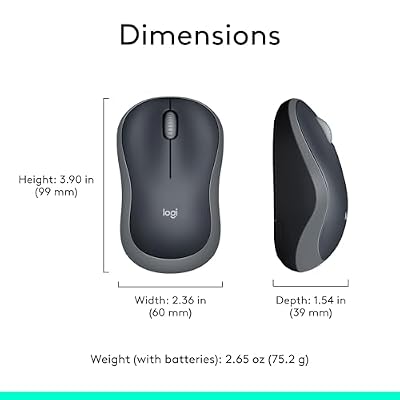
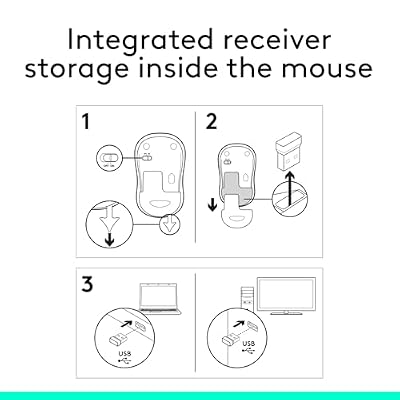
Logitech M185 Compact Ambidextrous 2.4 GHz Wireless Mouse - Swift Grey | Ambidextrous mouse with 2.4 GHz USB-A Nano Receiver, Optical Tracking, 12-Months Battery Life, PC, Mac, Laptop compatible




As an Amazon Associate we earn from qualifying purchases. Product prices and availability are accurate as of the date/time indicated.
The Logitech M185 is a compact, no-frills wireless mouse that suits editors who want the simplest possible pointing device or a reliable travel backup. It connects over 2.4GHz wireless with a tiny USB receiver and is genuinely plug-and-play — there is nothing to configure. Logitech rates it for up to twelve months of battery life on a single AA cell, so it essentially fades into the background of your setup.
This is a basic mouse with left and right buttons and a scroll wheel rather than a programmable control cluster, so it is best thought of as a dependable cursor mover rather than a power tool. For an editor who does most of their work from the keyboard and just needs a comfortable, accurate mouse for the rest, or who wants a cheap and reliable mouse to throw in a laptop bag, the M185 is hard to fault for the price.
Pros: Very affordable; long 12-month battery life; compact and travel-friendly; plug-and-play. Cons: No programmable buttons; small size will not suit everyone; basic feature set.
How to Choose a Mouse for Video Editing
Choosing a mouse for video editing is a different exercise from picking one for general office use, because the demands of a timeline reward specific features. The single most useful thing to look for is programmable buttons. Editing is full of repetitive actions — cut, ripple delete, zoom in and out of the timeline, jump to the next edit point, mark in and out — and being able to bind these to thumb or side buttons keeps one hand free for the keyboard and meaningfully speeds up your workflow. A mouse like the G502 Hero, with eleven buttons, lets you build a whole layer of editing shortcuts; even a mouse with two side buttons is a clear step up from none.
Sensor accuracy and DPI matter because precise cursor placement is the heart of editing. You rarely need the very highest DPI a gaming mouse offers, but you do want a sensor that tracks cleanly and predictably so that dragging a clip edge to a single frame, or nudging a keyframe, lands exactly where you intend. On a high-resolution display, a sensor with a higher maximum DPI gives you the headroom to move smoothly across the screen without lifting and repositioning the mouse. Adjustable DPI is a bonus, letting you switch between fast cursor travel and fine, precise placement.
Comfort is non-negotiable because editing sessions are long. A mouse that fits your hand and supports it well prevents the fatigue and strain that builds up over hours of scrubbing and clicking. Pay attention to size and shape relative to your hand, and to grip material. A larger, contoured mouse such as the M510 suits a palm grip and longer sessions, while a lighter, smaller mouse suits a claw grip or a more mobile setup. The right choice is personal, so weigh the dimensions against your own hand and how you hold a mouse.
Finally, weigh wired against wireless and set a budget. A wired mouse means no battery to manage and zero latency, which suits a permanent editing workstation, while a low-latency wireless mouse such as the G305 keeps your desk clean and feels nearly as responsive. For most editors the deciding factors are the button count, the comfort of the shape and the price, rather than headline gaming specifications — so match the mouse to how you actually work and how much you want to spend.
Frequently Asked Questions
What is the best mouse for video editing in 2026?
The Logitech G502 Hero is our top overall pick because its eleven programmable buttons let you bind common editing actions like cut, ripple delete and zoom, while its accurate 25K sensor handles precise timeline work. For a wireless option the Logitech G305 Lightspeed is excellent, and the M510 is a great comfort-first choice.
Do I need a gaming mouse for video editing?
Not strictly, but gaming mice are well suited to editing because they typically offer programmable buttons, accurate sensors and comfortable ergonomic shapes. A mouse like the G502 Hero or Redragon M602 gives you remappable buttons for editing shortcuts, which a basic office mouse lacks.
How many buttons should an editing mouse have?
There is no fixed number, but extra buttons are genuinely useful for editing. Even two side buttons let you bind navigation or common actions, while a mouse with several programmable buttons, such as the G502 Hero’s eleven, lets you build a fuller set of timeline shortcuts and keep one hand on the keyboard.
Is a wireless mouse good for video editing?
Yes. Modern low-latency wireless mice such as the Logitech G305 Lightspeed feel nearly as responsive as wired models and keep your desk free of cables. If you prefer zero latency and no battery management on a fixed workstation, a wired mouse like the G502 Hero is still a fine choice.
Related Guides
- Best Mouse for Content Creation
- Best RGB Keyboards
- Best 240Hz Monitors
- Best RTX 5070 Gaming Laptops
- Best OLED Gaming Laptops
- Best Gaming Laptops Under $1,200
Affiliate Disclosure: As an Amazon Associate, we earn from qualifying purchases. If you click a link and make a purchase, we may earn a small commission at no extra cost to you. Prices and availability are accurate as of publication and may change.










