

- Top Pick: HP 0men Max 45L RTX 5070, Ryzen 7 7700X, 16GB DDR5 RAM, 1TB Gen4 SSD, Liquid-Cooled Gaming PC w/ 1200W Platinum PSU, WiFi 6E, Windows 11 Pro, USB-C, Tempered Glass & RGB Keyboard/Mouse
- Best Value: Dell Tower Desktop Computer, Intel Ultra 7 265F, 32GB RAM, 1TB SSD
- Premium Choice: Dell Tower Desktop Computer, Intel Ultra 7 265F, RTX 5060,32GB RAM, 1TB SSD
Content creation covers a wide range of work — editing photos and video, designing graphics, writing, recording and streaming, and managing the endless small tasks in between. The mouse that serves you best is one that stays comfortable across long, varied sessions, tracks accurately when you are placing a cursor with care, and offers buttons you can put to work for the apps you live in. Unlike a pure gaming mouse, a content creation mouse is judged as much on all-day comfort and versatility as on raw sensor speed.
- Best Mouse for Content Creation at a Glance
- 1. Logitech G502 Hero
- 2. Logitech G305 Lightspeed
- 3. TECKNET Wireless Mouse
- 4. Logitech M510 Wireless Mouse
- 5. Redragon M602 Gaming Mouse
- 6. Logitech M185 Wireless Mouse
- How to Choose a Mouse for Content Creation
- Frequently Asked Questions
- Related Guides
- Related Articles
- Related Guides
We have selected six mice that suit content creators with different priorities and budgets, from an affordable ergonomic wireless model to a feature-rich wired mouse with a deep bank of programmable buttons. Each one earns its place for a particular kind of creator, whether you want a tidy wireless desk, the most buttons you can bind, or simply a dependable mouse that will not tire your hand. Below is an at-a-glance comparison, a detailed look at each pick, and a buying guide focused on what content creators actually need. Prices are approximate and move frequently.
As an Amazon Associate we earn from qualifying purchases at no extra cost to you.



🛒 Best Price Today on Amazon
Prime members get fast, free shipping on everything above, plus member-only deals. New members get a 30-day free trial — cancel anytime.
Best Mouse for Content Creation at a Glance
| Product | Best For | Standout Spec | Approx Price |
|---|---|---|---|
| Logitech G502 Hero | Creators who want max buttons | 11 programmable buttons, 25K sensor | around $32 |
| Logitech G305 Lightspeed | Tidy wireless creative desks | HERO sensor, Lightspeed wireless | around $37 |
| TECKNET Wireless Mouse | Budget ergonomic comfort | Ergonomic shape, adjustable DPI | around $10 |
| Logitech M510 Wireless Mouse | All-day comfort for writers | Contoured shape, side buttons | around $28 |
| Redragon M602 Gaming Mouse | Buttons and lighting on a budget | 7 buttons, up to 7200 DPI | around $20 |
| Logitech M185 Wireless Mouse | Simple, reliable, travel-ready | 12-month battery, plug-and-play | around $14 |
1. Logitech G502 Hero

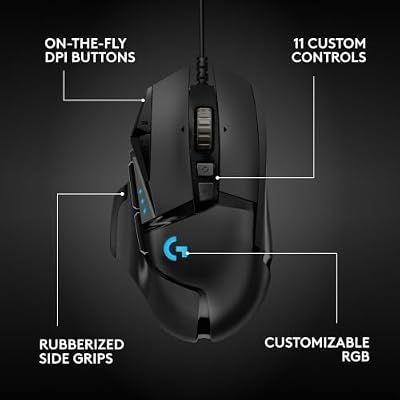
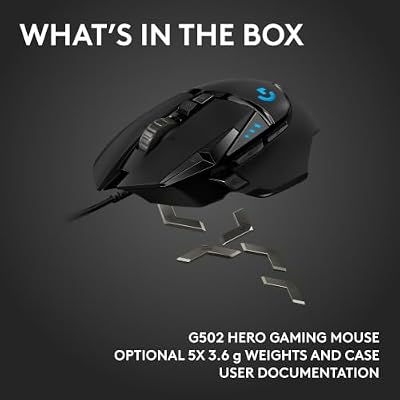
Logitech G502 Hero Wired Gaming Mouse - Black | High performance, 25,600 DPI, RGB, adjustable weights, 11 programmable buttons, on-board memory, PC/Mac





As an Amazon Associate we earn from qualifying purchases. Product prices and availability are accurate as of the date/time indicated.
The Logitech G502 Hero is the most feature-rich pick here, and its eleven programmable buttons make it a natural fit for content creators who juggle many tools. You can map buttons to actions in your editor, design app or streaming software — switch scenes, toggle a mute, apply a brush, jump between tools — and keep your other hand on the keyboard. The HERO 25K sensor tracks accurately at up to 25,600 DPI, which gives you precise cursor control whether you are masking a photo or trimming a clip.
It is a wired mouse with adjustable weights and a well-regarded right-handed ergonomic shape that holds up over long working sessions. For a creator whose workflow spans several demanding applications and who wants to build a tailored set of shortcuts, the depth of customisation here is the standout. The trade-off is that it is wired and a touch heavy, but for a fixed creative workstation that is rarely a problem.
Pros: Eleven programmable buttons for app shortcuts; accurate 25K sensor; adjustable weights; sturdy wired build. Cons: Wired only; relatively heavy; many buttons take time to configure.
2. Logitech G305 Lightspeed

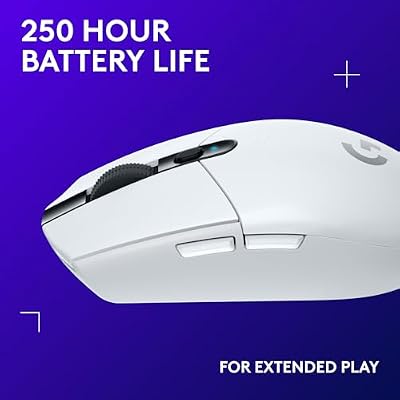
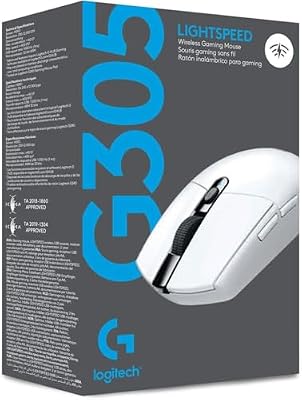
Logitech G305 Lightspeed Wireless Gaming Mouse - White | 12,000 DPI, Lightweight, 6 Programmable Buttons, 250h Battery, On-Board Memory, Compatible with PC and Mac




As an Amazon Associate we earn from qualifying purchases. Product prices and availability are accurate as of the date/time indicated.
The Logitech G305 Lightspeed is the pick for creators who want a clean, cable-free desk without giving up responsiveness. Its Lightspeed wireless is designed to match the feel of a wired connection, so there is no perceptible lag when you are placing a cursor precisely, and the HERO sensor tracks accurately up to 12,000 DPI — ample for design, editing and everyday creative work. The result is a wireless mouse that feels genuinely up to professional tasks.
It is light and compact with a simple shape, running on a single AA cell with strong battery life so you rarely think about charging. There are fewer buttons than on the G502, so it is better suited to creators who lean on keyboard shortcuts and want the mouse for accurate pointing rather than a dense control surface. For a wireless, precise and affordable everyday creative mouse, it is an excellent balance.
Pros: Low-latency wireless; accurate HERO sensor; lightweight and compact; long AA battery life. Cons: Limited button count for heavy remapping; uses an AA battery.
3. TECKNET Wireless Mouse

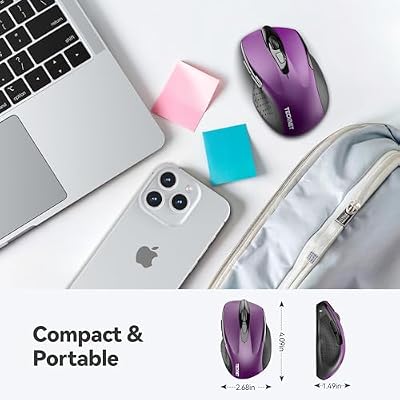
TECKNET Wireless Mouse, 2.4G Ergonomic Computer Mouse, 2600 DPI, Purple | Ergonomic Design with Side Grips, Adjustable DPI, 2-Year Battery, Compact Size, USB-A Plug & Play, Wide OS Compatibility


As an Amazon Associate we earn from qualifying purchases. Product prices and availability are accurate as of the date/time indicated.
The TECKNET Wireless Mouse is the value champion of this group, offering ergonomic comfort and dependable wireless at a remarkably low price. Its contoured optical shape is designed to sit comfortably under the hand, which matters for creators who spend long stretches at the desk, and it connects over a reliable 2.4GHz link with a compact USB receiver for true plug-and-play use. It also offers adjustable DPI levels so you can pick a tracking speed that suits your screen and your work.
This is a straightforward mouse rather than a deeply programmable one, so it is best for creators whose priority is comfort and reliability on a tight budget, or who want a capable secondary mouse. It will not replace a multi-button gaming mouse for shortcut-heavy workflows, but for accurate, comfortable everyday pointing at this price it is outstanding value. For a creator equipping a setup affordably, it is an easy choice to include.
Pros: Excellent value; comfortable ergonomic shape; adjustable DPI; reliable plug-and-play wireless. Cons: Few extra buttons; budget build; not aimed at heavy customisation.
4. Logitech M510 Wireless Mouse

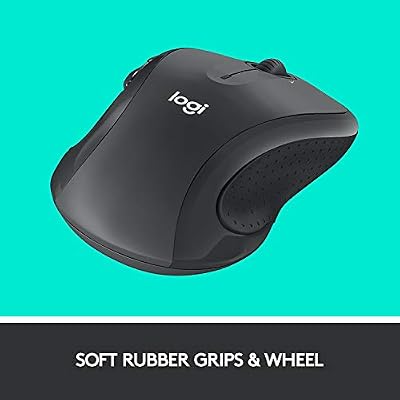
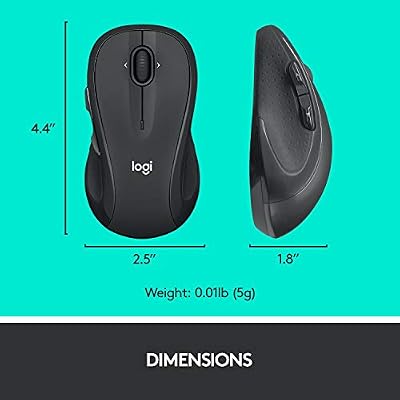
Logitech M510 Full Size Ambidextrous 2.4 GHz Wireless Mouse | 2.4 GHz USB-A Nano Receiver, tilt-to-scroll function, 2-year battery life, Windows Mac Linux compatible, certified for Chrome




As an Amazon Associate we earn from qualifying purchases. Product prices and availability are accurate as of the date/time indicated.
The Logitech M510 is a comfort-first wireless mouse that suits creators who write, research and edit for hours and want a mouse that will not tire their hand. Its full-size, contoured body with side rubber grips is built for the palm and supports the whole hand well, which makes a real difference across long sessions. It connects over dependable 2.4GHz wireless and, in this version, works with Logitech’s Unifying receiver so you can pair it alongside other Logitech devices on one USB port.
Helpfully, it includes back and forward side buttons plus extra controls you can assign through Logitech’s software for navigation and common actions. It is not a high-DPI gaming sensor, but for the cursor work of writing, light editing and general creative tasks it tracks cleanly and reliably. For a creator who values comfort and a tidy multi-device setup above raw specifications, the M510 is a dependable everyday companion.
Pros: Comfortable full-size shape; reliable wireless with Unifying support; useful side buttons; long battery life. Cons: Modest sensor for high-resolution work; large size will not suit small hands.
5. Redragon M602 Gaming Mouse
![Redragon M602 Gaming Mouse, Ergonomic RGB Gaming Mouse Wired with 7200 Adjustable DPI, 9 Programmable Buttons, Professional Software for Gamer Office [Black]](https://m.media-amazon.com/images/I/4189L2UBl9L._SL400_.jpg)
Redragon M602 Gaming Mouse, Ergonomic RGB Gaming Mouse Wired with 7200 Adjustable DPI, 9 Programmable Buttons, Professional Software for Gamer Office [Black]


As an Amazon Associate we earn from qualifying purchases. Product prices and availability are accurate as of the date/time indicated.
The Redragon M602 brings a gaming mouse’s feature set to content creation at a budget price, which makes it appealing for creators who want extra buttons without a premium spend. Its seven programmable buttons can be bound to shortcuts in your creative apps, and the sensor adjusts up to 7200 DPI with on-the-fly switching, so you can move between fast cursor travel and precise placement. For a creator on a budget who still wants remappable controls, that is a strong combination.
It has an ergonomic right-handed shape with RGB lighting and a wired connection, so there is no battery to manage and tracking is consistent. The build is clearly budget-grade and the software is less refined than Logitech’s, but the fundamentals — comfortable grip, accurate-enough sensor and useful programmable buttons — cover creative work well. If you want shortcut buttons and reliable wired performance for the least money, the M602 deserves consideration.
Pros: Seven programmable buttons; adjustable DPI up to 7200; ergonomic shape; very affordable. Cons: Budget build; wired only; software less polished than premium brands.
6. Logitech M185 Wireless Mouse

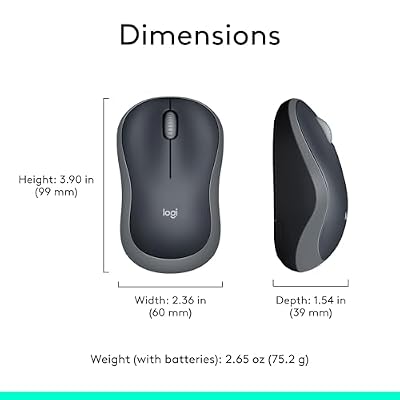
Logitech M185 Compact Ambidextrous 2.4 GHz Wireless Mouse - Swift Grey | Ambidextrous mouse with 2.4 GHz USB-A Nano Receiver, Optical Tracking, 12-Months Battery Life, PC, Mac, Laptop compatible




As an Amazon Associate we earn from qualifying purchases. Product prices and availability are accurate as of the date/time indicated.
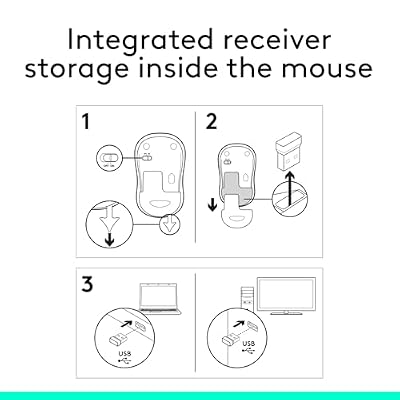
The Logitech M185 is a compact, dependable wireless mouse that suits creators who want simplicity or a reliable travel mouse for working away from the desk. It connects over 2.4GHz wireless with a tiny USB receiver and needs no configuration — it simply works the moment you plug in. Logitech rates it for up to twelve months of battery life on one AA cell, so it stays out of your way and out of your charging routine.
This is a basic two-button-and-wheel mouse rather than a programmable tool, so it is best for creators who do most of their work from the keyboard, or who want an inexpensive, reliable mouse to keep in a laptop bag. It will not anchor a shortcut-heavy editing setup, but as a comfortable, accurate everyday pointer or a dependable backup it is excellent value. For a creator who values simplicity and portability, it is hard to beat for the price.
Pros: Very affordable; long 12-month battery life; compact and portable; truly plug-and-play. Cons: No programmable buttons; compact size will not suit everyone; basic feature set.
How to Choose a Mouse for Content Creation
Choosing a mouse for content creation means thinking about versatility and comfort more than peak gaming performance, because creative work is long, varied and demanding in different ways. The first thing to weigh is how much you will lean on programmable buttons. If your day moves between an editor, a design app and streaming software, a mouse with many remappable buttons — like the G502 Hero — lets you build app-specific shortcuts that genuinely speed up your work. If you mostly drive your tools from the keyboard, a simpler mouse with a couple of side buttons, or none at all, may serve you just as well and cost far less.
Comfort is the criterion that affects every minute of your day, so it deserves real attention. Creators sit at the desk for long, continuous stretches, and a mouse that fits your hand and supports it properly prevents the fatigue and strain that build up over hours. Consider the size and shape against your own hand and your grip style: a full-size, contoured mouse such as the M510 suits a palm grip and long sessions, while a lighter, more compact mouse suits a claw grip or a mobile setup. An ergonomic shape, like the TECKNET’s, is worth prioritising if comfort is your main concern.
Sensor accuracy matters whenever you place a cursor with care — masking a photo, aligning a design element, trimming a clip or selecting precisely in any creative app. You rarely need the very highest DPI, but you want a sensor that tracks cleanly and predictably, and on a high-resolution display a higher maximum DPI gives you smooth travel across the screen without repositioning. Adjustable DPI is a useful bonus, letting you switch between quick cursor movement and fine, deliberate placement depending on the task in front of you.
Finally, decide between wired and wireless and set a sensible budget. A low-latency wireless mouse such as the G305 Lightspeed keeps your creative desk tidy and feels nearly as responsive as wired, while a wired mouse such as the G502 means no battery management and zero latency for a fixed workstation. Budget matters too: excellent value options like the TECKNET and M185 prove you do not need to spend much for a comfortable, accurate mouse. Match the connection, the comfort and the button count to how you actually create, and you will not go far wrong.
Frequently Asked Questions
What is the best mouse for content creation in 2026?
The Logitech G502 Hero is our top overall pick because its eleven programmable buttons let you build shortcuts across editing, design and streaming apps, while its accurate sensor handles precise creative work. For a wireless desk the G305 Lightspeed is excellent, and the TECKNET is unbeatable value for comfort on a budget.
What features matter most in a content creation mouse?
Comfort over long sessions, an accurate sensor for precise cursor placement, and programmable buttons you can bind to your apps are the key features. Versatility matters more than peak gaming speed, since creative work is long and varied rather than reflex-driven.
Do content creators need a wireless mouse?
Not necessarily, but a low-latency wireless mouse like the G305 Lightspeed keeps your desk clean and feels nearly as responsive as wired. If you prefer no battery management and zero latency on a fixed workstation, a wired mouse such as the G502 Hero is an equally good choice.
Can a budget mouse work for content creation?
Yes. Affordable mice such as the TECKNET Wireless Mouse and Logitech M185 offer comfortable, accurate everyday pointing at a low price, which is fine for creators who rely mainly on keyboard shortcuts. For shortcut-heavy workflows, a budget gaming mouse like the Redragon M602 adds programmable buttons cheaply.
Related Guides
- Best Mouse for Video Editing
- Best RGB Keyboards
- Best 240Hz Monitors
- Best RTX 5070 Gaming Laptops
- Best Intel Core Ultra Gaming Laptops
- Best Gaming Laptops Under $1,200
Affiliate Disclosure: As an Amazon Associate, we earn from qualifying purchases. If you click a link and make a purchase, we may earn a small commission at no extra cost to you. Prices and availability are accurate as of publication and may change.










