

- Top Pick: TP-Link BE6500 Dual-Band WiFi 7 Router (BE400)
- Best Value: TP-Link AX1800 WiFi 6 Router (Archer AX21 V5)
- Premium Choice: TP-Link Deco X55 AX3000 WiFi 6 Mesh System, Deco X55(3-Pack)
A large home is where ordinary routers fall apart. One box in the study can blanket a small apartment, but stretch that same signal across multiple floors, thick walls and a few thousand square feet and you get the familiar story: full bars in one room, buffering in the next, and a dead zone in the back bedroom. The fix is not a faster single router so much as better coverage — and that usually means a mesh WiFi system that spreads several nodes around the house so every corner sits close to a strong access point. This guide rounds up the best routers for large homes in 2026, leading with mesh systems rated for thousands of square feet and finishing with strong standalone routers for those who want one capable box.
- Best Routers for Large Homes at a Glance
- 1. TP-Link Deco X55 AX3000 WiFi 6 Mesh System – Covers up to 6,500 Sq.Ft
- 2. TP-Link Deco WiFi 6 Mesh System (Deco X20) – Covers up to 5,800 Sq.Ft
- 3. TP-Link Deco M5 Mesh WiFi System – Up to 5,500 sq. ft. Whole Home Coverage
- 4. TP-Link Deco S4 Mesh AC1900 WiFi System – Up to 5,500 Sq.ft. Coverage
- 5. TP-Link AX1800 WiFi 6 Router (Archer AX21 V5) – Dual Band Gigabit
- 6. TP-Link AC1200 Gigabit WiFi Router (Archer A6) – Dual Band MU-MIMO
- How to Choose a Router for a Large Home
- Frequently Asked Questions
- Related Guides
- Related Articles
Our picks were chosen on what genuinely matters when you are trying to cover a big house: rated coverage area, the number of nodes in the box, WiFi standard and range, and value. We have included a deliberate spread — from affordable three-pack mesh kits up to larger WiFi 6 systems and capable single routers — with prices from around $40 up to around $150, because the best router for a large home is the one whose coverage map actually matches your floor plan. Whether you need to blanket 5,500 square feet over two storeys, push WiFi 6 into 6,500 square feet, or simply extend reach on a tighter budget, there is an option here. Below you will find an at-a-glance comparison, then a closer look at each system and a buyer’s guide focused on coverage, dead zones and the things that decide whole-home WiFi.
As an Amazon Associate we earn from qualifying purchases at no extra cost to you.




🛒 Best Price Today on Amazon
Prime members get fast, free shipping on everything above, plus member-only deals. New members get a 30-day free trial — cancel anytime.
Best Routers for Large Homes at a Glance
| Router / System | Best For | Standout Spec | Approx Price |
|---|---|---|---|
| TP-Link Deco X55 (AX3000 WiFi 6) | Largest WiFi 6 coverage | Up to 6,500 sq ft, WiFi 6 mesh | around $150 |
| TP-Link Deco X20 (WiFi 6 Mesh) | Modern WiFi 6 whole-home | Up to 5,800 sq ft, WiFi 6 | around $130 |
| TP-Link Deco M5 Mesh System | Coverage plus security | Up to 5,500 sq ft, HomeCare | around $140 |
| TP-Link Deco S4 (AC1900) | Budget whole-home mesh | Up to 5,500 sq ft, 3-pack value | around $96 |
| TP-Link Archer AX21 (AX1800) | Single WiFi 6 router | Dual-band WiFi 6, Gigabit | around $52 |
| TP-Link Archer A6 (AC1200) | Cheapest single router | AC1200 dual-band, MU-MIMO | around $40 |
1. TP-Link Deco X55 AX3000 WiFi 6 Mesh System – Covers up to 6,500 Sq.Ft

TP-Link Deco X55 AX3000 WiFi 6 Mesh System, Deco X55(3-Pack) | Covers up to 6500 Sq.Ft. , Replaces Wireless Router and Extender, 3 Gigabit ports per unit, supports Ethernet Backhaul





As an Amazon Associate we earn from qualifying purchases. Product prices and availability are accurate as of the date/time indicated.
The TP-Link Deco X55 leads this list because it pairs the largest rated coverage here with the modern WiFi 6 standard. A typical pack blankets up to 6,500 square feet, and the AX3000 dual-band hardware brings WiFi 6 efficiency features that help when a busy household connects dozens of phones, laptops, TVs and smart-home gadgets at once. At around $150 it is the premium pick, and for the biggest homes here it is the one to start with.
This is the system to choose when your priority is covering as much square footage as possible without sacrificing the latest WiFi generation. The nodes form a single seamless network, so devices roam from the front door to the back garden without dropping or switching names, and WiFi 6 keeps things responsive when the network is crowded. If you have a genuinely large, device-heavy home and want headroom for years, the Deco X55 is the standout coverage pick.
Pros: Largest rated coverage here (up to 6,500 sq ft), WiFi 6 (AX3000), seamless roaming, future-proof.
Cons: Most expensive option; WiFi 6 benefits depend on having WiFi 6 devices.
2. TP-Link Deco WiFi 6 Mesh System (Deco X20) – Covers up to 5,800 Sq.Ft

TP-Link Deco x20 Dual-Band WiFi 6 Mesh System, Deco X20 (3-Pack) | Covers up to 5800 Sq Ft, Replaces Wireless Routers & Extenders, 6 Ethernet Ports Total, Supports Wired Backhaul





As an Amazon Associate we earn from qualifying purchases. Product prices and availability are accurate as of the date/time indicated.
The TP-Link Deco X20 is the modern WiFi 6 whole-home pick for slightly smaller large houses. It covers up to 5,800 square feet and brings the same core WiFi 6 advantages as the X55 — better efficiency and more graceful handling of many simultaneous devices — in a slightly more affordable package. At around $130 it is a strong middle option for a big home that wants the current standard.
This is the system for the household that wants WiFi 6 coverage across most of a large home but does not need the absolute maximum square footage. The mesh nodes hand devices off seamlessly as you move between rooms and floors, the WiFi 6 hardware keeps a busy network of phones, consoles and smart devices responsive, and TP-Link’s Deco app makes setup and management genuinely simple. For a near-top-tier WiFi 6 whole-home system at a friendlier price than the X55, the Deco X20 is an excellent choice.
Pros: Strong WiFi 6 coverage (up to 5,800 sq ft), seamless roaming, easy Deco app, good value for the standard.
Cons: Slightly less coverage than the X55; WiFi 6 gains need compatible devices.
3. TP-Link Deco M5 Mesh WiFi System – Up to 5,500 sq. ft. Whole Home Coverage

TP-Link Deco M5 Mesh WiFi System Deco M5 3-Pack | Up to 5,500 sq. ft. Whole Home Coverage and 100+ Devices,WiFi Router/Extender Replacement, Anitivirus


As an Amazon Associate we earn from qualifying purchases. Product prices and availability are accurate as of the date/time indicated.
The TP-Link Deco M5 is the coverage-plus-security pick of the list. It covers up to 5,500 square feet across its nodes and is best known for bundling TP-Link’s HomeCare suite — antivirus, parental controls and quality-of-service features — into the mesh, so a large household gets whole-home protection alongside whole-home WiFi. At around $140 it is a feature-rich option for families.
This is the system to choose when you want big coverage and built-in network security and controls rather than the newest WiFi generation. The M5 spreads a single seamless network across a large home so devices roam without dropping, while HomeCare lets you filter content, set time limits for kids and prioritise important devices. If protecting and managing a busy family network matters as much as raw coverage, the Deco M5 earns its place.
Pros: Whole-home coverage (up to 5,500 sq ft), bundled HomeCare security and parental controls, seamless mesh roaming.
Cons: WiFi 5-class system rather than WiFi 6; priced like a WiFi 6 kit.
4. TP-Link Deco S4 Mesh AC1900 WiFi System – Up to 5,500 Sq.ft. Coverage

TP-Link Deco S4 Mesh AC1900 WiFi System, Deco S4(3-Pack) | Up to 5,500 Sq.ft. Coverage, Replaces WiFi Router and Extender, Gigabit Ports, Works with Alexa

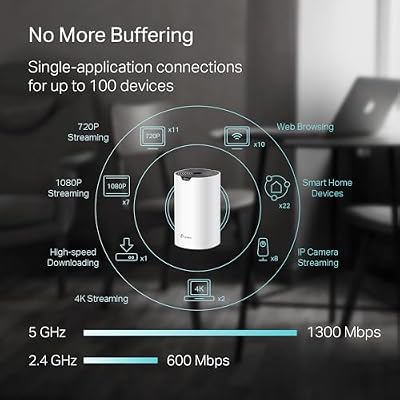


As an Amazon Associate we earn from qualifying purchases. Product prices and availability are accurate as of the date/time indicated.
The TP-Link Deco S4 is the budget whole-home mesh pick, and it is the value star of this list. A three-pack covers up to 5,500 square feet on the AC1900 (WiFi 5) standard, delivering proper multi-node mesh coverage for a large home at a price that undercuts every other mesh kit here. At around $96 it proves you do not have to spend a fortune to kill dead zones across a big house.
This is the system to choose when your goal is simply blanketing a large home in reliable WiFi without overspending. The S4 forms one seamless network so devices move from room to room without reconnecting, the AC1900 hardware is perfectly capable for everyday browsing, streaming and video calls across a whole household, and the Deco app keeps setup painless. If you want effective, affordable whole-home coverage and can live without WiFi 6, the Deco S4 is the smartest value here.
Pros: Excellent value, whole-home coverage (up to 5,500 sq ft), three-node mesh, seamless roaming, easy setup.
Cons: AC1900 (WiFi 5), not WiFi 6; less headroom for very dense device counts.
5. TP-Link AX1800 WiFi 6 Router (Archer AX21 V5) – Dual Band Gigabit
The TP-Link Archer AX21 is the single-router pick for a large home — the best choice if you would rather run one capable box than a mesh kit. It is a dual-band WiFi 6 (AX1800) router with Gigabit ports, bringing the efficiency of the modern standard to a wide-coverage standalone unit. At around $52 it is an outstanding-value way to upgrade to WiFi 6 without buying a multi-pack.
This is the router to choose for a large but more open floor plan, or as the main router you will later extend with add-on nodes if needed. As a single unit it cannot match a multi-node mesh for covering thick-walled, multi-storey homes — its reach is broad but finite — yet for a sizeable home without awkward dead zones it delivers fast, modern WiFi 6 at a budget price. If you want one strong WiFi 6 router rather than a mesh system, the Archer AX21 is the obvious value pick.
Pros: Affordable WiFi 6 (AX1800), Gigabit ports, broad single-unit coverage, easy to expand later.
Cons: Single router can leave dead zones in very large or walled homes; no mesh nodes included.
6. TP-Link AC1200 Gigabit WiFi Router (Archer A6) – Dual Band MU-MIMO

TP-Link AC1200 Gigabit Dual Band WiFi Router (Archer A6) | MU-MIMO Wireless Internet Router, 4 x Antennas, OneMesh and AP Mode, Long Range Coverage


As an Amazon Associate we earn from qualifying purchases. Product prices and availability are accurate as of the date/time indicated.
Rounding out the list is the TP-Link Archer A6, the cheapest router here and the budget single-box option. It is a dual-band AC1200 (WiFi 5) router with Gigabit Ethernet and MU-MIMO for handling several devices at once. At around $40 it is an inexpensive way to get a dependable router, and an honest assessment matters: as a single AC1200 unit, it is the most limited choice on this list for genuinely large-home coverage.
This is the router to choose for a smaller large home, a single open floor, or as an affordable main router you plan to pair with extenders. MU-MIMO helps it serve multiple devices smoothly, the Gigabit ports keep wired connections fast, and the price is hard to argue with. For whole-home coverage of a multi-storey or walled house, a mesh kit higher up this list will serve you far better — but as a low-cost, reliable router for a more modest space, the Archer A6 does its job well.
Pros: Lowest price here, dual-band AC1200 with MU-MIMO, Gigabit ports, reliable everyday router.
Cons: WiFi 5 single unit with the least reach here; not ideal alone for very large homes.
How to Choose a Router for a Large Home
For a large home, coverage is the single most important specification — far more than peak speed. Look first at the rated square footage and, crucially, whether that figure comes from one box or a multi-node kit. A mesh system like the Deco S4, M5, X20 or X55 spreads several access points around the house so every room sits near a strong signal, which is exactly what a big, walled or multi-storey home needs. A single router, even a good one, projects from one spot and will struggle to reach distant corners through several walls.
Match the system to your floor plan, not just a headline number. Manufacturer coverage ratings assume relatively open space; thick walls, multiple floors, brick, concrete and large appliances all eat into real-world range. If your home is long, tall or heavily partitioned, lean toward a system with more nodes and a coverage rating comfortably above your actual square footage — the X55 at up to 6,500 square feet, for example, leaves headroom that a single router cannot. The goal is to eliminate dead zones, so err on the side of more coverage.
Decide between WiFi 6 and WiFi 5 based on how many devices you run and how future-proof you want to be. The Deco X20 and X55 use WiFi 6 (AX), which handles dense, busy networks of phones, laptops, consoles and smart-home gadgets more efficiently and gives you more headroom for years to come. The Deco S4 and M5 use the older but still capable WiFi 5 (AC) standard, which is perfectly fine for everyday streaming and browsing in most households and usually costs less. If your home is packed with devices or you want longevity, pay for WiFi 6; otherwise WiFi 5 mesh saves money.
Finally, weigh features, management and budget together. Some systems bundle extras — the Deco M5’s HomeCare adds security and parental controls — while every Deco here is managed through TP-Link’s straightforward app for painless setup. If you genuinely have a more open or modest space, a strong single router like the Archer AX21 (WiFi 6) or the budget Archer A6 can do the job for far less than a mesh kit, with the option to add nodes later. Map your coverage needs first, choose mesh for a sprawling home, pick your WiFi standard for your device load, and select the system on this list that blankets your floor plan with the fewest dead zones.
Frequently Asked Questions
Do I need a mesh system or will one router cover my large home?
For most genuinely large homes — multiple floors, thick walls, several thousand square feet — a mesh system is the better answer. Spreading nodes like the Deco S4, M5, X20 or X55 around the house puts a strong signal in every room and eliminates the dead zones a single router leaves behind. One capable router such as the Archer AX21 can suffice for a smaller or more open large space, but mesh is the reliable choice for sprawling floor plans.
How much WiFi coverage area do I actually need?
Measure or estimate your home’s square footage and choose a system rated comfortably above it, because manufacturer figures assume open space and walls reduce real-world range. For a big house, a kit rated for 5,500 to 6,500 square feet like the Deco S4, M5, X20 or X55 gives sensible headroom. If your layout is long, tall or heavily walled, favour more nodes and a higher rating to be safe.
Is WiFi 6 worth it for a large home?
It can be, especially if you connect many devices at once. WiFi 6 systems like the Deco X20 and X55 handle dense, busy networks more efficiently than WiFi 5 and offer more future-proofing. If your household is device-heavy or you want the system to last for years, WiFi 6 is worth the premium. For lighter everyday use, a WiFi 5 mesh like the Deco S4 or M5 still covers a large home well for less.
Why do I get dead zones even with a strong router?
Dead zones happen because a single router broadcasts from one location, and walls, floors, brick and distance weaken the signal as it travels. In a large home the far rooms simply sit too far from that one box. A mesh system fixes this by placing additional nodes throughout the house, so every area is close to an access point and the signal no longer has to fight through the whole building from a single point.
Related Guides
- Best Gaming Routers
- Best WiFi 6 Routers
- Best Mesh WiFi Systems
- Best WiFi Extenders
- Best Powerline Adapters
- Best Budget Gaming Setup
Affiliate Disclosure: As an Amazon Associate, we earn from qualifying purchases. If you click a link and make a purchase, we may earn a small commission at no extra cost to you. Prices and availability are accurate as of publication and may change.










