

A large gaming PC is about more than presence on the desk — though these full-size towers certainly have that. A bigger chassis buys you better airflow for high-end components, room for large air or liquid coolers, easier cable management, and the expansion headroom to add drives, RAM and a future GPU without a fight. For the most powerful hardware — flagship CPUs and big RTX 50-series graphics cards — a roomy case is genuinely the right home. This guide rounds up the best large gaming PCs in 2026: full-tower and large-chassis prebuilt desktops built around serious components and the space to keep them cool.
- Best Large Gaming PCs at a Glance
- 1. CLX Horus Gaming PC – Intel Core Ultra 9 285K, GeForce RTX 5080, 2TB SSD
- 2. ASUS ROG Strix G700 Desktop, 24TB Storage + SSD, 128GB DDR5, Win 11 Pro
- 3. ZOTAC MEK Gaming PC Desktop, RTX 5080 16GB GDDR7, AMD Ryzen 7 9800
- 4. iBUYPOWER Element Gaming PC Desktop, AMD Ryzen 9 7900X, NVIDIA GeForce RTX
- 5. STORMCRAFT Skyhawk PRO Gaming PC – Ryzen 7 7800X3D, RTX 5070 Ti 16GB
- 6. Skytech Gaming O11 Vision Gaming PC, AMD Ryzen 7 7700X, NVIDIA RTX 5070
- How to Choose a Large Gaming PC
- Frequently Asked Questions
- Related Guides
- Related Articles
Our picks were chosen on what matters for a big-chassis build: the capability of the CPU and GPU, cooling and airflow, storage and memory, expansion room, and value across a wide price band — here from around $2,000 to around $4,300. We describe each machine by its capability and fit rather than quoting invented frame-rate numbers, and we have ordered the list to lead with the largest, most expansion-friendly flagships before the more attainable big-case builds. Whether you want an Intel Core Ultra showpiece, a storage-loaded ROG tower, or a roomy Ryzen build that leaves money for a monitor, there is a fit here. Below is an at-a-glance comparison of all six, then a closer look at each and a buyer’s guide to choosing a large gaming PC.
As an Amazon Associate we earn from qualifying purchases at no extra cost to you.





🛒 Best Price Today on Amazon
Prime members get fast, free shipping on everything above, plus member-only deals. New members get a 30-day free trial — cancel anytime.
Best Large Gaming PCs at a Glance
| Gaming PC | Best For | Standout Spec | Approx Price |
|---|---|---|---|
| CLX Horus (Core Ultra 9 285K, RTX 5080) | Flagship full-tower showpiece | Core Ultra 9 285K, RTX 5080, 2TB | around $4,300 |
| ASUS ROG Strix G700 (24TB + SSD) | Storage-loaded big tower | 128GB DDR5, 24TB storage, Win 11 Pro | around $4,299 |
| ZOTAC MEK (Ryzen 7 9800, RTX 5080) | Big-chassis RTX 5080 value | RTX 5080 16GB GDDR7, Ryzen 7 | around $3,149 |
| iBUYPOWER Element (Ryzen 9 7900X) | Roomy high-core build | Ryzen 9 7900X, RTX 50-series | around $2,300 |
| STORMCRAFT Skyhawk PRO (7800X3D, RTX 5070 Ti) | Gaming-tuned large build | Ryzen 7 7800X3D, RTX 5070 Ti 16GB | around $2,250 |
| Skytech O11 Vision (Ryzen 7 7700X, RTX 5070) | Spacious airflow case on a budget | O11-style case, RTX 5070, 7700X | around $2,000 |
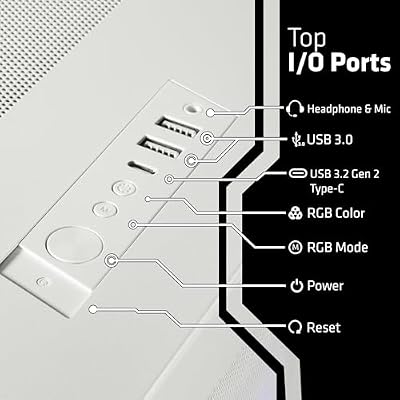
1. CLX Horus Gaming PC – Intel Core Ultra 9 285K, GeForce RTX 5080, 2TB SSD

CLX Horus Gaming PC - Intel Core Ultra 9 285K 3.7GHz, GeForce RTX 5080, 2TB SSD, 32GB DDR5 RGB Memory, 360mm AIO, WiFi, Windows 11 Home, White, AI-Accelerated




As an Amazon Associate we earn from qualifying purchases. Product prices and availability are accurate as of the date/time indicated.
The CLX Horus is the flagship full-tower showpiece of this list and the pick for buyers who want maximum capability in a roomy chassis. It pairs Intel’s Core Ultra 9 285K with a GeForce RTX 5080 and a 2TB SSD inside a large CLX tower built for airflow and display. At around $4,300 it sits at the top of the range, and the combination of elite parts and a spacious case is the reason.
This is the machine for the enthusiast who wants top-tier hardware with the space to keep it cool and the room to show it off. The Core Ultra 9 285K and RTX 5080 handle the most demanding games and creative workloads with ease, the large chassis gives the components generous airflow and tidy cable routing, and the full-tower form factor leaves clear headroom for additional drives and future upgrades. For a big, powerful, expansion-ready flagship that looks the part, the CLX Horus is the standout.
Pros: Elite Core Ultra 9 285K and RTX 5080, spacious full tower, strong airflow, room to expand.
Cons: Top-of-range price; large footprint demands real desk or floor space.
2. ASUS ROG Strix G700 Desktop, 24TB Storage + SSD, 128GB DDR5, Win 11 Pro
The ASUS ROG Strix G700 is the storage-loaded big-tower pick. This large ROG desktop is configured with a massive 24TB of storage plus an SSD and a generous 128GB of DDR5 memory, running Windows 11 Pro and an NVIDIA RTX-class GPU. At around $4,299 it is aimed at users whose big chassis needs to hold a lot of data as well as power, and the sheer capacity is its headline.
This is the machine for the creator-gamer who fills drives — large game libraries, video projects, virtual machines — and wants it all in one roomy, well-cooled ROG tower. The 24TB of storage and 128GB of DDR5 give enormous headroom for multitasking and media, the large chassis keeps everything cool and accessible, and Windows 11 Pro suits power users. For a big gaming PC that doubles as a heavyweight workstation with vast storage and memory, the ROG Strix G700 is the standout.
Pros: Huge 24TB storage plus SSD, 128GB DDR5, large ROG tower, Windows 11 Pro.
Cons: Premium price; storage-and-RAM focus means value depends on needing that capacity.
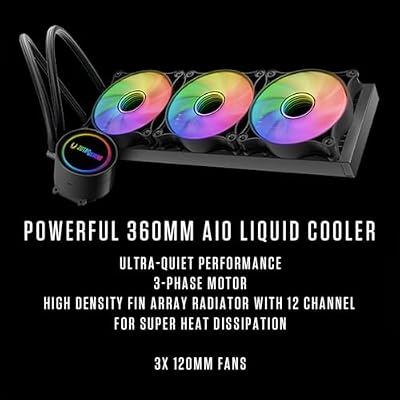
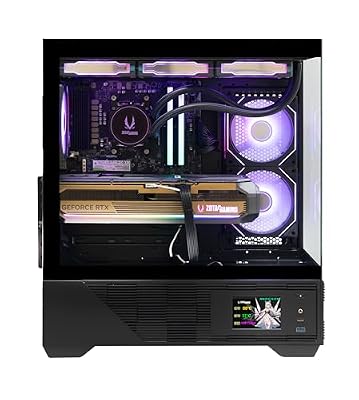
3. ZOTAC MEK Gaming PC Desktop, RTX 5080 16GB GDDR7, AMD Ryzen 7 9800

ZOTAC MEK Gaming PC Desktop, Ryzen 7 9800X3D, NVIDIA GeForce RTX 5080 16GB | 32GB DDR5, 2TB NVMe SSD, 850W 80+ Gold PSU, WiFi 6E, Windows 11 Pro, GDDR7, up to 5.2GHz






As an Amazon Associate we earn from qualifying purchases. Product prices and availability are accurate as of the date/time indicated.
The ZOTAC MEK is the big-chassis RTX 5080 value pick. It puts a GeForce RTX 5080 with 16GB of fast GDDR7 alongside an AMD Ryzen 7 9800-series CPU in a roomy ZOTAC MEK tower, delivering flagship-class graphics at a noticeably lower price than the dual-$4,000 machines above. At around $3,149 it is the sensible way into RTX 5080 performance in a large case.
This is the machine for the gamer who wants top-tier GPU power and the room to cool it without paying flagship-tower money. The RTX 5080 with 16GB GDDR7 drives high-resolution, high-detail gaming comfortably, the capable Ryzen 7 keeps it fed, and the spacious MEK chassis provides good airflow and upgrade room. For a large gaming PC that prioritises a flagship graphics card and cooling space over maximal storage or CPU tier, the ZOTAC MEK is excellent value.
Pros: RTX 5080 16GB GDDR7, capable Ryzen 7, roomy MEK chassis, strong value for the GPU.
Cons: Lower CPU tier and storage than the priciest builds; still a large footprint.
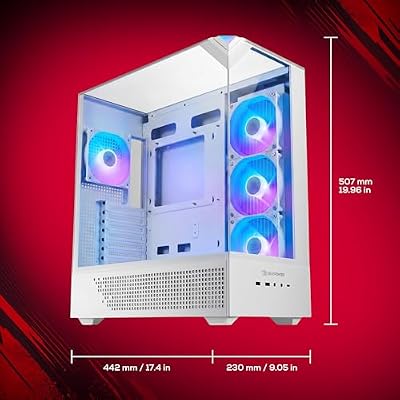
4. iBUYPOWER Element Gaming PC Desktop, AMD Ryzen 9 7900X, NVIDIA GeForce RTX

iBUYPOWER Element Gaming PC Desktop Computer AMD Ryzen 9 7900X CPU, NVIDIA GeForce RTX 5070 12GB GPU, 32GB DDR5 RAM, 1TB NVMe SSD, Windows 11 Home, Gamer Keyboard and Mouse - EWA9N5702






As an Amazon Associate we earn from qualifying purchases. Product prices and availability are accurate as of the date/time indicated.
The iBUYPOWER Element is the roomy high-core pick. It is built around AMD’s 12-core Ryzen 9 7900X paired with an NVIDIA GeForce RTX 50-series GPU in a spacious iBUYPOWER Element chassis with glass and good airflow. At around $2,300 it brings a high-core-count CPU and a large, well-ventilated case together at a mid-range price.
This is the machine for the gamer who also does CPU-heavy work — streaming, encoding, rendering, heavy multitasking — and wants the cores plus the chassis room to keep them cool. The 12-core Ryzen 9 7900X handles demanding multithreaded tasks alongside gaming, the RTX graphics card drives high-detail play, and the roomy Element case offers airflow and expansion headroom for drives and upgrades. For a large gaming PC that leans into CPU power for create-and-play use, the iBUYPOWER Element is a strong, sensibly priced choice.
Pros: 12-core Ryzen 9 7900X, RTX 50-series GPU, spacious airflow chassis, good value.
Cons: GPU tier below the RTX 5080 builds; large case needs space.
5. STORMCRAFT Skyhawk PRO Gaming PC – Ryzen 7 7800X3D, RTX 5070 Ti 16GB

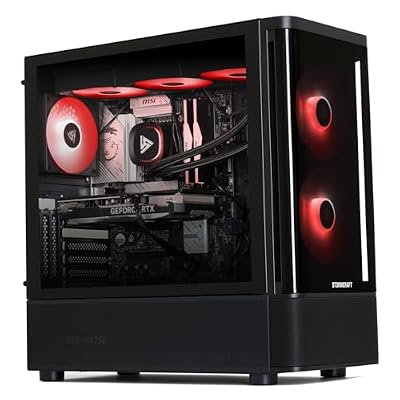
STORMCRAFT Skyhawk PRO Gaming PC RTX 5070 Ti R7 7800X3D 32GB DDR5 1TB SSD | Best AMD Ryzen 7 CPU 5.0GHz,5070Ti 16GB GDDR7,RGB 6000MHz RAM,B850 Motherboard,360mm AIO,850W Gold PSU,Prebuilt Computer




As an Amazon Associate we earn from qualifying purchases. Product prices and availability are accurate as of the date/time indicated.
The STORMCRAFT Skyhawk PRO is the gaming-tuned large build. It centres on AMD’s Ryzen 7 7800X3D — a CPU with 3D V-Cache that is widely regarded as one of the best gaming processors available — paired with a GeForce RTX 5070 Ti 16GB in a roomy Skyhawk PRO chassis. At around $2,250 it targets pure gaming performance in a spacious, well-cooled case.
This is the machine for the gamer who wants the most gaming-optimised CPU and a strong GPU with room to breathe. The Ryzen 7 7800X3D’s V-Cache excels in games, the RTX 5070 Ti 16GB delivers high-detail performance at high resolutions, and the large chassis keeps both running cool with headroom to expand. It prioritises gaming efficiency over raw core count, which suits players more than heavy multithreaded workers. For a big-case build tuned specifically for gaming, the Skyhawk PRO is a compelling pick.
Pros: Gaming-optimised Ryzen 7 7800X3D, RTX 5070 Ti 16GB, roomy cooled chassis, great value.
Cons: Eight-core CPU favours gaming over heavy multithreading; sizeable footprint.
6. Skytech Gaming O11 Vision Gaming PC, AMD Ryzen 7 7700X, NVIDIA RTX 5070
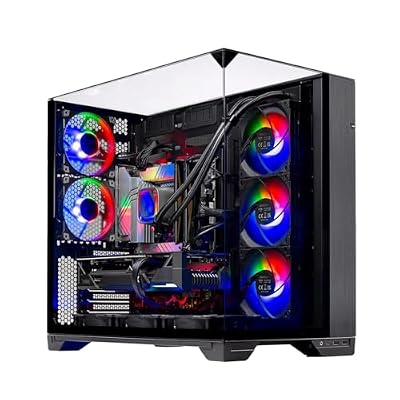
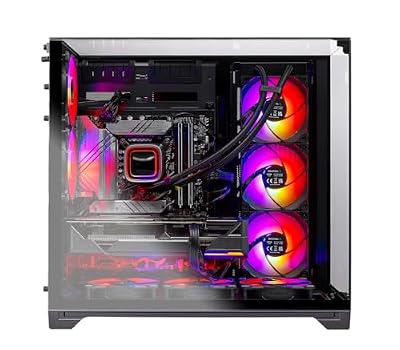
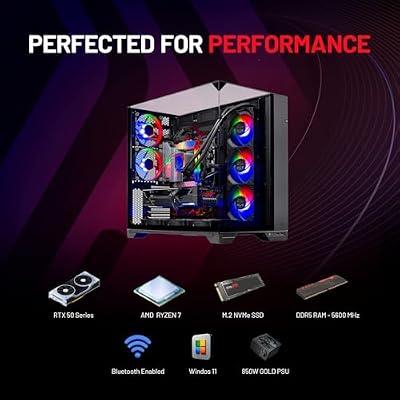
Skytech Gaming O11 Vision Gaming PC, AMD Ryzen 7 7700X 4.5GHz, NVIDIA RTX 5070 12GB, X670 Board, 1TB Gen4 NVMe SSD, 32GB DDR5 RAM 5600, 850W Gold ATX 3 PSU, 360 ARGB AIO, Wi-Fi, Win 11, Desktop







As an Amazon Associate we earn from qualifying purchases. Product prices and availability are accurate as of the date/time indicated.
Rounding out the list is the Skytech O11 Vision, the pick for a spacious airflow case on a budget. It is built in an O11-style chassis — a design celebrated for its open, multi-panel glass layout and excellent airflow — housing an AMD Ryzen 7 7700X and a GeForce RTX 5070. At around $2,000 it is the most affordable large-case build here and the entry point into the category.
This is the machine for the gamer who wants the look and cooling of a premium large chassis without a premium price. The O11 Vision case shows off the internals through its glass panels and moves air well, the Ryzen 7 7700X and RTX 5070 deliver solid high-detail gaming, and the roomy interior leaves space to add cooling, storage or a bigger GPU later. For an attractive, spacious, well-ventilated large gaming PC at the friendliest price on this list, the Skytech O11 Vision is the value standout.
Pros: Spacious O11-style airflow case, Ryzen 7 7700X, RTX 5070, lowest price here.
Cons: Most modest CPU and GPU on the list; the big case still needs desk space.
How to Choose a Large Gaming PC
Choosing a large gaming PC starts with being clear about why size helps, because a bigger case is a means, not an end. A full-tower or large chassis buys you better airflow around hot components, clearance for large air coolers or radiators, room for more drives and memory, and the headroom to swap in a future GPU without contortions. If you are running flagship parts like an RTX 5080 or a high-core CPU, that space genuinely pays off — but make sure you have the desk or floor room first, since these machines have real footprints.
Match the components to how you actually play and work. For the highest-tier gaming and creation, the CLX Horus and ZOTAC MEK lead with the RTX 5080, while the STORMCRAFT Skyhawk PRO’s Ryzen 7 7800X3D is a gaming-specialist CPU thanks to its V-Cache. If you do CPU-heavy multitasking, streaming or rendering, the 12-core iBUYPOWER Element or the 128GB-DDR5 ROG Strix G700 give you cores and memory. Decide whether GPU power, gaming-tuned CPU, or multithreaded muscle matters most, and let that steer the pick.
Cooling, storage and expansion are where the large form factor proves itself, so weigh them deliberately. Look for a chassis with good airflow — the O11-style Skytech case is a notable example — and confirm there is room for the cooler and radiators you want. Consider how much storage you need now and later: the ROG Strix G700’s 24TB is overkill for some and essential for others. And value the spare drive bays, RAM slots and GPU clearance a big case offers, because that headroom is what keeps the machine upgradeable for years.
Finally, set your budget against the wide price band and remember the practical details. These builds span around $2,000 to $4,300, so decide where flagship parts stop being worth it for you — a $2,000 to $2,250 build like the Skytech O11 Vision or Skyhawk PRO games superbly, while the $4,000-plus towers add top-tier parts, vast storage or memory. Confirm the case fits your space, the power and ports suit your peripherals and monitor, and the components match your workload, then pick the large gaming PC here that lands on your priority. The best one is powerful, well-cooled, and ready to grow with you.
Frequently Asked Questions
Why choose a large gaming PC over a compact one?
A larger chassis gives you better airflow for high-end parts, clearance for big air or liquid coolers, easier cable management, and room to add drives, memory and a future GPU. For flagship components like an RTX 5080 or a high-core CPU, that space helps cooling and longevity. The trade-off is footprint — these towers, such as the CLX Horus and ROG Strix G700, take up real desk or floor room, so confirm you have the space.
Which large gaming PC here is best for streaming and content creation?
Look to the CPU-and-memory-heavy builds. The iBUYPOWER Element’s 12-core Ryzen 9 7900X handles streaming, encoding and rendering alongside gaming, and the ASUS ROG Strix G700, with 128GB of DDR5 and 24TB of storage, is built like a workstation for heavy multitasking and large media projects. Both pair create-and-play power with a roomy, well-cooled chassis.
Do I need an RTX 5080, or is an RTX 5070 / 5070 Ti enough in a big build?
It depends on your resolution and ambitions. The RTX 5080 in the CLX Horus and ZOTAC MEK is flagship-class for the highest-detail, high-resolution gaming. But the RTX 5070 Ti in the Skyhawk PRO and the RTX 5070 in the Skytech O11 Vision deliver excellent high-detail performance for most gamers at a far lower price. Buy the GPU tier your target resolution and budget justify.
Is a large case better for upgrading later?
Generally yes. A full-tower or large chassis usually offers more drive bays, RAM slots, radiator mounts and GPU clearance than a compact case, so adding storage, memory, cooling or a bigger graphics card down the line is easier. That expansion headroom — clear on builds like the CLX Horus and the O11-style Skytech — is one of the main reasons enthusiasts choose a big PC.
Related Guides
- Best Gaming PCs
- Best Prebuilt Gaming PCs
- Best Full-Tower PC Cases
- Best GPUs for Your Build
- Best CPU Coolers
- Best Gaming Monitors
Affiliate Disclosure: As an Amazon Associate, we earn from qualifying purchases. If you click a link and make a purchase, we may earn a small commission at no extra cost to you. Prices and availability are accurate as of publication and may change.










