

Video editing lives and dies by shortcuts. A good editor barely touches the mouse — they cut, ripple-delete, scrub the timeline, mark in and out, and nudge clips frame by frame, all from the keyboard, for hours at a stretch. That makes the right keyboard a productivity tool: it needs comfort for long sessions, a reliable feel for rapid repeated keystrokes, programmable keys or layers for your most-used commands, and ideally a full layout so the numpad is there for timecodes and values. This guide rounds up the best keyboards for video editing in 2026, chosen for how well they support a timeline-driven editing workflow.
- Best Keyboards for Video Editing at a Glance
- 1. Logitech MK270 Wireless Keyboard and Mouse Combo, 2.4 GHz
- 2. Logitech G213 Prodigy Gaming Keyboard, Mech-Dome Keys with Media Controls
- 3. Razer Ornata Chroma Gaming Keyboard with Hybrid Mechanical Switches
- 4. Redragon K585 DITI One-Handed RGB Mechanical Keyboard, 42 Keys Programmable
- 5. Redragon S101M-KS Gaming Keyboard and Mouse, Wireless Tri-Mode RGB
- 6. Redragon S101-3 PRO Gaming Keyboard and Mouse, RGB Programmable Combo
- How to Choose a Keyboard for Video Editing
- Frequently Asked Questions
- Related Guides
- Related Articles
- Related Guides
Our picks were selected on what genuinely speeds up an edit: comfort and key feel over long sessions, programmability for shortcuts and macros, a full-size or purpose-built layout, and value. Editing rewards consistency and comfort more than flashy gaming features, so the list ranges from a low-fatigue wireless board to a programmable one-handed shortcut pad, with prices from around $24 up to around $200. Some picks include a mouse, useful for an editing station. Below is an at-a-glance comparison, then a closer look at each keyboard and a buyer’s guide built around comfort, shortcuts, and layout — the things that actually matter at the timeline.
As an Amazon Associate we earn from qualifying purchases at no extra cost to you.


🛒 Best Price Today on Amazon
Prime members get fast, free shipping on everything above, plus member-only deals. New members get a 30-day free trial — cancel anytime.
Best Keyboards for Video Editing at a Glance
| Keyboard | Best For | Standout Spec | Approx Price |
|---|---|---|---|
| Logitech MK270 Wireless Combo | Quiet low-fatigue editing | Full-size wireless, long battery, mouse incl. | around $24 |
| Logitech G213 Prodigy | Comfortable tactile typing | Mech-dome keys, media controls, spill-resistant | around $57 |
| Razer Ornata Chroma | Premium long-session comfort | Hybrid switches, programmable, wrist rest | around $200 |
| Redragon K585 DITI One-Handed | Dedicated shortcut/macro pad | 42-key, programmable macros, mechanical | around $33 |
| Redragon S101M-KS Wireless Combo | Wireless full-layout value | Tri-mode wireless, full layout, mouse incl. | around $55 |
| Redragon S101-3 PRO Combo | Programmable budget kit | Programmable keys, full layout, mouse incl. | around $40 |
1. Logitech MK270 Wireless Keyboard and Mouse Combo, 2.4 GHz

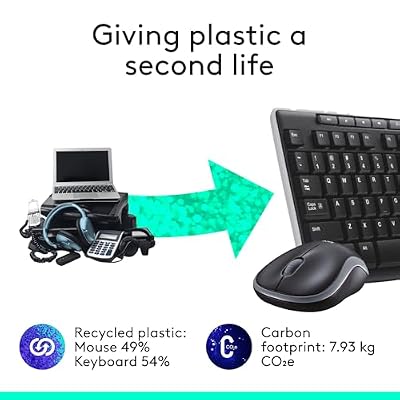
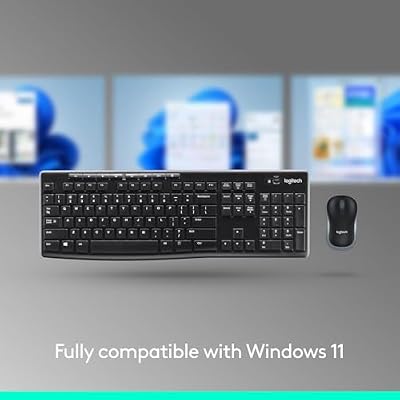
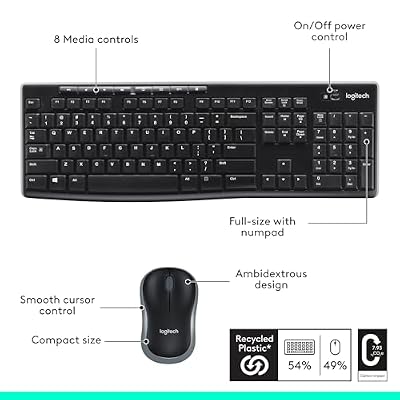
Logitech MK270 Full Size Wireless Keyboard and Mouse Combo - Black | Full size keyboard with spill-resistant design, compact ambidextrous mouse, connect via single included USB-A Nano Receiver





As an Amazon Associate we earn from qualifying purchases. Product prices and availability are accurate as of the date/time indicated.
The Logitech MK270 is the pick for quiet, low-fatigue editing, and the smart value lead of this list. It is a full-size 2.4GHz wireless keyboard and mouse combo from Logitech, with a quiet, comfortable membrane feel, a complete layout including the numpad, and famously long battery life. At around $24 it is the most affordable way to get a reliable, comfortable editing keyboard with a mouse included.
For long timeline sessions, comfort and quiet matter more than gaming flair, and the MK270 delivers exactly that. The soft, low-noise keystrokes are easy on the fingers through hours of cutting and scrubbing, the full layout keeps the numpad available for entering timecodes and values, and the wireless design keeps your desk tidy with no cable to fight. Logitech’s reliability and multi-year battery life mean it just works, day after day. For an editor who wants a comfortable, no-fuss, full-size keyboard that fades into the background during long edits, the MK270 is an outstanding-value choice.
Pros: Quiet low-fatigue keys for long edits, full layout with numpad, very long battery, mouse included, superb value.
Cons: Membrane feel, not mechanical; no programmable macro keys.
2. Logitech G213 Prodigy Gaming Keyboard, Mech-Dome Keys with Media Controls

Logitech G213 Prodigy Wired RGB Gaming Keyboard - Black | Mech-Dome Keys, Palm Rest, Adjustable Feet, Media Controls, LIGHTSYNC RGB, USB, Compatible with Windows


As an Amazon Associate we earn from qualifying purchases. Product prices and availability are accurate as of the date/time indicated.
The Logitech G213 Prodigy is the pick for comfortable, tactile typing at the timeline. It uses Logitech’s ‘Mech-Dome’ keys — engineered to give a more tactile, mechanical-like response than ordinary membrane — alongside dedicated media controls, a spill-resistant design, and a wrist rest. At around $57 it is a comfortable, durable full-size board well suited to long editing days.
For editing specifically, the G213 hits several practical notes. The tactile Mech-Dome feel gives confident keystroke confirmation for rapid shortcut work without the volume of clicky switches, the dedicated media keys let you control playback and audio while you review footage, and the integrated wrist rest keeps your hands comfortable across long sessions. The spill-resistant build is reassuring at a desk with coffee nearby, and the full layout keeps the numpad handy. For an editor who wants a comfortable, tactile, full-featured keyboard with proper media controls, the G213 is a strong, sensibly priced pick.
Pros: Tactile mech-dome feel, dedicated media controls for review, wrist rest, spill-resistant, full layout.
Cons: Not true mechanical switches; macro support is limited.
3. Razer Ornata Chroma Gaming Keyboard with Hybrid Mechanical Switches
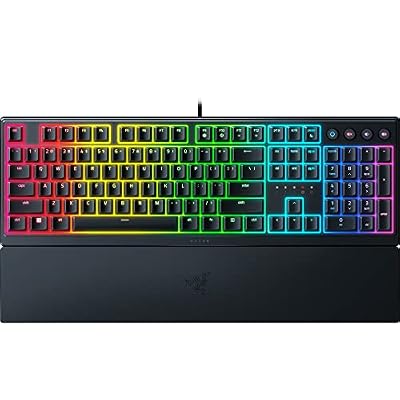
Razer Ornata V3 Gaming Keyboard, Low-Profile Keys, Black | Mecha-Membrane Switches, UV-Coated Keycaps, Backlit Media Keys, 10-Zone RGB Lighting, Snap Tap, Magnetic Wrist Wrest


As an Amazon Associate we earn from qualifying purchases. Product prices and availability are accurate as of the date/time indicated.
The Razer Ornata Chroma is the premium pick for editors who want maximum comfort and full programmability over long sessions. It pairs Razer’s hybrid mechanical-membrane switches — tactile and clicky but cushioned — with a plush magnetic wrist rest and full Razer Synapse macro support. At around $200 it is the most capable and comfortable board here for an editor who treats the keyboard as a primary tool.
For video editing, the Ornata’s strength is turning the keyboard into a personalised shortcut machine. Through Synapse you can remap keys and bind macros for your editor’s most-used commands — ripple delete, add edit, marker placement, render — and store profiles per application, so the same board adapts between Premiere, DaVinci Resolve, and others. The comfortable hybrid feel and magnetic wrist rest keep your hands fresh through marathon timeline work. If you edit professionally or for long hours and want deep, software-driven shortcut customization with first-class comfort, the Ornata Chroma is the standout.
Pros: Deep Synapse macros and per-app profiles, comfortable hybrid feel, plush wrist rest, premium build.
Cons: By far the most expensive here; Synapse software required for full customization.
4. Redragon K585 DITI One-Handed RGB Mechanical Keyboard, 42 Keys Programmable

Redragon K585 Wired One-Handed RGB Gaming Keypad, Tactical 42-Key Layout | On Board 28 Combo Slots 4 Profiles Keyboard, USB Pass-Through Port, 16.8M Colors, Swap-Ready Socket, Detachable Wrist Rest





As an Amazon Associate we earn from qualifying purchases. Product prices and availability are accurate as of the date/time indicated.
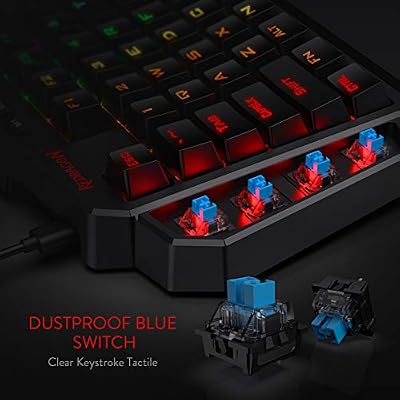
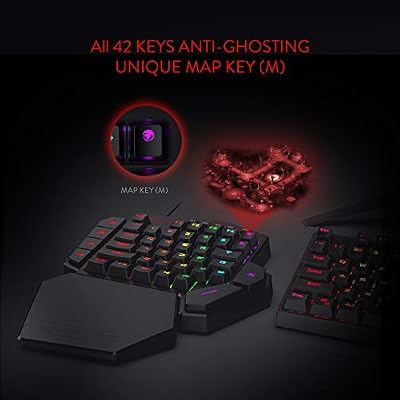
The Redragon K585 DITI is the specialist pick — a one-handed, 42-key mechanical keypad designed as a dedicated shortcut and macro surface, at around $33. Rather than replacing your main keyboard, it sits beside it (or beside a control surface) to put a bank of programmable mechanical keys under your non-mouse hand. For shortcut-heavy editing, that is a genuinely useful tool.
In an editing workflow, the K585 DITI shines as a left-hand command pad. Its keys are fully programmable with macros, so you can map your editor’s core shortcuts — cut, trim, scrub, marker, in/out — to mechanical keys right under your fingers, keeping your other hand on the mouse for fine timeline work. The genuine mechanical switches give crisp, reliable actuation for rapid repeated presses, and the compact one-handed form leaves desk space. It is a companion device rather than a full keyboard, so pair it with one of the full-size boards above — but as a dedicated, affordable macro pad for editors, it is excellent.
Pros: Programmable mechanical macro keys for editing shortcuts, compact one-handed form, crisp actuation, low price.
Cons: One-handed pad, not a full keyboard — needs pairing with a main board; no numpad.
5. Redragon S101M-KS Gaming Keyboard and Mouse, Wireless Tri-Mode RGB

Redragon S101M-KS Gaming Keyboard and Mouse Wireless with Tri-Mode, RGB Keyboard and 4800 DPI Gaming Mouse, 10 Independent Multimedia Keys for Wins, PC, Computer, Wireless S101 Ideal for Gamer



As an Amazon Associate we earn from qualifying purchases. Product prices and availability are accurate as of the date/time indicated.
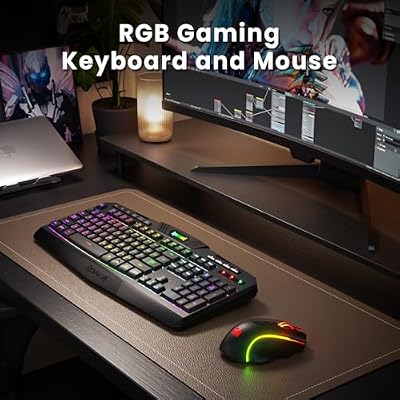
The Redragon S101M-KS is the wireless full-layout value pick for an editing desk. It is a tri-mode keyboard — Bluetooth, 2.4GHz, and wired USB — with a full layout, RGB backlighting, and a bundled wireless mouse, at around $55. For an editor who wants a tidy, cable-free station with a complete keyboard and mouse in one purchase, it is a practical, affordable option.
For editing, the appeal is a clean wireless desk with everything you need for timeline work. The full layout keeps the numpad available for typing timecodes and numeric values, tri-mode connectivity lets you run it wired for rock-solid reliability or wireless to cut clutter, and the bundled mouse means a coordinated, ready-to-go setup. The RGB is a nice-to-have rather than an editing essential, but the full-size wireless convenience and included mouse make this a sensible value pick for an editor who prizes a tidy, complete workspace over premium key feel.
Pros: Wireless full layout with numpad, tri-mode connectivity, mouse included, tidy desk, good value.
Cons: Membrane-style feel rather than mechanical; no dedicated macro keys.
6. Redragon S101-3 PRO Gaming Keyboard and Mouse, RGB Programmable Combo

Redragon S101-3 PRO Gaming Keyboard and Mouse, RGB Backlit Programmable Keyboard Mouse with Software, Independent Macro Record Keys, Value Combo Set, New Update Version


As an Amazon Associate we earn from qualifying purchases. Product prices and availability are accurate as of the date/time indicated.
Rounding out the list is the Redragon S101-3 PRO, the programmable budget kit for editors. It is a full-size RGB keyboard with programmable functionality, bundled with a matching mouse and a wrist rest, at around $40. For an editing station built on a budget, it offers a full layout, some shortcut programmability, and a complete peripheral pair in one inexpensive box.
For timeline work, the programmable keys let you assign some of your frequently used editing shortcuts for quicker access, while the full layout keeps the numpad on hand for entering values and timecodes. The included wrist rest adds comfort for long sessions, and the bundled mouse gives you a ready-to-edit setup without buying pieces separately. It is a membrane-style board rather than mechanical, and its programming is simpler than premium software suites — but as an affordable, full-featured starter kit for an editor who wants shortcut keys and a complete desk on a budget, the S101-3 PRO is a sensible foundation.
Pros: Programmable keys for shortcuts, full layout with numpad, mouse and wrist rest included, low price.
Cons: Membrane feel, not mechanical; programming is basic versus dedicated macro software.
How to Choose a Keyboard for Video Editing
Comfort comes first for editing, because you will spend hours at the keyboard and fatigue is the enemy of a long session. Look for a board with a comfortable, consistent key feel and ideally a wrist rest — the Razer Ornata’s plush magnetic rest and the Logitech G213’s integrated rest both help here, while a quiet, soft board like the MK270 reduces finger fatigue over marathon edits. Key feel is personal: some editors prefer the tactile confirmation of mechanical or mech-dome keys, others the gentle quiet of a good membrane. Prioritise the feel you can sustain comfortably all day.
Programmability is the productivity multiplier for editors, since editing is fundamentally a shortcut-driven craft. A board with macro support, like the Razer Ornata through Synapse, lets you map your editor’s most-used commands and store per-application profiles so the layout follows you between Premiere, Resolve, and others. A dedicated one-handed macro pad like the Redragon K585 DITI takes this further, putting programmable mechanical keys under your non-mouse hand. Decide whether built-in shortcuts are enough or whether custom macros would genuinely speed up your edits.
Layout matters more for editing than for gaming, because you regularly enter numeric values. A full-size board keeps the numpad available for typing timecodes, durations, and parameter values quickly — which is why most picks here, from the MK270 to the S101 combos, are full-layout boards. The exception is a purpose-built companion like the K585 DITI macro pad, which you pair alongside a full keyboard. If you key in numbers often, do not give up the numpad; if you mainly drive shortcuts, a compact board plus a macro pad can work well together.
Finally, weigh connectivity, extras, and budget against how your station is set up. Wireless boards like the MK270 and Redragon S101M-KS keep an editing desk tidy and cable-free, while wired boards never need charging during a deadline. Dedicated media controls, as on the G213, are handy for reviewing footage, and bundled combos like the S101 kits give you a coordinated keyboard and mouse in one buy. Comfort and shortcuts should drive the decision more than RGB or gaming branding. Set your budget, prioritise all-day comfort and your shortcut workflow, and pick the editing keyboard on this list that best fits how you work at the timeline.
Frequently Asked Questions
What kind of keyboard is best for video editing?
One that is comfortable for long sessions and supports your shortcut workflow. Editing is shortcut-driven, so programmable keys or a dedicated macro pad add real speed, while a comfortable feel and a wrist rest fight fatigue over hours of cutting and scrubbing. A full layout also helps because you enter numeric timecodes and values often. The Razer Ornata (programmable, comfortable) and the quiet full-size Logitech MK270 are good examples for different budgets.
Are programmable or macro keys worth it for editing?
For shortcut-heavy editing, yes. Mapping your most-used commands — cut, ripple delete, markers, in/out points — to programmable keys saves countless mouse trips. The Razer Ornata offers deep macros and per-app profiles through Synapse, and the Redragon K585 DITI is a dedicated one-handed macro pad you place under your non-mouse hand. If you edit often, even a few well-chosen macros noticeably speed up your timeline work.
Do I need a full-size keyboard with a numpad for editing?
It helps. Editors regularly type timecodes, durations, and parameter values, and a numpad makes that fast — which is why most picks here are full-layout boards like the MK270 and the Redragon combos. If you prefer a compact main keyboard, you can pair it with a separate macro pad such as the K585 DITI for shortcuts, but if you key in numbers a lot, keeping the numpad is the more convenient route.
Is a one-handed macro keypad like the Redragon K585 DITI useful for editors?
Very, as a companion device. The K585 DITI is a 42-key one-handed mechanical pad with programmable macros that sits beside your main keyboard or control surface, putting your editor’s core shortcuts under your non-mouse hand while the other hand drives the timeline. It is not a replacement for a full keyboard, so pair it with one — but as a dedicated, affordable shortcut surface for editing, it is a smart addition.
Related Guides
- Best Mechanical Keyboards
- Best Monitors for Content Creation
- Best Wireless Mouse for Editing
- Best PCs for Video Editing
- Best NVMe SSDs for Editing
- Best Budget Gaming Setup
Affiliate Disclosure: As an Amazon Associate, we earn from qualifying purchases. If you click a link and make a purchase, we may earn a small commission at no extra cost to you. Prices and availability are accurate as of publication and may change.










