

🛒 Best Price Today on Amazon
Prime members get fast, free shipping on everything above, plus member-only deals. New members get a 30-day free trial — cancel anytime.
- Top Cases Overclocking Picks for 2026
- Best PC Cases for Overclocking at a Glance
- 1. Corsair iCUE 220T RGB Airflow Tempered Glass Mid-Tower ATX Case
- 2. CORSAIR 4000D RS ARGB Frame Modular Mid-Tower ATX PC Case
- 3. NZXT H6 Flow CC-H61FB-01 Compact Dual-Chamber Mid-Tower Airflow Case
- 4. Corsair Crystal Series 680X RGB High Airflow Tempered Glass ATX Case
- 5. Hyte Y70 Modern Aesthetic Gaming PC Case, Panoramic Glass, High-Airflow
- 6. Cooler Master MasterBox Q300L Micro-ATX PC Case, Compact mATX
- How to Choose a PC Case for Overclocking
- Frequently Asked Questions
- Related Guides
- Related Articles
Top Cases Overclocking Picks for 2026
Here are our current top cases overclocking picks, compared on real Amazon owner reviews, price, and features. Live prices update below.
As an Amazon Associate we earn from qualifying purchases at no extra cost to you.


Overclocking turns up the heat — literally. Pushing a CPU or GPU past its stock clocks raises voltage and power draw, and all that extra energy becomes heat your case has to evacuate. That is why the chassis matters so much for overclockers: a case that chokes airflow will throttle even the best cooler, while one built for thermals lets a tuned system stretch its legs. The cases that win here lead with mesh front panels, generous fan mounts, and room for big air coolers or large radiators. This guide rounds up the best PC cases for overclocking in 2026, ranked by the thermal headroom they actually give you.
Our picks were chosen on what genuinely keeps an overclocked build cool: front-panel airflow, the number and size of fan mounts, radiator clearance for AIO liquid coolers, CPU cooler height, and overall layout. We have included a deliberate price spread — from around $40 up to around $275 — because effective cooling exists at every tier, from compact mesh mATX boxes to dual-chamber showpieces with massive radiator support. Below you will find an at-a-glance comparison of all six, then a closer look at each case and a buyer’s guide built around airflow, radiator support and clearance — the factors that decide how far you can safely overclock.
Best PC Cases for Overclocking at a Glance
| Case | Best For | Standout Spec | Approx Price |
|---|---|---|---|
| Corsair iCUE 220T RGB Airflow | RGB airflow ATX build | High-airflow front, 3 RGB fans | around $180 |
| CORSAIR 4000D RS ARGB Frame | Value high-airflow ATX | Modular airflow, 3 ARGB fans | around $100 |
| NZXT H6 Flow Dual-Chamber | Clean dual-chamber thermals | Dual-chamber airflow layout | around $90 |
| Corsair Crystal 680X RGB | Max radiator + dual-chamber | Dual-chamber, huge rad support | around $275 |
| Hyte Y70 Panoramic | Panoramic high-airflow showpiece | High-airflow, panoramic glass | around $170 |
| Cooler Master MasterBox Q300L | Compact mATX overclocking | Compact mATX, ventilated panels | around $40 |
1. Corsair iCUE 220T RGB Airflow Tempered Glass Mid-Tower ATX Case
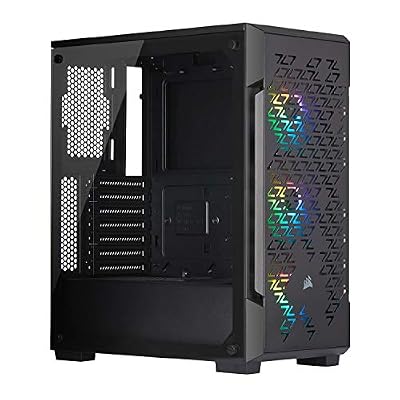
Corsair iCUE 220T RGB Airflow Tempered Glass Mid-Tower Smart ATX Case - High Airflow - Three Included SP120 RGB PRO Fans - Black


As an Amazon Associate we earn from qualifying purchases. Product prices and availability are accurate as of the date/time indicated.
The Corsair iCUE 220T RGB Airflow is our lead pick for an overclocked build that also wants to look the part. As the name promises, it is built around airflow: a high-airflow front intake feeds three included RGB fans, so cool air reaches your components from the moment you power on. At around $180 it bundles the lighting, the fans and the ventilated layout an overclocker needs in one box.
For overclocking this is exactly the intent it serves. The open front panel lets the trio of intake fans pull in plenty of fresh air to feed a hot CPU and GPU, the tempered-glass side shows off your tuned build, and the iCUE ecosystem lets you ramp fan curves as temperatures climb. There is room for a tower air cooler or a front-mounted radiator, so whether you cool on air or liquid you have the headroom to keep clocks stable. If you want airflow, RGB and a polished finish together, the 220T is the obvious starting point.
Pros: High-airflow front feeds 3 included RGB fans, glass panel, iCUE fan control, strong thermals.
Cons: Pricier than plain airflow boxes; RGB tax for non-enthusiasts.
2. CORSAIR 4000D RS ARGB Frame Modular Mid-Tower ATX PC Case
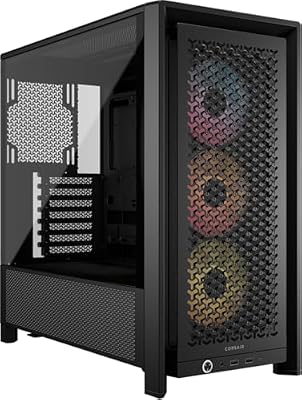
CORSAIR 4000D RS ARGB Frame Customizable Mid-Tower PC Case – Black | 3x Pre-Installed Fans, High Airflow, Fully Modular, Easy InfiniRail Fan Mounting, GPU Anti-Sag, Reverse Motherboard Support


As an Amazon Associate we earn from qualifying purchases. Product prices and availability are accurate as of the date/time indicated.
The Corsair 4000D RS ARGB Frame is the value high-airflow pick, and a smart middle ground for overclockers watching their budget. It carries on the 4000D’s reputation for excellent thermals with a modular, open frame design and ships with three pre-installed ARGB fans, so you get coordinated lighting and strong intake out of the box. At around $100 it delivers serious cooling potential for the money.
This is the case to choose when you want proper airflow for a tuned system without paying flagship prices. The open, ventilated frame keeps restriction low so the included ARGB fans can move real air across an overclocked CPU and graphics card, the modular layout simplifies cable routing for clean airflow paths, and there is ample clearance for tall coolers and front or top radiators. For a no-nonsense airflow chassis that gives an overclock room to breathe at a sensible price, the 4000D RS ARGB Frame is a standout.

Pros: Modular open-frame airflow, 3 pre-installed ARGB fans, generous radiator and cooler clearance.
Cons: Open frame collects more dust; mid-tower fits ATX, not E-ATX.
3. NZXT H6 Flow CC-H61FB-01 Compact Dual-Chamber Mid-Tower Airflow Case

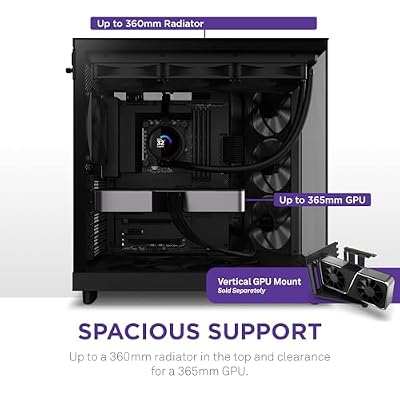
NZXT H6 Flow - Compact Dual-Chamber ATX PC Case - Black | Compact dual-chamber ATX case with panoramic glass and 3 included 120mm fans. Airflow-optimized for clean, cool builds.




As an Amazon Associate we earn from qualifying purchases. Product prices and availability are accurate as of the date/time indicated.
The NZXT H6 Flow brings a dual-chamber layout to the airflow conversation, and that design is its overclocking advantage. By separating the power supply and cables into a second chamber, it keeps the main compartment open and unobstructed so air flows cleanly across the components that actually get hot. A perforated, high-airflow front panel feeds the system, and at around $90 it pairs that thermal layout with a clean, modern look.
For overclockers this is the pick when you want strong cooling and a tidy, uncluttered build. The dual-chamber design hides the PSU and cable mess, leaving an open path for intake air to reach an overclocked CPU and GPU, the ventilated front maximises that airflow, and the compact mid-tower footprint still leaves room for tall coolers and radiators. The panoramic glass shows the result. If a clean, well-ventilated dual-chamber chassis appeals, the H6 Flow balances thermals and style nicely.
Pros: Dual-chamber layout clears the main compartment, high-airflow front, tidy cable management.
Cons: Compact mid-tower limits the largest radiators; glass adds cost.
4. Corsair Crystal Series 680X RGB High Airflow Tempered Glass ATX Case

CORSAIR iCUE Link 3500X RGB Mid-Tower ATX PC Case – Panoramic Tempered Glass – Reverse Connection Motherboard Compatible – 3X CORSAIR iCUE Link RX120 RGB Fans Included – Black


As an Amazon Associate we earn from qualifying purchases. Product prices and availability are accurate as of the date/time indicated.
The Corsair Crystal 680X RGB is the maximum-cooling pick for serious overclockers, and the premium option on this list at around $275. It combines a spacious dual-chamber design with high-airflow intakes and extensive radiator support, giving an extreme build the room it needs for big liquid cooling. The wraparound tempered glass turns all that hardware into a showpiece.
This is the case for the enthusiast chasing aggressive overclocks who needs every advantage in cooling. The dual-chamber layout isolates the PSU and drives so the main chamber stays open for air, the generous radiator mounts let you fit large AIOs or even a custom loop to tame a heavily overclocked CPU and GPU, and the multiple fan positions create strong, directed airflow. It is big, it is not cheap, but for a no-compromises thermal platform that also looks spectacular, the 680X is the standout high-end choice.

Pros: Spacious dual-chamber, extensive radiator support for large AIO or custom loops, premium glass.
Cons: Highest price and largest footprint here; overkill for modest overclocks.
5. Hyte Y70 Modern Aesthetic Gaming PC Case, Panoramic Glass, High-Airflow

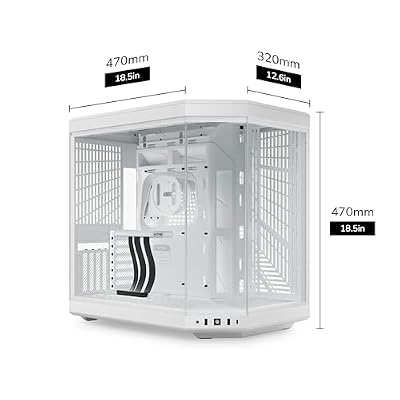
Hyte Y70 Modern Aesthetic Gaming PC Case - Panoramic Glass | High-Airflow Design | Cable Management | Dual Chamber ATX Mid-Tower Chassis | 10 Fan Capacity | Luxury PCIe 4.0 Riser Cable - Snow White


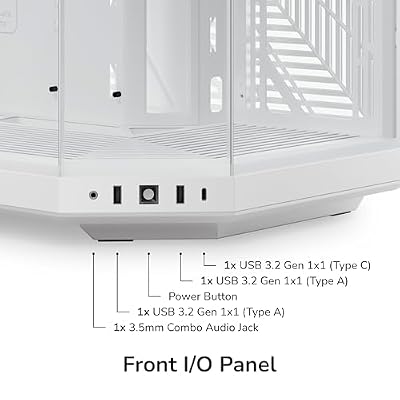
As an Amazon Associate we earn from qualifying purchases. Product prices and availability are accurate as of the date/time indicated.
The Hyte Y70 is the showpiece pick that does not sacrifice thermals. Famous for its sweeping panoramic glass that wraps the front and side into a single uninterrupted view, it is designed as a high-airflow chassis underneath the looks, with room for the fans and radiators an overclocked build relies on. At around $170 it targets builders who want a striking centerpiece that can still keep clocks cool.
For overclocking, the Y70 proves a statement case can still cool well. The high-airflow design and generous fan and radiator mounts give a tuned CPU and GPU the intake and exhaust they need, while the panoramic glass shows off vertical-GPU and custom-loop builds beautifully. It is roomy enough for tall coolers and large radiators, so the thermal headroom matches the visual ambition. If you want a head-turning build that still has the airflow to support an overclock, the Y70 delivers both.
Pros: Panoramic wraparound glass, high-airflow design, ample fan and radiator room, showpiece looks.
Cons: Premium price; size and glass focus suit display builds more than budget ones.
6. Cooler Master MasterBox Q300L Micro-ATX PC Case, Compact mATX

Cooler Master Q300L V1 Micro-ATX PC Case, High Airflow, Transparent Panel | 360mm Graphics Card Support, 240mm AIO Support, Micro-ATX Motherboard, Magnetic Dust Filters, Modular I/O Panel
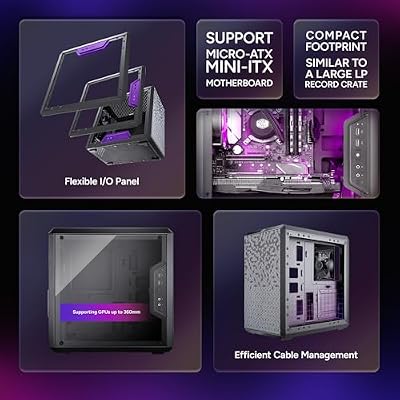





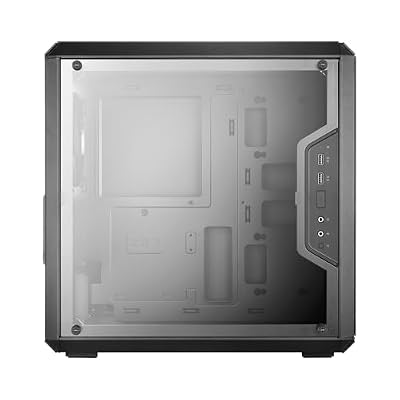


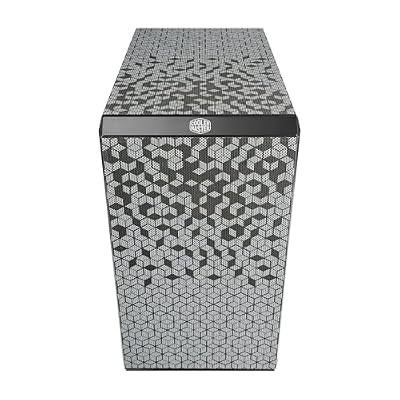
As an Amazon Associate we earn from qualifying purchases. Product prices and availability are accurate as of the date/time indicated.
Rounding out the list is the Cooler Master MasterBox Q300L, the compact and budget overclocking pick at around $40 — by far the most affordable case here. Despite the small Micro-ATX footprint, it is built with ventilation in mind, using perforated, magnetic dust-filter panels and flexible fan mounting to keep air moving through a small space. For a tight budget or a compact build, it punches above its size.
This is the case for the overclocker working in a smaller form factor or on a strict budget who still wants real airflow. The ventilated panels and adjustable fan positions let you set up an effective intake-and-exhaust path for a modestly overclocked mATX system, and the compact dimensions suit smaller desks and LAN duty. You will not fit the largest radiators here, but for cool-running compact builds at a rock-bottom price, the Q300L is a smart, ventilated choice that rounds out the list.

Pros: Very affordable, ventilated panels and flexible fan mounts, compact mATX footprint, good airflow for the size.
Cons: Limited radiator and cooler clearance; best for modest mATX overclocks.
How to Choose a PC Case for Overclocking
When you overclock, the case’s job is to remove heat fast, so airflow is the first thing to scrutinise. Look for a mesh or heavily perforated front panel rather than a solid one — a sealed glass front starves intake fans and traps heat, while the open fronts on the Corsair 220T, 4000D RS and NZXT H6 Flow let cool air rush straight to your hot components. The single biggest thermal decision you make is intake restriction, so prioritise a case that lets air in freely.
Fan and radiator support is the next consideration, because an overclock needs more cooling than a stock system. Count the fan mounts and check the sizes — more positions and support for 140mm fans move more air more quietly. If you cool on liquid, confirm the radiator clearance: a mid-tower like the 4000D RS handles a front or top 240/280mm AIO, while a dual-chamber giant like the Crystal 680X swallows large radiators or a full custom loop. Match the radiator support to how aggressive your overclock and your cooler will be.
Clearance and layout decide whether your cooling actually fits and breathes. Check the maximum CPU cooler height if you run a big air tower, the GPU length for long graphics cards, and whether a top radiator collides with tall RAM. Dual-chamber designs like the H6 Flow and 680X hide the PSU and cables in a second compartment, keeping the main chamber open for clean airflow — a real thermal advantage for a tuned build. Tidy cable routing is not just cosmetic; it keeps air paths unobstructed.
Finally, match the case to your form factor and budget. A compact mATX box like the Q300L can cool a modest overclock well if it is ventilated, but it caps radiator and cooler size; a full-airflow ATX or dual-chamber case gives an aggressive overclock far more headroom. Decide how hard you intend to push, whether you want RGB and glass or pure function, and how much space you have. Set airflow as the non-negotiable, confirm your cooler and radiator fit, and pick the case on this list that matches your ambition. The best overclocking case is the one that keeps temperatures low enough to hold your clocks stable under load.
Frequently Asked Questions
Does the PC case really affect overclocking?
Yes, significantly. Overclocking raises power draw and heat, and the case controls how quickly that heat leaves the system. A high-airflow chassis with a mesh front and plenty of fans — like the Corsair 220T or 4000D RS — keeps components cooler, which lets them hold higher clocks before throttling. A restrictive case can bottleneck even the best cooler, so the chassis is a genuine part of your thermal solution.
Is airflow or radiator support more important for overclocking?
Both matter, but airflow comes first. Even the largest radiator cannot help if the case starves it of cool intake air, so prioritise a mesh front and good fan layout like the cases here lead with. Once airflow is sorted, radiator support determines how much liquid cooling you can add — vital for aggressive overclocks, where a dual-chamber case like the Crystal 680X gives the most room.
Can I overclock in a compact Micro-ATX case?
You can, within limits. A ventilated compact case like the Cooler Master Q300L moves enough air for a modest overclock if you set up a sensible intake-and-exhaust path. The trade-off is restricted radiator and cooler clearance, so extreme overclocks that need a large AIO or tall air tower are better suited to a roomier ATX or dual-chamber chassis with more thermal headroom.
Do I need a dual-chamber case to overclock?
No, but it helps. Dual-chamber designs like the NZXT H6 Flow and Corsair Crystal 680X tuck the power supply and cables into a separate compartment, leaving the main chamber open and unobstructed for airflow — a real advantage for keeping a tuned system cool. A well-ventilated single-chamber airflow case such as the 4000D RS also cools an overclock effectively, so it comes down to budget and the look you want.
Related Guides
- Best PC Cases
- Best CPU Coolers
- Best AIO Liquid Coolers
- Best Case Fans for Airflow
- Best Gaming PC Builds
- Best Power Supplies
Affiliate Disclosure: As an Amazon Associate, we earn from qualifying purchases. If you click a link and make a purchase, we may earn a small commission at no extra cost to you. Prices and availability are accurate as of publication and may change.










