

Affiliate disclosure: As an Amazon Associate we earn from qualifying purchases. This post contains affiliate links — if you buy through them we may earn a small commission at no extra cost to you. This never affects our recommendations.
In a hurry? See the top-rated Ducky One 3 Mini deals available right now:
Related: Wooting keyboards.
🛒 Check Ducky One 3 Mini Prices on Amazon →🛒 Best Price Today on Amazon
Prime members get fast, free shipping on everything above, plus member-only deals. New members get a 30-day free trial — cancel anytime.
Start 30-Day Prime Free Trial →See Today’s Amazon DealsIntroduction
The Ducky One 3 Mini is a compact mechanical keyboard that proves small form factors don’t mean compromised quality. This 60% board combines Ducky’s reputation for reliability with hot-swap functionality, allowing you to swap switches to your preference. If you’re building a clean, minimalist gaming desk or need portability without sacrificing quality, the Ducky One 3 Mini deserves serious consideration.
Ducky keyboards are beloved by enthusiasts for their consistency, build quality, and approachable pricing. The One 3 Mini brings that ethos to the ultra-portable 60% form factor, making it ideal for gamers who value simplicity and solid engineering.
Specifications
| Feature | Specification |
|---|---|
| Layout | 60% (61 keys) |
| Switch Type | Hot-swap compatible (Cherry MX compatible) |
| Hot-Swap Support | Yes, 5-pin hot-swap sockets |
| Polling Rate | 1kHz USB (standard) |
| Connectivity | Wired USB-C only |
| Battery Life | Not applicable (wired) |
| Materials | PCB-mounted, ABS plastic case, stabilizers |
| Weight | 620g |
| Dimensions | 285 x 85 x 30mm |
| RGB Lighting | Single-color LED per key (RGB available in premium editions) |
| Software Support | Minimal; Ducky focuses on firmware customization |
Build Quality & Materials
The Ducky One 3 Mini uses a plastic case, which sounds like a compromise, but Ducky’s ABS plastic is durable and feels solid. The case is reinforced internally to prevent flex under typing. The gasket mounting system is simple but effective, providing subtle flex without mushiness. Stabilizers are clip-mounted and stable—no rattle even on the spacebar.
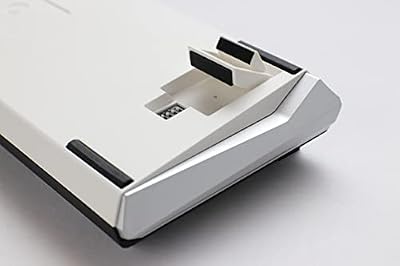
The keyboard is ultralight (620g), making it incredibly portable. You can toss it into a backpack without weight concerns. Despite the plastic construction, the keyboard feels premium and built to last. Ducky’s reputation for reliability backs this up—these keyboards age gracefully and remain responsive for years.
Switches & Typing Feel
The Ducky One 3 Mini ships with Ducky’s own mechanical switches—smooth, consistent, and responsive. The standard options are linear (red) or tactile (brown) variants with 45g actuation force. The switches have no perceptible scratch or inconsistency. The typing feel is fast and snappy, ideal for gaming.
Since the keyboard supports hot-swap, you can experiment with any Cherry MX-compatible switch. Popular swaps include Gateron, Holy Panda, or NK switches. This modularity means you can customize your typing feel without buying a new keyboard. The switch sound profile from factory is clean and satisfying.
Software & Customization
Ducky intentionally minimizes software. There’s no RGB lighting app—you control lighting via built-in keyboard modes accessible through Fn combos. Macro recording is handled via firmware, not software. This is a design choice that prioritizes simplicity and longevity. The keyboard works on any OS (Windows, Mac, Linux) without driver installation.
For advanced users, Ducky’s firmware is customizable via text files, but this requires technical knowledge. For casual users, the built-in modes and simplicity are features, not limitations. You get a keyboard that just works without requiring software.
Latency & Performance
The Ducky One 3 Mini uses standard USB polling at 1kHz, translating to 1ms latency. This is acceptable for gaming but not tournament-competitive (which demands 8kHz). For casual gaming and productivity, 1kHz polling is invisible—you won’t perceive the latency. For esports, faster polling would be preferable, but the Ducky’s solid build and reliable switches compensate.
Key rollover is full n-key, meaning simultaneous inputs register without ghosting. The wired USB-C connection is direct and reliable with zero disconnects or interference.
Gaming Performance
The Ducky One 3 Mini excels at casual gaming and productivity gaming. The light switches enable rapid key presses without fatigue. The 60% layout keeps hands positioned close to the mouse, reducing hand travel distance. The compact form factor means the keyboard takes minimal desk space, leaving room for a large mouse pad.
For competitive esports, the 1kHz polling rate is acceptable but not optimal. Professional players would prefer 8kHz. However, for ranked matches, casual tournaments, and non-esports gaming, the Ducky’s responsiveness is more than sufficient. The solid build and switch consistency mean your performance is limited by skill, not hardware.
Pros & Cons
Pros
- Exceptional build quality and reliability
- Hot-swap support with Cherry MX compatibility
- Ultra-compact 60% form factor (highly portable)
- Lightweight (620g) for travel
- No required software (works on any OS)
- Factory switches are smooth and responsive
- Affordable price ($120-150) for quality construction
Cons
- Wired-only (no wireless option)
- 1kHz polling rate (not tournament-grade)
- Plastic case (though solid quality)
- Minimal RGB customization (firmware-only)
- No macro support via software
- 60% layout requires function layers for F-keys and arrow keys
- Limited per-key customization options
Comparison vs Competing Keyboards
Ducky One 3 Mini vs Wooting 60HE
The Wooting 60HE ($280-300) is a premium 60% with analog Hall effect switches and 8kHz polling. The Ducky One 3 Mini ($120-150) is a budget-friendly 60% with standard mechanical switches and 1kHz polling. The Wooting is for esports professionals; the Ducky is for enthusiasts and casual gamers. Choose Wooting for cutting-edge performance, Ducky for reliable, affordable quality.
Ducky One 3 Mini vs Keychron Q1 Pro
The Keychron Q1 Pro is 75% wireless ($150-170). The Ducky is 60% wired ($120-150). Both have hot-swap support. The Keychron offers wireless and Bluetooth for multi-device users. The Ducky is more portable and compact. Choose Keychron for flexibility, Ducky for portability.
Ducky One 3 Mini vs Glorious GMMK Pro
The Glorious GMMK Pro is 75% aluminum with hot-swap ($150). The Ducky is 60% plastic with hot-swap ($120-150). The GMMK Pro offers more desk space and premium materials. The Ducky is more compact and lightweight. Choose GMMK Pro if you want a bigger keyboard, Ducky if you prioritize portability.
Best Use Cases
Portable Gamers: The lightweight design and compact form factor are perfect for LAN events, travel, and desk space constraints.
Enthusiasts & Modders: Hot-swap support and no required software make the Ducky an excellent platform for switch experimentation and customization.
Casual Gamers & Productive Typists: The 60% layout and reliable switches are ideal for mixed gaming and work workflows without distraction.
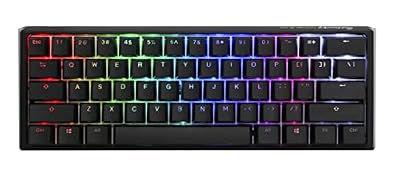
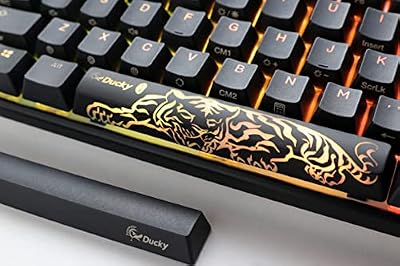
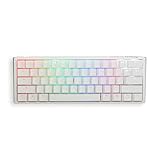
Ducky One 3 Mini 60% Mechanical Gaming Keyboard, Cherry MX Red, RGB, Black | 60% mechanical gaming keyboard, hot-swap switches, Quack Mechanics, PBT tripleshot keycaps, RGB


As an Amazon Associate we earn from qualifying purchases. Product prices and availability are accurate as of the date/time indicated.
Frequently Asked Questions
Can I use third-party switches with the Ducky One 3 Mini?
Yes, the keyboard uses standard 5-pin Cherry MX-compatible hot-swap sockets. Any Cherry MX-compatible switch will fit. Popular options include Gateron, Holy Panda, NK, and Durock switches.
Does the Ducky One 3 Mini have Bluetooth?
No, it’s wired USB-C only. If you need wireless, consider the Keychron Q1 Pro or NuPhy Air75 V2.
Is there RGB lighting?
The standard One 3 Mini has single-color LED lighting. Premium editions include full RGB. You control lighting via built-in firmware modes—no software required.
How do I record macros?
The Ducky One 3 Mini supports macro recording via firmware, but it requires technical knowledge. For casual use, the keyboard doesn’t have easy macro functionality like Corsair or Razer boards.
What’s the polling rate?
Standard USB polling at 1kHz (1ms latency). This is acceptable for casual gaming but not tournament-competitive. Professional esports boards offer 8kHz.
Is the Ducky One 3 Mini suitable for productivity?
Yes, absolutely. The light switches and responsive feel make it excellent for typing. The 60% layout requires function layers for arrow keys and F-row, but most users adapt quickly.
Final Verdict
The Ducky One 3 Mini is the best budget-friendly 60% mechanical keyboard for anyone prioritizing portability and reliability. The hot-swap support unlocks endless customization options, the build quality is exceptional for the price, and the lightweight design makes it travel-friendly.
The wired-only design and 1kHz polling rate are trade-offs for affordability. If you need wireless or tournament-grade latency, look elsewhere. But for casual gamers, enthusiasts, and portable setups, the Ducky One 3 Mini delivers outstanding value.
Pair it with a quality gaming mouse and a high-refresh monitor for a complete budget-friendly gaming setup. You’ll have a keyboard trusted by thousands of enthusiasts worldwide.
As an Amazon Associate we earn from qualifying purchases at no extra cost to you.


Related Articles
Looking for more on this topic? Browse the hand-picked guides below — each one applies the same scoring rubric used in this review.










