- Top Pick: msi Thin 15 15.6” 144Hz FHD Gaming Laptop: Intel Core i7-13620H, NVIDIA Geforce RTX 4050, 16GB DDR4, 512GB NVMe SSD, WiFi 6E, Win 11: Black B13VE-2678US
- Best Value: msi Thin 15 15.6” 144Hz FHD Gaming Laptop: Intel Core i5-12450H, NVIDIA Geforce RTX 2050, 16GB DDR5, 512GB NVMe SSD, Cooler Boost 5, Win 11: Black B13UCX-2041US
- Premium Choice: msi Thin 15 B13VE 2024 Gaming Laptop 15.6" FHD IPS 144Hz 8-Core Intel i5-13420H 16GB DDR4 512GB SSD NVIDIA GeForce RTX 4050 6GB GDDR6 Wi-Fi 6E Backlit Keyboard Win11 Home w/ONT 32GB USB
The MSI Thin 15 (B13VE) is MSI’s thin-and-light entry into the budget gaming-laptop class — engineered for buyers who want playable modern gaming in a more portable chassis than the typical 15-inch performance laptop. It pairs an Intel Core i5-13420H with an NVIDIA GeForce RTX 4050 Laptop GPU, 16GB of memory and a 15.6-inch FHD 144Hz display for roughly $800-$1,000 depending on the configuration. This MSI Thin 15 review covers the specifications, performance, the display, the practicalities and the verdict.

Updated October 2026 – memory, battery and price details corrected against the spec sheet and published reviews.
Quick answer: the MSI Thin 15 B13VE is a budget thin-and-light gaming laptop for 1080p play at 144Hz. The MSI Thin 15 B13VE pairs a Core i5-13420H with an RTX 4050 (6GB, 45W), 16GB of DDR4 memory and a 52.4Wh battery, weighs about 1.86 kg and usually costs roughly $800-$1,000. Buy it if portability and price matter most; skip it if you want long battery life or an RTX 50-series GPU.
🛒 Best Price Today on Amazon
Prime members get fast, free shipping on everything above, plus member-only deals. New members get a 30-day free trial — cancel anytime.
As an Amazon Associate we earn from qualifying purchases.


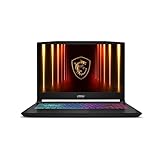
MSI Thin 15 at a Glance
| Component | Specification |
|---|---|
| Processor | Intel Core i5-13420H (8 cores, hybrid) |
| Graphics | NVIDIA GeForce RTX 4050 Laptop GPU 6GB (Ada Lovelace) |
| Memory | 16GB DDR4-3200 |
| Storage | 512GB NVMe SSD |
| Display | 15.6″ FHD (1920×1080), 144Hz |
| Operating system | Windows 11 Home |
| Battery | 52.4Wh battery; roughly 5 hours of light use, under 3 hours gaming (published reviews) |
| Weight | Approx. 1.86 kg |
| Price | Roughly $800-$1,000 |
Performance: Gaming and Productivity
The Thin 15 is built around the same core platform that powers many budget-class gaming laptops of this generation — and it delivers what that platform is engineered for. The 8-core Intel Core i5-13420H is a Raptor Lake hybrid chip that is efficient, responsive in everyday work, and capable enough to feed the GPU well in modern games. The NVIDIA GeForce RTX 4050 Laptop GPU is an Ada Lovelace mobile chip with 6GB of GDDR6 memory and a modest 45W power limit, well matched to the Thin’s 1080p 144Hz display.
Because the GPU is Ada Lovelace rather than Blackwell, the Thin 15 supports DLSS 3 with Frame Generation rather than the newer DLSS 4 with Multi Frame Generation — DLSS 3 nevertheless lifts frame rates meaningfully in supported titles. The 16GB of DDR4 memory is a sensible specification at this price, though it is a generation behind DDR5 laptops — comfortable for gaming, light streaming and multitasking. The 512GB NVMe SSD covers a small library; most owners will want to add storage in time. For the broader context, see our best gaming laptops under $1,200 guide.
Display Quality
MSI fits the Thin 15 with a 15.6-inch FHD (1920×1080) panel at a 144Hz refresh rate. It is a sensible, well-judged choice for the price and the GPU: the 1080p resolution is one the RTX 4050 can comfortably drive at high frame rates, the 144Hz refresh is a clear step beyond a standard 60Hz panel for smoother motion, and the panel itself does the essentials well in both games and everyday use.
It is not a colour-critical or HDR-capable panel — those features sit further up the price ladder — but for a buyer whose first priority is playable, smooth gaming in a portable chassis, it does what it needs to do. Anyone moving from an older 60Hz laptop will notice the 144Hz refresh in everyday use as much as in games. For higher-tier panels, see our best 240Hz gaming laptops guide.
Design, Build and Cooling
The Thin line is MSI’s name for its more portable-orientated gaming laptops, and the chassis lives up to it — the Thin 15 is noticeably slimmer and lighter than a typical 15.6-inch performance laptop, at around 1.86 kg. The design is restrained for a gaming laptop, with a backlit keyboard and a sensible port layout, and the overall look is one a student or a working buyer can carry without drawing attention.
Cooling is the area MSI has had to engineer carefully in a thinner chassis. The i5-13420H and RTX 4050 are efficient components, so the thermal load is manageable, but a slimmer body means less air volume and tighter venting. MSI’s design is built to keep both within their performance windows during gaming sessions; buyers should expect a more audible fan profile under load than a thicker chassis would produce, which is the inherent trade-off of the thin-and-light approach.
Battery, Portability and Connectivity
Portability is the Thin 15’s central selling point. At around 1.86 kg in a slimmer chassis than typical 15.6-inch gaming laptops, it is genuinely easier to carry to classes, work or a friend’s house, which is the practical reason to choose a Thin model over a more conventional gaming laptop. As with any gaming laptop, full performance is only available plugged in, but the battery is only average: published reviews report roughly five hours of light use and under three hours of gaming, and the laptop does not charge over USB-C.
Connectivity covers the modern essentials needed for external displays, peripherals, fast storage and modern wireless networking. The 16GB of memory removes the immediate upgrade question that other budget options leave open, and MSI’s support network sits behind the buyer. For buyers weighing other affordable options, our best gaming laptops under $1,200 guide covers adjacent picks.
MSI Thin 15 B13VE Specs and Variants Explained
The MSI Thin 15 is sold in many configurations, and the model code matters. B13VE means a 13th-gen Intel CPU with an RTX 4050; B13UC and B13UCX codes mean an RTX 2050 and a weaker GPU. Always check the code before you buy.
| Variant | CPU | GPU | Memory / storage | Best for |
|---|---|---|---|---|
| Thin 15 B13VE (i5) | Core i5-13420H, 8 cores | RTX 4050, 6GB | 16GB DDR4 / 512GB | Best value version |
| Thin 15 B13VE (i7) | Core i7-13620H, 10 cores | RTX 4050, 6GB | 16GB DDR4 / 512GB | Heavier multitasking |
| Thin 15 B13UCX | Core i5-13420H or i5-12450H | RTX 2050 | 16GB DDR5 / 512GB | Lowest price only |
| Thin A15 B7UCX | Ryzen 5 7535HS | RTX 2050 | 8GB DDR5 / 512GB | AMD fans on a budget |
MSI Thin 15 B13VE performance in games
Published reviews report roughly 60 fps at ultra settings in an older title such as The Witcher 3 and 70 fps or more at high settings in current games. Ray tracing cuts frame rates sharply on the 45W RTX 4050, so leave it off. DLSS 3 with Frame Generation helps in supported games.
Battery, charging and noise
- The 52.4Wh battery lasts about five hours of web browsing and under three hours of gaming according to published reviews.
- Charging uses the supplied barrel adapter; the laptop does not charge over USB-C.
- Heat is handled well, but the fans get loud under load, which is the usual trade-off in a thin chassis.
Upgrade options
- Memory is DDR4-3200 and can be expanded, and reviewers report a maximum of 64GB.
- Buyers report that storage can be expanded, so the 512GB SSD is not a hard limit.
- The display is a 1080p 144Hz IPS panel that some reviewers describe as a little washed out, so it suits games better than colour work.
Who Is the MSI Thin 15 For?
The Thin 15 is for the buyer who specifically values portability in a budget gaming laptop and does not want a heavier, thicker performance chassis. If you carry your laptop daily — to classes, to work, to a friend’s house — and want playable modern gaming on top of that mobility, with 16GB of memory as a sensible default, the Thin 15 is squarely your machine. It is also a sound pick for a student who games.
It is less suited to two groups. Buyers who want maxed high-resolution gaming, or who play the most demanding AAA titles at very high settings, will need a more powerful GPU. And buyers who do not need to carry their laptop daily will get more thermal headroom and likely a quieter fan profile from a thicker, conventional 15-inch gaming chassis at a similar price. For portable, brand-backed mainstream gaming, the Thin 15 is well judged.
Pros and Cons
Pros: Genuinely thinner and lighter than a typical 15-inch gaming laptop at around 1.86 kg; capable RTX 4050 Laptop GPU with DLSS 3; well-judged 144Hz FHD display; sensible 16GB DDR4 default (upgradeable); restrained design that suits classroom or office settings; recognisable MSI brand.
Cons: Entry-tier GPU is not built for maxed high-resolution gaming; slimmer chassis can be more audible under load; 512GB storage is modest for a game library; DLSS 3 rather than the newer DLSS 4 because the GPU is Ada Lovelace, not Blackwell.
Is the MSI Thin 15 Worth It?
At roughly $800-$1,000 the MSI Thin 15 is a sensible buy for the buyer who specifically values portability in a budget gaming laptop. It delivers genuinely playable 1080p-class gaming, pairs it with a well-matched 144Hz display, includes a sensible 16GB of memory and packs it into a slimmer, more carry-friendly chassis than the typical 15-inch gaming laptop.
The honest compromises are the entry-tier GPU, the modest 512GB storage and the slightly more audible thermal profile inherent to thinner chassis design. For a buyer who carries their laptop daily and wants real gaming capability on top, it earns a clear recommendation; buyers who do not need the portability and want more thermal headroom should compare conventional alternatives in our best gaming laptops under $1,200 guide.
MSI Thin 15 Alternatives for Budget Gaming
If the MSI Thin 15 B13VE is unavailable or you want a different balance of screen, GPU and memory, three laptops are worth comparing. The Acer Nitro V 15 and ASUS TUF Gaming A15 share the RTX 4050, and the MSI Cyborg 15 AI steps up to a newer GPU.
Acer Nitro V 15 – Best for a Faster Screen

The Acer Nitro V 15 uses the same Core i5-13420H and RTX 4050 as the Thin 15 but adds a 165Hz screen. It is the closest match to the MSI at a similar price.
- Intel Core i5-13420H processor
- NVIDIA GeForce RTX 4050 Laptop GPU
- 15.6-inch FHD IPS 165Hz display
- 8GB DDR5 memory and 512GB Gen 4 SSD in this listing
- Wi-Fi 6, model ANV15-52-586Z
Pros: 165Hz panel; DDR5 memory; Gen 4 SSD. Cons: only 8GB of RAM in this configuration; heavier than the Thin 15.
Skip it if you need to carry the laptop every day.
ASUS TUF Gaming A15 – Best Build for the Price

The ASUS TUF Gaming A15 swaps in an AMD Ryzen 7 processor and DDR5 memory, with a display that covers the full sRGB range.
- AMD Ryzen 7 7435HS processor
- NVIDIA GeForce RTX 4050 graphics
- 15.6-inch FHD 144Hz display with 100% sRGB
- 16GB DDR5 memory and 512GB PCIe SSD
- Wi-Fi 6, model FA507NUR-AS73
Pros: strong Ryzen 7 CPU; 100% sRGB panel; DDR5 memory. Cons: costs more than the Thin 15; thicker and heavier chassis.
Skip it if weight matters more than CPU speed.
MSI Cyborg 15 AI – Best Step-Up Pick

The MSI Cyborg 15 AI keeps the thin-and-light idea but moves to an RTX 5060 with 8GB of GDDR7 memory, which is the pick if you want DLSS 4 and a longer useful life.
- Intel Core 5 210H processor, 8 cores
- NVIDIA GeForce RTX 5060 with 8GB GDDR7
- 15.6-inch FHD IPS 144Hz display
- 16GB DDR5 memory and 512GB SSD
- Wi-Fi 6E
Pros: RTX 50-series GPU; DDR5; Wi-Fi 6E. Cons: higher price; small 512GB drive.
Skip it if you want the lowest possible price.
Frequently Asked Questions
How thin and light is the MSI Thin 15?
Around 1.86 kg in a noticeably slimmer chassis than typical 15-inch gaming laptops — genuinely easier to carry daily to classes, work or a friend’s house.
Does the MSI Thin 15 support DLSS 4?
No. Its RTX 4050 Laptop GPU is built on the Ada Lovelace architecture, which supports DLSS 3 with Frame Generation. DLSS 4 with Multi Frame Generation is a Blackwell-architecture feature reserved for RTX 50-series GPUs.
Is 16GB of memory enough on the Thin 15?
Yes, comfortably so for gaming, light streaming and everyday productivity. The 16GB default removes the upgrade question many cheaper budget gaming laptops leave open.
Will the MSI Thin 15 thermals hold up under sustained gaming?
The components are efficient, and MSI engineers the chassis to keep them within their performance windows. Expect a more audible fan profile under load than a thicker chassis would produce — the inherent trade-off of thin-and-light design.
What is the difference between the MSI Thin 15 B13VE and other Thin 15 models?
The B13VE has an RTX 4050 with a 13th-gen Intel CPU. The B13UC and B13UCX variants use an RTX 2050 and are slower, so check the model code.
Is the MSI Thin 15 B13VE good for gaming?
Yes, for 1080p at 144Hz. The RTX 4050 handles most current games at medium-to-high settings, and DLSS 3 helps in supported titles.
Does the MSI Thin 15 use DDR4 or DDR5?
The B13VE uses 16GB of DDR4-3200, not DDR5. It can be upgraded, with reviewers reporting support up to 64GB.
How long does the MSI Thin 15 battery last?
Expect around five hours of light use and under three hours of gaming from the 52.4Wh battery, so keep the charger with you.
More Gaming Laptop Reviews
- Lenovo Legion LOQ AI-Powered Gaming Laptop Review
- MSI Cyborg 17 Gaming Laptop Review
- Acer Nitro 16S AI Copilot+ PC Gaming Laptop Review
- Acer Predator Helios Neo 18 AI Gaming Laptop Review
- ASUS TUF Gaming A18 (RTX 5070) Review
- ASUS V16 Gaming Laptop Review (Core 7 240H / RTX 5060)
- MSI Thin A15 Gaming Laptop Review (Ryzen)
- MSI Vector 16 HX AI Review (A2XWHG-275US)
Affiliate Disclosure: As an Amazon Associate, we earn from qualifying purchases. If you click a link and make a purchase, we may earn a small commission at no extra cost to you. Prices and availability are accurate as of publication and may change.
Related Articles
Looking for more on this topic? Browse the hand-picked guides below — each one applies the same scoring rubric used in this review.