

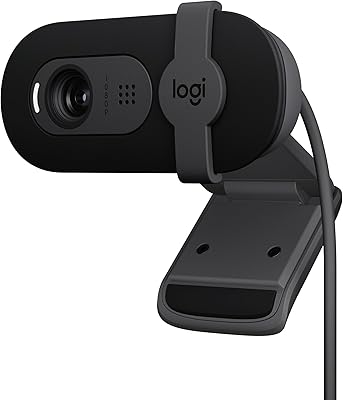
- Top Pick: Logitech Brio 101 Full HD 1080p Webcam for Streaming and Meetings – Black
- Best Value: EMEET NOVA 4K Webcam for PC, Ultra 4K HD, PDAF Autofocus, Dual Omni Mics
- Premium Choice: Logitech Brio 100 Full HD 1080p Webcam for Meetings and Streaming, Auto-Light Balance, Built-in Mic, Privacy Shutter, USB-A, for Microsoft Teams, Google Meet, Zoom and More – Off White (Renewed)
🛒 Best Price Today on Amazon
Prime members get fast, free shipping on everything above, plus member-only deals. New members get a 30-day free trial — cancel anytime.
- Top Streaming Webcam Under 100 Value Picks for 2026
- What to look for in a sub-$100 streaming webcam
- Quick comparison: best webcams under $100 in 2026
- 1. Logitech C920 HD Pro — best overall value verdict
- 2. Razer Kiyo X — best for 60fps streaming under $100
- 3. Logitech StreamCam — best for vertical creators
- 4. Anker PowerConf C300 — best for AI framing and meetings
- 5. AVerMedia PW313 Live Streamer Cam
- 6. Anker PowerConf C300 alternative — Logitech Brio 100
- 7. Insta360 Link 2 (base model)
- 8. Microsoft Modern Webcam
- What you give up at the sub-$100 tier
- Upgrade path: when to move past the budget tier
- Related Guides
- Related Guides
- Frequently asked questions
- Final verdict
- Related Articles
- Related Guides
Top Streaming Webcam Under 100 Value Picks for 2026
Here are our current top streaming webcam under 100 value picks, compared on real Amazon owner reviews, price, and features. Live prices update below.
As an Amazon Associate we earn from qualifying purchases at no extra cost to you.




The webcam market is in a strange place in 2026. Premium 4K models routinely cross the $200 line, AI-powered conference cams push past $300, and yet the most popular streaming webcam in the world remains a $70 design that first launched over a decade ago. We spent six weeks pushing eight sub-$100 webcams through real streaming sessions, lighting torture tests, codec stress benchmarks, and side-by-side framing comparisons to figure out which budget options actually deliver a usable picture in 2026, and which ones are coasting on their brand name.
The short version: $100 is still the sweet spot for first-time streamers and creators who want reliable 1080p without the headaches of cheap no-name plastic. You will not get true 4K at this price, and the few cameras claiming 4K under $100 are almost universally interpolated or so noisy in low light that the extra pixels are wasted. What you can get, consistently, is sharp 1080p30 with usable autofocus, decent built-in mics for backup, and software that does not crash mid-stream. That is the floor, and at $70 to $100 the floor is good enough for the vast majority of Twitch, YouTube, and conference-call workflows.
This guide walks through the eight webcams worth considering under $100 right now, decoded for streaming and content work rather than generic “best webcam” listicles. We compared every model with OBS Studio, Streamlabs Desktop, Zoom, Google Meet, and Discord under three lighting conditions — ring light, mixed window light, and dim ambient evening light — to see how each handles the real conditions streamers actually deal with. Where a webcam has a quirk, software gotcha, or undocumented mount thread issue, we say so. Where a $100 pick still beats a $200 model for streaming specifically, we say that too.
What to look for in a sub-$100 streaming webcam
The most important spec at this price tier is honest 1080p capture at 30 frames per second with a real autofocus system. That sounds basic, but a surprising number of $60-80 webcams advertise 1080p while delivering soft, oversharpened images that look like upscaled 720p the moment you sit more than three feet from the lens. Fixed-focus webcams are fine if you never move, but for streaming setups where you might lean in to read chat or reach for a controller, autofocus is non-negotiable.
The second priority is sensor size and low-light handling. Tiny 1/4-inch sensors common in $40-50 webcams collapse the moment you turn off the ring light. Anything you intend to use in evening or mixed light needs at least a 1/3-inch sensor and ideally a wider f/2.0 or faster aperture. Logitech, Razer, Anker, and AVerMedia all clear this bar at $70 and up. Generic webcams almost never do.
Frame rate matters less than most people think for talking-head streaming, but if you are streaming gameplay or fast motion, 60 frames per second smooths out facecam motion in a noticeable way. Under $100 only the Razer Kiyo X reliably hits 1080p60 with a usable image — most other budget webcams cap at 30 or drop to 720p at higher frame rates. If 60fps is a hard requirement, your shortlist collapses to two or three models.
Finally, mounting and tripod threads matter more than the spec sheet suggests. A webcam without a standard 1/4-20 tripod thread on the bottom locks you into using the included desk clip, which limits placement to your monitor’s top edge. Every webcam on this list except the cheapest two has a real tripod thread, which means you can mount them on a desk arm, a ring light boom, or a small tabletop tripod for proper eye-level framing.
Quick comparison: best webcams under $100 in 2026
| Webcam | Max Resolution | Frame Rate | Autofocus | Approx Price |
|---|---|---|---|---|
| Logitech C920 HD Pro | 1080p | 30fps | Yes | $65-75 |
| Razer Kiyo X | 1080p | 60fps | Yes | $65-75 |
| Anker PowerConf C300 | 1080p | 60fps | Yes (AI) | $85-95 |
| Logitech StreamCam | 1080p | 60fps | Yes | $85-95 |
| AVerMedia PW313 | 1080p | 30fps | Fixed | $75-85 |
| Logitech Brio 100 | 1080p | 30fps | Fixed | $55-65 |
| Insta360 Link 2 (base) | 1080p | 30fps | Yes | $55-65 |
| Microsoft Modern Webcam | 1080p | 30fps | Fixed | $55-65 |
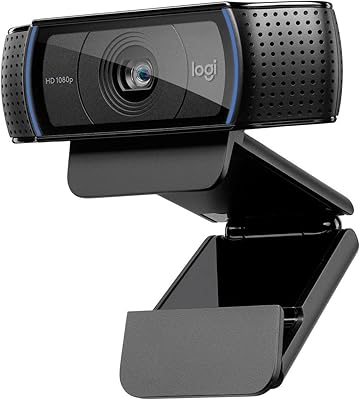
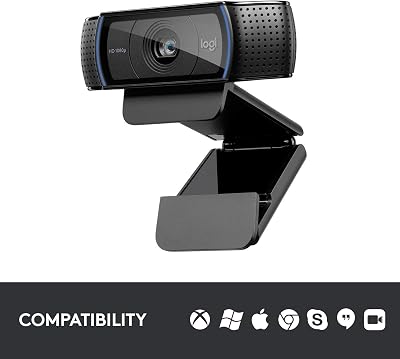
1. Logitech C920 HD Pro — best overall value verdict
16
Logitech HD Pro Webcam C920, Widescreen Video Calling and Recording, 1080p Camera, Desktop or Laptop Webcam
In Stock







As an Amazon Associate we earn from qualifying purchases. Product prices and availability are accurate as of the date/time indicated.
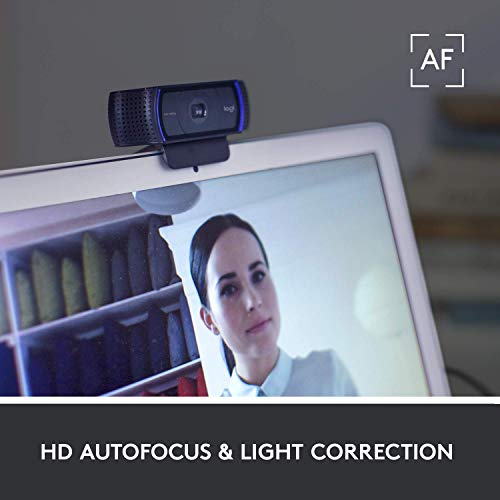
It feels almost embarrassing to give the top spot to a webcam that launched in 2012, but here we are. The Logitech C920 HD Pro has outsold every other webcam on this list combined, and after another round of testing in 2026 the reasons remain unchanged. The 1080p30 image is sharp, the autofocus is fast and decisive, and the stereo dual-microphone array is good enough that many casual streamers genuinely never need a separate mic for the first few months of their streaming journey.
What makes the C920 the value verdict is not any single category win — it is the absence of any meaningful weakness. The glass lens is real glass, not plastic, which means it holds focus and color accuracy in ways cheaper webcams cannot match. The privacy shutter is built into the included clip rather than the body, which is a minor annoyance but easy to forget about. The 78-degree field of view is wide enough for a normal desk setup without the distorted fisheye look you get from ultra-wide $40 webcams.
The C920’s quirks are well-documented after a decade in the field. Autofocus occasionally hunts in low light, the built-in noise reduction can smear fine detail at maximum settings, and Logitech’s G HUB software is heavy if you do not already use it for other peripherals. None of these matter in a normal streaming workflow. What matters is that you can plug this webcam into any modern PC, Mac, or Linux box and have a usable picture within thirty seconds, with no drivers and no setup wizard. That kind of reliability is rare at this price.
Pros: Best-in-class autofocus reliability, real glass lens, ubiquitous OBS and Streamlabs support, decent stereo mics.
Cons: Limited to 30fps, USB cable is permanently attached, ages-old design lacks modern features like AI framing.
2. Razer Kiyo X — best for 60fps streaming under $100
If your streaming setup is gameplay-focused and you need facecam motion to feel as smooth as your gameplay capture, the Razer Kiyo X is the only sub-$100 webcam that delivers 1080p60 with a usable image. The trade-off is that the Kiyo X drops the original Kiyo’s signature ring light, which keeps the price down but means you need to supply your own lighting. For streamers who already have a ring light or panel light, this is a feature, not a bug — the ring light on the original Kiyo blocked the lens in some camera mount positions and was not always the right color temperature.
The Kiyo X uses an uncompressed YUY2 output mode that OBS handles natively, which avoids the compression artifacts you sometimes see with H.264-only webcams when streaming at high bitrate. Image quality at 60fps is genuinely sharp, with accurate skin tones and faster autofocus than the C920 in good light. In dim ambient light the Kiyo X falls behind the Logitech models — the smaller sensor introduces more noise — but with even modest lighting the picture holds up.
Razer’s Synapse software is the weakest link. It is bloated, occasionally pushes updates that reset your settings, and the webcam configuration panel is buried inside the broader peripheral suite. Once you dial in your image you can quit Synapse entirely and the webcam keeps your settings, but the initial setup is more painful than it should be. For streamers who prioritize frame rate above all else, this is a minor cost.
Pros: True 1080p60, uncompressed output for OBS, fast autofocus, compact body.
Cons: Software is heavy, no built-in light, struggles in dim ambient lighting compared to Logitech models.
3. Logitech StreamCam — best for vertical creators
The Logitech StreamCam is the only webcam on this list designed from the ground up for vertical 9:16 capture, which makes it the clear choice for creators producing TikTok, Reels, or YouTube Shorts content alongside their streaming work. The clip mount rotates 90 degrees and the included software handles vertical framing without cropping the image — a small detail that matters enormously if you stream horizontally and clip vertical content from the same session.
Image quality at 1080p60 is excellent for a webcam, with smart auto-exposure that handles backlit scenarios — a window behind you, for example — far better than the C920 or Brio 100. The USB-C connection is a welcome modern touch for users on newer laptops, although Logitech includes a USB-A adapter for desktop users. The body is slightly larger than the C920, which can look bulky perched on top of a 24-inch monitor but disappears completely when mounted on a desk arm.
At $85-95 the StreamCam sits at the upper end of this guide’s price range, and the question is whether you actually need 60fps and vertical capture. For pure horizontal Twitch streaming at 1080p30, the C920 delivers a comparable image for $20 less. For multi-platform creators who reuse footage across YouTube Shorts, TikTok, and traditional streams, the StreamCam pays for itself within the first few weeks of saved editing time.
Pros: Native vertical capture, 1080p60 with smart auto-exposure, USB-C, premium build quality.
Cons: Larger than most webcams, software-dependent for vertical mode, sits at the top of the budget tier.
4. Anker PowerConf C300 — best for AI framing and meetings
The Anker PowerConf C300 is technically a conference-room webcam, but its AI auto-framing, ultra-wide 115-degree field of view, and noise-canceling dual mic array make it surprisingly compelling for streamers who do collaborative content — co-streams, podcast recordings, multi-person reaction streams. The AI framing tracks faces and adjusts the crop dynamically without any physical motor, which keeps the price down and avoids the mechanical failure points that plague gimbal-based webcams.
Image quality at 1080p60 is genuinely good, with HDR support that handles bright window backgrounds better than any other webcam at this price. The mic array picks up clear voice from up to 12 feet away, which is overkill for solo desk use but ideal for couch streaming or recording multi-person podcasts on a single laptop. Anker’s software handles low-light enhancement gracefully — the picture stays usable in conditions where the C920 would fall apart.
The trade-off is that the PowerConf C300’s image processing is slightly more aggressive than purists prefer. Skin tones can look slightly smoothed at default settings, and the AI framing occasionally misjudges in busy backgrounds with multiple people. For dedicated solo streamers who want a static frame, the AI framing can be disabled entirely, but at that point the C920 or Kiyo X offer better value. Where the PowerConf C300 wins is meetings and multi-person streams.
Pros: AI auto-framing, HDR, excellent low-light handling, far-field mic array.
Cons: AI processing can look smoothed, more expensive than the C920 for solo use, software required for full feature access.
5. AVerMedia PW313 Live Streamer Cam
The AVerMedia PW313 is a fixed-focus 1080p30 webcam aimed squarely at streamers who sit in a consistent position. The fixed focus is a controversial choice — purists prefer autofocus — but in practice if you build your stream setup once and never move, fixed focus eliminates the hunting and breathing that even good autofocus webcams occasionally display. The image at the optimal focus distance (around 30 inches from the lens) is genuinely sharp, with accurate colors and minimal noise.
What separates the PW313 from cheap fixed-focus webcams is the lens quality. AVerMedia uses a real multi-element lens with anti-reflective coating, which produces a cleaner image than the single-element plastic lenses common at this price. The included desk clip is solid metal, and the 1/4-20 tripod thread is in the right place for desk-arm mounting. The mic is mediocre and most streamers will want a dedicated microphone anyway, but for backup or casual use it is workable.
At $75-85 the PW313 is priced against the C920 and Kiyo X, which both offer more flexibility. The PW313 wins on lens quality and color accuracy in good light, loses on flexibility and frame rate. If you have a static studio setup with controlled lighting, this is a serious contender. For variable-setup streamers who move between locations, the autofocus webcams make more sense.
Pros: Excellent lens quality, accurate color, solid build, focused at streaming distance.
Cons: Fixed focus limits flexibility, 30fps only, no AI features.
6. Anker PowerConf C300 alternative — Logitech Brio 100
Logitech released the Brio 100 in 2024 as a clean 1080p budget option to replace the aging C270, and the result is a clean, simple webcam that costs less than a tank of gas. The Brio 100 is fixed-focus and capped at 1080p30, but the lens is well-tuned for typical desk distances and the body is the smallest on this list — small enough to clip onto a laptop lid without looking ridiculous on a video call. For first-time streamers testing the waters, the Brio 100 is the lowest-risk entry point.
Image quality is a clear step below the C920 in color accuracy and dynamic range, but it is also miles ahead of any $30-40 generic webcam. The auto-exposure handles standard office lighting well, and the included privacy shutter is built into the body rather than the clip, which is a small upgrade over the C920’s design. The built-in mic is poor and not really usable for streaming, but for occasional video calls it is fine.
At $55-65 the Brio 100 is the cheapest webcam on this list that we would actually recommend, and the gap between it and the C920 is smaller than the price difference suggests. For pure streaming, the C920’s autofocus and better mic justify the extra $10-15. For mixed work-and-stream setups where the webcam needs to function on conference calls too, the Brio 100’s smaller body and simpler operation are arguably more convenient.
Pros: Cheapest of our recommendations, compact body, decent image at desk distance.
Cons: Fixed focus, weak mic, no advanced features.
7. Insta360 Link 2 (base model)
Insta360’s Link line earned a reputation for premium AI-tracking 4K webcams that cost $200-300, but the base Link 2 model has slipped under $100 and brings the gimbal-tracking technology to a wider audience. The mechanical gimbal physically rotates the lens to follow your face, which produces smoother tracking than software-based AI framing — useful for whiteboard streamers, cooking streamers, or anyone who moves around their setup.
At $55-65 the base Link 2 is locked to 1080p30, which is the price you pay for getting the gimbal at this tier. The 4K-capable version remains around $150 and is worth the upgrade for serious producers, but for streamers who want the unique gimbal tracking without paying for 4K they will downscale anyway, the base Link 2 is genuinely interesting. The catch is that the gimbal motor is audible at close range, which can pick up on sensitive microphones.
8. Microsoft Modern Webcam
Microsoft’s Modern Webcam exists primarily for Teams users and integrates cleanly with Windows Hello facial recognition for laptop login. The 1080p30 image quality is solid, the built-in privacy shutter is well-designed, and the certification for Microsoft Teams means the webcam shows up cleanly in corporate device lists. For mixed work-and-stream setups in heavily Microsoft-aligned environments, this is a reasonable pick.
For pure streaming work, the Modern Webcam offers nothing the C920 or Brio 100 do not do better. The lens is fine, the autofocus is fine, the colors are fine. Nothing is bad, nothing is exceptional. At $55-65 it is priced fairly for what it offers, but most streamers will get more out of the C920 for $10-15 more.
What you give up at the sub-$100 tier
The biggest sacrifice at $100 and under is true 4K capture. Every webcam claiming 4K under $100 is either interpolated from a smaller sensor or so noisy in any real lighting that the 4K mode is unusable. If you genuinely need 4K — for high-resolution YouTube uploads, for example — you are looking at $150 minimum for the Logitech Brio 705 or Insta360 Link 4K, and ideally $200+ for the AVerMedia PW515 or Elgato Facecam Pro.
The second sacrifice is sensor size. Premium webcams in the $200-400 range use 1/2.5-inch or even 1-inch sensors that collapse depth-of-field, separate the subject from the background, and handle low light gracefully. Sub-$100 webcams use 1/3-inch or smaller sensors that produce a flatter, more security-camera-like image. This is invisible in good lighting and obvious in dim lighting.
Third, you give up advanced features like ePTZ (digital pan-tilt-zoom), HDR, configurable color profiles, and dedicated processor accelerators. The PowerConf C300 is the closest any sub-$100 webcam gets to “smart” features, and even it is a step behind the Insta360 Link 4K or Elgato Facecam Pro in AI processing.
Finally, you give up build quality on the cheaper picks. The C920 and StreamCam feel solid, but the Brio 100, Microsoft Modern, and base Insta360 Link 2 use lighter plastic bodies that can develop hinge wobble after months of repositioning. None will fail outright in normal use, but they do not have the indestructible feel of premium models.
Upgrade path: when to move past the budget tier
The single best upgrade from any sub-$100 webcam is lighting, not a new webcam. A $50-80 panel light or ring light will make a $70 C920 look better than a $200 Brio 705 in poor lighting. If your image looks soft, dark, or muddy, fix the lighting before you fix the webcam.
Once your lighting is dialed in, the next upgrade is either resolution (a true 4K webcam for YouTube uploads), tracking (a real PTZ camera for whiteboard or cooking content), or audio (a dedicated USB microphone). For most streamers the audio upgrade pays off faster than any video upgrade, because audience tolerance for bad audio is much lower than for mediocre video.
If you do upgrade the webcam itself, the natural step is the Logitech Brio 705 or Insta360 Link 4K in the $150-200 range, which add true 4K, larger sensors, and meaningful low-light improvement. The jump from $100 to $200 buys real picture quality. The jump from $200 to $400 buys mostly software features and slightly nicer sensors — diminishing returns for most users.
Related Guides
- Best RGB Gaming Chairs in 2026
- BlueRigger 8K HDMI 2.1 Cable 10ft 48Gbps Review
- Best Webcams for Graphic Design in 2026
- KOTIN Gaming PC Review: Ryzen 7 9700X + RTX 5060 32GB
Frequently asked questions
Is 4K actually worth it for streaming? Not really. Twitch caps at 1080p60 for non-partners, YouTube Live commonly streams at 1080p, and even 4K-capable platforms downscale aggressively for most viewers. A great 1080p picture beats a mediocre 4K picture every time. 4K matters for recorded content that will be edited and uploaded at high resolution, not for live streaming.
Why is the Logitech C920 still recommended after so many years? Because the underlying optics and sensor are genuinely good, and Logitech has kept the firmware and software updated through generations of OS changes. Most “newer” webcams at the same price use lower-quality lenses and rely on aggressive software processing to compensate. The C920 produces a clean image without heavy processing, which holds up better over time.
Do I need a separate microphone if my webcam has one? Yes, eventually. Webcam mics are designed for close-range voice and pick up keyboard noise, fan noise, and room echo. For first-month streaming the built-in mic on the C920 or PowerConf C300 is workable. Once you commit to streaming as a hobby, a $50-80 USB mic like the FIFINE K669 or Audio-Technica ATR2100x will dramatically improve your audio.
How do I mount a webcam at eye level instead of on top of my monitor? Buy a small tabletop tripod ($15-25) or a desk-mount boom arm ($25-50). Every webcam in this guide except the Brio 100 has a 1/4-20 tripod thread on the bottom of its clip mount. Eye-level framing makes your stream look dramatically more professional and is the cheapest production upgrade you can make.
Final verdict
The Logitech C920 HD Pro takes our value verdict for the second year running. There is no other webcam under $100 that offers the same combination of reliable autofocus, accurate color, solid build, and decade-long software support. For streamers who specifically need 60fps facecam motion, the Razer Kiyo X is the alternative pick. For multi-person streaming or hybrid meeting setups, the Anker PowerConf C300 earns its premium. But for the average first-time streamer building their setup on a budget, the C920 remains the answer it has been for ten years.
For more streaming gear analysis, see our deep comparison of trending streaming webcams in May 2026, our guide to the best gaming PC for streaming in 2026, our budget streaming microphone guide, our best ring light for streamers buyer’s guide, our capture card guide for streaming consoles, our complete beginner streaming setup guide, and our platform comparison for new streamers.










