

- Top Pick: Lian Li V100-ATX Mid-Tower PC Case-Black-V100RX
- Best Value: MUSETEX Y6 PC Case, Pre-Installed 4 Non-LED Fans, ATX Mid Tower Case, Computer Case with Type-C, 270° Full View Tempered Glass, Black
- Premium Choice: MUSETEX Y6 PC Case, Pre-Installed 7 Infinity Mirror PWM ARGB Fans, ATX Mid Tower Computer Case, Gaming PC Case with Type-C, 270° Full View Tempered Glass, Black
A black PC case is the timeless choice for a clean, stealthy build. Black goes with any component colour, hides dust and cable shadows better than light finishes, and gives a build that understated, premium look whether you run blackout components or a splash of RGB. This guide rounds up the best black PC cases in 2026 across the styles people actually shop for: compact micro-ATX cases, airflow-focused mid-towers, a dual-chamber panoramic design, and a premium showpiece chassis — all in black-finish trim. Every case here ships in a black colourway, so you can build the sleek, dark system you are picturing.
- Best Black PC Cases at a Glance
- 1. Cooler Master MasterBox Q300L Micro-ATX Black PC Case
- 2. Corsair iCUE 220T RGB Airflow Tempered Glass Mid-Tower (Black)
- 3. Corsair Crystal Series 680X RGB Dual-Chamber ATX Case (Black)
- 4. HYTE Y70 Touch Infinite Black Gaming PC Case with 2.5K LCD
- 5. Fractal Design Focus G Black Mid-Tower ATX Case, High Airflow
- 6. NZXT H6 Flow Compact Dual-Chamber Mid-Tower Airflow Case (Black)
- How to Choose a Black PC Case
- Frequently Asked Questions
- Related Guides
- Related Articles
Our picks were chosen on what matters for a case: airflow and cooling support, build quality, form factor and motherboard support, ease of building, and value, all in a black finish. We have included a deliberate spread — from a around $40 compact mATX box to a around $350 showpiece with an integrated screen — because the best black case is the one that fits your hardware, your desk and your budget. Below you will find an at-a-glance comparison of all six, then a closer look at each case and a buyer’s guide covering airflow, size and aesthetics — the things that genuinely shape how a black build looks and performs.
As an Amazon Associate we earn from qualifying purchases at no extra cost to you.


🛒 Best Price Today on Amazon
Prime members get fast, free shipping on everything above, plus member-only deals. New members get a 30-day free trial — cancel anytime.
Best Black PC Cases at a Glance
| Case | Best For | Standout Spec | Approx Price |
|---|---|---|---|
| Cooler Master MasterBox Q300L | Compact black mATX builds | Micro-ATX, magnetic dust filter | around $40 |
| Corsair iCUE 220T RGB Airflow | RGB airflow mid-tower | Tempered glass, high airflow | around $180 |
| Corsair Crystal 680X RGB | Dual-chamber showcase | Dual-chamber, tempered glass | around $275 |
| HYTE Y70 Touch Infinite | Premium screen showpiece | Integrated 2.5K LCD touch | around $350 |
| Fractal Design Focus G | Budget airflow mid-tower | ATX, 2x 120mm fans included | around $60 |
| NZXT H6 Flow | Dual-chamber airflow value | Panoramic glass, dual-chamber | around $90 |
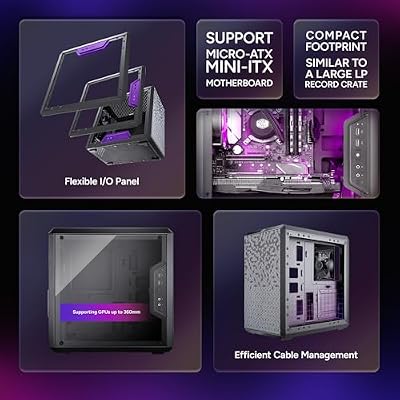
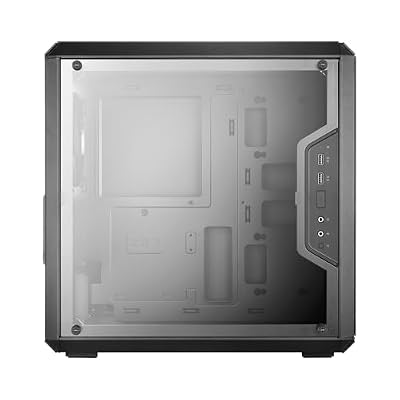
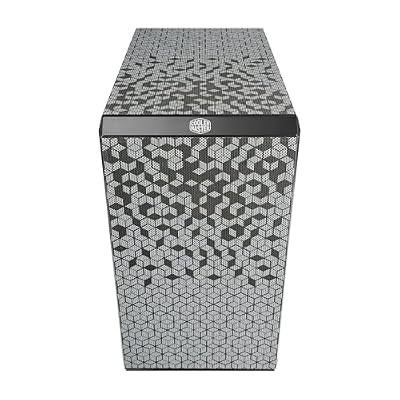
1. Cooler Master MasterBox Q300L Micro-ATX Black PC Case

Cooler Master Q300L V1 Micro-ATX PC Case, High Airflow, Transparent Panel | 360mm Graphics Card Support, 240mm AIO Support, Micro-ATX Motherboard, Magnetic Dust Filters, Modular I/O Panel








As an Amazon Associate we earn from qualifying purchases. Product prices and availability are accurate as of the date/time indicated.
The Cooler Master MasterBox Q300L is the compact black pick of this list. It is a small micro-ATX case with a sleek black finish, a distinctive magnetic dust-filter pattern across its panels, and a surprisingly flexible layout for its size, including adjustable I/O placement. At around $40 it is the most affordable case here and a long-standing favorite for small black builds.
This is the case for anyone building a compact, tidy mATX system that still looks sharp in black. The small footprint suits desks and tight spaces, the magnetic dust filters keep the interior clean and are easy to remove for cleaning, and the flexible layout makes building easier than many cases this size. It is not a high-airflow tower, but for an affordable, good-looking compact black case that punches above its price, the Q300L is the obvious starting point.
Pros: Compact black mATX, magnetic dust filters, flexible layout, lowest price here.
Cons: Limited room for large coolers and long GPUs; modest airflow.
2. Corsair iCUE 220T RGB Airflow Tempered Glass Mid-Tower (Black)
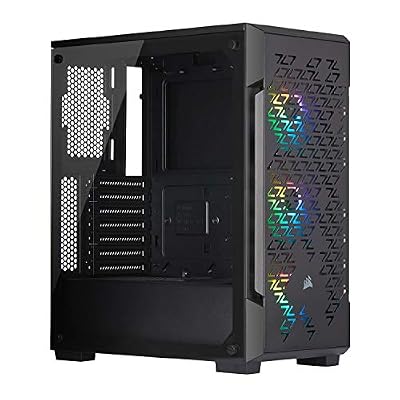
Corsair iCUE 220T RGB Airflow Tempered Glass Mid-Tower Smart ATX Case - High Airflow - Three Included SP120 RGB PRO Fans - Black


As an Amazon Associate we earn from qualifying purchases. Product prices and availability are accurate as of the date/time indicated.
The Corsair iCUE 220T RGB Airflow is the RGB airflow pick. It is a black mid-tower ATX case with a high-airflow front panel, a tempered-glass side panel to show off your build, and bundled iCUE RGB fans for coordinated lighting out of the box. At around $180 it delivers a polished, RGB-ready black chassis tied into Corsair’s iCUE ecosystem.
This is the case for a builder who wants airflow and RGB in a sleek black tower without assembling the lighting piecemeal. The high-airflow front feeds cool air to your components, the tempered-glass panel showcases the interior and the included iCUE fans, and the black finish keeps it understated despite the lighting. For a mainstream ATX build that wants strong airflow, a glass showcase and ready-to-go RGB in black, the 220T Airflow is a well-rounded, popular choice.
Pros: Black mid-tower, high-airflow front, tempered glass, bundled iCUE RGB fans.
Cons: Pricier than plain airflow cases; RGB value depends on iCUE use.
3. Corsair Crystal Series 680X RGB Dual-Chamber ATX Case (Black)

CORSAIR iCUE Link 3500X RGB Mid-Tower ATX PC Case – Panoramic Tempered Glass – Reverse Connection Motherboard Compatible – 3X CORSAIR iCUE Link RX120 RGB Fans Included – Black


As an Amazon Associate we earn from qualifying purchases. Product prices and availability are accurate as of the date/time indicated.
The Corsair Crystal 680X RGB is the dual-chamber showcase pick. It is a premium black ATX case with a dual-chamber layout that separates the motherboard area from the PSU and drives, wrapped in expansive tempered glass on the front and side with bundled RGB fans. At around $275 it is one of the more premium options here, built to display a high-end build beautifully.
This is the case for a builder who wants a striking, glass-heavy black showcase with excellent thermals. The dual-chamber design hides cables and the PSU in a separate compartment for an exceptionally clean main chamber, the high-airflow layout and included RGB fans support strong cooling, and the wraparound glass makes the most of the view. For a premium black case that doubles as a centrepiece for a serious build, the Crystal 680X is a standout choice.
Pros: Premium black dual-chamber, expansive tempered glass, clean cable hiding, bundled RGB.
Cons: Large footprint and premium price; heavy with all the glass.
4. HYTE Y70 Touch Infinite Black Gaming PC Case with 2.5K LCD

HYTE Y70 Touch Infinite Modern Aesthetic Gaming PC Case - Integrated 2.5K LCD Touchscreen Screen Display - Dual Chamber ATX Desktop Chassis - 10 Fan Capacity - Luxury PCIe 4.0 Riser Cable - Snow White


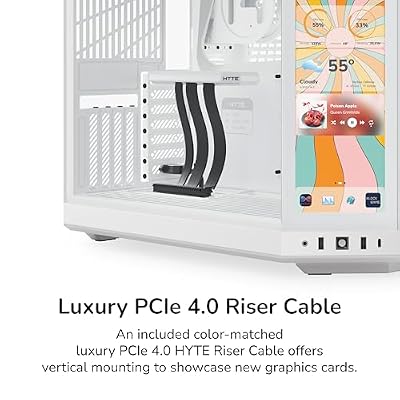


As an Amazon Associate we earn from qualifying purchases. Product prices and availability are accurate as of the date/time indicated.
The HYTE Y70 Touch Infinite is the premium showpiece pick of this list and the most distinctive case here. It is a modern black gaming chassis with a panoramic glass design and, most notably, a large integrated 2.5K LCD touch screen built into the front, turning the case itself into an interactive display. At around $350 it is the most expensive option, and the screen is the reason why.
This is the case for the enthusiast who wants a true showpiece build and a black chassis unlike anything else on a desk. The integrated 2.5K touch screen can display system stats, artwork or animations, the panoramic glass shows off the interior dramatically, and the modern black aesthetic is sleek and premium. It demands a higher budget and careful component planning around the screen, but for a head-turning, screen-equipped black showpiece, the Y70 Touch Infinite is in a class of its own here.
Pros: Striking black showpiece, integrated 2.5K LCD touch screen, panoramic glass, premium feel.
Cons: Highest price here; the screen adds cost and build complexity.
5. Fractal Design Focus G Black Mid-Tower ATX Case, High Airflow


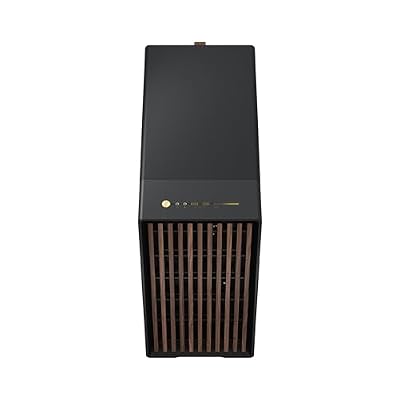


As an Amazon Associate we earn from qualifying purchases. Product prices and availability are accurate as of the date/time indicated.
The Fractal Design Focus G is the budget airflow pick. It is a black mid-tower ATX case with a high-airflow design, a clean Fractal aesthetic, a side window, and two 120mm fans included out of the box. At around $60 it is one of the most affordable airflow-focused black cases here and a long-standing value favorite from a respected case maker.
This is the case for a builder who wants solid airflow and Fractal’s tidy, understated black styling without spending much. The high-airflow front and included 120mm fans give a cooling head start, the ATX layout supports standard builds, and the side window offers a peek inside without premium glass pricing. It skips RGB and luxury touches, but for an affordable, well-built black airflow tower that gets the fundamentals right, the Focus G is an easy recommendation.
Pros: Affordable black airflow mid-tower, two 120mm fans included, clean Fractal styling.
Cons: Side window rather than full glass; no RGB or premium extras.
6. NZXT H6 Flow Compact Dual-Chamber Mid-Tower Airflow Case (Black)

NZXT H6 Flow - Compact Dual-Chamber ATX PC Case - Black | Compact dual-chamber ATX case with panoramic glass and 3 included 120mm fans. Airflow-optimized for clean, cool builds.


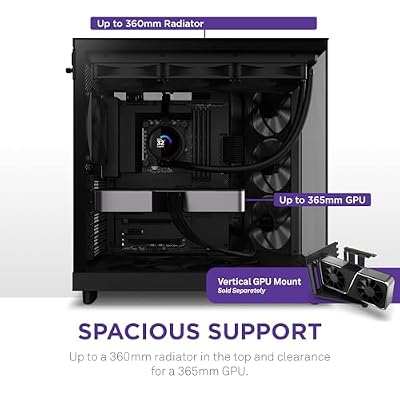


As an Amazon Associate we earn from qualifying purchases. Product prices and availability are accurate as of the date/time indicated.
Rounding out the list is the NZXT H6 Flow, the dual-chamber airflow value pick. It is a compact black mid-tower with a dual-chamber layout and a panoramic glass corner that shows off the build from two sides, paired with a perforated front for strong airflow. At around $90 it brings a modern dual-chamber design and NZXT’s clean aesthetic at a sensible mid-range price.
This is the case for a builder who wants a contemporary, airflow-focused black chassis with showcase looks without paying premium-tier money. The dual-chamber layout tidies cables and the PSU into a separate area for a clean main compartment, the perforated front feeds plenty of cool air, and the panoramic glass corner gives a modern two-sided view. For a value-conscious black case that blends strong airflow with a stylish dual-chamber design, the H6 Flow is a smart, well-priced choice to round out the list.
Pros: Black dual-chamber, panoramic glass corner, strong airflow, modern NZXT styling, good value.
Cons: Compact dual-chamber limits some large radiators; glass shows dust.
How to Choose a Black PC Case
Choosing a black PC case starts with form factor and motherboard support, because the case has to fit your hardware. A compact micro-ATX case like the Cooler Master Q300L suits small mATX builds and tight desks, while a mid-tower ATX case like the Corsair, Fractal and NZXT options here accepts standard ATX boards, larger coolers and longer GPUs. Confirm your motherboard size, GPU length and cooler height fit the case’s clearances before buying — a beautiful black case is no good if your parts do not fit.
Airflow and cooling are the next priority, since they decide how well your components run. Look for a high-airflow front (perforated or mesh) and included fans to get a cooling head start, as on the Fractal Focus G, NZXT H6 Flow and Corsair 220T Airflow. Dual-chamber designs like the Corsair 680X and NZXT H6 Flow also help by separating the PSU and drives from the main chamber, improving both airflow and tidiness. If you run hot components, prioritise mesh and fan support over a fully glass front.
Aesthetics are central to a black build, and there is more to it than the colour. Decide how much you want to show off the interior: a tempered-glass panel (the Corsair and HYTE cases) or a panoramic glass corner (the NZXT H6 Flow) showcases your build, while a side window (the Fractal Focus G) offers a more modest peek. Consider whether you want bundled RGB, as on the Corsair cases, or a clean blackout look, and remember a black finish hides dust and cable shadows well for an understated result.
Finally, weigh premium features and budget together. Most builders are well served by an affordable-to-mid-range black case that nails airflow and fit, like the Q300L, Focus G or H6 Flow. Showpiece features — expansive glass on the Crystal 680X, or the integrated 2.5K touch screen on the HYTE Y70 — add real wow factor but raise the price and, with the screen, the build complexity. Set your form factor, prioritise airflow and the right clearances, decide how much glass and RGB you want, and pick the black case on this list that fits your build and budget.
Frequently Asked Questions
Are black PC cases better at hiding dust and cables?
A black finish does tend to hide dust, fingerprints and cable shadows better than light or white cases, which keeps a build looking clean for longer with less visible maintenance. It also pairs with any component colour. That said, glass panels on black cases still show dust on the glass itself, so regular cleaning helps — but overall, black is a forgiving, low-maintenance choice aesthetically.
Do I need a glass side panel on a black case?
Only if you want to show off the interior. A tempered-glass panel, like those on the Corsair 220T and Crystal 680X or the HYTE Y70’s panoramic glass, displays your components and any RGB beautifully. If you prefer a clean, stealthy blackout look or want to prioritise airflow, a solid or mesh panel (or a modest side window like the Fractal Focus G) is perfectly fine and often cheaper.
What size black case should I buy?
Match the case to your motherboard and components. A compact micro-ATX case like the Cooler Master Q300L suits small builds and tight spaces, while a mid-tower ATX case like the Corsair, Fractal or NZXT options accepts standard ATX boards, larger coolers and longer GPUs with more room to build. Always check the GPU length, cooler height and motherboard size against the case’s stated clearances before buying.
Is the HYTE Y70’s built-in screen worth it?
It depends on how much you value a showpiece build. The HYTE Y70 Touch Infinite’s integrated 2.5K LCD touch screen turns the case into an interactive display for system stats, artwork or animations, which is genuinely striking. It also raises the price to around $350 and adds some build complexity around the screen. For most builders a standard glass case is plenty; for an enthusiast wanting a head-turning centrepiece, the screen can be worth it.
Related Guides
- Best PC Cases
- Best White PC Cases
- Best Power Supplies
- Best CPU Coolers
- Best Case Fans for Airflow
- Best Gaming PC Builds
Affiliate Disclosure: As an Amazon Associate, we earn from qualifying purchases. If you click a link and make a purchase, we may earn a small commission at no extra cost to you. Prices and availability are accurate as of publication and may change.
Ready to decide? Our #1 pick for 2026 is the Cooler Master MasterBox Q300L.
Live price & availability on Amazon.


