

The Elgato Prompter is a desktop teleprompter with a built-in screen, aimed at streamers and YouTubers who want to read scripts while looking straight at the camera. It works with any camera mounted in front of it, uses its own built-in display rather than relying on a phone or external screen, and is controlled entirely through software. Priced around $240 and with more than 1,230 reviews, it has become a popular tool in the creator-hardware space. This Elgato Prompter review covers the design, software, performance and value.
- Elgato Prompter at a Glance
- Type, Layout and Macro Capabilities
- Software, Profiles and App Integrations
- Build Quality and Design
- Performance in Streaming/Productivity Workflows
- Who Is the Elgato Prompter For?
- Pros and Cons
- Is the Elgato Prompter Worth It?
- Frequently Asked Questions
- More Streaming Gear Reviews
- Related Articles
- Related Articles

Elgato Prompter, Teleprompter with Built-in Screen | Drag-and-drop display, Supports DSLR, webcam, smartphone, Read chat or scripts, Works with Mac, PC, Stream Deck






As an Amazon Associate we earn from qualifying purchases. Product prices and availability are accurate as of the date/time indicated.
🛒 Best Price Today on Amazon
Prime members get fast, free shipping on everything above, plus member-only deals. New members get a 30-day free trial — cancel anytime.
As an Amazon Associate we earn from qualifying purchases.




Elgato Prompter at a Glance
| Component | Specification |
|---|---|
| Type | Desktop teleprompter with built-in screen |
| Keys / dials / strip | Software-controlled scrolling and playback |
| Connection | USB-C to host PC |
| Software | Elgato Prompter software (Windows, macOS) |
| Customisation | Scroll speed, font size, mirroring, scripts and slides |
| Form factor | Compact prompter unit with camera mount |
| Mount / stand | Desk stand; camera mounts via included plate |
| Compatibility | Works with any DSLR, mirrorless or webcam |
| Price | Around $240 |
Type, Layout and Macro Capabilities
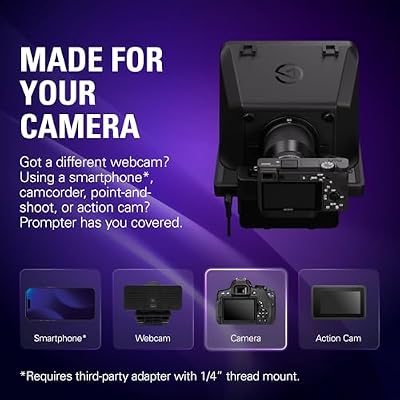
A teleprompter solves a specific problem: it lets a presenter read prepared text while appearing to look directly at the audience. The Elgato Prompter handles this with its own built-in screen and a beam-splitter glass, so the camera behind sees through the glass to the presenter, while the presenter sees the reflected text. Crucially, because the screen is built in, there is no need to balance a phone or external tablet on top of the prompter — the unit is self-contained. It works with any DSLR, mirrorless camera or webcam mounted on its included plate, which makes it usable across a wide range of streaming and YouTube setups. Combined with a Stream Deck nearby, the Prompter can be cued and controlled without ever breaking eye contact with the camera.
Software, Profiles and App Integrations
The Elgato Prompter software is the other half of the product. It runs on Windows and macOS, lets users load scripts, set scroll speed and font size, and supports mirroring so the text reads correctly through the beam-splitter. The software also doubles as a slide and image display, so creators can show themselves notes, prompts or visuals in place of a script. Stream Deck integration is the obvious complement — start scroll, pause, jump section and load a different script can all be mapped to physical buttons. For YouTubers who script their videos and for streamers who run scripted segments, the integration removes a lot of friction.
Script formatting tools in the app handle common writing conventions automatically — pause markers, emphasised words, and section breaks all behave the way a presenter expects, which keeps the on-screen text easy to read at glance speed. Multiple scripts can be loaded and switched between during a session, which is useful for creators who film several short videos back-to-back without rewriting the prompter contents each time.
Build Quality and Design
The Prompter is a well-engineered piece of kit. The frame is sturdy, the beam-splitter glass is clear and properly aligned, the built-in screen is bright enough to read in normal room lighting, and the camera mount accommodates a variety of camera sizes. The included desk stand is stable. Because the unit is self-contained, setup is much faster than with a traditional phone-based prompter — there is no app, no balancing act, no fragile mount. The single USB-C connection to the host PC keeps cabling tidy. It is built to live on a creator desk and look the part.
The beam-splitter glass is the heart of any prompter and Elgato’s implementation is calibrated carefully. It is angled at the geometry that produces a clear reading reflection for the presenter while passing a clean image through to the camera behind, and it is treated to minimise stray reflections of the room. The bezel that surrounds the glass is matte black so the camera does not pick up frame edges, and the rear of the unit has clearance for a typical DSLR lens to sit close to the glass for the best optical result.
Performance in Streaming/Productivity Workflows
In use the Elgato Prompter does what it is supposed to do without drama. Text reads clearly through the glass, the scroll speed is easy to tune, and the camera sees a clean image without prompter glare. For YouTubers who script their videos, the difference between reading a prompter and remembering lines is enormous — production speed rises and delivery becomes more natural. For streamers who run podcast-style or interview segments, the ability to display structured notes, talking points or images keeps the show on track. Stream Deck integration ties it cleanly into the rest of an Elgato setup.
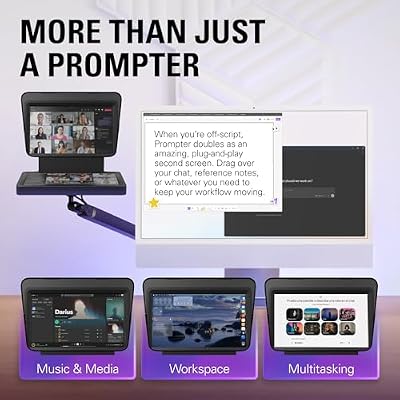
An underrated feature is the ability to send any image to the prompter screen — not just scrolling text. That makes the Prompter useful as a discreet on-camera teleprompt for visual references, brand colour cards, headshot framing guides or even a small chat window. For interview shows, the host can have notes and questions in front of them while looking directly at the camera, which transforms the feel of the segment without requiring the guest to know anything has changed.
Who Is the Elgato Prompter For?
The Prompter is for the creator who scripts. If you record YouTube videos to a script, run scripted streaming segments, host interviews with prepared questions or appear on camera in a structured talking-head format, this is built for you. It is also useful for remote workers and educators who deliver scripted presentations to camera. It is less suited to creators whose content is purely conversational and unscripted, who do not need a prompter at all. For the scripted-content niche, it is a serious upgrade over phone-based prompters.
Pros and Cons
Pros: Self-contained design with built-in screen; works with any DSLR, mirrorless or webcam; clear beam-splitter glass; capable software with script and slide support; Stream Deck integration; sturdy build.
Cons: Premium price for a niche tool; only useful to creators who script their content; needs desk space in front of the camera.
Is the Elgato Prompter Worth It?
At around $240 the Elgato Prompter is worth it for the scripted creator. It removes the friction of phone-based prompters, integrates with the rest of an Elgato setup and is built to a serious standard. For YouTubers, scripted streamers and on-camera presenters it can pay for itself in faster recording and smoother delivery. For conversational creators it is hardware they will not use. For the niche it targets, it is a clear recommendation. Buyers building the wider creator desk should also see our Intel Core Ultra laptop guide guide for the kind of PC and our best OLED gaming laptops guide for high-fidelity creator displays.
Frequently Asked Questions
What does the Elgato Prompter do?
It is a desktop teleprompter with its own built-in screen, so a presenter can read scripts while looking directly at the camera mounted behind a beam-splitter glass. It works with any DSLR, mirrorless or webcam.
Does the Elgato Prompter need a phone?
No. Unlike traditional prompters, the Elgato Prompter has its own built-in screen, so there is no need to balance a phone or external tablet on top.
Is the Elgato Prompter compatible with Stream Deck?
Yes. The Prompter software is designed to be controlled from a Stream Deck, so scroll, pause and section navigation can be mapped to physical keys.
Is the Elgato Prompter worth it for YouTubers?
Yes, for scripted YouTubers. Reading a prompter instead of memorising lines makes recording faster and delivery more natural. It is less useful for purely conversational creators.
More Streaming Gear Reviews
- Elgato Stream Deck MK.2 White Review
- Elgato Stream Deck MK.2 Review (15 LCD Keys)
- Elgato Stream Deck XL Review (32 LCD Keys)
- Elgato Stream Deck Mini Review (6 LCD Keys)
- Elgato Stream Deck + Review (Touch Strip + Dials)
- Elgato Stream Deck + White Review
- Elgato Stream Deck Pedal Review (Foot Switch)
- Elgato Key Light Review (Pro Studio Light)
Affiliate Disclosure: As an Amazon Associate, we earn from qualifying purchases. If you click a link and make a purchase, we may earn a small commission at no extra cost to you. Prices and availability are accurate as of publication and may change.
Related Articles
Looking for more on this topic? Browse the hand-picked guides below — each one applies the same scoring rubric used in this review.










