

The Elgato Stream Deck MK.2 is the flagship 15-key version of the controller that defined a category. It places fifteen customisable LCD keys in front of you, each one driving any action you can build in the free Stream Deck software, from launching scenes in OBS to firing macros in your creative apps. Priced around $135 and backed by a vast user base of more than 10,000 reviews, it has become the default reference for stream-control hardware. This Elgato Stream Deck MK.2 review covers the layout, software, build and value.
- Elgato Stream Deck MK.2 at a Glance
- Type, Layout and Macro Capabilities
- Software, Profiles and App Integrations
- Build Quality and Design
- Performance in Streaming/Productivity Workflows
- Who Is the Elgato Stream Deck MK.2 For?
- Pros and Cons
- Is the Elgato Stream Deck MK.2 Worth It?
- Frequently Asked Questions
- More Streaming Gear Reviews
- Related Articles
- Related Articles
- Related Guides

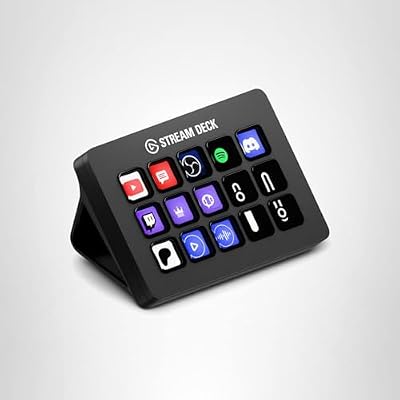
Elgato Stream Deck MK.2 Studio Controller, 15 Macro Keys | Trigger actions in OBS, Twitch, YouTube and more, Visual feedback, Hundreds of plugins, Works with Mac and PC


As an Amazon Associate we earn from qualifying purchases. Product prices and availability are accurate as of the date/time indicated.
🛒 Best Price Today on Amazon
Prime members get fast, free shipping on everything above, plus member-only deals. New members get a 30-day free trial — cancel anytime.
As an Amazon Associate we earn from qualifying purchases.




Elgato Stream Deck MK.2 at a Glance
| Component | Specification |
|---|---|
| Type | LCD-key stream controller |
| Keys / dials / strip | 15 customisable LCD keys |
| Connection | USB-C (detachable cable) |
| Software | Stream Deck software (free, Windows and macOS) |
| Customisation | Profiles, multi-actions, folders, plugin marketplace |
| Form factor | Compact desk unit |
| Mount / stand | Detachable magnetic stand with adjustable angle |
| Compatibility | Windows and macOS; OBS, Streamlabs, Twitch, YouTube, Discord and many more |
| Price | Around $135 |
Type, Layout and Macro Capabilities
The MK.2 sits in the middle of the Stream Deck family: it is the original 15-key layout, the size that most creators settle on after using the smaller Mini or the larger XL. Fifteen keys is a deliberate sweet spot — large enough to host a real production setup across OBS scenes, audio toggles, app launchers and chat tools, but small enough to sit beside a keyboard without dominating the desk. Each key is a small LCD that shows whatever icon you assign to it, so the controller never feels like a generic macropad — it feels like a custom-built console for your workflow. Multi-actions chain commands together with a single press, folders let you nest deeper layers behind a single key, and Smart Profiles can swap the entire layout when you switch focus between OBS, your photo editor or your DAW. That depth of customisation is the reason the MK.2 has become a reference product. For users planning a longer creator setup, see our best RTX 5070 gaming laptops coverage for the machine behind the controller.
Software, Profiles and App Integrations
The Stream Deck software is the real engine here and it remains free. Elgato has built a deep plugin marketplace around the platform, with first-party integrations for OBS, Streamlabs, Twitch, YouTube, Discord and a long list of creative apps, plus third-party plugins for everything from Spotify and Philips Hue to Home Assistant. You can assign system actions like opening apps, websites and folders, run hotkey macros into any program, and combine them into multi-actions with timed delays. Profiles let the same keys do different things in different apps, and Smart Profiles can switch automatically. The MK.2 is fully supported on Windows and macOS, with regular firmware updates.
Build Quality and Design
The MK.2 is a tidy, well-finished desk object. The frame is matte plastic, the keys have a positive click without being noisy, and the LCD panels are bright enough to read in normal room lighting. Elgato uses a detachable USB-C cable on this revision, which is a genuine improvement over the older fixed-cable model — it makes the unit easier to transport and cheaper to repair. The magnetic stand clips on and off and supports a couple of angles, so the controller can sit upright on the desk or lie flatter to slide under a monitor arm. It is a practical, neutral design that fits any setup.
Long-term ownership reports tend to focus on a couple of details. The LCDs are well-protected behind the soft plastic key caps, which take fingerprints but wipe clean easily and do not scratch under normal use. The stand’s hinge holds its angle reliably without sagging over time. The base of the unit is grippy enough to stay put on a wooden desk under firm keypresses, and light enough to move around with one hand when the setup changes. These are small things individually, but they add up to a controller that feels engineered to live on a desk for years rather than to look good in a launch photo.
Performance in Streaming/Productivity Workflows
Where the MK.2 earns its place is in everyday use. In a streaming context, you press one key to switch scene, another to mute the microphone, a third to fire a sound effect or trigger a chat command — all without alt-tabbing away from the game. In productivity, the same hardware turns into a launcher: keys for your apps, folders for your projects, macros for the multi-step actions you do every day. The plugin ecosystem means you rarely have to script anything by hand. The combination of fifteen keys and unlimited folders means even a heavy creator setup fits comfortably, and switching profiles between contexts is instant.
The benefit becomes more obvious the longer you use the deck. Actions that used to be three or four clicks deep into a menu become a single physical press. Muscle memory builds quickly for the top-row keys, so you stop looking at the LCDs at all for your most-used actions and use them more like a tactile keyboard than a screen. For users who already own a Stream Deck Pedal or Stream Deck +, the MK.2 slots in as the primary surface with the others handling specialist tasks — the platform is genuinely designed around mixing hardware to suit the workflow.
Who Is the Elgato Stream Deck MK.2 For?
The MK.2 is for the creator who has outgrown the 6-key Mini and is ready for a full production controller, but does not need the 32 keys of the XL. If you stream, podcast or run a multi-app creative workflow and want one device that consolidates scenes, audio, hotkeys and shortcuts under physical buttons, this is squarely the model to choose. It is also a strong productivity tool for power users who want a custom launcher beside their keyboard. It is less suited to buyers who are sure they only need a handful of buttons — the Mini is cheaper — or to creators running so many controls that they want the XL’s bigger surface. For most people, the MK.2 is the right Stream Deck.
Pros and Cons
Pros: Fifteen-key sweet-spot layout; deep, free Stream Deck software; large plugin marketplace; detachable USB-C cable; tidy build with adjustable magnetic stand; huge user base of over 10,000 reviews.
Cons: Premium price for a macropad-style device; competing budget LCD-key controllers exist; Windows and macOS only, no native Linux client.
Is the Elgato Stream Deck MK.2 Worth It?
At around $135 the Elgato Stream Deck MK.2 is the default recommendation for anyone who wants a serious LCD-key controller. The hardware is well-built, the software platform is mature and free, and the plugin marketplace makes it useful far beyond streaming. The price sits above generic macropads, but the depth of integration and the size of the user community are what you pay for. For a streamer, podcaster or creator who wants one controller that consolidates a full production setup, it earns a clear recommendation. Productivity users who want a faster way to drive their daily apps will get just as much out of it, and the wider creator-PC context in our Intel Core Ultra laptop guide gives a sense of the machines these decks usually sit alongside.
Frequently Asked Questions
Is the Elgato Stream Deck MK.2 worth it for streaming?
Yes. Fifteen customisable LCD keys, deep OBS and Streamlabs integration, and the ability to nest folders and multi-actions make it a strong default choice for a streaming control surface.
How many keys does the Stream Deck MK.2 have?
It has fifteen customisable LCD keys. Folders let you nest additional layers of buttons behind any key, so the effective number of available actions is much larger.
Does the Stream Deck MK.2 work on macOS?
Yes. The Stream Deck software is supported on both Windows and macOS, with the same plugin marketplace and integrations on each platform.
What is the difference between the Stream Deck MK.2 and the original?
The MK.2 keeps the 15-key layout but adds a detachable USB-C cable and a refreshed magnetic stand. The software platform and key behaviour are the same.
More Streaming Gear Reviews
- Elgato Stream Deck XL Review (32 LCD Keys)
- Elgato Stream Deck Mini Review (6 LCD Keys)
- Elgato Stream Deck + Review (Touch Strip + Dials)
- Elgato Stream Deck + White Review
- Elgato Stream Deck Pedal Review (Foot Switch)
- Elgato Key Light Review (Pro Studio Light)
- Logitech for Creators Litra Glow Review
- UBeesize 10-inch Key Light for Streaming Review
Affiliate Disclosure: As an Amazon Associate, we earn from qualifying purchases. If you click a link and make a purchase, we may earn a small commission at no extra cost to you. Prices and availability are accurate as of publication and may change.
Related Articles
Looking for more on this topic? Browse the hand-picked guides below — each one applies the same scoring rubric used in this review.










