

- Top Pick: WIWB Gaming PC Desktop Computer, GeForce RTX 3050 8GB GDDR6, Ryzen 7 4700LE
- Best Value: ACEMAGICIAN S3A Gaming Mini PC, Ryzen 7 H 255 (Up to 4.9GHz, 8C/16T), Radeon 780M Graphics, 16GB RAM, 512GB PCIe4.0 SSD, Mini Desktop Computer for Content Creation, Programming, Gaming & Home Office
- Premium Choice: TEAMGROUP T-Force XTREEM DDR5 Ram 48GB (2x24GB) 7600MHz PC5-60800 CL36 M-DIE Desktop Memory Module Ram for Intel XMP 3.0 & AMD Expo Compatible Pink FFPD548G7600HC36EDC01
Content creation is one of the most memory-hungry things you can do on a computer. A 4K video timeline with multiple layers, a 3D scene packed with high-resolution textures, a stack of large image files in an editor, or a browser full of references beside your render — every one of these eats RAM, and when you run short the whole system slows to a crawl as it swaps to disk. That is why creators prioritise capacity first, then speed, then the reliability of running a matched dual-channel kit. This guide rounds up the best RAM for content creation in 2026, focused on higher-capacity DDR4 kits that keep large creative projects running smoothly.
- Best RAM for Content Creation at a Glance
- 1. Crucial 64GB DDR4 RAM Kit (2x32GB) 3200MHz Laptop Memory, SODIMM
- 2. G.SKILL Ripjaws V Series DDR4 32GB (2x16GB) 3200MT/s CL16 (XMP)
- 3. Corsair Vengeance RGB Pro 32GB (2x16GB) DDR4 3200 C16 Desktop Memory
- 4. Corsair Vengeance LPX DDR4 32GB (2x16GB) up to 3200MHz CL16
- 5. Corsair Vengeance LPX DDR4 16GB (2x8GB) 3200MHz CL16 Memory
- 6. Corsair Vengeance LPX DDR4 16GB (2x8GB) 3000MHz CL15 Memory
- How to Choose RAM for Content Creation
- Frequently Asked Questions
- Related Guides
- Related Articles
- Related Guides
Our picks were chosen on what genuinely helps creative work: total capacity for large timelines and scenes, speed and dual-channel bandwidth to feed the CPU during exports and renders, and value and reliability for long working sessions. We have avoided quoting invented benchmark numbers — instead we explain where each kit fits and who it is for, with prices from around $119 up to around $419. The list spans value 16GB kits for lighter creation, a high-capacity 64GB option for heavy multitasking, and a laptop-specific kit for creators who edit on a notebook. Below is an at-a-glance comparison of all six, then a closer look at each and a buyer’s guide built around capacity, speed and dual-channel configuration.
As an Amazon Associate we earn from qualifying purchases at no extra cost to you.





🛒 Best Price Today on Amazon
Prime members get fast, free shipping on everything above, plus member-only deals. New members get a 30-day free trial — cancel anytime.
Best RAM for Content Creation at a Glance
| Memory Kit | Best For | Standout Spec | Approx Price |
|---|---|---|---|
| Crucial 64GB DDR4 3200 (2x32GB, SODIMM) | Heavy laptop creation | 64GB total, laptop SODIMM | around $419 |
| G.SKILL Ripjaws V 32GB 3200 CL16 (XMP) | Best desktop creation default | 32GB, CL16, XMP | around $240 |
| Corsair Vengeance RGB Pro 32GB 3200 C16 | 32GB with RGB build | 32GB, CL16, RGB | around $230 |
| Corsair Vengeance LPX 32GB 3200 (2x16GB) | Low-profile 32GB desktop | 32GB, low-profile LPX | around $230 |
| Corsair Vengeance LPX 16GB 3200 CL16 | Entry creation / dual-screen edit | 16GB, CL16, low profile | around $119 |
| Corsair Vengeance LPX 16GB 3000 CL15 | Budget starter capacity | 16GB, 3000MHz, low profile | around $119 |
1. Crucial 64GB DDR4 RAM Kit (2x32GB) 3200MHz Laptop Memory, SODIMM
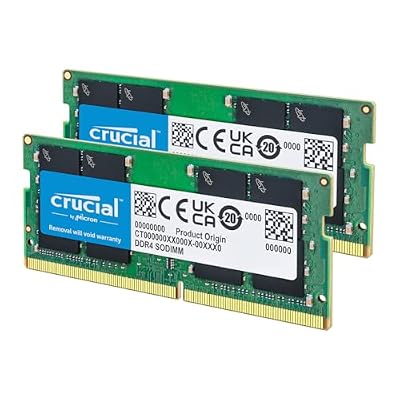
Crucial 64GB DDR4 RAM Kit (2x32GB), 3200MHz (PC4-25600) CL22 Laptop Memory, SODIMM 260-Pin, Downclockable to 2933/2666MHz, Compatible with 13th Gen Intel Core and AMD Ryzen 7000 - CT2K32G4SFD832A


As an Amazon Associate we earn from qualifying purchases. Product prices and availability are accurate as of the date/time indicated.
The Crucial 64GB DDR4-3200 kit is the heavy-creation pick for laptop users, and its standout is sheer capacity: 64GB total across two 32GB SODIMM modules. For content creation that much memory is genuinely useful — it lets a laptop hold large 4K timelines, dense 3D scenes and stacks of high-resolution assets in RAM at once without swapping to disk. At around $419 it is the most expensive kit here, and it is important to note these are laptop (SODIMM) modules, not desktop DIMMs.
This is the kit for the mobile creator pushing a capable laptop hard — a video editor, 3D artist or photographer who works on the move and keeps demanding projects open. The 64GB capacity is the highest on this list and provides huge headroom for memory-hungry creative apps and aggressive multitasking, the 3200MHz speed feeds the CPU well, and Crucial’s reputation for compatibility and reliability adds peace of mind. Just confirm your laptop accepts 64GB and uses SODIMM memory before buying — this is the right answer for serious mobile creation, not for a desktop build.
Pros: Huge 64GB capacity for heavy projects, reliable Crucial SODIMMs, ideal for capable laptops.
Cons: Laptop SODIMM kit, not for desktops; highest price here and overkill for light work.
2. G.SKILL Ripjaws V Series DDR4 32GB (2x16GB) 3200MT/s CL16 (XMP)

G.SKILL RipjawsV Series DDR4 RAM (XMP) 32GB (2x16GB) Up to 3200MT/s* CL16-18-18-38 1.35V Intel AMD Desktop Computer Memory U-DIMM - Black (F4-3200C16D-32GVK)


As an Amazon Associate we earn from qualifying purchases. Product prices and availability are accurate as of the date/time indicated.
The G.SKILL Ripjaws V 32GB kit is the best default for desktop content creation, and it tops this list for good reason. For creators, 32GB is the modern sweet spot — enough to comfortably handle 4K video timelines, moderate 3D scenes and heavy multitasking — and this kit delivers it across two 16GB modules at a tight CL16 timing and 3200MT/s, with XMP for easy one-click setup. At around $240 it pairs the right capacity with proven reliability.
This is the kit for the desktop creator who wants a dependable, high-capacity foundation without overthinking it. The 32GB capacity gives real headroom for editing, rendering and keeping reference apps open alongside your project, the CL16 timing at 3200MT/s feeds the CPU briskly during exports, and the matched dual-channel layout delivers the bandwidth creative apps thrive on. G.SKILL’s strong DDR4 track record and the simple XMP profile make it effortless to run at rated speed. For most desktop content-creation builds, this Ripjaws V kit is the smart, well-priced starting point.
Pros: Ideal 32GB capacity for creation, tight CL16 at 3200MT/s, easy XMP, trusted reliability.
Cons: Plain styling with no RGB; XMP must be enabled in BIOS for full speed.
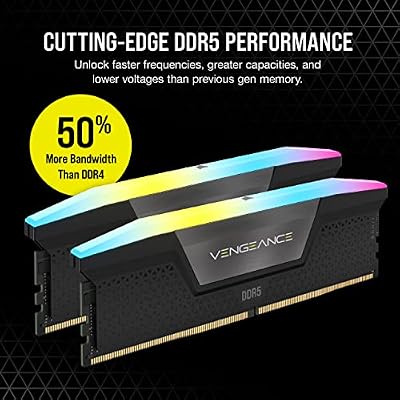
3. Corsair Vengeance RGB Pro 32GB (2x16GB) DDR4 3200 C16 Desktop Memory

CORSAIR Vengeance RGB DDR5 RAM 32GB (2x16GB) Up to 6000MHz CL30-36-36-76 1.40V AMD EXPO Intel XMP Desktop Computer Memory - Gray (CMH32GX5M2B6000Z30K)


As an Amazon Associate we earn from qualifying purchases. Product prices and availability are accurate as of the date/time indicated.
The Corsair Vengeance RGB Pro 32GB kit is the pick for a content-creation build that also wants to look the part. It offers the same creator-friendly 32GB capacity across two 16GB modules at 3200MHz with a tight C16 timing, and adds Corsair’s well-regarded RGB lighting controlled through iCUE. For a creator whose workstation doubles as a showpiece — or who simply enjoys a coordinated build — it pairs the right capacity with style at a competitive price.
This is the kit for the creator who wants a full 32GB for editing and rendering but also values aesthetics in an open or glass-panel case. The 32GB capacity comfortably handles 4K timelines, moderate 3D work and serious multitasking, the CL16 timing at 3200MHz keeps the memory responsive during exports, and the iCUE-controlled RGB lets you match the lighting to the rest of your rig. It delivers identical creative capability to a plain 32GB kit with the bonus of customisable lighting. For a content-creation PC that performs and shows off, this Vengeance RGB Pro kit fits.
Pros: Creator-ready 32GB at CL16 3200MHz, attractive iCUE RGB lighting, strong value.
Cons: RGB adds height that can crowd large coolers; lighting is a cosmetic extra.
4. Corsair Vengeance LPX DDR4 32GB (2x16GB) up to 3200MHz CL16

CORSAIR Vengeance LPX DDR4 RAM 32GB (2x16GB) Up to 3200MHz CL16-20-20-38 1.35V Intel XMP AMD EXPO Computer Memory – Black (CMK32GX4M2E3200C16)


As an Amazon Associate we earn from qualifying purchases. Product prices and availability are accurate as of the date/time indicated.
The Corsair Vengeance LPX 32GB kit is the low-profile pick for desktop creation. It delivers the same desirable 32GB capacity across two 16GB modules at up to 3200MHz with a tight CL16 timing, all in Corsair’s famously slim LPX heat spreaders that clear tall CPU coolers and fit tight cases. At around $230 it is a proven, no-nonsense choice for a creator who values clearance and reliability over lighting.
This is the kit for the creator building in a compact case or running a large air cooler, who wants a full 32GB without RGB getting in the way. The 32GB capacity handles 4K editing, moderate 3D and heavy multitasking with room to spare, the CL16 timing at 3200MHz keeps the system feeding data quickly during renders and exports, and the low-profile LPX design slots in where taller modules will not. It is a long-standing favourite for good reason. For a dependable, space-efficient 32GB creation kit, the Vengeance LPX is an easy recommendation.
Pros: Reliable 32GB at CL16 3200MHz, low-profile LPX clears big coolers, broad compatibility.
Cons: No RGB and plain styling; cosmetic only, performance is unaffected.
5. Corsair Vengeance LPX DDR4 16GB (2x8GB) 3200MHz CL16 Memory

CORSAIR Vengeance DDR5 32GB (2 x 16GB) Up to 6000MHz AMD Intel RAM | Desktop Gaming Memory, AMD EXPO & Intel XMP 3.0 Compatible, CL30, Grey, CMK32GX5M2B6000Z30


As an Amazon Associate we earn from qualifying purchases. Product prices and availability are accurate as of the date/time indicated.
The Corsair Vengeance LPX 16GB kit is the entry creation pick. It pairs a value-friendly 16GB capacity across two 8GB modules with a 3200MHz speed and a tight CL16 timing in the slim, reliable LPX package. At around $119 it is one of the more affordable kits here, and a sensible starting point for lighter creative work or as a second screen’s worth of editing headroom.
This is the kit for the creator just starting out, working with 1080p footage or lighter projects, or building a budget editing PC. The 16GB capacity comfortably covers 1080p timelines, modest photo work and general multitasking, the CL16 timing at 3200MHz keeps things responsive, and the low-profile LPX design fits anywhere. It is honest about its place — heavier 4K and 3D creators will want to step up to 32GB — but for entry-level creation and dual-screen editing on a budget, this Vengeance LPX 16GB kit delivers dependable performance at a fair price, with an easy upgrade path later.
Pros: Affordable 16GB at CL16 3200MHz, low-profile LPX, dependable for lighter creative work.
Cons: 16GB is modest for heavy 4K and 3D; serious creators should consider 32GB+.
6. Corsair Vengeance LPX DDR4 16GB (2x8GB) 3000MHz CL15 Memory

CORSAIR Vengeance RGB DDR5 RAM 32GB (2x16GB) 6400MHz CL36-48-48-104 1.35V AMD EXPO Intel XMP 3.0 Desktop Computer Memory – Gray (CMH32GX5M2B6400Z36)


As an Amazon Associate we earn from qualifying purchases. Product prices and availability are accurate as of the date/time indicated.
Rounding out the list is the Corsair Vengeance LPX 16GB 3000MHz kit, the budget starter pick. It is a 2x8GB dual-channel kit running at 3000MHz with a tight CL15 timing in the slim LPX package, and at around $119 it is among the cheapest ways to get a reliable 16GB of memory into a creation build. It is the entry-level option for creators on the tightest budgets.
This is the kit to choose for a first editing PC, light creative tasks, or as an affordable capacity floor you can build on. The 16GB dual-channel capacity handles 1080p editing, basic photo work and everyday multitasking, the CL15 timing keeps it responsive, and the low-profile LPX design fits any case. At 3000MHz it is a small step below the 3200MHz kits, but the difference is minor for most creative workloads. Be realistic about its limits — demanding 4K and 3D work calls for more memory — but as a budget foundation for lighter creation, it does the job dependably.
Pros: Budget-friendly 16GB, tight CL15 at 3000MHz, low-profile LPX, reliable entry capacity.
Cons: Only 16GB and 3000MHz; built for light creation, not heavy 4K or 3D projects.
How to Choose RAM for Content Creation
For content creation, capacity is the single most important spec, because running out of memory is what brings a creative workstation to its knees. Large 4K timelines, texture-heavy 3D scenes and stacks of big image files all consume RAM, and once you exhaust it the system swaps to disk and slows dramatically. For that reason 32GB — as on the Ripjaws V, the two Vengeance LPX 32GB and the RGB Pro kits here — is the modern sweet spot for most creators, while heavy professionals pushing many large projects benefit from stepping up to 64GB.
Speed and timing come second, feeding the CPU during exports and renders. A kit at 3200MHz with a tight CL16 timing, the configuration shared by most kits on this list, offers an excellent balance of bandwidth and responsiveness for creative workloads on DDR4. Higher capacity matters more than chasing the absolute fastest speed — a larger 3200MHz kit serves a creator better than a smaller, faster one — so prioritise getting enough memory first, then a sensible speed and timing within budget.
Always buy a matched dual-channel kit rather than mixing single modules. Two sticks running in dual channel deliver markedly more bandwidth than one of the same total capacity, and that bandwidth genuinely helps during memory-intensive exports and renders. Matched kits, like every option here, are also tested to run together at their rated speed and timing, which avoids the instability that can come from pairing mismatched modules. It is the simplest way to ensure your creative apps get the throughput they need.
Finally, match the kit to your platform and form factor, and be honest about your workload. Confirm whether you need desktop DIMMs or laptop SODIMM modules — the 64GB Crucial kit is SODIMM for notebooks, not desktops — and remember to enable XMP in the BIOS so kits like the Ripjaws V actually run at their rated speed. Decide whether RGB matters for your build, weigh low-profile clearance if you run a big cooler, and size capacity to your projects: 16GB for light 1080p work, 32GB as the creator default, 64GB for heavy professional use. Pick the kit on this list that fits your machine and your projects.
Frequently Asked Questions
How much RAM do I need for content creation?
For most creators, 32GB is the sweet spot — enough to handle 4K video timelines, moderate 3D scenes and heavy multitasking, which is why kits like the G.SKILL Ripjaws V 32GB lead this list. Lighter 1080p editing and photo work are fine on 16GB, while heavy professionals juggling many large projects benefit from 64GB, as offered by the Crucial laptop kit. Size capacity to the projects you actually work on.
Does RAM speed matter for video editing and rendering?
It helps, but capacity matters more. A 3200MHz kit with a tight CL16 timing — the configuration shared by most kits here — feeds the CPU well during exports and renders and offers a strong balance of bandwidth and responsiveness on DDR4. That said, having enough total memory to hold your project matters far more than chasing the fastest speed, so prioritise capacity, then a sensible speed within budget.
Should I buy a matched kit or add single sticks of RAM?
Always buy a matched dual-channel kit where you can. Two modules running in dual channel deliver markedly more bandwidth than a single stick of the same capacity, which genuinely helps during memory-intensive exports and renders. Matched kits like those here are also tested to run together at their rated speed and timing, avoiding the instability that can come from mixing mismatched modules.
Is the 64GB kit overkill for content creation?
For many creators, yes — 32GB comfortably covers mainstream 4K editing and moderate 3D. The 64GB Crucial kit is aimed at heavy professionals who juggle very large timelines, dense 3D scenes or aggressive multitasking, and specifically at capable laptops, since it uses SODIMM modules. If your projects regularly exhaust 32GB, the extra capacity is worth it; if not, a 32GB kit is the better-value choice.
Related Guides
- Best Content Creation GPUs
- Best RAM for Gaming
- Best DDR4 RAM Kits
- Best Monitors for Content Creation
- Best NVMe SSDs
- Best Gaming PCs
Affiliate Disclosure: As an Amazon Associate, we earn from qualifying purchases. If you click a link and make a purchase, we may earn a small commission at no extra cost to you. Prices and availability are accurate as of publication and may change.










