

The Elgato Stream Deck XL is the pro creator tier of Elgato’s LCD-key platform. Where the 15-key MK.2 covers most streamers, the XL doubles the surface area with 32 customisable LCD keys, aimed at users who want a full production console rather than a compact accessory. Priced around $250 and backed by more than 8,400 reviews, it is the flagship layout in the Stream Deck range. This Elgato Stream Deck XL review covers the layout, software, build and value.
- Elgato Stream Deck XL at a Glance
- Type, Layout and Macro Capabilities
- Software, Profiles and App Integrations
- Build Quality and Design
- Performance in Streaming/Productivity Workflows
- Who Is the Elgato Stream Deck XL For?
- Pros and Cons
- Is the Elgato Stream Deck XL Worth It?
- Frequently Asked Questions
- More Streaming Gear Reviews
- Related Articles
- Related Articles
- Related Guides

Elgato Stream Deck XL Advanced Studio Controller, 32 Keys | Instantly trigger unlimited actions, Powerful integrations, Visual feedback, Custom icon packs, Works with Mac and PC



As an Amazon Associate we earn from qualifying purchases. Product prices and availability are accurate as of the date/time indicated.
🛒 Best Price Today on Amazon
Prime members get fast, free shipping on everything above, plus member-only deals. New members get a 30-day free trial — cancel anytime.
As an Amazon Associate we earn from qualifying purchases.


Elgato Stream Deck XL at a Glance
| Component | Specification |
|---|---|
| Type | LCD-key stream controller (large layout) |
| Keys / dials / strip | 32 customisable LCD keys |
| Connection | USB-C (detachable cable) |
| Software | Stream Deck software (free, Windows and macOS) |
| Customisation | Profiles, multi-actions, folders, plugin marketplace |
| Form factor | Wide desk unit |
| Mount / stand | Detachable adjustable stand |
| Compatibility | Windows and macOS; OBS, Streamlabs, Twitch, YouTube, Discord and many more |
| Price | Around $250 |
Type, Layout and Macro Capabilities
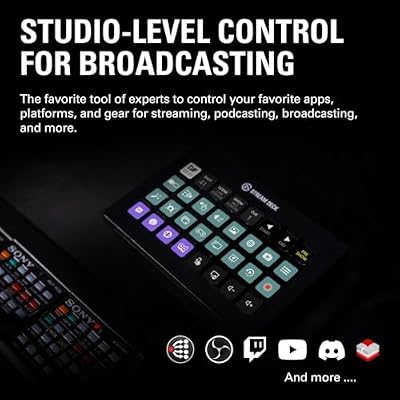
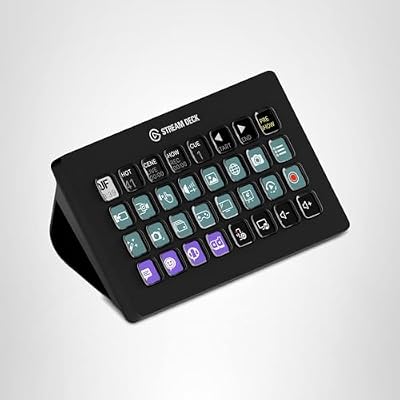
The XL is unmistakable on a desk. Thirty-two LCD keys laid out in an 8×4 grid give you more buttons than most users will ever fill at the top level, but that is the point: it lets advanced creators flatten their workflow. Where MK.2 users frequently rely on folders to keep things organised, XL users can lay out scenes, audio sources, app launchers, hotkeys and macros all on one screen. For a complex stream with many cameras, sources, sound effects and chat commands, that flatness is faster than nesting. Multi-actions, folders and Smart Profiles still work exactly as on the smaller decks, so the XL adds capacity rather than changing how the platform behaves. Combined with a powerful creator PC like those in our best RTX 5070 gaming laptops guide, the XL is a setup designed to scale.
Software, Profiles and App Integrations
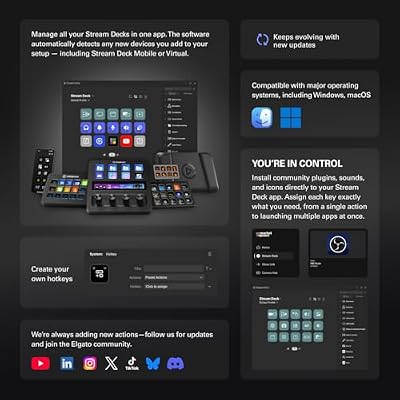
The XL runs the same Stream Deck software as every other model. That means the same deep marketplace of first- and third-party plugins, the same integrations with OBS, Streamlabs, Twitch, YouTube, Discord and a long list of creative apps, and the same multi-action and folder system. Profiles can be tied to specific applications so the keys swap automatically when you alt-tab. The benefit of the XL is purely that every plugin and every action gets more real estate. The platform remains free and well-maintained on Windows and macOS.
Build Quality and Design
Physically the XL is a wider, heavier slab than the MK.2, with the same matte plastic frame and bright LCD keys. The build is solid — it does not slide on the desk under heavy use — and the detachable USB-C cable makes it easy to swap or replace. The included stand props the deck up at a comfortable typing angle. Because the XL takes up more horizontal space, it pairs best with wider desks; on a small setup it can crowd a keyboard, so plan the layout before buying.
The added weight is actually an asset. A wider deck with a lighter chassis would tend to skate around the desk under heavy use, but the XL stays planted even when fired repeatedly during a busy stream. The matte finish hides fingerprints reasonably well and the keys themselves feel identical to those on the smaller decks — the only thing that has scaled with the layout is the count, not the per-key feel. Users who have come from a smaller deck will find the input experience familiar from the first press, which makes the transition to a larger surface much smoother than expected.
Performance in Streaming/Productivity Workflows
The XL shines for users with genuinely busy workflows. A streamer running multiple camera angles, gameplay scenes, sound effects, alerts, chat commands and audio toggles can put nearly everything on the top layer of the deck, with subfolders reserved for occasional actions. Productivity users with many apps and macros benefit similarly — every project, app and shortcut sits in front of you instead of buried two folders deep. Day-to-day, the flatness of the layout reduces context switching, which is the whole point. The trade-off is that planning the layout takes more thought than a 6- or 15-key deck.
Many XL owners report grouping their keys by colour or icon style to make the dense grid easier to scan at a glance. Common patterns include a row of scenes along the top, an audio strip on the side, sound effects in one quadrant and app launchers in another. The investment in layout design pays off because once the muscle memory builds, the XL feels less like an interface and more like an extension of the keyboard, with each region of the grid handling a different category of work.
Who Is the Elgato Stream Deck XL For?
The XL is for the creator who has outgrown the 15-key layout. If you run a multi-camera stream, manage a complex production with many scenes and audio sources, or maintain a productivity workflow with dozens of macros and app shortcuts you want flat rather than nested, the XL is built for you. It is also for hardware-minded users who simply prefer more physical buttons. It is not for beginners — most streamers will be very well served by the MK.2 — and it is overkill for users who only need a handful of buttons. For pro creators and power users, the XL is the model to choose.
Pros and Cons
Pros: Thirty-two LCD keys for a flat, dense layout; same mature Stream Deck software and plugin marketplace; detachable USB-C cable; substantial, stable build; large positive user base of over 8,400 reviews.
Cons: Premium price; large desk footprint may crowd small setups; many users do not need this many keys.
Is the Elgato Stream Deck XL Worth It?
At around $250 the Elgato Stream Deck XL is worth it for advanced creators and pro streamers, not for casual users. Where the MK.2 covers most setups, the XL is for the production where having every control physically present matters more than saving desk space. It is the pro tier of an already mature platform, and it inherits all the strengths of the Stream Deck software. For a busy creator, the flat 32-key layout is a meaningful upgrade. For a typical user, the MK.2 will do the same job for less money. Buyers planning the rest of a high-end creator desk should also look at our best 240Hz gaming laptops guide.
Frequently Asked Questions
How many keys does the Stream Deck XL have?
It has thirty-two customisable LCD keys laid out in an 8×4 grid — more than twice as many as the 15-key MK.2, intended for advanced creators and pro streamers.
Is the Stream Deck XL overkill for most streamers?
For most streamers, yes. The 15-key MK.2 covers typical workflows comfortably. The XL pays off when you run a complex multi-camera production or want every macro physically present.
Does the Stream Deck XL run the same software as smaller decks?
Yes. All Stream Deck models share the same free Stream Deck software, the same plugin marketplace and the same multi-action and folder features.
How big is the Stream Deck XL on a desk?
It is noticeably wider than the 15-key MK.2 and takes up substantial horizontal space. On a small desk it can crowd a keyboard, so it pairs best with wider setups.
More Streaming Gear Reviews
- Elgato Stream Deck Mini Review (6 LCD Keys)
- Elgato Stream Deck + Review (Touch Strip + Dials)
- Elgato Stream Deck + White Review
- Elgato Stream Deck Pedal Review (Foot Switch)
- Elgato Key Light Review (Pro Studio Light)
- Logitech for Creators Litra Glow Review
- UBeesize 10-inch Key Light for Streaming Review
- NiceVeedi 2-Pack LED Studio Light Kit Review
Affiliate Disclosure: As an Amazon Associate, we earn from qualifying purchases. If you click a link and make a purchase, we may earn a small commission at no extra cost to you. Prices and availability are accurate as of publication and may change.
Related Articles
Looking for more on this topic? Browse the hand-picked guides below — each one applies the same scoring rubric used in this review.










