

The Anker PowerConf C200 is a mid-range webcam built around 2K resolution, AI low-light correction, stereo microphones and a physical privacy cover. With more than 9,000 buyer reviews behind it, Anker’s webcam targets the hybrid-work professional and serious home-office user who wants a step above 1080p without paying full 4K money. Priced around $60, it sits in a useful sweet spot. This Anker PowerConf C200 review covers the image quality, microphones, software and value.
- Anker PowerConf C200 at a Glance
- Image Quality at 1080p and 4K
- Frame Rate, Autofocus and Low-Light Performance
- Microphone, Software and Streaming Integration
- Build, Mount and Privacy Features
- Who Is the Anker PowerConf C200 For?
- Pros and Cons
- Is the Anker PowerConf C200 Worth It?
- Frequently Asked Questions
- More Webcam Reviews
- Related Articles
- Related Articles

Anker PowerConf C200 2K Webcam for PC/Laptop/Mac, Low-Light Correction | Conference Microphone, 360° Voice Coverage, Smart Voice Enhancement, Powerful Sound, Desktop PC Speaker, Online Meetings



As an Amazon Associate we earn from qualifying purchases. Product prices and availability are accurate as of the date/time indicated.
🛒 Best Price Today on Amazon
Prime members get fast, free shipping on everything above, plus member-only deals. New members get a 30-day free trial — cancel anytime.
As an Amazon Associate we earn from qualifying purchases.






Anker PowerConf C200 at a Glance
| Component | Specification |
|---|---|
| Resolution | 2K (1440p) |
| Max frame rate | Up to 2K/30fps |
| Field of view | Standard streaming FOV |
| Autofocus | Yes |
| Microphone | Stereo microphones |
| Privacy cover | Included |
| Connection | USB-C |
| Price | Around $60 |
Image Quality at 1080p and 4K
The PowerConf C200 captures 2K (1440p) video, which is the sweet spot between 1080p and 4K — sharper than a typical 1080p webcam without the bandwidth and storage cost of 4K capture. The image is clean and naturally coloured in good light, and AI-driven processing helps maintain a usable picture in less ideal rooms. For most meeting and casual streaming use, the 2K resolution is a more practical real-world upgrade than 4K — viewers see a sharper image without the encoder strain. Buyers who want full 4K should look at the NexiGo N660P Pro or OBSBOT Meet 2. For mainstream streaming and meetings see our best streaming PC builds guide.
Choosing 2K rather than 4K is also a deliberate practical decision for many buyers. 2K capture is recognised cleanly by all major meeting and streaming applications, the file sizes for recorded video are far more manageable than 4K, and the bandwidth required for streaming is in a sensible range for typical home internet connections. 4K capture in a meeting context is often unnecessary because the apps themselves frequently downscale the image to 1080p or lower for transmission anyway — making the higher capture resolution moot for that use case. The C200’s 2K positioning is the practical sweet spot that many buyers will actually benefit from.
Frame Rate, Autofocus and Low-Light Performance
The C200 includes autofocus, which keeps you sharp as you lean toward the screen or pull back. The standout feature is AI low-light correction — Anker’s processing brightens dim scenes and reduces noise in a way that a pure-hardware approach cannot match. It is a meaningful win for buyers working in evening light or in rooms with imperfect lighting, and one of the practical advantages this camera has over older 1080p designs. As with any webcam, a dedicated light from our best key lights for content creators guide produces the best results, but the C200 is more tolerant of imperfect rooms than most rivals.
Microphone, Software and Streaming Integration
The C200 includes stereo microphones, which produce noticeably more natural voice capture than a typical single-mic webcam. They are not a substitute for a dedicated USB microphone — buyers serious about audio should still see our best USB microphones for streaming guide — but they are good enough that the daily meeting user rarely needs an upgrade. Anker provides software for adjustments, the camera connects over USB-C (a useful modernisation over the USB-A norm), and it works as a plug-and-play device on Windows, macOS and Linux. It integrates with Zoom, Microsoft Teams, Google Meet, OBS Studio and the other major meeting and streaming applications without driver hassle.
Reliability across the more than 9,000 customer reviews behind the C200 is strong, and Anker’s long-running brand reputation across consumer electronics is part of what makes this webcam a sensible buy at its price tier. The AnkerWork software is unobtrusive and well-judged: image tuning controls are clear, the AI low-light correction is exposed as a single toggle rather than a complicated set of parameters, and the software does not constantly nag for updates or push other Anker products. For buyers who want a modern mid-range camera from an established consumer-electronics brand, the C200 is a clean pick that does not feel like a corners-cut budget product.
Build, Mount and Privacy Features
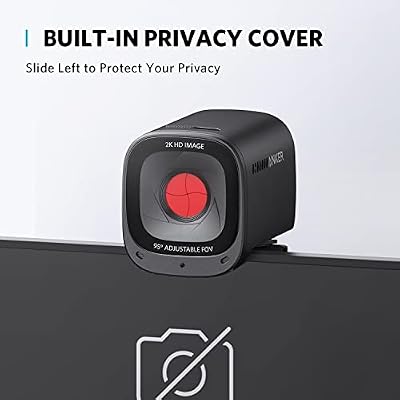
The C200 carries Anker’s tidy, neutrally styled chassis suitable for any office. It clips to monitor bezels and laptop lids and has a tripod thread for desk stands or webcam arms — pair it with picks from our best monitors for streaming guide. A physical privacy cover slides over the lens, which is genuinely useful on a camera intended to live on top of a monitor in a home office. The USB-C connection is a practical detail many older webcams lack and is friendly to modern laptops, and the included cable is generous. Build quality matches what buyers expect from Anker.
Setup is straightforward. Connect the USB-C cable to a free port on a modern laptop or desktop, choose the Anker as camera and microphone in your meeting app, and the camera is ready. AnkerWork software adds adjustments for AI low-light correction strength, image fine-tuning and other controls; the camera is also recognised as a standard UVC device on Windows, macOS and Linux for buyers who prefer no software. Buyers with older PCs that have only USB-A ports can use a USB-C to USB-A adapter without losing functionality, although USB-C remains the cleaner connection for any modern machine. The mount tilts through a useful range and the cable is long enough for typical desk setups.
Who Is the Anker PowerConf C200 For?
The C200 is for the buyer who wants meaningful upgrades over a basic 1080p webcam — sharper 2K image, autofocus, AI low-light correction, stereo audio, USB-C — without paying full 4K prices. If you are a hybrid-work professional, a presenter or a small-business buyer who lives on calls and wants the picture to look better than 1080p without going overboard, the C200 is well judged. It is not for the cheapest budget buyer (the NexiGo N60 will do for less) or the buyer who wants premium 4K features (look at the Brio or OBSBOT Meet 2). For the mid-range buyer, it is a clean pick.
Pros and Cons
Pros: 2K resolution sweet spot; AI low-light correction; autofocus; stereo microphones; USB-C connection; physical privacy cover; clean Anker build; broad app compatibility.
Cons: Capped at 2K/30fps; no 4K mode for buyers who want it; stereo mics still trail a dedicated USB microphone; USB-C cable needed for older USB-A only PCs (an adapter resolves this).
Is the Anker PowerConf C200 Worth It?
At around $60 the Anker PowerConf C200 is a strong mid-range pick. 2K capture, AI low-light correction, autofocus, stereo audio and USB-C connectivity put it ahead of most 1080p cameras and below the cost of full-featured 4K rivals. For the hybrid-work or home-office buyer who wants a clean upgrade without overspending, it earns a recommendation. Buyers building out a streaming setup should also see our best capture cards for streaming guide.
Frequently Asked Questions
Does the Anker PowerConf C200 shoot 2K?
Yes. It captures up to 2K (1440p) resolution, which is sharper than 1080p and a practical sweet spot below 4K for meetings and streaming.
Does the Anker PowerConf C200 use USB-C?
Yes. It connects over USB-C, which is friendly to modern laptops. A USB-C to USB-A adapter resolves compatibility with older ports.
Does the Anker PowerConf C200 have a privacy cover?
Yes. A physical privacy cover slides over the lens, which is useful for any camera that lives permanently on top of a monitor.
Is the Anker PowerConf C200 good for low light?
Yes. AI low-light correction helps brighten dim scenes and reduce noise, although a dedicated light source still produces the best results.
More Webcam Reviews
- Razer Kiyo Streaming Webcam Review (Ring Light)
- EMEET C960 4K Webcam Review
- OBSBOT Meet 2 4K AI Webcam Review
- EMEET Nova 4K Webcam Review
- NexiGo N60 1080P Webcam Review
- NexiGo N660P Pro 4K Webcam Review
- EMEET C960 1080P Webcam Review
- NexiGo N950P Gen 2 4K Zoomable Webcam Review
Affiliate Disclosure: As an Amazon Associate, we earn from qualifying purchases. If you click a link and make a purchase, we may earn a small commission at no extra cost to you. Prices and availability are accurate as of publication and may change.
Related Articles
Looking for more on this topic? Browse the hand-picked guides below — each one applies the same scoring rubric used in this review.










