

- Top Pick: NexiGo N660P Pro 4K Webcam with Distortion-Free Lens, 1080p 60 fps Autofocus USB Streaming Camera, 3DNR, Noise-Canceling Mics & Privacy Cover, Web Cam for Gaming/Live Streaming/PC/Mac/Switch 2, Black
- Best Value: NexiGo N660P Pro 4K Webcam with Distortion-Free Lens, 1080p 60 fps Autofocus USB Streaming Camera, 3DNR, Noise-Canceling Mics & Privacy Cover, Web Cam for Gaming/Live Streaming/PC/Mac/Switch 2, Pink
- Premium Choice: NexiGo N680E Pro 4K Webcam with Ring Light, PDAF Autofocus, 1080p 60FPS, Dual Noise-Canceling Mics, Privacy Shutter, USB Plug-and-Play for Zoom, Teams, Twitch, Google Meet
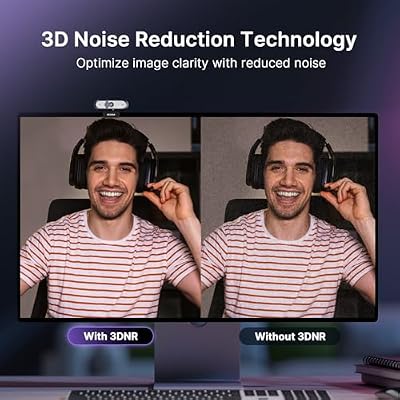
The NexiGo N660P Pro is a streaming-grade 4K webcam that brings 4K UHD video and 1080p/60fps autofocus to a sub-$100 price tier. Priced around $70 and built around a distortion-free lens, it targets the streamer, content creator and serious remote professional who wants a real step up from a basic 1080p webcam without paying flagship money. This NexiGo N660P Pro review covers the image quality, autofocus, microphone, software and value.
- NexiGo N660P Pro at a Glance
- Image Quality at 1080p and 4K
- Frame Rate, Autofocus and Low-Light Performance
- Microphone, Software and Streaming Integration
- Build, Mount and Privacy Features
- Who Is the NexiGo N660P Pro For?
- Pros and Cons
- Is the NexiGo N660P Pro Worth It?
- Frequently Asked Questions
- More Webcam Reviews
- Related Articles
- Related Articles
- Related Guides

NexiGo N660P Pro 4K Webcam with Distortion-Free Lens, 1080p 60 fps Autofocus USB Streaming Camera, 3DNR, Noise-Canceling Mics & Privacy Cover, Web Cam for Gaming/Live Streaming/PC/Mac/Switch 2, Black




As an Amazon Associate we earn from qualifying purchases. Product prices and availability are accurate as of the date/time indicated.
🛒 Best Price Today on Amazon
Prime members get fast, free shipping on everything above, plus member-only deals. New members get a 30-day free trial — cancel anytime.
As an Amazon Associate we earn from qualifying purchases.


NexiGo N660P Pro at a Glance
| Component | Specification |
|---|---|
| Resolution | 4K UHD (3840×2160) |
| Max frame rate | 4K/30fps, 1080p/60fps |
| Field of view | Distortion-free streaming lens |
| Autofocus | Yes |
| Microphone | Built-in stereo microphones |
| Privacy cover | Included |
| Connection | USB-A |
| Price | Around $70 |
Image Quality at 1080p and 4K
The N660P Pro is built around 4K capture, which is the headline feature at this price. At 4K/30fps the picture is genuinely sharp and detailed, with fine textures, hair and clothing patterns rendered cleanly — a clear visible upgrade over any 1080p webcam side by side. For most streamers and creators, however, the more useful mode is 1080p/60fps, because the doubled frame rate produces smooth motion that suits screen-shared streaming and high-refresh viewers. The distortion-free lens is a feature NexiGo emphasises and the effect is noticeable: straight lines stay straight at the edges of the frame, which matters when a bookshelf or window sits in shot. For full streaming setups, see our best streaming PC builds guide.
Colour rendition is one of the camera’s quieter strengths. Skin tones look natural under typical office lighting, white balance shifts handled by the camera are smooth rather than abrupt, and the sensor handles mixed lighting better than most cameras in this price tier. For content creators worried about how their image looks on the recording timeline rather than just in a meeting window, that consistency matters. The distortion-free lens also pays back in practical ways for screen-shared streaming: viewers see a natural-looking shot without the goldfish-bowl effect of cheaper wide-angle webcams.
Frame Rate, Autofocus and Low-Light Performance
The N660P Pro offers a real autofocus system, and that is one of the strongest reasons to choose it over a fixed-focus budget camera. Autofocus tracks you cleanly as you lean forward to demo something or reach for a prop, which is exactly the use case that catches fixed-focus webcams out. The 1080p/60fps mode is the standout for streaming — high-frame-rate capture looks far smoother than the typical 30fps webcam and matches the refresh rates streaming viewers expect. Low-light performance is competent for the class, helped by the larger sensor, although as with every webcam a dedicated light source still produces the best results; pair it with options from our best key lights for content creators guide.
Microphone, Software and Streaming Integration
The N660P Pro includes built-in stereo microphones, which are a step above the typical mono webcam microphone and are usable for casual streams, video meetings and quick recordings. As always, a dedicated USB microphone produces the best results for serious streaming and podcasting, and our best USB microphones for streaming guide covers good options at every price. NexiGo provides software control for brightness, contrast and other adjustments, and the camera works as a USB-A plug-and-play device on Windows, macOS and Linux. It integrates with Zoom, Teams, Google Meet, OBS Studio, Streamlabs and the other major streaming and meeting apps without driver hassle.
For streamers, the headline integration detail is that 4K capture and 1080p/60fps capture appear as separate device modes in OBS and Streamlabs, so you can choose the mode that best suits the stream and the bandwidth available. Recording at 4K and downscaling to 1080p in software gives a noticeably cleaner final image than streaming directly at 1080p, which is a real-world benefit of having native 4K capture available even if the eventual output is 1080p. NexiGo’s optional control software is unobtrusive — it can run minimised or be ignored entirely once the camera is configured, which is the right approach for software at this price tier.
Build, Mount and Privacy Features
The N660P Pro carries a tidy, more streaming-focused chassis than budget NexiGo cameras, with a versatile mount that clips to monitor bezels and laptop lids and a tripod thread for a desk stand or webcam arm. A physical privacy cover slides over the lens — a feature worth having on any camera that lives on top of a monitor in a home office or studio. The build feels appropriately solid for the price, the cable is generous and the unit is light enough to perch securely on a monitor edge. Mount options pair well with the picks in our best monitors for streaming guide.
Setup follows the streaming-friendly path: plug the USB-A cable into a free port, install NexiGo’s optional control software for fine-tuning brightness, contrast and exposure, and select the camera inside OBS, Streamlabs, Zoom or Teams. The N660P Pro is recognised as a standard UVC device on Windows, macOS and Linux without driver installation, so it works in any meeting or streaming app from the moment it is plugged in. The mount’s tilt range is wide enough to deal with monitors of different heights, which matters more than buyers expect — a webcam tilted at the wrong angle is the single most common cause of unflattering on-camera framing, and the N660P Pro’s mount makes it easy to correct.
Who Is the NexiGo N660P Pro For?
The N660P Pro is for the buyer who wants real streaming-grade image quality without paying flagship money. If you stream on Twitch or YouTube, record courses or YouTube content, run regular client video calls, and value 4K capture, 1080p/60fps for smooth motion and autofocus to keep you sharp, the N660P Pro is squarely your camera. It is also a strong upgrade pick for the buyer outgrowing a 1080p/30fps fixed-focus webcam. It is not the cheapest option — basic buyers should look at the NexiGo N60 — and serious creators wanting AI framing and a larger sensor should see the OBSBOT Meet 2. For most upgraders, this NexiGo hits the sweet spot.
Pros and Cons
Pros: 4K capture and 1080p/60fps in one camera; real autofocus; distortion-free lens keeps backgrounds straight; built-in stereo microphones; plug-and-play USB-A; privacy cover included; strong value for a 4K webcam.
Cons: 4K is capped at 30fps; built-in microphones still trail a dedicated USB mic; USB-A only (no USB-C variant in this configuration); needs decent lighting to fully exploit the sensor.
Is the NexiGo N660P Pro Worth It?
At around $70 the NexiGo N660P Pro is one of the strongest value picks in the streaming-webcam category. It packs the features that matter — 4K, 1080p/60fps, autofocus, distortion-free optics — into a price tier where competitors still ship fixed focus and 30fps. For the streamer or creator who wants a meaningful jump from a basic webcam without flagship pricing, it earns a clear recommendation. Buyers ready to build out a full streaming kit should also see our best capture cards for streaming guide for capture cards.
Frequently Asked Questions
Does the NexiGo N660P Pro shoot 4K?
Yes. It captures 4K UHD at 30fps, and 1080p at 60fps for smoother streaming-friendly motion.
Does the NexiGo N660P Pro have autofocus?
Yes. It uses a real autofocus system, a clear upgrade over the fixed-focus NexiGo N60 and a feature streamers and presenters will appreciate.
Is the NexiGo N660P Pro good for Twitch and YouTube?
Yes. The 1080p/60fps mode is well suited to streaming, the autofocus keeps you sharp as you move, and the distortion-free lens keeps backgrounds clean.
What ports does the NexiGo N660P Pro use?
It connects over USB-A and works as a plug-and-play device on Windows, macOS and Linux without drivers.
More Webcam Reviews
- EMEET C960 1080P Webcam Review
- NexiGo N950P Gen 2 4K Zoomable Webcam Review
- Logitech C920x HD Pro Webcam Review
- Logitech 4K Pro Webcam (Brio) Review
- Logitech Brio 101 Full HD 1080p Webcam Review
- Anker PowerConf C200 2K Webcam Review
- Razer Kiyo Streaming Webcam Review (Ring Light)
- EMEET C960 4K Webcam Review
Affiliate Disclosure: As an Amazon Associate, we earn from qualifying purchases. If you click a link and make a purchase, we may earn a small commission at no extra cost to you. Prices and availability are accurate as of publication and may change.
Related Articles
Looking for more on this topic? Browse the hand-picked guides below — each one applies the same scoring rubric used in this review.










