

- Top Pick: Logitech Brio Ultra 4K HD Webcam for Streaming and Meetings – Black
- Best Value: Logitech BRIO 4K Webcam Business PRO – Crystal-Clear Video, Privacy Shutter, HDR Enhanced Lighting, Noise-Cancelling Microphone, 960-001105, Windows, macOS, ChromeOS Compatible, Global Teck Cloth
- Premium Choice: Logitech 4k Webcam
The Logitech Brio 4K Pro is Logitech’s flagship 4K webcam, a premium camera with 5x digital zoom, HDR, RightLight 3 and Windows Hello facial recognition support. With more than 17,600 buyer reviews behind it, it remains one of the most recognised premium webcams on the market. Priced around $118, it targets the serious streamer, executive home office and content creator who wants Logitech’s top-tier camera. This Logitech Brio 4K review covers the image quality, features and value.
- Logitech Brio at a Glance
- Image Quality at 1080p and 4K
- Frame Rate, Autofocus and Low-Light Performance
- Microphone, Software and Streaming Integration
- Build, Mount and Privacy Features
- Who Is the Logitech Brio 4K For?
- Pros and Cons
- Is the Logitech Brio 4K Worth It?
- Frequently Asked Questions
- More Webcam Reviews
- Related Articles
- Related Articles
- Related Guides

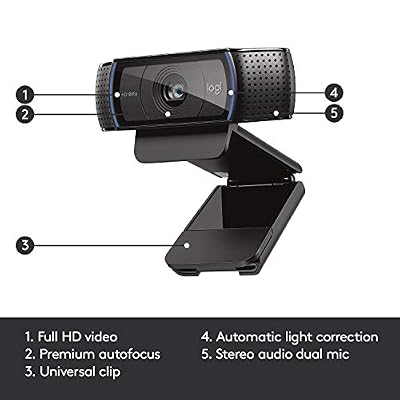
Logitech HD Pro Webcam C920, Widescreen Video Calling and Recording, 1080p Camera, Desktop or Laptop Webcam




As an Amazon Associate we earn from qualifying purchases. Product prices and availability are accurate as of the date/time indicated.
🛒 Best Price Today on Amazon
Prime members get fast, free shipping on everything above, plus member-only deals. New members get a 30-day free trial — cancel anytime.
As an Amazon Associate we earn from qualifying purchases.




Logitech Brio at a Glance
| Component | Specification |
|---|---|
| Resolution | 4K UHD |
| Max frame rate | Up to 4K/30, 1080p/60 |
| Field of view | Adjustable, with 5x digital zoom |
| Autofocus | Yes |
| Microphone | Dual built-in microphones |
| Privacy cover | Bundled shutter (varies by region) |
| Connection | USB-A / USB-C cable |
| Price | Around $118 |
Image Quality at 1080p and 4K
The Brio captures 4K UHD video, and at this price its image quality is what you should expect from a flagship: sharp detail, accurate colour, strong dynamic range. HDR support is a meaningful differentiator — bright windows behind the speaker and harshly mixed office lighting are handled noticeably better than on standard SDR webcams. For most users the more useful mode is 1080p/60fps, which is smooth enough for streaming and forgiving on bandwidth, but the option to crank up to 4K when needed for recording is valuable. Buyers building a streaming setup will find our best streaming PC builds guide useful.
Skin tones, white balance and exposure handling are all the kind of polished, well-judged details that distinguish a flagship Logitech webcam from cheaper rivals. The HDR pipeline is the most visible advantage: scenes with bright backgrounds (a window or a bright lamp behind the subject) are handled smoothly rather than collapsing into silhouette, which is the typical failure mode of cheaper SDR webcams. For recording high-quality video calls, presentations, courses or product demos, the Brio’s image quality stays consistent across a wide range of lighting conditions that would cause less capable cameras to struggle visibly mid-recording.
Frame Rate, Autofocus and Low-Light Performance
Autofocus is fast and accurate, as expected from Logitech, and the 5x digital zoom gives an unusual amount of framing flexibility for a fixed camera. Low-light performance is one of the Brio’s standout features thanks to RightLight 3 — Logitech’s adaptive lighting technology that brightens dim scenes and balances harsh contrast intelligently. It is not a replacement for proper room lighting from our best key lights for content creators guide, but it is the best in-camera light correction on this guide and produces visibly better results than HD light correction alone. Frame rates step down at 4K but remain smooth at 1080p/60 for streaming.
Microphone, Software and Streaming Integration
The Brio includes dual built-in microphones suited to meeting and casual streaming use. Serious creators will still pair it with a dedicated USB microphone from our best USB microphones for streaming guide. Software support is the Brio’s quiet strength — Logitech’s G HUB and Logi Tune apps are mature, well-supported and offer real adjustment range. The Brio integrates with Zoom, Microsoft Teams, Google Meet, OBS Studio, Streamlabs and every other major application. A notable bonus is Windows Hello facial recognition support, which lets the camera unlock a compatible Windows PC and is a feature very few webcams offer.
Reliability across the more than 17,600 customer reviews behind the Brio is one of its quiet strengths. The Brio family has been on the market since 2017 in various revisions, and the buyer-review history is as strong an endorsement as any flagship feature — multi-year service from a single unit is normal. The Windows Hello support is more practical than it first sounds: replacing a password prompt with an instant facial unlock is the kind of small daily improvement that compounds across years of use, and few rival webcams in this guide offer it. For the buyer who wants premium features with the polish of Logitech’s long-tenured software support, the Brio remains a clean recommendation.
Build, Mount and Privacy Features
The Brio is built to flagship standard — a compact, premium chassis with a textured metallic top, neutrally styled to suit any office. The included mount works on a wide range of monitors and laptop lids, and a tripod thread on the base lets it sit on a desk stand or webcam arm; pair it with picks from our best monitors for streaming guide. A privacy shutter is bundled with current configurations (specifics vary by region and bundle), which is appropriate at this price. Build quality matches the price and the camera feels likely to outlast several PCs.
Setup is the smooth, well-supported affair Logitech buyers expect. The Brio is recognised as a standard UVC device on Windows, macOS, ChromeOS and Linux without driver installation, and Logitech’s G HUB and Logi Tune software adds full control over field of view, zoom, HDR, RightLight, image adjustments and Windows Hello settings. For Windows Hello buyers, configuration is a simple walk through the Windows Settings app, with the Brio appearing as a recognised biometric device. The mount tilts through a generous range and the chassis is small enough to suit even slim modern monitors. For IT-managed deployments the Brio is one of the easiest premium webcams to support, and Logitech publishes long-term firmware updates for the Brio family.
Who Is the Logitech Brio 4K For?
The Brio is for the buyer who wants Logitech’s flagship webcam — 4K, HDR, RightLight 3, 5x digital zoom and Windows Hello support in one premium device. If you are a serious streamer, an executive who lives on video calls, or a content creator who values mature software and major-brand reliability, the Brio is squarely your camera. It is also a strong pick for environments that need Windows Hello-compatible biometric login. It is not the cheapest 4K option — the NexiGo N660P Pro is the budget alternative — and the OBSBOT Meet 2 is the modern AI-framing rival to consider. For the brand-loyal flagship buyer, the Brio still holds up.
Pros and Cons
Pros: 4K UHD capture; HDR; 5x digital zoom; excellent RightLight 3 low-light correction; Windows Hello facial recognition; dual microphones; mature Logitech software and OS support; premium build.
Cons: Higher price than 1080p competitors; older design than newer rivals; 4K capped at 30fps; serious streamers will still want a dedicated microphone.
Is the Logitech Brio 4K Worth It?
At around $118 the Logitech Brio 4K Pro remains the premium Logitech webcam to consider. It is not the newest design on the market — the OBSBOT Meet 2 has more recent AI features — but the Brio’s combination of 4K, HDR, RightLight 3, Windows Hello and Logitech’s mature software is a strong package, and it has the buyer-history of a proven product. For brand-loyal premium buyers, it earns a recommendation. Streaming setups benefit from pairing it with picks from our best capture cards for streaming guide.
Frequently Asked Questions
Does the Logitech Brio shoot 4K?
Yes. The Brio captures 4K UHD video, with HDR support and 1080p/60 for smoother streaming-friendly motion.
Does the Logitech Brio support Windows Hello?
Yes. It supports Windows Hello facial recognition, allowing biometric login to compatible Windows PCs — a feature very few webcams offer.
What is RightLight 3?
RightLight 3 is Logitech’s adaptive lighting technology that brightens dim scenes and balances harsh contrast intelligently. It is one of the best in-camera light corrections available.
Does the Logitech Brio have a privacy cover?
A privacy shutter is bundled with current Brio configurations, although the specifics can vary by region and bundle. Third-party covers also fit the Brio.
More Webcam Reviews
- Logitech Brio 101 Full HD 1080p Webcam Review
- Anker PowerConf C200 2K Webcam Review
- Razer Kiyo Streaming Webcam Review (Ring Light)
- EMEET C960 4K Webcam Review
- OBSBOT Meet 2 4K AI Webcam Review
- EMEET Nova 4K Webcam Review
- NexiGo N60 1080P Webcam Review
- NexiGo N660P Pro 4K Webcam Review
Affiliate Disclosure: As an Amazon Associate, we earn from qualifying purchases. If you click a link and make a purchase, we may earn a small commission at no extra cost to you. Prices and availability are accurate as of publication and may change.
Related Articles
Looking for more on this topic? Browse the hand-picked guides below — each one applies the same scoring rubric used in this review.










