

- Top Pick: Logitech C920x HD Pro PC Webcam Full 1080p/30fps Video – Black
- Best Value: Logitech C920S HD Pro Webcam Full 1080p/30fps Video Calling Clear Stereo
- Premium Choice: Logitech C920x HD Pro PC Webcam,Full HD 1080p/30fps Video,Clear Audio,HD-Light Correction,Works with Microsoft Teams,Google Meet,Zoom,Nintendo Switch 2’s New GameChat Mode,Mac/Tablet-Black,(Pack of 4)
The Logitech C920x HD Pro is arguably the most iconic webcam ever made — a 1080p/30fps camera with autofocus, a 78 degree field of view, dual stereo microphones and HD light correction. With more than 21,800 buyer reviews and years of incumbency, it remains a reference point in its class. Priced around $70, it targets the buyer who wants a proven, well-supported webcam from a major brand. This Logitech C920x review covers the image quality, microphones, software and value.
- Logitech C920x at a Glance
- Image Quality at 1080p and 4K
- Frame Rate, Autofocus and Low-Light Performance
- Microphone, Software and Streaming Integration
- Build, Mount and Privacy Features
- Who Is the Logitech C920x For?
- Pros and Cons
- Is the Logitech C920x Worth It?
- Frequently Asked Questions
- More Webcam Reviews
- Related Articles
- Related Articles

Logitech C920x HD Pro PC Webcam Full 1080p/30fps Video - Black | 30fps Video, Clear Audio, Light Correction, Works with Teams, Meet, Zoom, Nintendo Switch 2, Mac, Tablet




As an Amazon Associate we earn from qualifying purchases. Product prices and availability are accurate as of the date/time indicated.
🛒 Best Price Today on Amazon
Prime members get fast, free shipping on everything above, plus member-only deals. New members get a 30-day free trial — cancel anytime.
As an Amazon Associate we earn from qualifying purchases.





Logitech C920x at a Glance
| Component | Specification |
|---|---|
| Resolution | 1080p (Full HD) |
| Max frame rate | 30fps |
| Field of view | 78 degrees |
| Autofocus | Yes |
| Microphone | Dual stereo microphones |
| Privacy cover | Optional accessory |
| Connection | USB-A |
| Price | Around $70 |
Image Quality at 1080p and 4K
The C920x captures 1080p Full HD video at 30 frames per second, which has remained the standard target for video meetings since the original C920 launched. The image is sharp, naturally coloured and well exposed in mixed lighting — Logitech’s HD light correction adjusts to dim or backlit environments and keeps the picture usable when the room is not ideal. It does not target 4K and that is honest given the price; buyers who want a 4K Logitech should look at the Brio further down this guide. For its tier and for video calls, lectures and casual streaming, the C920x sets the standard others are measured against. Buyers building out a streaming setup should see our best streaming PC builds guide.
Logitech’s image tuning is part of what gives the C920x its longevity. Skin tones look natural, white balance is judged conservatively, and exposure shifts are smooth rather than abrupt — all the small image-processing details that take years to refine and that give Logitech webcams their reputation. The HD light correction is more sophisticated than the simple gain-boost some rivals use; it actually balances the bright and dim regions of the frame independently, which is why backlit scenes (the classic case of sitting in front of a window) look better on the C920x than on most cheaper rivals. For buyers who care about how the picture looks rather than just the resolution specification, that processing matters.
Frame Rate, Autofocus and Low-Light Performance
The C920x runs at 30fps, which is the right configuration for its meeting-and-creator audience. Autofocus is fast, accurate and unobtrusive — it keeps you sharp as you lean forward or move slightly without the obvious hunting that bothers cheaper cameras. Low-light performance is the area where the camera’s age shows least and its software polish shows most: Logitech’s HD light correction is genuinely useful, smoothing out backlight and dim rooms in a way that pure-hardware fixes cannot match. As ever, a dedicated lighting source from our best key lights for content creators guide gives the best results, but the C920x is more forgiving of imperfect rooms than most competitors.
Microphone, Software and Streaming Integration
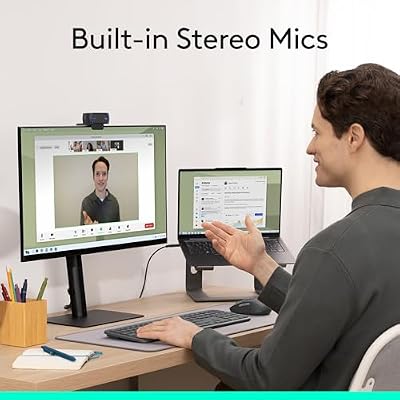
The C920x includes a pair of stereo microphones, which produce noticeably more natural voice capture than the typical single-mic webcam. They are not a substitute for a dedicated USB microphone — buyers serious about streaming or podcasting should still see our best USB microphones for streaming guide — but they are good enough that the buyer using the C920x purely for meetings rarely needs the upgrade. Software support is the C920x’s quiet strength: Logitech’s webcam software remains one of the more mature options on the market, and the camera is a first-class citizen in Zoom, Microsoft Teams, Google Meet, OBS Studio and every other major meeting and streaming app. Driver support across Windows, macOS, ChromeOS and Linux is mature.
Reliability across the more than 21,800 customer reviews behind the C920x is one of its quiet superpowers. The C920 family has been on the market in various revisions for many years and the buyer-review history is as strong an endorsement as any technical specification — multi-year service from a single unit is the norm rather than the exception. The combination of mature Logitech software, broad OS support, fast autofocus and dependable audio is the reason the C920x has remained a fixture in best-webcam recommendations for so long. There are newer designs in this guide, but few rival the C920x’s combination of polish and proven long-term reliability.
Build, Mount and Privacy Features
The C920x ships with the familiar Logitech mount that clips to a wide range of monitors and laptop lids, and a standard tripod thread on the base lets it sit on a desk stand or a webcam arm. The chassis is the well-known C920 shape — solid, neutrally styled and unobtrusive on top of a monitor. A privacy cover is not included as standard but is available as a low-cost accessory; many third-party privacy shutters fit the C920 family. Mount options pair well with the picks in our best monitors for streaming guide. Build quality is consistent with Logitech’s long track record at this price.
Setup is the smoothest in this guide. Plug the USB-A cable into a free port, and on Windows, macOS, ChromeOS and Linux the C920x is recognised immediately as a standard UVC device. Logitech’s G HUB and Logi Tune software adds field-of-view, brightness, contrast and white-balance controls if needed, but for most users the default tuning is well-judged and no software is necessary. The mount tilts through a wide range and the cable is long enough to reach from a monitor down to a desktop tower. For IT-managed deployments, the C920x is one of the easiest webcams to support — driver-free recognition across every operating system means it works without the support overhead of less mainstream cameras.
Who Is the Logitech C920x For?
The C920x is for the buyer who wants a proven, well-supported, no-surprises webcam from a major brand. If you value mature software, well-tested driver support across every operating system, autofocus that simply works, and dual microphones that are credibly above the budget norm — and you do not need 4K — the C920x is squarely your camera. It is also the safest recommendation for IT-managed environments where compatibility and reliability matter more than headline features. It is not for buyers who want 4K, AI framing or zoomable framing, who should look at the Logitech Brio or OBSBOT Meet 2. For the mainstream buyer, it remains the obvious pick.
Pros and Cons
Pros: Excellent autofocus; reliable, polished image quality at 1080p/30fps; dual stereo microphones; HD light correction handles imperfect lighting; mature software and driver support across every major OS; massive base of more than 21,800 buyer reviews.
Cons: Capped at 1080p/30fps; no 4K mode; privacy cover sold separately; USB-A only; design is showing its age compared with newer streaming-focused webcams.
Is the Logitech C920x Worth It?
At around $70 the Logitech C920x HD Pro remains a strong recommendation in 2026. It does not have the headline features of newer 4K or AI-framing cameras, but it does the fundamentals — image quality, autofocus, microphones, software, OS support — better than most of its rivals in its class. For the buyer who wants a webcam that simply works and stays out of the way, it earns a recommendation. Buyers wanting to extend the setup should also see our best capture cards for streaming guide.
Frequently Asked Questions
Does the Logitech C920x have autofocus?
Yes. It uses fast, accurate autofocus that keeps you sharp as you move at typical desk distances without the obvious hunting that affects some cheaper cameras.
Does the Logitech C920x shoot 4K?
No. The C920x tops out at 1080p/30fps. Buyers who want 4K from Logitech should look at the Brio further up the range.
Does the Logitech C920x have a privacy cover?
Not as standard. Logitech sells a separate privacy shutter accessory, and several third-party covers also fit the C920 family.
Is the Logitech C920x good for streaming?
Yes, for 1080p/30fps streaming. For high-frame-rate or 4K streaming, look at the NexiGo N660P Pro or the Logitech Brio.
More Webcam Reviews
- Logitech 4K Pro Webcam (Brio) Review
- Logitech Brio 101 Full HD 1080p Webcam Review
- Anker PowerConf C200 2K Webcam Review
- Razer Kiyo Streaming Webcam Review (Ring Light)
- EMEET C960 4K Webcam Review
- OBSBOT Meet 2 4K AI Webcam Review
- EMEET Nova 4K Webcam Review
- NexiGo N60 1080P Webcam Review
Affiliate Disclosure: As an Amazon Associate, we earn from qualifying purchases. If you click a link and make a purchase, we may earn a small commission at no extra cost to you. Prices and availability are accurate as of publication and may change.
Related Articles
Looking for more on this topic? Browse the hand-picked guides below — each one applies the same scoring rubric used in this review.










