

The OBSBOT Meet 2 is a premium 4K AI webcam built around a half-inch sensor, AI framing and autofocus, and a beauty mode for video calls. With more than 2,000 buyer reviews already behind it, OBSBOT’s Meet 2 represents one of the most modern designs in the consumer webcam category. Priced around $129, it targets the streamer, presenter and serious content creator who wants flagship-tier AI features and a larger sensor in a compact device. This OBSBOT Meet 2 review covers the image quality, AI features and value.
- OBSBOT Meet 2 at a Glance
- Image Quality at 1080p and 4K
- Frame Rate, Autofocus and Low-Light Performance
- Microphone, Software and Streaming Integration
- Build, Mount and Privacy Features
- Who Is the OBSBOT Meet 2 For?
- Pros and Cons
- Is the OBSBOT Meet 2 Worth It?
- Frequently Asked Questions
- More Webcam Reviews
- Related Articles
- Related Articles

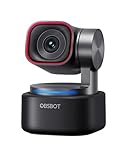
OBSBOT Meet 2-4K Webcam for PC with 1/2" Sensor, AI Framing & Autofocus | Beauty Mode, Lightweight, Gesture Control, HDR, Dual Microphone, 60 FPS, Web Cam for Streaming, Meeting, Gaming. (Space Grey)


As an Amazon Associate we earn from qualifying purchases. Product prices and availability are accurate as of the date/time indicated.
🛒 Best Price Today on Amazon
Prime members get fast, free shipping on everything above, plus member-only deals. New members get a 30-day free trial — cancel anytime.
As an Amazon Associate we earn from qualifying purchases.


OBSBOT Meet 2 at a Glance
| Component | Specification |
|---|---|
| Resolution | 4K UHD |
| Max frame rate | Up to 4K |
| Field of view | AI-controlled framing |
| Autofocus | AI autofocus |
| Microphone | Built-in microphones |
| Privacy cover | Included |
| Connection | USB-C |
| Price | Around $129 |
Image Quality at 1080p and 4K
The Meet 2’s headline is its 1/2-inch sensor, which is the largest sensor in any webcam in this guide and meaningfully bigger than the sensors used in commodity 4K webcams. A larger sensor gathers more light, produces less noise in low light and renders more accurate skin tones — the differences are most visible against the EMEET C960 4K, NexiGo N660P Pro and Anker C200 in dim rooms, where the Meet 2 holds detail and natural colour while smaller-sensor rivals start to show grain. 4K output is sharp and detailed, and downsampled 1080p output looks notably cleaner than direct 1080p capture from cheaper sensors. Buyers building a wider streaming setup should see our best streaming PC builds guide.
Frame Rate, Autofocus and Low-Light Performance
AI autofocus is the Meet 2’s standout framing feature. It tracks the subject smoothly and intelligently, holding focus through movements that catch out simpler systems. AI framing keeps the subject centred even as you shift around — a feature that is genuinely useful for presenters, instructors and streamers who do not sit perfectly still. Low-light performance is one of the best in this guide thanks to the half-inch sensor combined with AI processing; in evening light or imperfectly lit rooms the picture stays clean where commodity sensors visibly degrade. Buyers who want studio lighting alongside the Meet 2 should see our best key lights for content creators guide for excellent results.
Microphone, Software and Streaming Integration
The Meet 2 includes built-in microphones for meeting and casual streaming use. Serious creators will still pair it with a dedicated USB microphone from our best USB microphones for streaming guide. OBSBOT software provides genuinely useful adjustments — AI framing controls, a beauty mode that lightly retouches the picture for video calls, gesture controls in some configurations, and image fine-tuning. The Meet 2 connects over USB-C, which is friendly to modern laptops, and it works as a plug-and-play device on Windows and macOS. It integrates with Zoom, Microsoft Teams, Google Meet, OBS Studio, Streamlabs and the other major meeting and streaming applications, with OBSBOT’s own software adding the AI layer.
OBSBOT’s software is a meaningful differentiator. Unlike generic webcam control utilities, the OBSBOT app exposes the AI features as practical controls — framing modes, beauty mode strength, autofocus behaviour — that have clear visible impact on the live image. The company has a track record across its PTZ and conference-camera products of supporting devices with regular firmware and software updates, and the Meet 2 has continued to receive feature additions since release. For buyers who want a webcam that improves over time rather than stagnating after launch, that ongoing software investment is part of the value. The compact USB-C package also makes the Meet 2 unusually easy to travel with, which is a plus for hybrid workers and presenters.
Build, Mount and Privacy Features
The Meet 2 carries OBSBOT’s compact, modern chassis — a smaller and more refined form than typical consumer 4K webcams. It clips to monitor bezels and laptop lids and has a tripod thread for desk stands or webcam arms; pair it with picks from our best monitors for streaming guide. A physical privacy cover is included, which is appropriate at this price. The USB-C connection is a practical modern detail. Build quality is appropriately premium for the $129 price point and matches OBSBOT’s reputation as a specialist webcam brand.
Setup is straightforward but software-led, in keeping with the AI feature set. Plug the USB-C cable into a free port, install OBSBOT’s WebCam software on Windows or macOS to access AI framing, beauty mode and image controls, and the camera is ready to use in OBS, Streamlabs, Zoom, Teams or any other major app. Standard UVC operation means it is also recognised on Linux for basic use, although the AI feature set is best supported on the OBSBOT software for Windows and macOS. Buyers with older PCs that lack USB-C ports can use a USB-C to USB-A adapter without losing functionality. The mount’s tilt and pivot range is generous enough to handle most monitor positions, and the compact chassis is unobtrusive even on slim modern monitors.
Who Is the OBSBOT Meet 2 For?
The Meet 2 is for the buyer who wants the most modern AI webcam features in a premium consumer package. If you stream, present, teach or run client video calls, and you value AI framing, AI autofocus, a half-inch sensor and beauty-mode controls in a USB-C package, the Meet 2 is squarely your camera. It is the most directly competitive option in this guide against the Logitech Brio for premium buyers. It is not for the budget buyer (the EMEET C960 4K does basic 4K for less) and is overkill for the basic meeting user. For the modern-features-led buyer, it is a compelling pick.
Pros and Cons
Pros: Large half-inch sensor delivers the best low-light performance in this guide; AI framing and autofocus track subjects intelligently; beauty mode useful for video calls; USB-C connection; physical privacy cover; compact, modern build; broad app compatibility.
Cons: Premium price; built-in microphones still trail a dedicated USB mic; AI features less critical for static desk users; younger product than the entrenched Logitech Brio.
Is the OBSBOT Meet 2 Worth It?
At around $129 the OBSBOT Meet 2 is a strong choice for buyers who genuinely want flagship-tier modern features. The half-inch sensor, AI framing and autofocus, beauty mode and USB-C connectivity make it the most modern-feeling camera in this guide, and it competes directly with the Logitech Brio on premium-buyer territory while bringing newer AI features. For the right buyer, it earns a recommendation. Buyers wanting a full streaming rig should also see our best capture cards for streaming guide.
Frequently Asked Questions
Does the OBSBOT Meet 2 have a big sensor?
Yes. It uses a 1/2-inch sensor, which is the largest in this guide and meaningfully bigger than the sensors used in most consumer 4K webcams — the main reason for its low-light advantage.
What is AI framing?
AI framing automatically tracks the subject and keeps them centred in the shot as they move, which is useful for presenters, instructors and streamers who do not stay perfectly still.
Does the OBSBOT Meet 2 use USB-C?
Yes. It connects over USB-C, which is friendly to modern laptops. A USB-C to USB-A adapter resolves compatibility with older ports.
Does the OBSBOT Meet 2 have a beauty mode?
Yes. OBSBOT’s software includes a beauty mode that lightly retouches the picture for video calls — useful for professional meetings and casual streaming.
More Webcam Reviews
- EMEET Nova 4K Webcam Review
- NexiGo N60 1080P Webcam Review
- NexiGo N660P Pro 4K Webcam Review
- EMEET C960 1080P Webcam Review
- NexiGo N950P Gen 2 4K Zoomable Webcam Review
- Logitech C920x HD Pro Webcam Review
- Logitech 4K Pro Webcam (Brio) Review
- Logitech Brio 101 Full HD 1080p Webcam Review
Affiliate Disclosure: As an Amazon Associate, we earn from qualifying purchases. If you click a link and make a purchase, we may earn a small commission at no extra cost to you. Prices and availability are accurate as of publication and may change.
Related Articles
Looking for more on this topic? Browse the hand-picked guides below — each one applies the same scoring rubric used in this review.










