

- Top Pick: NexiGo N60 1080P Webcam with Microphone, Software Control & Privacy Cover, USB HD Computer Web Camera, Plug and Play, for Zoom/Skype/Teams, Conferencing and Video Calling
- Best Value: NexiGo N60 1080P Web Camera, HD Webcam with Microphone & Privacy Cover, USB Computer Camera, 110-degree Wide Angle, Plug and Play, for Zoom/Skype/Teams/OBS, Conferencing and Video Calling (Renewed)
- Premium Choice: TRAUSI 1080P FHD Webcam with Noise-Canceling Mic, Auto Light Correction, Privacy Cover and Wide Angle Lens, Plug & Play USB Camera for Laptop/Desktop/PC/Mac, Compatible with Zoom/Teams/Streaming
The NexiGo N60 is one of the most popular budget webcams on the market, a 1080p/30fps USB-A camera that has earned more than 52,400 buyer reviews. Priced around $28 and bundled with built-in microphone, software control and a privacy cover, it targets the home worker, student and casual streamer who wants a clean upgrade over a laptop camera without spending much. This NexiGo N60 review covers the image quality, microphone, software and value.
- NexiGo N60 at a Glance
- Image Quality at 1080p and 4K
- Frame Rate, Autofocus and Low-Light Performance
- Microphone, Software and Streaming Integration
- Build, Mount and Privacy Features
- Who Is the NexiGo N60 For?
- Pros and Cons
- Is the NexiGo N60 Worth It?
- Frequently Asked Questions
- More Webcam Reviews
- Related Articles
- Related Articles
- Related Guides

NexiGo N60 1080P Webcam with Microphone, Software Control & Privacy Cover, USB HD Computer Web Camera, Plug and Play, for Zoom/Skype/Teams, Conferencing and Video Calling




As an Amazon Associate we earn from qualifying purchases. Product prices and availability are accurate as of the date/time indicated.
🛒 Best Price Today on Amazon
Prime members get fast, free shipping on everything above, plus member-only deals. New members get a 30-day free trial — cancel anytime.
As an Amazon Associate we earn from qualifying purchases.




NexiGo N60 at a Glance
| Component | Specification |
|---|---|
| Resolution | 1080p (Full HD) |
| Max frame rate | 30fps |
| Field of view | Standard webcam FOV |
| Autofocus | Fixed focus |
| Microphone | Built-in mono microphone |
| Privacy cover | Included |
| Connection | USB-A (plug and play) |
| Price | Around $28 |
Image Quality at 1080p and 4K
The NexiGo N60 captures video at 1080p Full HD at 30 frames per second, which is the resolution standard expected for video calls and entry-level streaming. For its price tier, the image is a substantial upgrade over the typical built-in laptop camera — colours are more natural, the picture is sharper, and the wider sensor handles average office lighting in a way most laptop webcams cannot. The N60 does not target 4K buyers, and that is the right call at this price; the goal here is to deliver a clean, recognisable 1080p picture for calls and casual content, and it achieves that. If you are setting up a streaming corner, our best streaming PC builds guide pairs nicely with this camera.
Frame Rate, Autofocus and Low-Light Performance
The N60 records at 30 frames per second, which is the standard for video meetings, lectures and most non-streaming use. Motion looks smooth, lip sync stays clean, and there is no perceptible lag during normal conversation. The camera uses fixed focus rather than autofocus, which is a deliberate trade-off at this price point: there is no hunting in low light, the image is consistent from session to session, and you only need to position yourself at a comfortable arm’s length from the screen for sharp results. Low-light performance is honest for the money — a well-lit room is preferred, and a basic desk lamp or window light makes a clear difference. Buyers serious about lighting should see our best key lights for content creators guide.
Microphone, Software and Streaming Integration
The N60 includes a built-in microphone, which is useful as a backup or for casual calls but is, as with all webcam microphones at this price, a step below a dedicated USB microphone. For meetings, lectures and quick recordings it is perfectly usable; for podcasting or serious streaming, a separate microphone is the right upgrade and our best USB microphones for streaming guide covers good options. NexiGo provides software control for adjustments such as brightness and contrast, and the webcam works as a plug-and-play USB-A device on Windows, macOS and Linux, with no driver installation required. It also integrates with Zoom, Microsoft Teams, Google Meet, OBS Studio and every other major video and streaming application without fuss.
Reliability across the more than 52,400 customer reviews behind the N60 is one of its quiet strengths. A webcam at this price stands or falls on whether it survives daily use and whether it works in every meeting app — and the N60’s review history is a clear indicator that it does both. Many buyers report multi-year service from a single unit, which is the kind of long-term value that matters far more than headline specifications. It is also worth noting that as a generic UVC device, the N60 picks up new operating-system updates without compatibility drama: there is no proprietary driver to break across macOS or Windows version changes.
Build, Mount and Privacy Features
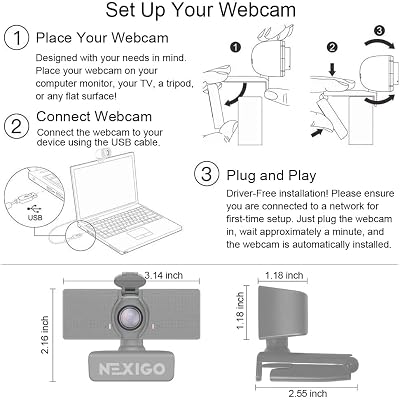
NexiGo equips the N60 with a versatile mount that clips to laptop lids and monitor bezels, and a standard tripod thread on the base lets it sit on a desk stand or a dedicated webcam tripod. A physical privacy cover slides over the lens, which is a small but genuinely useful feature for anyone working from home or sharing a space — it is the kind of detail that costlier cameras sometimes omit. The build is plastic and lightweight, in keeping with the price, but the camera feels secure once clipped to a monitor and stays where you point it. The cable is generous, easily reaching from a monitor down to a desktop tower.
Setup is almost instant. Plug the cable into a free USB-A port, open Zoom or Teams or any other meeting app, pick the NexiGo as the camera and microphone source, and you are done. There is no Windows driver to install, no companion app required for basic use, and the camera is detected immediately on macOS, ChromeOS and Linux as a standard UVC device. For the buyer who values frictionless setup as much as image quality, that simplicity is part of the appeal — a webcam should not be a project, and the N60 is not. The angle adjustment on the mount lets you tilt the camera up or down through a useful range, which matters because the most common cause of an unflattering webcam picture is not the camera itself but the angle it sits at.
Who Is the NexiGo N60 For?
The N60 is for the buyer who wants a clean, dependable 1080p webcam at the lowest sensible price. If you are upgrading from a laptop camera for video meetings, online classes, family calls or casual content, and you do not need 4K, autofocus or studio-grade audio, the N60 is squarely your camera. It is also a sensible secondary webcam for a multi-camera streaming setup, or a backup for a more expensive primary. It is not for serious streamers who want 4K, advanced autofocus, AI framing or studio-quality audio in one device — those buyers should look at the NexiGo N660P Pro, OBSBOT Meet 2 or Logitech Brio further down this guide. For mainstream buyers, the N60 is hard to argue with on value.
Pros and Cons
Pros: Excellent value for around $28; clean 1080p image for the price; plug-and-play USB-A connection; built-in microphone covers casual use; physical privacy cover included; massive base of more than 52,400 buyer reviews indicates strong real-world reliability.
Cons: Fixed focus rather than autofocus; built-in microphone is workable but not studio quality; capped at 30fps so not ideal for high-refresh streaming; modest low-light performance compared with premium cameras.
Is the NexiGo N60 Worth It?
At around $28 the NexiGo N60 is one of the easiest webcam recommendations to make. It does exactly what a webcam at this price should do — delivers a clean 1080p picture, includes a basic microphone, plugs in without drivers and adds a privacy cover for peace of mind — and it has the buyer-review history of a tested, dependable product. It will not satisfy a buyer who needs 4K or advanced features, but for the home worker, student or casual streamer it is a strong choice. Buyers wanting to expand the rig will find our best monitors for streaming and best capture cards for streaming guides useful next reads.
Frequently Asked Questions
Is the NexiGo N60 good for streaming?
It is fine for casual streaming at 1080p/30fps. For serious streaming, look at autofocus 4K options like the NexiGo N660P Pro or OBSBOT Meet 2.
Does the NexiGo N60 have autofocus?
No. It uses fixed focus, which is sharp at typical desk-viewing distance and consistent across sessions, but does not refocus if you move toward or away from the camera.
Does the NexiGo N60 work with Mac, Windows and Linux?
Yes. It is a plug-and-play USB-A device that works without drivers on Windows, macOS and Linux, and integrates with Zoom, Teams, Meet, OBS and other major apps.
Does the NexiGo N60 have a privacy cover?
Yes. A physical privacy cover slides over the lens, which is a useful feature for anyone working from home or sharing a space.
More Webcam Reviews
- NexiGo N660P Pro 4K Webcam Review
- EMEET C960 1080P Webcam Review
- NexiGo N950P Gen 2 4K Zoomable Webcam Review
- Logitech C920x HD Pro Webcam Review
- Logitech 4K Pro Webcam (Brio) Review
- Logitech Brio 101 Full HD 1080p Webcam Review
- Anker PowerConf C200 2K Webcam Review
- Razer Kiyo Streaming Webcam Review (Ring Light)
Affiliate Disclosure: As an Amazon Associate, we earn from qualifying purchases. If you click a link and make a purchase, we may earn a small commission at no extra cost to you. Prices and availability are accurate as of publication and may change.
Related Articles
Looking for more on this topic? Browse the hand-picked guides below — each one applies the same scoring rubric used in this review.










