

- Top Pick: KAMRUI Pinova P2 Mini PC, AMD Ryzen 7330U(4 Cores, 8 Threads, Up to 4.3GHz), 16GB RAM 256GB SSD, Zen3 Architecture 7nm Processor, 8MB L3 Smart Cache Mini Computers,Triple 4K Display Home/Business
- Best Value: KAMRUI Pinova P2 Mini PC 16GB RAM 512GB SSD, AMD Ryzen 4300U(Beats 10110U/3500U/N95,Up to 3.7GHz,4C/8T)Mini Computers,Triple 4K Display/HDMI+DP+Type-C/WiFi/BT for Home/Business Mini Desktop Computers
- Premium Choice: KAMRUI Pinova P2 Mini PC 8GB RAM 512GB SSD, AMD Ryzen 4300U(Beats 10110U/3500U/N95,Up to 3.7GHz,4C/8T) Mini Computers,Triple 4K Display/HDMI+DP+Type-C/WiFi/BT for Home/Business Mini Desktop Computers
The KAMRUI Pinova P2 is a compact, value-focused mini PC designed for everyday computing. It pairs an AMD Ryzen 4300U with Radeon integrated graphics, 16GB of memory and a 512GB SSD inside a tidy 0.6L chassis for around $330. With more than 1,930 buyer reviews behind it, this KAMRUI Pinova P2 review covers the specifications, real-world performance, connectivity and value of one of the most popular entry-level mini PCs.
- KAMRUI Pinova P2 at a Glance
- Performance and CPU Capability
- Graphics: Integrated vs External Output
- Memory, Storage and Upgradability
- Connectivity, Ports and Networking
- Who Is the KAMRUI Pinova P2 For?
- Pros and Cons
- Is the KAMRUI Pinova P2 Worth It?
- Frequently Asked Questions
- More Mini PC Reviews
- Related Articles
- Related Articles
🛒 Best Price Today on Amazon
Prime members get fast, free shipping on everything above, plus member-only deals. New members get a 30-day free trial — cancel anytime.
As an Amazon Associate we earn from qualifying purchases.

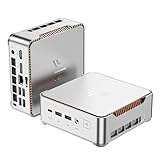


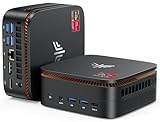

KAMRUI Pinova P2 at a Glance
| Component | Specification |
|---|---|
| Processor | AMD Ryzen 4300U (4 cores, 8 threads, Zen 2) |
| Graphics | AMD Radeon integrated graphics |
| Memory | 16GB RAM |
| Storage | 512GB SSD |
| Ports | USB, HDMI and audio for desktop, display and peripherals |
| Networking | Wired and wireless networking |
| OS | Windows 11 Pro |
| Form factor | Compact 0.6L chassis |
| Price | Around $330 |
Performance and CPU Capability
The Pinova P2 is built around the AMD Ryzen 4300U, a four-core, eight-thread Zen 2 mobile processor that has earned a strong reputation in the value mini PC space. It is not a flagship chip, but for the kinds of tasks people actually run on a small desktop — web browsing, office work, video calls, light photo editing, media playback — it has more than enough headroom. The eight threads handle modern multitasking comfortably, and Zen 2 still benefits from AMD’s mature core design with sensible per-core performance. With 16GB of memory alongside, the Pinova P2 leaves room for plenty of browser tabs and background apps without slowing down. A Windows 11 Pro install is included, which is a genuine extra at this price compared with Home-only rivals and matters if you want BitLocker drive encryption, Remote Desktop hosting or domain join in a small office. The popularity of the machine — more than 1,930 reviews — is the strongest validation that the Pinova P2 behaves as advertised for the daily workloads it targets. Buyers comparing options should also look at our best mini PCs guide guide and our best AMD Ryzen mini PCs roundup.
Graphics: Integrated vs External Output
Graphics on the Pinova P2 come from AMD’s Radeon iGPU built into the Ryzen 4300U. It is an integrated solution, not a discrete gaming card, so expectations should be set accordingly. For everyday graphics — driving a sharp desktop, smooth windowing in Windows 11, hardware-accelerated video playback, multiple browser windows, the occasional older or lightweight game — the Radeon iGPU is perfectly capable. It is not built for modern AAA gaming at meaningful settings, and that is by design at this price. For office and home users, the integrated graphics are well matched to the rest of the system, and the HDMI output means you can connect a monitor of your choosing — the Pinova P2 is a small box that drives a normal desktop monitor well. Buyers who want stronger integrated gaming should look at the Ryzen 7000-class machines in our best mini PCs for gaming guide.
Memory, Storage and Upgradability
The Pinova P2 ships with 16GB of RAM and a 512GB SSD, a configuration that is genuinely sensible for the price. 16GB is the modern comfort point for Windows 11 and matches what most mainstream laptops include — it gives the Pinova P2 real headroom for browser tabs, office apps and the occasional creative tool. The 512GB SSD is fast, modern storage rather than the slow eMMC or HDD some budget machines still ship with, so Windows boots quickly and app launches are responsive. As a small-form-factor mini PC, the Pinova P2 is meant to be a self-contained appliance rather than a heavily upgradable workstation, but the standard SSD and RAM modules give the machine a long, useful life with the configuration it ships with. For most office and home users, the included memory and storage are simply what they need.
Connectivity, Ports and Networking
For a small desktop, the Pinova P2 covers the essentials. USB ports are provided for keyboard, mouse and external storage, HDMI is available for the display, and audio output is included for headphones or speakers. Networking covers wired and wireless options so the Pinova P2 fits cleanly into both home and office setups — wired for a stable, fast connection on a desk, wireless for flexibility. The 0.6L chassis also gives the machine a couple of practical mounting options on a desk or behind a monitor, which is one of the genuine advantages of the mini PC form factor over a tower. It is a tidy, well-judged set of connectivity for the role.
Who Is the KAMRUI Pinova P2 For?
The Pinova P2 is for the buyer who wants a tidy, reliable small desktop for everyday computing on a sensible budget. If you do office work, browse the web, run video calls, watch streaming media, manage a household PC, or need a small machine for a kitchen, study or reception desk, the Pinova P2 is squarely your machine — its very large positive review base is the strongest evidence that it does this job well. It is also a sensible choice for a basic home-office or remote-work PC, and Windows 11 Pro adds genuine value there. It is less suited to gamers, heavy creators or anyone who needs discrete graphics — the integrated GPU is for general use, not modern AAA play. For accessible, popular everyday mini PC computing, the Pinova P2 is well judged. Compare it with rivals in our best mini PCs for office and home use guide.
Pros and Cons
Pros: Genuinely accessible price; sensible AMD Ryzen 4300U with 8 threads; comfortable 16GB of memory and 512GB SSD; Windows 11 Pro included; compact 0.6L chassis; very large positive buyer review base.
Cons: Integrated graphics are not built for modern gaming; Zen 2 is no longer AMD’s newest architecture; barebone upgrade options are limited by the compact form factor.
Is the KAMRUI Pinova P2 Worth It?
At around $330 the KAMRUI Pinova P2 is a genuinely sensible buy. It delivers a tidy, reliable everyday Windows 11 Pro desktop in a compact 0.6L chassis, with enough CPU, memory and storage for typical office and home workloads, and its very large positive review base is the strongest possible validation. The integrated graphics are the honest compromise — this is not a gaming box — but for the role it targets, the Pinova P2 is well rounded. For accessible, brand-validated everyday mini PC computing, it is easy to recommend. Buyers who want stronger CPU or integrated gaming performance should compare the Ryzen 7000-class machines in our best AMD Ryzen mini PCs roundup.
Frequently Asked Questions
Is the KAMRUI Pinova P2 good for office work?
Yes. The Ryzen 4300U with 8 threads, 16GB of RAM and a 512GB SSD comfortably handle browsing, office suites, video calls and multitasking, and Windows 11 Pro adds business features.
Can the KAMRUI Pinova P2 play modern games?
Not at meaningful settings. The integrated Radeon graphics are built for general desktop use and light or older games, not modern AAA titles.
Does the KAMRUI Pinova P2 come with Windows 11 Pro?
Yes. Windows 11 Pro is included, which adds business-grade features like BitLocker and Remote Desktop hosting compared with Home-only rivals.
Is the KAMRUI Pinova P2 a trusted choice?
Yes. The Pinova P2 has a very large positive buyer review base of more than 1,930 reviews, which is strong real-world validation at this price.
More Mini PC Reviews
- GMKtec M7 Ultra Mini PC Review (Ryzen 7 PRO 6850U)
- KAMRUI Hyper H2 Mini Gaming PC Review (i9-11900H)
- GMKtec M5 Ultra Mini PC Review (Ryzen 7 7730U)
- GMKtec K8 Plus Gaming Mini PC Review (Ryzen 7 8845HS)
- GMKtec AI Mini PC Ultra 9 285H Review
- GMKtec NucBox Mini PC Review (i7-1185G7)
- MSI Cubi NUC AI+ Barebone Mini PC Review
- GEEKOM A8 Max Mini PC Review (Ryzen 7 8745HS)
Affiliate Disclosure: As an Amazon Associate, we earn from qualifying purchases. If you click a link and make a purchase, we may earn a small commission at no extra cost to you. Prices and availability are accurate as of publication and may change.
Related Articles
Looking for more on this topic? Browse the hand-picked guides below — each one applies the same scoring rubric used in this review.










