

The Elgato 4K S sits in Elgato’s range as the 4K-capable external card positioned below the flagship 4K X. It captures at 4K30 and is built for streamers and creators who want a 4K-class capture spec without the premium of the 4K144 flagship — with explicit Switch 2, iPad and Mac compatibility alongside the usual PS5, Xbox Series X/S and PC support. With more than 1,300 reviews on Amazon, the 4K S has quickly found an audience among modern multi-platform streamers. At around $160 it is positioned between the mainstream HD60 X and the flagship 4K X. This Elgato 4K S review covers the capture resolution, pass-through, compatibility, software and value.
- Elgato 4K S at a Glance
- Capture Resolution and Frame Rate
- HDR, Pass-Through and Display Compatibility
- Connection Type and Latency
- Software, OBS Integration and Streaming Features
- Who Is the Elgato 4K S For?
- Pros and Cons
- Is the Elgato 4K S Worth It?
- Frequently Asked Questions
- More Capture Card Reviews
- Related Articles
- Related Articles

Elgato 4K S Capture Card for PS5, Xbox Series X/S, Switch 2 | 4K60 capture, 1440p120 or 1080p240 passthrough, HDR10 support, Near-zero latency, USB-C, Analog audio input






As an Amazon Associate we earn from qualifying purchases. Product prices and availability are accurate as of the date/time indicated.
🛒 Best Price Today on Amazon
Prime members get fast, free shipping on everything above, plus member-only deals. New members get a 30-day free trial — cancel anytime.
As an Amazon Associate we earn from qualifying purchases.






Elgato 4K S at a Glance
| Component | Specification |
|---|---|
| Type | External capture card |
| Connection | USB |
| Max capture resolution | 4K30 |
| HDR support | Yes on supported sources |
| Pass-through resolution | Ultra-low latency 4K HDR pass-through |
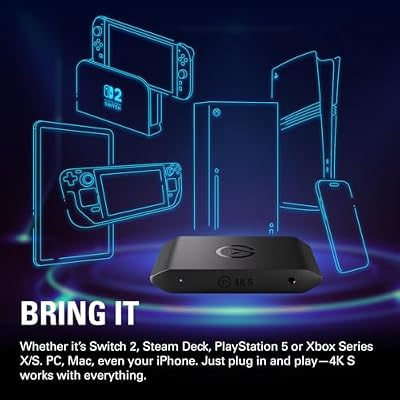
| Compatibility | PS5, Xbox Series X/S, Switch 2, PC, Mac, iPad |
| Latency class | Ultra-low latency |
| Price | Around $160 |
Capture Resolution and Frame Rate
The 4K S captures at up to 4K30. That spec is well chosen for the modern multi-platform creator: 4K30 is enough resolution for sharp YouTube uploads and 4K clip extraction, and 30 fps is what most consoles actually output in their 4K modes — pushing higher rarely produces a visible improvement on consumer panels. For live streaming most 4K S users will downscale to 1080p60 on the host PC for the actual stream, capturing in 4K30 to retain the resolution headroom for clip editing. That two-track workflow — 4K for clips, 1080p for live — is exactly the use case the 4K S is sized for, sitting comfortably between the HD60 X and the more expensive 4K X.
The other detail worth flagging is that the 4K S’s 4K30 capture means the recorded files retain the original console resolution intact — important if you later want to encode a clip at native quality for YouTube, or if you want the option of downscaling in post-production with the cleanest source possible. Starting from a 4K source and downscaling to 1080p in software produces a sharper 1080p clip than capturing at 1080p in the first place, which is a real editorial benefit for the creator who finishes most clips at 1080p but wants the upscale headroom.
HDR, Pass-Through and Display Compatibility
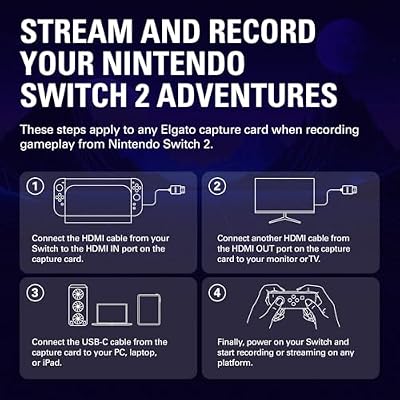
HDR is supported on capture from sources that output HDR, which now covers PS5, Xbox Series X/S, and many PC titles. The pass-through is ultra-low latency and supports 4K HDR — so the player keeps a full-fidelity 4K HDR experience on their main monitor while the card captures in 4K30. The standout compatibility detail is Switch 2 support: Elgato explicitly markets the 4K S for Switch 2 capture, which matters because the Switch 2 outputs at higher resolutions than its predecessor and benefits from a 4K-capable capture card. iPad compatibility is similarly relevant for creators who edit on the iPad or use it as a recording device. PC streaming hosts in this tier are covered in our best RTX 5070 gaming laptops guide.
Explicit Switch 2 compatibility is more important than it first sounds. The Switch 2 is a major target for clip-focused content creators, but its output resolution requires a capture card sized for it, and not every existing card in the market handles a Switch 2 cleanly. Elgato getting in early with explicit Switch 2 support gives the 4K S a meaningful advantage with the Nintendo creator community.
Connection Type and Latency
The 4K S is an external USB card, like the rest of the consumer Elgato range. Latency on the pass-through is ultra-low, so the player sees no delay in their gameplay. The external form factor is what enables the Mac and iPad compatibility — the card simply has to appear over USB Video Class for these platforms to recognise it, and Elgato have engineered firmware to be polite to whatever host operating system is at the other end of the cable. That cross-platform flexibility is a real point of difference against internal PCIe alternatives, which by definition cannot work with a Mac or an iPad.
Software, OBS Integration and Streaming Features
OBS Studio integration is the same as on the rest of the Elgato range — the 4K S appears as a standard video capture source and works without any special configuration. Elgato’s own 4K Capture Utility is well suited to the 4K S because of its 4K30 mode, providing comfortable handling of 4K clips, flashback recording and trimmed exports. For multi-platform creators who edit on iPad or Mac, the broad software compatibility means the 4K S fits into video apps on those platforms as a standard capture device, which is not always true of competitor cards.
Who Is the Elgato 4K S For?
The 4K S is for the modern multi-platform creator — typically someone who plays across PS5, Xbox Series X/S and Switch 2, who wants 4K-class capture without paying for the 4K144 flagship, and who values Mac and iPad compatibility alongside the usual Windows setup. If your end output is a mix of 1080p live streams and 4K YouTube uploads, and if you switch hosts and consoles regularly, the 4K S is well suited. It is less appropriate for the pure 1080p streamer, who is better served by the cheaper HD60 X, and for the 4K144 PC creator, who should go straight to the 4K X.
Pros and Cons
Pros: 4K30 capture with HDR; ultra-low latency 4K HDR pass-through; broad compatibility including PS5, Xbox Series X/S, Switch 2, PC, Mac and iPad; sits well between the mainstream HD60 X and the flagship 4K X; mature Elgato software.
Cons: 4K capture limited to 30 fps — not the right card for 4K60 or 4K144 workflows; pricier than the HD60 X; the niche between 1080p HDR and 4K144 may not suit every buyer.
Is the Elgato 4K S Worth It?
At around $160 the Elgato 4K S is the right card for the multi-platform creator who wants 4K30 capture and explicit Switch 2 / iPad / Mac compatibility without paying flagship money. For that buyer it earns a recommendation. Pure 1080p streamers should pick the HD60 X and save the difference; pure 4K144 PC creators should pick the 4K X. PC hosts to feed this kind of capture workflow are covered in our best 240Hz gaming laptops guide.
Frequently Asked Questions
Can the Elgato 4K S capture 4K?
Yes. The 4K S captures at up to 4K30 with HDR. For higher frame rates at 4K (60 fps or 144 fps) you would need the Elgato 4K X.
Does the Elgato 4K S work with Switch 2?
Yes. The 4K S is explicitly marketed for Switch 2 and supports the higher output resolutions of the new Switch generation.
Does the Elgato 4K S work with Mac and iPad?
Yes. The 4K S is compatible with Mac and iPad in addition to Windows PC and the major consoles, which is a real point of difference from internal PCIe cards.
Should I buy the 4K S or the 4K X?
Pick the 4K S if 4K30 capture is sufficient and you want broader iPad and Mac compatibility. Pick the 4K X if you specifically need 4K60, 4K144 or VRR pass-through.
More Capture Card Reviews
- EVGA XR1 Pro Capture Card Review (1440p/4K HDR)
- AVerMedia GC573 Live Gamer 4K Internal Capture Card Review
- UGREEN 1080P HDMI Capture Card Review (Budget)
- UGREEN 4K@30Hz HDMI Capture Card Review
- Elgato HD60 S External Capture Card Review
- Elgato Cam Link 4K External Capture Card Review
- Elgato HD60 X External Capture Card Review (HDR10)
- Elgato 4K X Capture Card Review (4K144 Flagship)
Affiliate Disclosure: As an Amazon Associate, we earn from qualifying purchases. If you click a link and make a purchase, we may earn a small commission at no extra cost to you. Prices and availability are accurate as of publication and may change.
Related Articles
Looking for more on this topic? Browse the hand-picked guides below — each one applies the same scoring rubric used in this review.










