

- Top Pick: TRENDnet 2-Port USB KVM Switch Kit with Audio, TK-209K
- Best Value: TRENDnet 2-in-1 USB VGA KVM Cable, TK-CU10
- Premium Choice: TRENDnet 2-Port USB KVM Switch, TK-207K
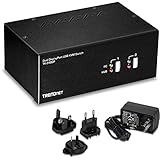
The TRENDnet TK-209K is a step up from the basic IOGEAR GCS22U: it is a 2-port USB VGA KVM that adds two of the features many small-office buyers need — audio pass-through and hot-key switching. Where the IOGEAR keeps things minimal at the lowest price, the TRENDnet builds on the same idea with audio and microphone routing, hot-key support, and a slightly more capable build, at roughly $55. This TRENDnet TK-209K review covers the switching performance, display compatibility, USB and audio pass-through, build and value.

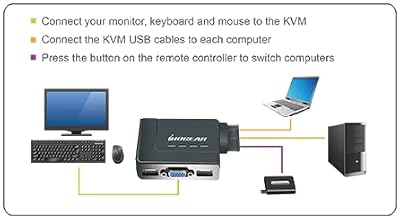
IOGEAR 2-Port USB VGA Cabled KVM Switch - 2048 x 1536 - Remote Button Switch - Plug n Play - PC, MAC, SUN - GCS22U


As an Amazon Associate we earn from qualifying purchases. Product prices and availability are accurate as of the date/time indicated.
🛒 Best Price Today on Amazon
Prime members get fast, free shipping on everything above, plus member-only deals. New members get a 30-day free trial — cancel anytime.
As an Amazon Associate we earn from qualifying purchases.



TRENDnet TK-209K at a Glance
| Component | Specification |
|---|---|
| Type | VGA KVM with audio pass-through |
| Computer count supported | 2 PCs |
| Monitor count | 1 (shared VGA monitor) |
| Display resolution support | VGA up to 2048×1536 |
| USB peripheral count | 2 USB-A 1.1 ports (keyboard + mouse) |
| USB version | USB 1.1 (HID-class) |
| Hot-key switching | Yes — Scroll Lock + Scroll Lock + 1/2 |
| Cables included | Two KVM cable sets (VGA + USB + 3.5mm audio + mic) |
| Approx price | around $55 |
Switching Performance & Latency
The TRENDnet TK-209K supports two switching methods: a front-panel selector button, and a scroll-lock hot-key sequence on the shared keyboard (Scroll Lock + Scroll Lock + 1 or 2). The hot-key support is the headline upgrade over a button-only KVM — heavy switchers who context-shift between machines many times an hour will find it materially nicer than reaching for a physical button each time. As a true KVM the changeover routes the keyboard, the mouse, the VGA video and the analogue audio to the newly selected host in a single action; expect the usual one to two seconds for the monitor to lock to the new VGA sync and the USB peripherals to re-enumerate. That delay is normal KVM behaviour and is essentially identical between the front-panel button and the hot-key — the hot-key just saves the physical reach.
Reliability is good. The TK-209K has been in TRENDnet’s range for many years and the firmware handles the keyboard re-enumeration cleanly on both Windows and Linux hosts. The active-host LED on the front is clearly visible at desk distance. There is no software to install.
Display Compatibility — Single / Dual / Triple
This is a single-VGA-monitor KVM. There is one VGA out on the unit and one VGA pigtail per host, and supported resolution is up to 2048×1536, which covers any sensible VGA panel. Like the IOGEAR GCS22U, this is the right product only if you are sharing a VGA monitor — typically a legacy office display, an industrial control screen, or a server-room VGA console. Modern HDMI desks need an HDMI KVM. There is no provision for dual or triple monitors on the TK-209K; for multi-monitor setups one of the dual-monitor HDMI KVMs reviewed elsewhere on this site is the right choice. For modern monitor cabling, see our best HDMI cables guide.
USB Pass-Through & Peripherals
The TK-209K has two USB 1.1 ports for the keyboard and mouse — the classic V and M of a KVM. As with the IOGEAR, USB 1.1 is the appropriate spec for HID-class devices but is not suitable for any high-bandwidth peripheral. The headline non-USB pass-through is the audio: the KVM includes two 3.5mm jacks per side (speakers out + mic in), so the same headphones and microphone follow the active host, which is a significant feature for office workers who join calls from either of two computers, or for streamers who use a single headset across two rigs. There is no USB-3.0 path through this KVM, which is the main reason a modern user might prefer one of the HDMI KVMs further down our list — those route USB 3.0 alongside the video.
Build Quality & Switching Method
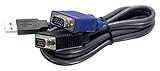
The TRENDnet chassis is metal-cased rather than plastic, which is unusual at this price and a small quality cue versus the all-plastic IOGEAR. The two host-side cable sets are bundled in the box and carry VGA, USB, speaker-audio and microphone signals together as a single labelled bundle per host — a tidy approach that simplifies cabling and removes the usual second-purchase friction. Switching method is dual, as covered above: front-panel button or scroll-lock hot-key on the shared keyboard. The hot-key sequence is the standard double-tap of Scroll Lock followed by 1 or 2, which is easy to remember and unlikely to be triggered by accident in normal typing. Front-panel LEDs indicate the active host.
Use Cases — Gaming + Streaming, Home Office
The TK-209K is the right small-office KVM for users who specifically want audio pass-through alongside the video: a home office with two PCs and one VGA monitor, where the same headset is used for calls and music regardless of which host is active; a small-business receptionist desk with a shared customer-facing PC and a back-office PC, both driving the same VGA monitor and the same handset-style headset; or a server-admin VGA console where audio alerts from the active machine need to be audible. It is not a gaming product — VGA does not run at high refresh rates and is not the right cable family for modern HDR displays — but for legacy office work the audio routing is genuinely useful. For modern gaming setups, an HDMI KVM is the correct choice, and our best 240Hz gaming laptops guide covers the gaming hardware behind one.
Verdict
The TRENDnet TK-209K is a focused, well-equipped small-office KVM with three concrete advantages over the cheaper IOGEAR alternative: hot-key switching, audio and microphone pass-through, and a metal chassis. The price premium of roughly $15 buys those features cleanly. As with every VGA KVM, the use case is legacy: it makes sense only if you are sharing a VGA monitor and a USB 1.1 keyboard-and-mouse pair. For HDMI desks and modern peripherals, one of the HDMI KVMs reviewed below is the right product. Within its legacy niche, the TK-209K is one of the easier KVMs to recommend.
Frequently Asked Questions
Does it have hot-key switching?
Yes — press Scroll Lock twice followed by 1 or 2 on the shared keyboard to switch to host 1 or host 2. The front-panel button works alongside the hot-key.
Does it carry audio?
Yes — two 3.5mm jacks per side route speaker audio and microphone audio between the two hosts along with the video, keyboard and mouse. The same headset and microphone follow the active host.
Is this an HDMI KVM?
No — this is a VGA KVM. For HDMI monitors, look at the HDMI KVMs reviewed elsewhere on this site.
Are the cables included?
Yes — two complete KVM cable sets are bundled in the box, each carrying VGA, USB, speaker audio and microphone signals as a labelled pair.
More KVM Switch Reviews
- UGREEN HDMI KVM Switch Review: 4K@60Hz + 4 USB 3.0
- UGREEN 4K@60Hz HDMI KVM Switch Review: 2 PC, 4 USB
- MLEEDA Dual Monitor HDMI KVM Review: 4K@60Hz, 2 PCs
- 4-Port HDMI KVM Switch Review: Dual Monitor, 4K, 4 PCs
- UGREEN HDMI KVM 2 Monitor 2 PC Review: 4K + USB 3.0
- UGREEN USB 2.0 Switch Review: 2 PC Share 4 USB Devices
- UGREEN USB 3.0 Switch Review: Selector for 2 PC, 4 USB
- Sabrent USB 2.0 Sharing Switch Review: Share Up to 4 PCs
Affiliate Disclosure: As an Amazon Associate, we earn from qualifying purchases. If you click a link and make a purchase, we may earn a small commission at no extra cost to you. Prices and availability are accurate as of publication and may change.
Related Articles
Looking for more on this topic? Browse the hand-picked guides below — each one applies the same scoring rubric used in this review.


