

- Top Pick: IOGEAR 2-Port USB VGA Cabled KVM Switch – 2048 x 1536 – 2.1 Stereo Audio w/Mic – Plug n Play – Remote Push Button Switching – Compatible w/PC MAC and SUN – GCS72U
- Best Value: IOGEAR 2-Port USB VGA Cabled KVM Switch – 2048 x 1536 – Remote Button Switch – Plug n Play – PC, MAC, SUN – GCS22U
- Premium Choice: IOGEAR 4-Port USB KVM Switch with Cables and Remote GCS24U, Black
The IOGEAR GCS22U 2-Port USB VGA KVM Switch is a small, fully cabled KVM switch designed to share one VGA monitor, keyboard and mouse between two computers — the original KVM use case in its most compact, no-fuss form. Unlike the USB switches reviewed above, this is a true KVM (Keyboard, Video, Mouse): pressing the front button switches the monitor signal as well as the peripherals, so the active computer’s display follows the keyboard and mouse. This IOGEAR 2-Port USB VGA KVM Switch review covers the switching performance, display compatibility, USB pass-through, build and value at around $40.
- IOGEAR 2-Port USB VGA KVM at a Glance
- Switching Performance & Latency
- Display Compatibility — Single / Dual / Triple
- USB Pass-Through & Peripherals
- Build Quality & Switching Method
- Use Cases — Gaming + Streaming, Home Office
- Verdict
- Frequently Asked Questions
- More KVM Switch Reviews
- Related Articles
- Related Articles

IOGEAR 2-Port USB VGA Cabled KVM Switch - 2048 x 1536 - Remote Button Switch - Plug n Play - PC, MAC, SUN - GCS22U


As an Amazon Associate we earn from qualifying purchases. Product prices and availability are accurate as of the date/time indicated.
🛒 Best Price Today on Amazon
Prime members get fast, free shipping on everything above, plus member-only deals. New members get a 30-day free trial — cancel anytime.
As an Amazon Associate we earn from qualifying purchases.




IOGEAR 2-Port USB VGA KVM at a Glance
| Component | Specification |
|---|---|
| Type | VGA KVM (Keyboard, Video, Mouse) |
| Computer count supported | 2 PCs |
| Monitor count | 1 (shared VGA monitor) |
| Display resolution support | VGA up to 2048×1536 @ 60Hz |
| USB peripheral count | 2 USB-A ports (keyboard + mouse) |
| USB version | USB 1.1 (for keyboard / mouse only) |
| Hot-key switching | No — front-panel button only |
| Cables included | Built-in host cables (VGA + USB) |
| Approx price | around $40 |
Switching Performance & Latency
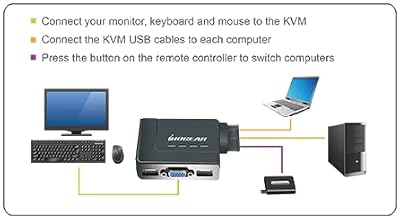
The IOGEAR GCS22U uses a single push-button on the front of the small chassis to toggle which host computer owns the shared VGA monitor, keyboard and mouse. As a true KVM it switches all three together, which is the meaningful behavioural difference versus a USB-only switch — the monitor signal follows the press, so the active computer’s desktop appears on the shared VGA display within the time the monitor needs to lock to the new sync. In practice that is about one to two seconds: there is the USB device handshake (the keyboard and mouse re-enumerating on the new host) and the VGA monitor’s own sync acquisition. That is normal KVM behaviour. There is no hot-key support on this base model — IOGEAR’s higher-tier KVMs offer scroll-lock hot-keys, but this entry-level model is button-only.
Reliability of the switch is the design’s strong suit. The GCS22U has been in IOGEAR’s range for many years; the firmware is mature, the keyboard and mouse re-enumerate cleanly, and the VGA pass-through is electrically straightforward. There is no driver to install on either host and no special boot sequence.
Display Compatibility — Single / Dual / Triple
This is a single-VGA-monitor KVM, period. There is one VGA out on the unit, one VGA in per host (built into the host cables), and the supported resolution is up to 2048×1536 at 60Hz — well above the typical 1280×1024 of an older office VGA display and adequate for the occasional 1080p VGA panel. Modern flat-panel monitors with VGA input are increasingly rare on the new market, so the typical buyer here is someone with an existing VGA monitor they want to keep using — a small business office computer, a legacy industrial control PC, or a server-room admin desk where one VGA console serves multiple machines. For users with HDMI monitors, the IOGEAR GCS22U is not the right product; look at the HDMI KVMs reviewed elsewhere on this site. For modern HDMI cabling, see our best HDMI cables guide.
USB Pass-Through & Peripherals
The GCS22U has two USB-A downstream ports on the front of the unit, designed specifically for a keyboard and a mouse — that is, two of the three letters in KVM. The USB ports are USB 1.1, which is the appropriate spec for human-interface devices and is the original USB standard a KVM of this generation was built around; it is not suitable for connecting external drives, webcams, or any non-HID peripheral. If your shared peripheral pool includes anything beyond a keyboard and mouse, you would supplement the KVM with a separate USB hub on each host, or step up to a more modern HDMI KVM with USB 3.0 pass-through. As a dedicated keyboard-and-mouse KVM the two-port allocation is exactly what is needed and the USB 1.1 spec is functionally sufficient.
Build Quality & Switching Method
The chassis is a small, palm-sized plastic unit with the front button, the active-host LED and the two USB ports on the front, and a pair of built-in host cables permanently moulded into the back of the unit — each pigtail terminating in a male VGA connector and a USB-A connector for plugging into a host PC. The built-in cabling is the design feature: there are no separate cables to buy or lose, and the cable lengths (around 1.2m / 4ft on each side) are well-judged for a typical desk. The switching method is push-button only, with a clean tactile click. The whole unit weighs almost nothing and will live happily on a desk, on top of a tower, or zip-tied behind a monitor. It is one of the smallest true KVMs you can buy.
Use Cases — Gaming + Streaming, Home Office
The GCS22U is not a gaming product — VGA does not carry HDR, does not run at the high refresh rates competitive gamers want, and is not the right cable family for modern displays. Its core use cases are legacy: a small office that keeps two PCs and one VGA monitor on the same desk to save space, a server-room admin who needs to console into either of two rack-mounted machines from a VGA crash-cart, an industrial control workstation where a VGA panel and two redundant PCs sit alongside, or a classroom computer with a teaching display and a backup machine. For those scenarios it is the cheapest, smallest, and most reliable KVM available. For modern gaming desks our best 240Hz gaming laptops guide covers the hardware that needs an HDMI KVM instead.
Verdict
The IOGEAR GCS22U 2-Port USB VGA KVM Switch is a focused, long-lived product that does exactly one thing well: share a single VGA monitor, keyboard and mouse between two computers. The built-in cables, push-button switching and tiny chassis make it the easiest physical KVM to deploy on a small desk, and the maturity of the design means there are no surprises in setup. Its limitations are inherent to its category — VGA only, USB 1.1 only, single monitor only — and not flaws to be fixed. If you have a VGA monitor and need a KVM to go with it, the GCS22U is the obvious answer. If you have HDMI monitors, you need one of the HDMI KVMs reviewed below.
Frequently Asked Questions
Is this an HDMI KVM?
No — this is a VGA KVM. It uses the older VGA video connector to share an analogue display between two computers. If you need to share HDMI monitors, look at the HDMI KVMs reviewed elsewhere on this site.
Does it have hot-key switching?
No — only a front-panel button. Higher-tier IOGEAR KVMs offer scroll-lock hot-keys, but this entry-level model is button-only.
What USB peripherals can I share?
Two USB-A 1.1 ports are provided, intended for one keyboard and one mouse. The KVM is not suitable for sharing external drives, webcams, or any high-bandwidth USB peripheral.
Will it work with my modern 4K HDMI monitor?
No — it only carries VGA video. For 4K HDMI displays, use one of the HDMI KVMs reviewed on this site.
More KVM Switch Reviews
- BENFEI USB 3.0 Switch Review: 4 Ports, 2 PC Selector
- TRENDnet TK-209K 2-Port KVM Review with Audio Pass-Through
- UGREEN HDMI KVM Switch Review: 4K@60Hz + 4 USB 3.0
- UGREEN 4K@60Hz HDMI KVM Switch Review: 2 PC, 4 USB
- MLEEDA Dual Monitor HDMI KVM Review: 4K@60Hz, 2 PCs
- 4-Port HDMI KVM Switch Review: Dual Monitor, 4K, 4 PCs
- UGREEN HDMI KVM 2 Monitor 2 PC Review: 4K + USB 3.0
- UGREEN USB 2.0 Switch Review: 2 PC Share 4 USB Devices
Affiliate Disclosure: As an Amazon Associate, we earn from qualifying purchases. If you click a link and make a purchase, we may earn a small commission at no extra cost to you. Prices and availability are accurate as of publication and may change.
Related Articles
Looking for more on this topic? Browse the hand-picked guides below — each one applies the same scoring rubric used in this review.


