

- Top Pick: BENFEI USB 3.0 Switch, USB Switch 2 Computers Share 4 USB for PC, Mouse, Keyboard, Printer, Scanner, USB KVM Switch Selector Compatible with Windows, Mac, Linux
- Best Value: BENFEI USB 3.0 Switch, USB Switcher 2 Computers Share 3*USB 3.0 and 1*USB C with Remote Control for PC Mouse Keyboard Printer Scanner, USB KVM Switch Selector Compatible with Windows, Mac, Linux
- Premium Choice: USB Hub 7 Port, USB Splitter with Individual On/Off Switches and Lights.
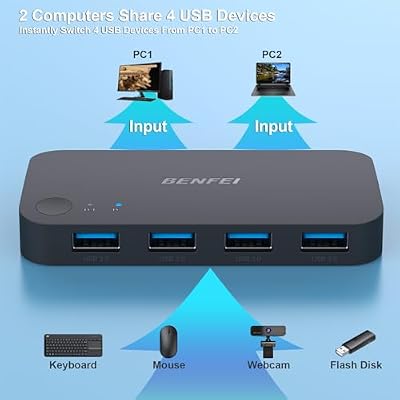
The BENFEI USB 3.0 Switch is a four-port USB 3.0 peripheral switch positioned squarely as a price-competitive alternative to the UGREEN USB 3.0 2-port model reviewed above. It performs the same job — sharing four USB devices between two computers at 5 Gbps — but slots in at a slightly lower price point. As with every USB switch covered so far, it is not a KVM: it does not route video. This BENFEI USB 3.0 Switch review covers the switching performance, USB pass-through, build and value at around $25.
- BENFEI USB 3.0 Switch at a Glance
- Switching Performance & Latency
- Display Compatibility — Single / Dual / Triple
- USB Pass-Through & Peripherals
- Build Quality & Switching Method
- Use Cases — Gaming + Streaming, Home Office
- Verdict
- Frequently Asked Questions
- More KVM Switch Reviews
- Related Articles
- Related Articles
- Related Guides

BENFEI USB 3.0 Switch, USB Switch 2 Computers Share 4 USB for PC, Mouse, Keyboard, Printer, Scanner, USB KVM Switch Selector Compatible with Windows, Mac, Linux


As an Amazon Associate we earn from qualifying purchases. Product prices and availability are accurate as of the date/time indicated.
🛒 Best Price Today on Amazon
Prime members get fast, free shipping on everything above, plus member-only deals. New members get a 30-day free trial — cancel anytime.
As an Amazon Associate we earn from qualifying purchases.



BENFEI USB 3.0 Switch at a Glance
| Component | Specification |
|---|---|
| Type | USB switch (peripheral sharing, no video) |
| Computer count supported | 2 PCs |
| Monitor count | 0 (USB switch only — no video routing) |
| Display resolution support | N/A (peripheral switch, video handled separately) |
| USB peripheral count | 4 USB-A 3.0 ports |
| USB version | USB 3.0 (5 Gbps) |
| Hot-key switching | No — button-press selector only |
| Cables included | 2x USB-A to USB-B 3.0 uplink cables |
| Approx price | around $25 |
Switching Performance & Latency
The BENFEI uses a single push-button on the top of the unit to toggle the four downstream USB ports between two hosts. The switching action is functionally identical to the UGREEN equivalents: press the button, the USB devices re-enumerate on the newly active host, and you are typing on the other machine within roughly half a second to a full second. That delay is the USB device-discovery handshake and is the same on every USB switch — it is not a flaw of BENFEI’s design. The selector is unambiguous, the active-host LED is bright, and there is no software or driver to install. There is no hot-key support; switching is button-only. For a budget USB 3.0 switch, the behaviour matches the UGREEN reference closely enough that most buyers would have difficulty telling them apart in normal use.
Reliability with high-bandwidth peripherals is comparable to UGREEN, which is the test that matters: a fast USB 3.0 external SSD plugged into a downstream port survives the toggle cleanly and is available on the new host within the usual handshake interval. That is the bar a USB 3.0 switch must clear, and the BENFEI does it.
Display Compatibility — Single / Dual / Triple
This is a USB switch, not a KVM, and it has no role in the display side of the desk. As with every other USB switch reviewed so far, the expected layout is two computers each with their own monitor sharing the peripherals through this unit, or one multi-input monitor where you swap inputs from the monitor’s own controls. If you need the keyboard, mouse and monitor to all switch together with one press, an HDMI KVM is the right product. For dual-monitor or multi-input cabling, see our best HDMI cables guide.
USB Pass-Through & Peripherals
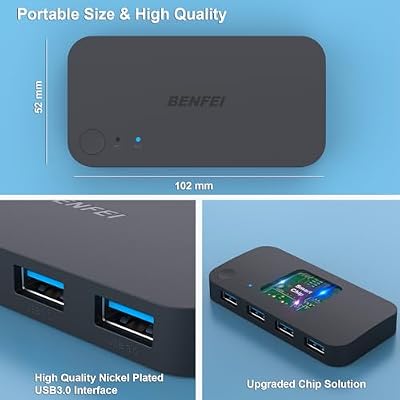
Four USB-A 3.0 ports at 5 Gbps each, sharing one upstream pipe, is enough bandwidth for the standard modern peripheral pool — keyboard, mouse, 4K webcam and a fast external SSD all coexist without trouble. The included host cables are correctly USB 3.0-rated, which matters because using a USB 2.0 cable on the uplink would silently downgrade every downstream port to 480 Mbps. The downstream USB-A connectors are colour-coded blue per USB-IF convention. For shared peripherals that exceed even USB 3.0 — typically NVMe-class external SSDs over the Thunderbolt or USB4 generation — you would need a higher-tier switch, but for the typical desk that demand is rare.
Build Quality & Switching Method
The BENFEI housing is a flat plastic moulding similar in shape to the UGREEN models, with the two USB-B 3.0 uplink ports on one edge and the four USB-A 3.0 downstream ports on the opposite edge. The selector is a single button on top of the unit, with two host LEDs to indicate the active side. Both USB 3.0 uplink cables are included in the box, which is the right call at this price point — separate cables would erase the saving versus UGREEN. The switching method is strictly button-press: no hotkey, no software, no remote control, no automation. The build is workmanlike — comparable to UGREEN at this price tier — and the unit is small enough to live unobtrusively on a desk corner.
Use Cases — Gaming + Streaming, Home Office
The BENFEI suits exactly the same desks as the UGREEN USB 3.0 2-port switch: two-PC home offices where keyboard, mouse, webcam and an external SSD need to follow you between machines, or dual-PC streaming setups where the capture-card peripheral and microphone need to follow the active gaming/streaming host. The price advantage is small but real, which makes BENFEI an easy recommendation for buyers who do not have a brand preference. For the gaming hardware on the other side of the switch, our best RTX 5070 gaming laptops guide covers the typical kit.
Verdict
The BENFEI USB 3.0 Switch is a tidy, slightly cheaper alternative to the UGREEN USB 3.0 2-port model with very similar real-world behaviour: button-press switching, four downstream USB 3.0 ports, included uplink cables and no video routing. The build is comparable, the switching is reliable, and the bandwidth is enough for modern peripherals. For two-host USB sharing on a small budget, it is one of the cleanest options on Amazon. As with the other USB switches reviewed above, it is not a true KVM — if you need video to follow, an HDMI KVM is the correct product.
Frequently Asked Questions
Is this a KVM switch?
No — it is a USB peripheral switch. It shares four USB devices between two computers but does not switch the video signal. For a true KVM, look at the HDMI KVMs reviewed elsewhere on this site.
How does it compare with the UGREEN USB 3.0 2-port switch?
Functionally very similar — both are button-press USB 3.0 switches with four downstream ports, included uplink cables, and no hot-key support. The BENFEI is slightly cheaper; UGREEN has a longer track record and slightly broader compatibility reports.
Does it support hot-key switching?
No — switching is by the top-mounted button only. There is no software, hotkey, or remote-toggle support.
Will it carry a 4K webcam or USB 3.0 SSD?
Yes — the USB 3.0 uplink delivers the full 5 Gbps to the downstream ports, so modern 4K webcams and fast USB 3.0 external SSDs work at their advertised speeds.
More KVM Switch Reviews
- TRENDnet TK-209K 2-Port KVM Review with Audio Pass-Through
- UGREEN HDMI KVM Switch Review: 4K@60Hz + 4 USB 3.0
- UGREEN 4K@60Hz HDMI KVM Switch Review: 2 PC, 4 USB
- MLEEDA Dual Monitor HDMI KVM Review: 4K@60Hz, 2 PCs
- 4-Port HDMI KVM Switch Review: Dual Monitor, 4K, 4 PCs
- UGREEN HDMI KVM 2 Monitor 2 PC Review: 4K + USB 3.0
- UGREEN USB 2.0 Switch Review: 2 PC Share 4 USB Devices
- UGREEN USB 3.0 Switch Review: Selector for 2 PC, 4 USB
Affiliate Disclosure: As an Amazon Associate, we earn from qualifying purchases. If you click a link and make a purchase, we may earn a small commission at no extra cost to you. Prices and availability are accurate as of publication and may change.
Related Articles
Looking for more on this topic? Browse the hand-picked guides below — each one applies the same scoring rubric used in this review.










