

- Top Pick: UGREEN USB 3.0 Switch 2 Computers Sharing USB C & A Devices, 4 Port USB Switcher Sharing Keyboard and Mouse, Printer/Scanner USB Switch Hub for Two Computers with 2 USB3.0 Cables and Controller
- Best Value: UGREEN USB 3.0 Switch Selector 2 Computers Share 4 USB Ports USB Switcher USB for PC Laptop Keyboard Mouse Printer Scanner One Button Switch Adapter with 2 Pack USB 3.0 Cables
- Premium Choice: UGREEN USBC Switch 2 Computers Share 4 USB 3.2 Ports, 10Gbps Switcher Selector for PC Laptop Keyboard Mouse, Sharing Switch Adapter with 2 USB-C to C Data Cables and Remote
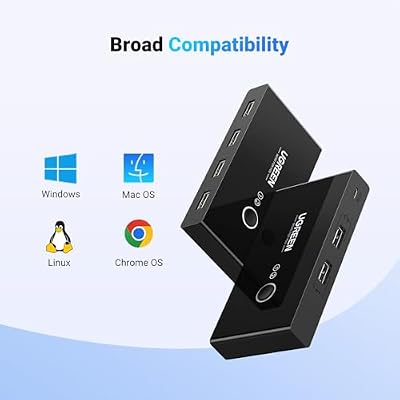
The UGREEN USB 2.0 Switch is a four-port USB peripheral switch that lets two computers share the same keyboard, mouse, printer and external drive through a single button-press selector. It is important to understand from the outset that this is a USB switch, not a KVM — a true KVM (Keyboard, Video, Mouse) switches video as well, while a USB-only switch like this one only swaps the USB peripherals between two hosts. For users who already have separate monitors per computer or who use a single-monitor multi-input setup, that distinction matters. This UGREEN USB 2.0 Switch review covers the switching performance, USB pass-through, build quality and value at around $20.
- UGREEN USB 2.0 Switch at a Glance
- Switching Performance & Latency
- Display Compatibility — Single / Dual / Triple
- USB Pass-Through & Peripherals
- Build Quality & Switching Method
- Use Cases — Gaming + Streaming, Home Office
- Verdict
- Frequently Asked Questions
- More KVM Switch Reviews
- Related Articles
- Related Articles
- Related Guides

UGREEN USB Switch Selector 2 Computers Sharing 4 USB Devices USB 2.0 Peripheral Switcher Box Hub for Mouse Keyboard Scanner Printer PCs with One-Button Swapping and 2 Pack USB A to A Cable



As an Amazon Associate we earn from qualifying purchases. Product prices and availability are accurate as of the date/time indicated.
🛒 Best Price Today on Amazon
Prime members get fast, free shipping on everything above, plus member-only deals. New members get a 30-day free trial — cancel anytime.
As an Amazon Associate we earn from qualifying purchases.





UGREEN USB 2.0 Switch at a Glance
| Component | Specification |
|---|---|
| Type | USB switch (peripheral sharing, no video) |
| Computer count supported | 2 PCs |
| Monitor count | 0 (USB switch only — no video routing) |
| Display resolution support | N/A (peripheral switch, video handled separately) |
| USB peripheral count | 4 USB-A 2.0 ports |
| USB version | USB 2.0 (480 Mbps) |
| Hot-key switching | No — button-press selector only |
| Cables included | 2x USB-A to USB-B uplink cables |
| Approx price | around $20 |
Switching Performance & Latency
The UGREEN USB 2.0 Switch uses a single physical button on the top of the housing to toggle which host computer owns the four downstream USB ports. Pressing the button immediately re-enumerates the connected peripherals on the newly selected host, which is the same handshake any USB device performs at plug-in. In practice that means a switching delay of roughly half a second to a full second from button press to the keyboard or mouse being responsive on the second machine — this is the unavoidable USB negotiation time, not a flaw of the switch. There is no hot-key support, no software, and no scripted switching; the button is the only control. For users who switch occasionally between a personal laptop and a work desktop, that is perfectly adequate. Users who context-switch many times a day will find a button press becomes tedious compared with a true KVM that offers keyboard hot-keys.
Reliability of the switching action is the strength here. UGREEN has been making this exact switch for years, the button has a clean tactile click, and there are no firmware quirks to learn — power the hub from one of the host USB ports (it is self-powered from the active uplink), plug in your peripherals, and it just works. The host LED indicates which computer is currently active.
Display Compatibility — Single / Dual / Triple
This is a USB switch only, so the display side of the equation is whatever you already have. Two common setups suit it: a dual-PC desk with each computer driving its own monitor, where the switch shares one keyboard and mouse between them; or a single high-end monitor with two video inputs (HDMI and DisplayPort, say) that you toggle on the monitor’s own input button, leaving the UGREEN to swap the peripherals. The switch does not see or affect the video signal at all, which keeps the price low but is a meaningful limitation versus a true HDMI KVM. If you need the same monitor to follow the keyboard and mouse with a single press, this is not the right product — look at the HDMI KVMs further down our reviews. For monitor-input cabling, see our best HDMI cables guide.
USB Pass-Through & Peripherals
Four USB 2.0 ports gives enough fan-out for the classic shared-peripherals set: keyboard, mouse, printer and an external drive or webcam, all on the same switch. USB 2.0 is the bandwidth ceiling at 480 Mbps, which is fine for human-interface devices (keyboards and mice negotiate at low speeds anyway), perfectly adequate for printers and webcams up to 1080p, but markedly slow for external SSDs — a USB 2.0 host caps a fast SSD at roughly 35 MB/s versus several hundred on USB 3.0. If you mainly switch keyboards, mice and printers between two computers, USB 2.0 is enough. If your shared workflow involves moving large files off an external SSD, the UGREEN USB 3.0 Switch reviewed below is the better buy for a small price increase.
All four ports share the upstream USB 2.0 bandwidth, which matters only when several peripherals push data simultaneously. For typing, mousing and the occasional print job, the shared bandwidth is invisible.
Build Quality & Switching Method
The housing is moulded plastic with a brushed-effect top panel and is genuinely small — easy to clip to the side of a monitor stand or hide behind a docking station. The two USB-B uplink ports are on one short edge, the four USB-A downstream ports on the opposite edge, and the selector button sits on the top, which keeps it easy to find without looking. UGREEN includes the two USB-A to USB-B cables in the box, which is the right call — separate cables would force an order from a different vendor. The switching method here is strictly button-press: there is no hotkey, no software driver, no remote toggle. That keeps the design simple and reliable, but it also means the switch is most at home a few centimetres from your keyboard, not buried under the desk. A common gaming setup pairs this with one of the laptops in our best RTX 5070 gaming laptops guide.
Use Cases — Gaming + Streaming, Home Office
The clearest use case for the UGREEN USB 2.0 Switch is a small home office where one keyboard, mouse, printer and webcam serve both a work laptop and a personal desktop. Press the button, the peripherals flip across, and your printer or webcam is available to whichever host you need at that moment. It also suits dual-PC streaming rigs where you want one mouse and keyboard to drive both the gaming machine and the streaming PC; for that use case, however, a true HDMI KVM is usually nicer because it follows the video too. As a pure peripheral switch it is honest about what it does, and at around $20 it does it well. For more demanding streaming setups, our best 240Hz gaming laptops guide covers the gaming hardware that typically sits on the other side of a switch like this.
Verdict
The UGREEN USB 2.0 Switch is a tightly focused, well-built and inexpensive way to share four USB peripherals between two computers. The button-only switching is unambiguous and reliable, the included cables remove the usual second-purchase friction, and the USB 2.0 bandwidth is enough for everything except fast external storage. Its biggest limitation is the one its name advertises: it does not switch video. If your workflow only ever needs the keyboard, mouse and printer to follow you between two computers, it is an easy recommendation; if you also need the monitor signal to follow, step up to a true HDMI KVM. For the price, it is one of the most popular USB switches on Amazon for good reason.
Frequently Asked Questions
Is this a KVM switch?
No — strictly speaking, a KVM switches Keyboard, Video and Mouse. This UGREEN model switches only USB peripherals (keyboard, mouse and other USB devices) between two computers; the video signal is not routed through it. If you need video to switch too, look at the HDMI KVMs reviewed elsewhere on this site.
How does the switching work?
There is one button on the top of the unit. Press it and the four USB ports re-enumerate on the other host. The handshake takes about half a second to one second, which is normal USB negotiation behaviour rather than a flaw of the switch.
Can I connect a USB 3.0 SSD to it?
You can plug it in, and it will work, but only at USB 2.0 speeds (around 35 MB/s). For fast external SSDs the UGREEN USB 3.0 Switch is a better choice.
Does it need its own power supply?
No — the switch is bus-powered from whichever uplink cable is currently active. There is no wall wart in the box and none needed for typical keyboard, mouse and printer use.
More KVM Switch Reviews
- UGREEN USB 3.0 Switch Review: Selector for 2 PC, 4 USB
- Sabrent USB 2.0 Sharing Switch Review: Share Up to 4 PCs
- UGREEN USB 3.0 4-Port KVM Review: USB-C + USB-A Switch
- IOGEAR 2-Port USB VGA KVM Switch Review (GCS22U)
- BENFEI USB 3.0 Switch Review: 4 Ports, 2 PC Selector
- TRENDnet TK-209K 2-Port KVM Review with Audio Pass-Through
- UGREEN HDMI KVM Switch Review: 4K@60Hz + 4 USB 3.0
- UGREEN 4K@60Hz HDMI KVM Switch Review: 2 PC, 4 USB
Affiliate Disclosure: As an Amazon Associate, we earn from qualifying purchases. If you click a link and make a purchase, we may earn a small commission at no extra cost to you. Prices and availability are accurate as of publication and may change.
Related Articles
Looking for more on this topic? Browse the hand-picked guides below — each one applies the same scoring rubric used in this review.










