

For 3D rendering, the GPU is the engine that turns scenes into finished frames, and the priorities are very different from gaming. Renderers like Blender Cycles, OctaneRender, Redshift and V-Ray RT lean on three things: large VRAM to hold complex scenes, textures and geometry; a high CUDA core count for parallel compute throughput; and dedicated RT cores accelerated by NVIDIA’s OptiX for fast ray tracing. NVIDIA dominates production rendering because most GPU renderers are built around CUDA and OptiX. This guide rounds up the best 3D rendering GPUs in 2026, from professional workstation cards to value GeForce options.
- Best 3D Rendering GPUs at a Glance
- 1. PNY Technology NVIDIA RTX PRO 6000 Blackwell Max-Q Workstation
- 2. PNY VCNRTXPRO5000B-PB NVIDIA RTX PRO 5000 Blackwell 48GB GDDR7
- 3. Nvidia RTX 5000 Ada Quadro RTX 5000 32 GB GDDR6
- 4. NVIDIA RTX PRO 4000 SFF Blackwell 24GB GDDR7 ECC, PCIe 5.0
- 5. ASUS TUF Gaming GeForce RTX 5090 Triple Fan GPU, 32GB GDDR7
- 6. MSI Gaming GeForce RTX 3060 12GB 15 Gbps GDDR6 192-Bit PCIe 4 Torx Twin Fan
- How to Choose a 3D Rendering GPU
- Frequently Asked Questions
- Related Guides
- Related Articles
Our picks were chosen on what genuinely drives rendering performance: VRAM capacity (the hard limit on scene size before you spill to system memory or fail), CUDA core count for throughput, RT-core acceleration for ray tracing, and value per dollar. We have included a wide range — from a $399 12GB GeForce card to a flagship workstation GPU near $12,700 — and we are honest about category: a couple of these are gaming-first GeForce cards that happen to render very well for the money, while the RTX PRO and RTX Ada cards are purpose-built professional workstation GPUs. Below is an at-a-glance comparison, then a closer look at each and a buyer’s guide built around VRAM, CUDA and RT cores.
As an Amazon Associate we earn from qualifying purchases at no extra cost to you.



🛒 Best Price Today on Amazon
Prime members get fast, free shipping on everything above, plus member-only deals. New members get a 30-day free trial — cancel anytime.
Best 3D Rendering GPUs at a Glance
| GPU | Best For | Standout Spec | Approx Price |
|---|---|---|---|
| PNY NVIDIA RTX PRO 6000 Blackwell Max-Q | Flagship pro rendering | Top-tier VRAM and CUDA, Max-Q | around $12,696 |
| PNY NVIDIA RTX PRO 5000 Blackwell 48GB | High-end studio workstation | 48GB GDDR7, 384-bit | around $4,820 |
| NVIDIA RTX 5000 Ada 32GB | Proven Ada pro card | 32GB GDDR6, Ada generation | around $4,590 |
| NVIDIA RTX PRO 4000 SFF Blackwell 24GB | Compact pro workstation | 24GB GDDR7 ECC, low-profile SFF | around $2,047 |
| ASUS TUF RTX 5090 32GB GDDR7 | High-VRAM value rendering | 32GB GDDR7, huge CUDA count | around $4,150 |
| MSI GeForce RTX 3060 12GB | Budget entry to GPU rendering | 12GB VRAM, CUDA + RT cores | around $399 |
1. PNY Technology NVIDIA RTX PRO 6000 Blackwell Max-Q Workstation

PNY Technology VCNRTXPRO6000BQ-PB NVIDIA RTX PRO 6000 Blackwell Max-Q Workstation Graphics Card
As an Amazon Associate we earn from qualifying purchases. Product prices and availability are accurate as of the date/time indicated.
The PNY NVIDIA RTX PRO 6000 Blackwell Max-Q is the no-compromise flagship for professional 3D rendering. As a top-tier Blackwell-generation workstation card it offers an enormous VRAM pool and a massive CUDA and RT-core count, letting it hold the largest, most complex scenes entirely in memory and chew through OptiX-accelerated ray tracing at the highest tier. At around $12,696 it is the most expensive GPU here, aimed squarely at studios and professionals.
This is the card for production environments where render time is money and scene complexity is unbounded — feature VFX, high-end product visualisation, and large architectural scenes. The huge VRAM means you rarely if ever spill out of memory, the enormous CUDA throughput slashes final-frame and viewport render times, and the Max-Q variant is engineered for efficient thermals and power in workstation chassis. For the most demanding professional rendering where nothing should hold you back, the RTX PRO 6000 is the undisputed standout.
Pros: Massive VRAM and CUDA count, top-tier OptiX RT, Max-Q efficiency, pro-grade.
Cons: Extremely expensive; overkill for hobbyists and most freelancers.
2. PNY VCNRTXPRO5000B-PB NVIDIA RTX PRO 5000 Blackwell 48GB GDDR7
PNY Technology VCNRTXPRO6000BQ-PB NVIDIA RTX PRO 6000 Blackwell Max-Q Workstation Graphics Card
As an Amazon Associate we earn from qualifying purchases. Product prices and availability are accurate as of the date/time indicated.
The PNY NVIDIA RTX PRO 5000 Blackwell is the high-end studio workstation pick. It pairs 48GB of fast GDDR7 memory on a wide 384-bit bus with a large CUDA and RT-core count, giving professionals huge headroom for complex scenes and excellent OptiX ray-tracing performance. At around $4,820 it sits a major step below the flagship while still being a serious professional rendering card.
This is the card for a working studio or serious freelancer who needs abundant VRAM and strong compute but cannot justify the flagship’s price. The 48GB pool comfortably holds large textured scenes and high-resolution assets without spilling to system memory, the GDDR7 bandwidth feeds the renderer quickly, and the professional Blackwell architecture delivers reliable, certified performance for production pipelines. For high-end rendering with generous memory at a more attainable professional price, the RTX PRO 5000 is a compelling choice.
Pros: Generous 48GB GDDR7, wide 384-bit bus, strong CUDA and OptiX, pro-certified.
Cons: Still a major investment; more than hobby renderers typically need.
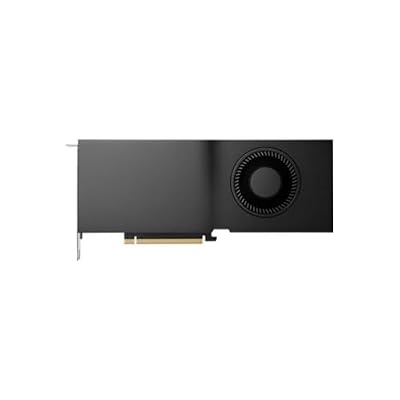
3. Nvidia RTX 5000 Ada Quadro RTX 5000 32 GB GDDR6


As an Amazon Associate we earn from qualifying purchases. Product prices and availability are accurate as of the date/time indicated.
The NVIDIA RTX 5000 Ada is the proven professional workstation pick from the Ada Lovelace generation. It offers 32GB of GDDR6 memory alongside a substantial CUDA and RT-core complement, delivering dependable rendering performance with the reliability and driver certification professionals expect. At around $4,590 it is a mature, well-understood option for studios standardised on Ada workstation cards.
This is the card for professionals who value a known, certified quantity over the very latest architecture. The 32GB of VRAM handles large, detailed scenes comfortably, the Ada-generation RT cores accelerate OptiX ray tracing effectively, and the workstation-class design prioritises stability for production work and ISV-certified applications. While the newer Blackwell RTX PRO cards push specs further, the RTX 5000 Ada remains a robust, reliable rendering GPU for studios that want a proven Ada platform at this tier.
Pros: 32GB VRAM, mature Ada RT cores, professional driver certification, reliable.
Cons: Previous-generation architecture; priced close to newer Blackwell options.
4. NVIDIA RTX PRO 4000 SFF Blackwell 24GB GDDR7 ECC, PCIe 5.0

NVIDIA RTX PRO 4000 SFF Blackwell 24GB GDDR7 ECC - PCIe 5.0x8, 4X mDP 2.1b, Low-Profile Dual-Slot AI Workstation GPU Retail


As an Amazon Associate we earn from qualifying purchases. Product prices and availability are accurate as of the date/time indicated.
The NVIDIA RTX PRO 4000 SFF Blackwell is the compact professional pick. It packs 24GB of GDDR7 with ECC memory and a Blackwell-generation CUDA and RT-core set into a low-profile, small-form-factor card on PCIe 5.0, with four Mini DisplayPort outputs. At around $2,047 it is the most affordable purpose-built professional card here and the one designed for compact or multi-display workstations.
This is the card for professionals who need certified, reliable rendering in a small chassis or who want a more accessible entry to the RTX PRO line. The 24GB of ECC GDDR7 holds substantial scenes while error-correcting memory adds data integrity for long renders, the Blackwell RT cores accelerate OptiX, and the low-profile SFF design fits compact workstations where full-size cards will not. For a space-efficient professional rendering GPU with modern features and ECC reliability, the RTX PRO 4000 SFF is an excellent, comparatively affordable option.
Pros: 24GB ECC GDDR7, Blackwell RT cores, compact low-profile SFF, PCIe 5.0, pro-grade.
Cons: Less raw VRAM and compute than higher RTX PRO cards; SFF cooling limits headroom.
5. ASUS TUF Gaming GeForce RTX 5090 Triple Fan GPU, 32GB GDDR7

ASUS TUF Gaming GeForce RTX 5090 Triple Fan GPU, 32GB GDDR7, 3352 AI Tops, 28 Gbps, 512-bit, DLSS 4, AI Content Creation, Local LLM Inference, DP 2.1b x3, HDMI 2.1b x2, with GPU Holder


As an Amazon Associate we earn from qualifying purchases. Product prices and availability are accurate as of the date/time indicated.
The ASUS TUF RTX 5090 is the high-VRAM value pick — and an honest note on category: it is a gaming-first GeForce card, not a workstation GPU, but it renders superbly for the money. It carries 32GB of GDDR7 and an enormous CUDA core count with the latest RT cores, so for CUDA and OptiX renderers it delivers professional-tier memory and throughput at around $4,150 — well below comparable RTX PRO cards.
This is the card for freelancers, solo artists and small studios who render in Blender, Octane or Redshift and want maximum performance per dollar rather than professional certification. The 32GB VRAM holds large scenes, the huge CUDA count and new-generation RT cores produce fast OptiX ray tracing, and the robust ASUS TUF cooling keeps it stable under sustained load. You give up ISV-certified drivers, ECC memory and pro support, which matter in some production pipelines — but for raw rendering value, a GeForce flagship like the RTX 5090 is hard to beat.
Pros: 32GB GDDR7, massive CUDA count, latest RT cores, strong cooling, excellent value.
Cons: Gaming card, not pro-certified; no ECC memory or workstation ISV support.
6. MSI Gaming GeForce RTX 3060 12GB 15 Gbps GDDR6 192-Bit PCIe 4 Torx Twin Fan

msi Katana 15 15.6” 165Hz QHD Gaming Laptop: Intel Core i7-13620H, NVIDIA Geforce RTX 4070, 16GB DDR5, 1TB NVMe SSD, Cooler Boost 5, Win 11: Black B13VGK-2000US



As an Amazon Associate we earn from qualifying purchases. Product prices and availability are accurate as of the date/time indicated.
Rounding out the list is the MSI GeForce RTX 3060 12GB, the budget entry to GPU rendering — and, like the 5090, a gaming card rather than a workstation GPU. Its appeal for rendering is specific: 12GB of VRAM is unusually generous for an affordable card, and combined with CUDA and RT cores it lets newcomers run real CUDA and OptiX rendering without spending thousands. At around $399 it is by far the cheapest path onto this list.
This is the card for students, hobbyists and anyone learning Blender Cycles or Octane who needs a legitimate, capable GPU renderer on a tight budget. The 12GB of VRAM handles moderately complex scenes that would overwhelm 8GB cards, the CUDA cores provide real GPU-accelerated rendering speed-ups over a CPU, and OptiX support enables hardware ray tracing. It will not match the VRAM or throughput of the pro and flagship cards above, so very large scenes are out of reach — but as an affordable, genuinely usable entry into GPU rendering, the RTX 3060 12GB is the smart starting point.
Pros: Generous 12GB VRAM for the price, CUDA and OptiX support, very affordable entry.
Cons: Gaming card with modest compute; limited VRAM and speed for large pro scenes.
How to Choose a 3D Rendering GPU
For 3D rendering, VRAM is the first thing to get right, because it is a hard limit rather than just a speed factor. Your entire scene — geometry, textures and assets — must fit in GPU memory, and once you exceed it you either spill to much slower system memory or the render fails outright. That is why capacity ranges so widely here, from 12GB on the RTX 3060 up to 48GB on the RTX PRO 5000 and beyond. Estimate how complex your scenes are: 12GB suits learning and moderate work, 24-32GB handles serious projects, and 48GB-plus is for the largest production scenes.
CUDA core count is the next priority, because it largely determines raw render speed. Most production GPU renderers — Blender Cycles, OctaneRender, Redshift, V-Ray RT — are built on NVIDIA’s CUDA, so more CUDA cores generally mean faster final-frame and viewport rendering. The flagship RTX PRO 6000 and the GeForce RTX 5090 carry the largest core counts here, while the RTX 3060 sits at the entry end. Weigh CUDA throughput alongside VRAM — a fast card you constantly run out of memory on is no bargain.
RT cores and OptiX acceleration matter enormously if your renderer ray traces, which most modern ones do. NVIDIA’s dedicated RT cores, driven through the OptiX API, dramatically speed up ray-traced rendering compared with relying on CUDA alone, and each newer generation — Ada, then Blackwell — improves this further. All the cards here include RT cores, but the newer Blackwell RTX PRO and RTX 5090 cards offer the most advanced ray-tracing acceleration. If you use OptiX in Cycles, Octane or Redshift, prioritise a recent RT-core generation.
Finally, decide between a professional and a gaming card, because it is the real fork in this list. Professional GPUs like the RTX PRO and RTX Ada cards add ECC memory, ISV-certified drivers, validated stability and pro support — things that matter in studio pipelines and certified applications, and that justify their higher prices. Gaming flagships like the RTX 5090 and the budget RTX 3060 deliver outstanding rendering value per dollar but lack certification and ECC. If you are a studio with certified workflows, buy professional; if you are a freelancer or hobbyist chasing performance per dollar, a GeForce card is often the smarter spend. Match VRAM, CUDA, RT generation and certification to your work, and pick the GPU on this list that fits.
Frequently Asked Questions
Why is VRAM so important for 3D rendering?
Because your whole scene has to fit in the GPU’s memory. Geometry, textures and assets all live in VRAM during a render, and if you exceed the available capacity the render either falls back to far slower system memory or fails entirely. That is why capacity matters so much — 12GB on the RTX 3060 suits learning and moderate scenes, while 48GB on the RTX PRO 5000 handles large production work without spilling.
Do I need a professional GPU, or will a gaming card work for rendering?
A gaming card works very well for rendering value. GeForce cards like the RTX 5090 and RTX 3060 use the same CUDA and OptiX technology renderers rely on and deliver excellent performance per dollar. Professional cards like the RTX PRO and RTX Ada add ECC memory, ISV-certified drivers and validated stability that matter in studio pipelines. Freelancers and hobbyists often choose GeForce; studios with certified workflows lean professional.
What are CUDA cores and OptiX, and why do they matter?
CUDA cores are NVIDIA’s parallel compute units, and most GPU renderers — Blender Cycles, Octane, Redshift, V-Ray RT — are built on CUDA, so more cores generally mean faster rendering. OptiX is NVIDIA’s ray-tracing API that taps the GPU’s dedicated RT cores to accelerate ray-traced rendering far beyond CUDA alone. Together they are why NVIDIA dominates production rendering and why RT-core generation is worth prioritising.
Is the RTX 3060 12GB really good enough for 3D rendering?
For learning and moderate projects, yes. Its 12GB of VRAM is generous for an affordable card and handles scenes that overwhelm 8GB GPUs, while its CUDA and RT cores enable real GPU-accelerated, OptiX-ray-traced rendering. It is far slower and more memory-limited than the pro and flagship cards here, so very large scenes are out of reach — but as an affordable entry into GPU rendering, it is a genuinely capable starting point.
Related Guides
- Best GPUs for Your Build
- Best Workstation GPUs
- Best CPUs for Rendering
- Best Gaming PC Builds
- Best Power Supplies
- Best NVMe SSDs
Affiliate Disclosure: As an Amazon Associate, we earn from qualifying purchases. If you click a link and make a purchase, we may earn a small commission at no extra cost to you. Prices and availability are accurate as of publication and may change.










