

- Top Pick: BONTEC Dual Monitor Desk Mount, 13-27 Inch, 22lbs, VESA 75×75/100×100,Black
- Best Value: BONTEC Dual Monitor Desk Mount, 13-27 Inch, 22lbs, VESA 75×75/100×100,White
- Premium Choice: VIVO Dual Monitor Desk Mount, Holds 2 Computer Screens up to 30 inches and 22lbs Each, Heavy Duty Fully Adjustable Steel Stand with C-Clamp and Grommet, Black, STAND-V002
The BONTEC Dual Monitor Desk Mount is a budget-friendly dual-arm mount designed for the most common monitor sizes in gaming and office use — 13 to 27 inches. It offers full tilt, swivel and rotation on each arm, integrated cable channels and a straightforward C-clamp installation. At around $35 it is one of the most accessible ways to turn two displays into an ergonomically correct, desk-clearing setup. This BONTEC Dual Monitor Desk Mount review covers the specifications, build, ergonomics and value.

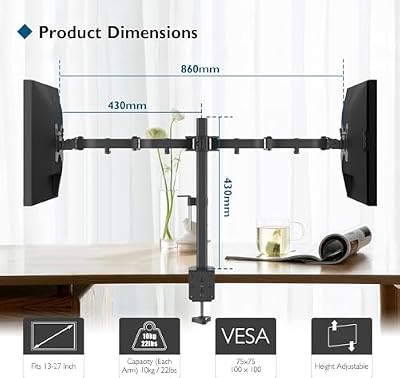
BONTEC Dual Monitor Desk Mount, 13-27 Inch, 22lbs, VESA 75x75/100x100,Black | Full Motion Adjustable Stand, Heavy Duty Arms, C Clamp and Grommet Base, Cable Management for Flexible Screen Positioning




As an Amazon Associate we earn from qualifying purchases. Product prices and availability are accurate as of the date/time indicated.
🛒 Best Price Today on Amazon
Prime members get fast, free shipping on everything above, plus member-only deals. New members get a 30-day free trial — cancel anytime.
As an Amazon Associate we earn from qualifying purchases.




BONTEC Dual Monitor Desk Mount at a Glance
| Specification | Detail |
|---|---|
| Mount type | Dual articulating arm, post-mounted |
| Screen size range | 13 to 27 inches per arm |
| Weight capacity | Up to manufacturer-rated limit per arm |
| VESA pattern | 75×75 mm and 100×100 mm |
| Adjustment range | Height along central pole; arms swivel and extend |
| Tilt / Swivel / Rotation | Tilt and swivel at joints; 360-degree rotation on screen plate |
| Cable management | Integrated clip channels on arms |
| Mount style | C-clamp through desktop |
| Approx price | Around $35 |
Build Quality & Materials
The BONTEC Dual Monitor Desk Mount is built from steel with a matte black powder-coat finish. The central pole, arms and joints are all metal, which is the right material choice for a load-bearing mount, and there are no plastic pieces in the structural chain from desktop to monitor. Joints rotate on metal-on-metal pivots with washers, giving consistent resistance through the range of movement.
Fit and finish are tidy for the price. The clamp jaw is solid and tightens evenly against the underside of the desk, the screen plates have neatly rolled edges, and the supplied hardware kit is comprehensive. It is not the precision-machined feel of a premium mount, but for a sub-$40 product the build is honest and the engineering is solid. The mount is rated to common monitor weights within its size range, and within that envelope it holds position confidently.
Adjustability & Ergonomics
The BONTEC offers the full set of adjustments a dual-arm mount should: tilt for monitor angle, swivel at the arm joints for left-right positioning, and a full 360-degree rotation on the screen plate for portrait or landscape orientation. Height is set along the central pole, and the two arms can sit at different heights, which is useful when pairing a primary display with a secondary at a lower or higher sightline.
The ergonomic benefit of moving from a stock monitor stand to an articulating mount is significant — the monitor can be lifted to eye-level, pushed back to a comfortable viewing distance, and angled to match your seating position rather than the other way around. Pair it with a height-adjustable chair (see our best gaming chairs guide) and a properly sized desk and the result is a meaningfully more comfortable long-session setup. For competitive gamers, a clean, ergonomically correct desk also helps with mouse and keyboard positioning — see our best gaming mice guide for complementary peripherals.
Mounting Options & Installation
The BONTEC uses a C-clamp installation, which is the most common option and fits virtually all gaming and office desks. Position the central pole at the back of the desk, slide the clamp jaw under the desktop, and tighten the bolt by hand until the pole stands firm. The clamp accommodates the typical 1 to 2-inch desktop thickness used in mainstream desks.
Installation is straightforward, with one person able to complete it in twenty to thirty minutes, though a second pair of hands speeds the process of mounting the screens themselves. The arms slide onto the central pole and lock with thumbscrews, and the VESA plates attach to the rear of the monitors with the supplied bolts. The included hardware covers both 75×75 mm and 100×100 mm VESA patterns. Instructions are clear and the parts kit is well labelled.
Cable Management
The BONTEC integrates cable management through clip channels along the underside of each arm. Display cables, power cables and any peripheral leads from the monitor’s USB hub are gathered into the channels, keeping the cable path tidy from the monitor back to where it drops behind the desk. It is not the fully enclosed system of premium gas-spring mounts, but it is effective and easy to service.
When installing, route each arm’s cables before extending the arms to their final position, leaving a small loop of slack at each pivot so cables are not stressed during articulation. Done properly, the mount delivers a clean cable run with no loose loops on the desktop surface, which is one of the visual benefits of moving from stock monitor stands to an articulating mount.
Compatible Setups
The 13 to 27-inch screen-size range covers the vast majority of gaming and productivity monitors, and the mount is well matched to the dual 24-inch or dual 27-inch builds that are the most common dual-display setups. With both screens at 27 inches it makes a strong gaming-and-productivity workstation, and with a 24-inch primary and a 24-inch secondary it is the classic productivity layout for a hybrid worker. It pairs particularly well with high-refresh panels — see our best 240Hz gaming monitors guide.
It is not the right mount for displays larger than 27 inches or for heavy curved ultrawides, which exceed its size or weight rating. For 32-inch panels and ultrawides, step up to one of the larger-capacity mounts in this guide. For the standard dual-monitor build that the majority of users have, however, the BONTEC sits squarely in the sweet spot. The freed desk space also leaves room for the keyboard and mouse to be positioned correctly — see our best gaming keyboards guide.
Verdict
The BONTEC Dual Monitor Desk Mount is a sensible, honest budget mount. At around $35 it delivers the core functionality of a dual-arm mount — full articulation, height adjustment, portrait rotation and tidy cable management — built from the right materials and finished to a respectable standard. It is not a premium gas-spring system, but it is not priced like one either, and for the dual 24-inch or dual 27-inch user it is more than sufficient.
For the buyer upgrading from stock monitor stands to a proper dual-arm mount and looking to keep the spend under $50, the BONTEC is easy to recommend. Buyers with larger or heavier displays, or who want gas-spring effortless adjustment, should look further down the list. For the standard dual-display build at the lowest sensible price, BONTEC is well judged.
Frequently Asked Questions
What monitor sizes does the BONTEC dual mount fit?
It is rated for screens from 13 to 27 inches per arm. This covers the most common gaming and office monitors, including the popular 24-inch and 27-inch sizes.
Does the BONTEC mount install with a clamp or grommet?
It uses a C-clamp install that secures to the rear edge of the desktop. It is designed to fit the typical 1 to 2-inch desktop thickness used in mainstream desks.
Can the BONTEC dual mount rotate to portrait?
Yes. Each VESA plate rotates a full 360 degrees on the arm, so either monitor can be set independently to portrait orientation, useful for code, documents or social feeds.
Is the BONTEC dual mount good for gaming?
Yes. It frees the desktop, lifts monitors to eye-level for better posture during long sessions, and accommodates the popular 24-inch and 27-inch gaming panel sizes.
More Monitor Arm Reviews
- HUANUO FlowLift Dual Gas-Spring Monitor Stand Review: 13–32 in
- HUANUO Dual Monitor Stand Review: Full Adjustable VESA
- ErGear Dual Monitor Stand Review: Up to 32 in
- VIVO Single 13–38 in Ultrawide Monitor Arm Review
- WALI Dual Monitor Stand Review: Up to 27 in
- Amazon Basics Single Computer Monitor Stand Review: Adjustable
- WALI Single Monitor Mount Review: 13–34 in
- WALI Ultrawide Single Monitor Arm Review: 13–49 in, 44 lb
Affiliate Disclosure: As an Amazon Associate, we earn from qualifying purchases. If you click a link and make a purchase, we may earn a small commission at no extra cost to you. Prices and availability are accurate as of publication and may change.
Related Articles
Looking for more on this topic? Browse the hand-picked guides below — each one applies the same scoring rubric used in this review.










