

- Top Pick: VIVO Dual Monitor Desk Mount, Holds 2 Computer Screens up to 30 inches and 22lbs Each, Heavy Duty Fully Adjustable Steel Stand with C-Clamp and Grommet, Black, STAND-V002
- Best Value: VIVO Dual Monitor Stand, Fully Adjustable Arms for 17 to 32 inch Screens, Mechanical Articulating Desk Mount, Gaming and Office Setups, VESA 75×75, 100×100, Max 19.8 lbs, Classic, Black, STAND-V002O
- Premium Choice: VIVO STAND-V002F Dual LED LCD Monitor Free-Standing Desk Stand for 2 Screens up to 27 Inch Heavy-Duty Fully Adjustable Arms with Max VESA 100x100mm
The VIVO Dual Monitor Desk Mount is one of the most widely chosen entry-level dual-arm mounts on the market, and for good reason. It supports two monitors up to 30 inches and 22 lb each, offers full tilt, swivel and rotation on each arm, and installs via either a C-clamp or a grommet through the desktop. With pricing around $40, it is a sensible upgrade for anyone moving from a stock monitor stand to a proper articulating dual-display setup. This VIVO Dual Monitor Desk Mount review covers the specifications, build, ergonomics and value.

VIVO Dual Monitor Desk Mount, Holds 2 Computer Screens up to 30 inches and 22lbs Each, Heavy Duty Fully Adjustable Steel Stand with C-Clamp and Grommet, Black, STAND-V002


As an Amazon Associate we earn from qualifying purchases. Product prices and availability are accurate as of the date/time indicated.
🛒 Best Price Today on Amazon
Prime members get fast, free shipping on everything above, plus member-only deals. New members get a 30-day free trial — cancel anytime.
As an Amazon Associate we earn from qualifying purchases.




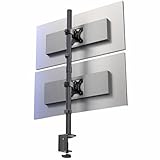

VIVO Dual Monitor Desk Mount at a Glance
| Specification | Detail |
|---|---|
| Mount type | Dual articulating arm, post-mounted |
| Screen size range | Up to 30 inches per arm |
| Weight capacity | Up to 22 lb (10 kg) per arm |
| VESA pattern | 75×75 mm and 100×100 mm |
| Adjustment range | Height along central pole; arms extend, retract and pivot |
| Tilt / Swivel / Rotation | Tilt and swivel at the arm; full 360-degree screen rotation (portrait or landscape) |
| Cable management | Integrated clips along arms and pole |
| Mount style | C-clamp or grommet through desktop |
| Approx price | Around $40 |
Build Quality & Materials
The VIVO Dual Monitor Desk Mount is a steel-construction mount with a powder-coated black finish. The central pole is the structural backbone of the assembly, and the two arms extend horizontally from independent collars that slide up and down the pole. The build is honest for the price — there are no fragile plastic load-bearing parts in the chain from desktop to display, and the joints rotate on metal-on-metal interfaces. It is not the precision-engineered, brushed-aluminium feel of premium mounts, but it is solidly built where it counts.
The clamp and grommet hardware are sized for typical gaming and office desks, accepting desktops up to roughly 2.4 inches thick for the clamp option. Hand-tightening the clamp is straightforward, and once locked the mount holds its position confidently. Fit and finish are tidy throughout, with no sharp edges and consistent paint coverage. For a sub-$50 dual-arm mount, the engineering is sound and the materials are appropriate to the load it is rated to carry.
Adjustability & Ergonomics
Where this mount earns its place is the breadth of adjustment. Each arm offers independent tilt and swivel so you can angle each display individually, and the screen plate rotates a full 360 degrees, allowing portrait orientation for code, documents or vertical social feeds. Height is set along the central pole, and because each arm has its own collar, the two monitors can sit at different heights — useful when pairing a primary display with a secondary that needs to align to a sightline rather than sit level with the first.
Ergonomically, the mount frees the desk surface of monitor stands, allowing the displays to be pushed back closer to the wall and lifted to eye level. That single change is the most impactful ergonomic improvement a desk-based gamer or professional can make — keeping the top of the monitor at or just below eye level reduces neck strain over long sessions. Pair the mount with a height-adjustable chair (see our best gaming chairs guide) and a deep desk for the full ergonomic benefit.
Mounting Options & Installation
The mount ships with both C-clamp and grommet hardware in the box, so installation suits the widest range of desks. The C-clamp is the simplest option and is what most users choose: position the central pole at the back of the desk, slide the clamp jaw under the desktop, and hand-tighten the bolt until firm. The grommet option drills (or uses an existing hole) through the desktop, which gives a cleaner look but is permanent.
Installation is straightforward and can be completed in twenty to thirty minutes by one person, though a second pair of hands helps when lifting the second monitor onto the arm. The arms attach to the central pole via the slide-on collars, and the screens mount to the arms via the VESA plates. The supplied hardware covers both 75×75 mm and 100×100 mm VESA patterns, which is the standard range for displays up to about 32 inches. Instructions are clear and the hardware is well labelled.
Cable Management
Cable management is integrated rather than enclosed: the mount uses a series of plastic clips that snap along the arms and the central pole, gathering display cables, power cables and any USB hub leads into tidy runs. It is not the channelled, hidden-cable system of premium mounts, but it does keep cables off the desktop and out of the way of the screen movement.
For a dual-monitor build with HDMI, DisplayPort and power cables per screen, plan the cable routing during installation rather than after. Group the cables by arm before clipping them, and leave a small amount of slack at each joint so the arms can articulate without pulling on connectors. The result is tidy and serviceable, well suited to a clean gaming or productivity desk.
Compatible Setups
With a per-arm capacity of 22 lb and a 30-inch screen-size limit, this mount handles the bulk of mainstream monitors: typical 24-inch and 27-inch IPS gaming and office panels comfortably, and most 30-inch displays so long as they fall within the weight allowance. It is well matched to a gaming PC desk where two 27-inch 1440p panels deliver a high-productivity, high-immersion setup, and equally at home in a hybrid work environment where two displays expand productivity. Combine it with one of the best 240Hz gaming monitors for a high-refresh dual-display build.
It is not the right mount for very heavy displays — heavyweight studio monitors or curved ultrawides at the top of the weight chart will exceed its rating. For those, look at heavier-duty single-arm mounts. But for the typical dual 24-inch or dual 27-inch build that the majority of gamers and professionals use, it is well sized. It also pairs naturally with a wide desk (see our best gaming desks guide) for the room two arms need to swing.
Verdict
The VIVO Dual Monitor Desk Mount is one of the most sensible upgrades a dual-display owner can buy. At around $40 it delivers full articulation, generous weight and size ratings for the price, both clamp and grommet installation options, and the genuine ergonomic benefit of getting monitors off the desk and to the correct height. It is not a premium gas-spring system, but it does not pretend to be — it is an honest, well-built, value mount that does the job a dual-arm should do.
For the gamer or hybrid worker who runs two 24-inch or 27-inch monitors and wants a tidier, more ergonomic desk, this mount is easy to recommend. Buyers with heavier displays, or who want effortless gas-spring height adjustment, should consider the gas-spring options further down this list. For the mainstream dual-display setup at a sensible price, the VIVO mount is well judged.
Frequently Asked Questions
What size monitors does the VIVO Dual Monitor Desk Mount support?
It supports two monitors up to 30 inches per arm, with a per-arm weight limit of 22 lb (10 kg). It fits the 75×75 mm and 100×100 mm VESA patterns common on displays in that size range.
Can the VIVO mount hold monitors in portrait orientation?
Yes. Each screen plate rotates a full 360 degrees, so either monitor can be set to portrait orientation — useful for code, documents or social feeds — independently of the other.
Does the VIVO Dual Monitor Desk Mount need a thick desk?
No. The C-clamp accepts desktops up to roughly 2.4 inches thick, which covers virtually all gaming and office desks. There is also a grommet option for desks with a pre-drilled hole.
Is the VIVO dual mount easy to install?
Yes. Installation is straightforward and takes most users twenty to thirty minutes. Both clamp and grommet hardware are supplied, and instructions are clear, though a second pair of hands helps when fitting the second monitor.
More Monitor Arm Reviews
- BONTEC Dual Monitor Desk Mount Review: 13–27 in
- HUANUO FlowLift Dual Gas-Spring Monitor Stand Review: 13–32 in
- HUANUO Dual Monitor Stand Review: Full Adjustable VESA
- ErGear Dual Monitor Stand Review: Up to 32 in
- VIVO Single 13–38 in Ultrawide Monitor Arm Review
- WALI Dual Monitor Stand Review: Up to 27 in
- Amazon Basics Single Computer Monitor Stand Review: Adjustable
- WALI Single Monitor Mount Review: 13–34 in
Affiliate Disclosure: As an Amazon Associate, we earn from qualifying purchases. If you click a link and make a purchase, we may earn a small commission at no extra cost to you. Prices and availability are accurate as of publication and may change.
Related Articles
Looking for more on this topic? Browse the hand-picked guides below — each one applies the same scoring rubric used in this review.










