

- Top Pick: VIVO STAND-V002F Dual LED LCD Monitor Free-Standing Desk Stand for 2 Screens up to 27 Inch Heavy-Duty Fully Adjustable Arms with Max VESA 100x100mm
- Best Value: VIVO Freestanding Dual Monitor Stand with Sleek Glass Base and Adjustable Arms, Mounts 2 Screens up to 32 inch and 22 lbs Each, Black, STAND-V002FG
- Premium Choice: VIVO Dual Monitor Desk Stand Free-Standing LCD Mount, Holds in Stacked Vertical Position 2 Ultrawide Screens up to 34 inches, Black, STAND-V002L
The VIVO STAND-V002F Dual Free-Standing Stand is an unusual and useful product: a dual-monitor mount that does not require clamping to a desk or drilling a grommet hole. It uses a weighted free-standing base instead, supporting two displays up to 27 inches with full articulation. It is the right answer for thin glass desks, rented desks where you cannot drill, or any setup where the desk simply does not accept a clamp. This VIVO STAND-V002F review covers the specifications, build, ergonomics and value.
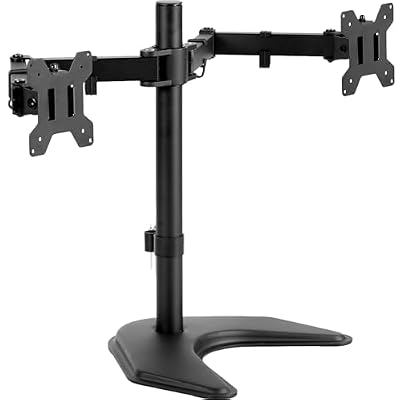
VIVO STAND-V002F Dual LED LCD Monitor Free-Standing Desk Stand for 2 Screens up to 27 Inch Heavy-Duty Fully Adjustable Arms with Max VESA 100x100mm


As an Amazon Associate we earn from qualifying purchases. Product prices and availability are accurate as of the date/time indicated.
🛒 Best Price Today on Amazon
Prime members get fast, free shipping on everything above, plus member-only deals. New members get a 30-day free trial — cancel anytime.
As an Amazon Associate we earn from qualifying purchases.






VIVO STAND-V002F Dual Free-Standing Stand at a Glance
| Specification | Detail |
|---|---|
| Mount type | Dual articulating arm, free-standing weighted base |
| Screen size range | Up to 27 inches per arm |
| Weight capacity | Per manufacturer rating per arm |
| VESA pattern | 75×75 mm and 100×100 mm |
| Adjustment range | Height along central pole; arms extend and swivel |
| Tilt / Swivel / Rotation | Tilt and swivel at joints; 360-degree screen rotation |
| Cable management | Clip channels on arms and pole |
| Mount style | Free-standing weighted base (no clamp, no grommet) |
| Approx price | Around $55 |
Build Quality & Materials
The VIVO STAND-V002F is steel-framed with a powder-coated black finish, and the headline component is the weighted base — a heavy steel plate that supports the central pole and the two extended arms without needing to clamp to the desk. The base is substantial in weight to provide the stability that a clamp normally provides, and that weight is the principal reason the stand works as a free-standing alternative.
The central pole, arms and joints are all metal. There are no plastic load-bearing parts in the structural chain from base to monitor. The arms have appropriate heft for the 27-inch rating, the joints rotate on metal pivots without play, and the screen plates have rolled edges to protect monitor housings during installation. Fit and finish are tidy for the price, and the engineering is appropriate to a stand that must hold position by weight alone.
Adjustability & Ergonomics
The VIVO STAND-V002F provides the full set of adjustments expected on a dual-arm mount: tilt and swivel at the joints for each arm, 360-degree rotation on each screen plate for portrait orientation, and height adjustment along the central pole using the supplied allen key. Each arm has its own collar so the two monitors can sit at different heights.
Ergonomically, the free-standing design has a small but real disadvantage compared to a clamped mount: the weighted base occupies desk space directly behind the pole, which slightly reduces the freed-desktop benefit that articulating mounts usually deliver. In return, it works on any desk — including glass desks, thin desks, and rented desks where drilling or clamping is not an option. For users who specifically need a clamp-free solution, this trade-off is well worth making. Pair the stand with a quality chair (see our best gaming chairs guide) for the full ergonomic setup.
Mounting Options & Installation
The stand is genuinely no-clamp, no-grommet. The base sits on the desk under the monitors, the central pole rises from the base, and the arms extend horizontally to support the displays. Installation requires only a level desk surface and enough space for the base.
Setup takes most users twenty to thirty minutes. The base bolts to the pole, the arms slide onto the pole and lock with thumbscrews, and the monitors mount to the VESA plates with the supplied bolts. A second pair of hands helps when fitting the second monitor, but the assembly is otherwise a one-person job. Instructions are clear and the hardware kit is well organised — no drilling, no clamping, just bolts and a level surface.
Cable Management
Cable management uses clip channels along the arms and the central pole. Display, power and peripheral cables route through the clips, keeping the cable path tidy from screen to desk edge. The cable path on a free-standing stand is naturally a little different from a clamped one — the cables exit at the base of the central pole rather than dropping behind the rear edge of the desk — so plan the routing accordingly.
When installing, route the cables before extending the arms, and leave a small loop of slack at each pivot so the arms can articulate without stressing connectors. The base hides the cable exit reasonably well, and the result is a tidy installation that complements a clean desk setup.
Compatible Setups
The 27-inch size limit covers the standard dual-display configurations — dual 24-inch and dual 27-inch builds are the most common, and the stand handles them comfortably. The free-standing format makes it particularly well-suited to specific desk types: glass-topped desks where clamping risks chipping the edge, thin-edged desks that the clamp jaw does not fit, and rented desks where any modification is forbidden.
For competitive gaming on dual 27-inch panels, see our best 240Hz gaming monitors guide. For mixed gaming-and-work setups, the dual 27-inch configuration is a classic productivity layout. The free-standing format is the differentiator: if you have a desk that does not work with a clamped mount, this stand is the answer. If you have a normal wood-topped desk, the clamp-based dual mounts in this guide are typically slightly cheaper and free up more desktop space.
Verdict
The VIVO STAND-V002F Dual Free-Standing Stand fills a specific and useful niche. At around $55 it delivers the core dual-arm adjustment set — full articulation, 360-degree rotation, integrated cable management — without requiring any modification to the desk. For users with glass desks, thin desks, or rented desks, it is the right answer where a clamp simply will not work.
For the buyer who specifically needs a clamp-free dual mount, this stand is easy to recommend. Buyers with a normal wood-topped desk can save a little money and free up more desktop space by choosing one of the clamp-based dual mounts elsewhere in this guide. For the specific use case it targets, however, the VIVO free-standing stand is well judged.
It is also worth flagging the practical advantage in apartments and rented accommodation: a free-standing mount packs flat for moving day, has no permanent attachment to the desk, and requires no drilling or clamping marks on a desk you do not own. For a renter or anyone who moves homes frequently, those practical considerations can outweigh the minor ergonomic compromise of the visible base.
Frequently Asked Questions
Does the VIVO STAND-V002F need to be clamped to the desk?
No. It is a genuinely free-standing dual mount — the weighted steel base sits on the desk and supports the central pole and the two arms without clamping or drilling.
Is the VIVO free-standing stand stable enough for dual 27-inch monitors?
Yes. The base is heavy steel and is sized to provide the stability that a clamp normally provides. Within its rated 27-inch screen size and per-arm weight limit, it holds two displays securely.
Can the VIVO STAND-V002F sit on a glass desk?
Yes — that is one of its principal use cases. The free-standing format does not require clamping or drilling, so it suits glass desks, thin desks, and rented desks where modification is not allowed.
Does the VIVO STAND-V002F support portrait orientation?
Yes. Each VESA plate rotates 360 degrees, so either monitor can be set independently to portrait orientation — useful for code, documents or vertical content.
More Monitor Arm Reviews
- HUANUO FlowLift Single Monitor Mount Review: 13–32 in
- VIVO Dual Monitor Desk Mount Review: Up to 30 in, 22 lb Each
- BONTEC Dual Monitor Desk Mount Review: 13–27 in
- HUANUO FlowLift Dual Gas-Spring Monitor Stand Review: 13–32 in
- HUANUO Dual Monitor Stand Review: Full Adjustable VESA
- ErGear Dual Monitor Stand Review: Up to 32 in
- VIVO Single 13–38 in Ultrawide Monitor Arm Review
- WALI Dual Monitor Stand Review: Up to 27 in
Affiliate Disclosure: As an Amazon Associate, we earn from qualifying purchases. If you click a link and make a purchase, we may earn a small commission at no extra cost to you. Prices and availability are accurate as of publication and may change.
Related Articles
Looking for more on this topic? Browse the hand-picked guides below — each one applies the same scoring rubric used in this review.










