

- Top Pick: ASUS A31 Black ATX Mid-Tower Gaming Case, Dual Tempered Glass, Frameless, BTF Hidden Connectors, 360 AIO Support, Angled Base, ARGB, Optimized Airflow, Seamless Cable Management, 2 Year Warranty
- Best Value: ASUS A31 White ATX Mid-Tower Gaming Case, Dual Tempered Glass, Frameless, BTF Hidden Connectors, 360 AIO Support, Angled Base, ARGB, Optimized Airflow, Seamless Cable Management, 2 Year Warranty
- Premium Choice: ASUS A31 Plus White ATX pc case (Hidden-Connector motherboards, 360mm radiators and 380mm Graphics Cards, Four pre-Installed ARGB Fans, Clean Cable Management), 2 Year Warranty
The ASUS A31 is an ATX mid-tower case that brings ASUS’s BTF (Back-to-the-Future) hidden cable connector ecosystem within budget reach. At around $58 it pairs a frameless dual tempered glass design with support for BTF-compatible motherboards, which route the power connectors out of the back of the board for a clean front-side appearance. For builders who want the visual benefit of hidden cables without paying a premium, the A31 is a notable arrival.
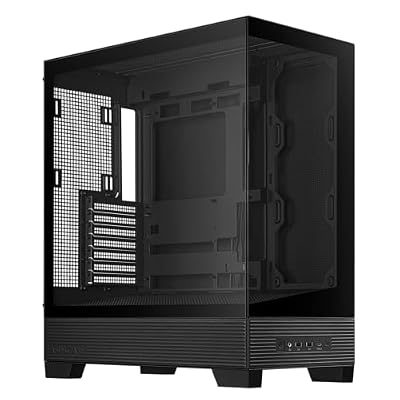
ASUS A31 ATX Mid-Tower PC Case | Panoramic design, Support for Hidden-connector Motherboards, 360mm Radiators & 380mm Graphics Cards, Clean Cable Management






As an Amazon Associate we earn from qualifying purchases. Product prices and availability are accurate as of the date/time indicated.
🛒 Best Price Today on Amazon
Prime members get fast, free shipping on everything above, plus member-only deals. New members get a 30-day free trial — cancel anytime.
As an Amazon Associate we earn from qualifying purchases.




ASUS A31 at a Glance
| Component | Specification |
|---|---|
| Form factor | ATX mid-tower |
| Motherboard support | ATX (BTF-compatible recommended) |
| Dimensions | Standard ATX mid-tower |
| Side panel | Frameless dual tempered glass |
| GPU clearance | Supports modern long graphics cards |
| Cooler clearance | Supports tower air coolers and AIO radiators |
| Pre-installed fans | Not specified by ASUS |
| Front I/O | Standard ATX front-panel set |
| Price | Around $58 |
Design and Aesthetics
The A31 carries a contemporary frameless tempered glass look that ASUS has tuned for the BTF aesthetic. With a BTF-compatible motherboard fitted, the main power cables disappear behind the motherboard tray and emerge on the rear of the board rather than the front, leaving the interior of the case unusually clean when viewed through the glass. The case is finished in black throughout.
Visually the result is closer to a showroom render than to a typical first build, with the GPU, cooler and RAM presented uncluttered. ASUS keeps the front fascia subtle and lets the components do the talking. For buyers attracted to the modern panoramic-glass aesthetic but who do not want to invest in a premium chassis, the A31 captures most of the visual appeal in a far more affordable package.
Build Quality and Materials
The A31 is built primarily from steel with dual tempered glass panels. ASUS has gone with a frameless glass treatment, which gives the front and side an uninterrupted look. Tempered glass at this price is welcome — many sub-$60 cases still ship with acrylic — and the steel chassis feels stable rather than tinny. It is not a flagship build but the fit and finish are sensible for the money.
Some compromises are inevitable at this price. The chassis is clearly value-engineered, and demanding builders will find more polished panels and more refined detailing on cases costing twice as much. That is expected. The important point is that the A31 delivers BTF compatibility and tempered glass at a price where neither has historically been on offer, and the basics of the build feel sound.
Airflow and Cooling Layout
The A31’s cooling approach is conventional for a modern mid-tower, with the BTF rear-connector design freeing up the front-side area for airflow rather than cable runs. The case supports tower air coolers and standard AIO radiators in the expected positions, and BTF motherboards typically place the rear power connectors in a way that does not interfere with front-mounted radiators or fans. Builders can therefore plan a normal cooling configuration.
ASUS does not foreground a pre-installed fan loadout for the A31, so most builders will want to budget for a starter set of intake and exhaust fans. The benefit of the BTF arrangement is that, with cables hidden behind the board, intake airflow has less obstruction across the motherboard area. The result is a clean, modern thermal layout that should perform well once a sensible fan set is fitted.
Component Compatibility and Cable Management
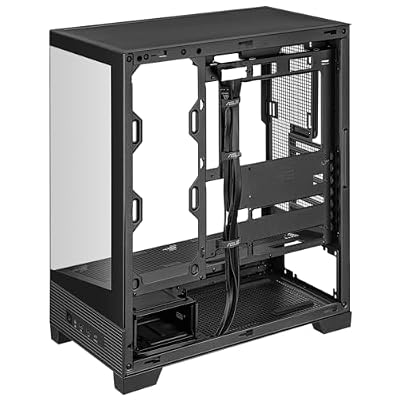
Component compatibility is the A31’s most interesting talking point. The case is designed to work with ASUS BTF motherboards — and similar back-connect designs — that route the main 24-pin, EPS, PCIe and front-panel connectors out of the back of the board. Standard ATX motherboards still fit, but builders only realise the full benefit of the case with a BTF-compatible board. ASUS sensibly cuts the rear of the motherboard tray to expose the connector area.
Cable management is consequently transformed. Cables run behind the motherboard tray almost entirely, and the front-side view is dominated by the GPU, cooler and RAM rather than a tangle of power wires. Even with a non-BTF board the case is workable, but the appeal of the A31 is genuinely tied to a BTF-compatible build. For that configuration it is one of the cleanest cable-management experiences on the market at any price.
Who Is the ASUS A31 For?
The A31 is for the builder planning a new ASUS BTF-compatible system and wanting the cleanest possible front-side appearance without paying a premium for a flagship BTF case. At around $58 it is a value gateway into the BTF ecosystem, and pairing it with a BTF motherboard yields a build that looks far more expensive than the chassis price suggests. It also suits buyers who simply want a modern dual-glass mid-tower at a budget price.
It is less ideal for builders who have no intention of using a BTF-compatible motherboard, since the case’s headline feature is then unused. Such buyers may prefer a similarly priced traditional mid-tower with stronger included cooling. But for the rapidly growing BTF audience, the A31 is the most affordable ticket into the ecosystem currently available, and that combination is genuinely compelling.
Pros and Cons
Pros: Affordable price at around $58; supports ASUS BTF hidden cable connectors; frameless dual tempered glass design; modern, clean aesthetic; standard ATX form factor.
Cons: Full benefit requires a BTF-compatible motherboard; pre-installed fan complement is modest; value-engineered build rather than flagship finish.
Is the ASUS A31 Worth It?
At around $58 the ASUS A31 is one of the best-value entry points into the BTF hidden-cable ecosystem currently on sale. For a builder pairing it with an ASUS BTF motherboard, the visual upgrade over a traditional cable layout is striking, and the case manages to deliver that experience at a clear budget price. Even ignoring BTF, the dual tempered glass and modern styling are competitive at this point in the market.
Builders who do not want or cannot use a BTF board will get more from a similarly priced conventional mid-tower with stronger included fans. But for buyers committed to the BTF route, the A31 earns a strong recommendation as the cheapest sensible chassis to go with.
Frequently Asked Questions
Do I need a BTF-compatible motherboard to use the ASUS A31?
No, the A31 accepts standard ATX motherboards. However, the case’s headline feature — hidden front-side cabling — only takes full effect with a BTF-compatible board.
What does BTF stand for?
BTF stands for Back-to-the-Future. It is ASUS’s hidden-connector ecosystem, where power and front-panel connectors are routed out of the rear of the motherboard rather than the front.
Does the ASUS A31 use tempered glass?
Yes. ASUS fits frameless dual tempered glass panels on the A31, which is notable at the case’s $58 price point.
Is the ASUS A31 good value for a BTF build?
Yes. It is one of the most affordable BTF-compatible cases on the market, making it a sensible entry point into the BTF ecosystem.
More PC Case Reviews
- MONTECH XR-B ATX Mid-Tower Case Review
- NZXT H5 Flow 2026 Compact ATX Case Review
- NZXT H6 Flow Dual-Chamber ATX Case Review (White)
- Corsair 4000D RS ARGB Frame Modular ATX Case Review
- Corsair Frame 4500X RS ARGB Panoramic Case Review
- Lian Li O11 Vision Compact ATX Case Review
- Lian Li O11D MINI V2 Flow ATX Case Review
- NZXT H9 Flow (2026) Large Dual-Chamber Case Review
Affiliate Disclosure: As an Amazon Associate, we earn from qualifying purchases. If you click a link and make a purchase, we may earn a small commission at no extra cost to you. Prices and availability are accurate as of publication and may change.
Related Articles
Looking for more on this topic? Browse the hand-picked guides below — each one applies the same scoring rubric used in this review.










