

🛒 Best Price Today on Amazon
Prime members get fast, free shipping on everything above, plus member-only deals. New members get a 30-day free trial — cancel anytime.
- Top Cases Streaming Picks for 2026
- Best PC Cases for Streaming at a Glance
- 1. NZXT H6 Flow CC-H61FW-01 Compact Dual-Chamber Mid-Tower Airflow Case, Panoramic Glass
- 2. Corsair iCUE 220T RGB Airflow Tempered Glass Mid-Tower Smart ATX Case, High Airflow
- 3. Corsair Crystal Series 680X RGB High Airflow Tempered Glass ATX Smart Case
- 4. Cooler Master MasterBox Q300L Micro-ATX PC Case, Compact mATX with Magnetic Dust Filters
- 5. Fractal Design Focus G Mid Tower Computer Case, ATX, High Airflow, USB 3.0
- 6. HYTE Y70 Touch Infinite Modern Aesthetic Gaming PC Case, Integrated 2.5K LCD Touchscreen
- How to Choose a PC Case for Streaming
- Frequently Asked Questions
- Related Guides
- Related Articles
Top Cases Streaming Picks for 2026
Here are our current top cases streaming picks, compared on real Amazon owner reviews, price, and features. Live prices update below.
As an Amazon Associate we earn from qualifying purchases at no extra cost to you.


A streaming PC works harder than a plain gaming rig. It is encoding video while running a game, often alongside a capture card, extra storage and beefier cooling, which means the case has to do two jobs well: move a lot of air to keep sustained loads cool, and offer the space and expansion to house all that extra streaming gear. The right chassis keeps temperatures (and fan noise) in check during long broadcasts and leaves room to grow. This guide rounds up the best PC cases for streaming in 2026, prioritising airflow and the space your capture and cooling hardware needs.
Our picks were chosen on what genuinely matters for a streaming build: airflow and cooling support (mesh fronts, fan and radiator mounts), internal space and expansion for capture cards and drives, cable management for a clean on-camera build, and value. We have spread the list from compact to full-featured, with prices from around $40 up to around $350, including dual-chamber designs that excel at cooling and a showpiece case with a built-in screen. Below is an at-a-glance comparison of all six, then a closer look at each and a buyer’s guide built around airflow, space and expansion for streaming.
Best PC Cases for Streaming at a Glance
| Case | Best For | Standout Spec | Approx Price |
|---|---|---|---|
| NZXT H6 Flow | Dual-chamber airflow | Dual-chamber, panoramic glass | around $80 |
| Corsair iCUE 220T RGB Airflow | RGB high-airflow ATX | High-airflow front, 3x RGB fans | around $180 |
| Corsair Crystal 680X RGB | Dual-chamber + capture gear | Dual-chamber, high airflow | around $275 |
| Cooler Master MasterBox Q300L | Compact budget streamer | mATX, magnetic dust filters | around $40 |
| Fractal Design Focus G | Value airflow ATX | Front mesh, 2 fans included | around $100 |
| HYTE Y70 Touch Infinite | Showpiece with LCD | Integrated 2.5K touchscreen | around $350 |
1. NZXT H6 Flow CC-H61FW-01 Compact Dual-Chamber Mid-Tower Airflow Case, Panoramic Glass

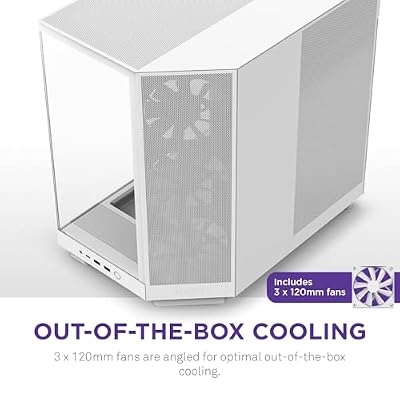
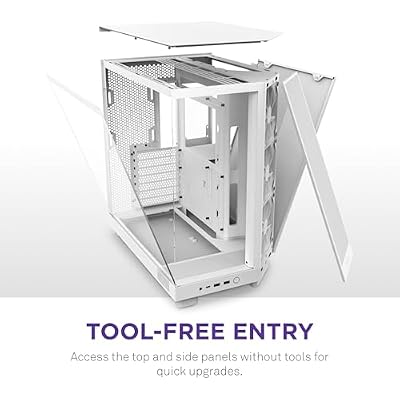
NZXT H6 Flow - Compact Dual-Chamber ATX PC Case - White | Compact dual-chamber ATX case with panoramic glass and 3 included 120mm fans. Airflow-optimized for clean, cool builds.





As an Amazon Associate we earn from qualifying purchases. Product prices and availability are accurate as of the date/time indicated.
The NZXT H6 Flow is our lead pick for streaming because its dual-chamber layout is built around airflow. Separating the motherboard area from the power supply and cabling lets cool air flow straight to the components that heat up under a streaming load, and the perforated panels feed three included fans for strong intake. A panoramic glass front and side show off the build, and at around $80 it is excellent value for a modern airflow chassis.
This is the case for the streamer who wants strong sustained cooling and a clean, on-camera build without overspending. The dual-chamber design keeps cables out of the airflow path so your CPU and GPU stay cooler during long broadcasts, the compact mid-tower footprint suits most desks, and the panoramic glass makes it a tidy centrepiece behind your webcam. There is room for substantial cooling and a capture card, making the H6 Flow a smart, well-priced foundation for a dedicated streaming PC.
Pros: Dual-chamber airflow, three included fans, clean panoramic glass, great value for streamers.
Cons: Compact interior is tidy but less roomy than a full tower for heavy expansion.
2. Corsair iCUE 220T RGB Airflow Tempered Glass Mid-Tower Smart ATX Case, High Airflow
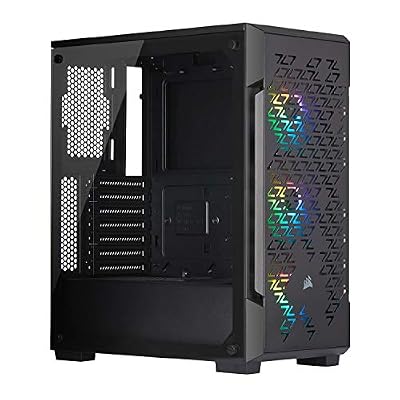
Corsair iCUE 220T RGB Airflow Tempered Glass Mid-Tower Smart ATX Case - High Airflow - Three Included SP120 RGB PRO Fans - Black


As an Amazon Associate we earn from qualifying purchases. Product prices and availability are accurate as of the date/time indicated.
The Corsair iCUE 220T RGB Airflow pairs a genuine high-airflow front with a show-ready RGB build. Its perforated front panel is designed to pull plenty of cool air over the components, and it ships with three RGB fans wired to Corsair’s iCUE ecosystem for coordinated lighting and fan control. At around $180 it is the pick for a streamer who wants strong airflow and a polished, illuminated look on camera.
This is the case for the broadcaster who wants their rig to look the part in shot while still cooling a hard-working streaming load. The high-airflow front feeds the three included RGB fans for solid sustained cooling during encode-while-gaming sessions, the tempered glass side panel shows off the interior, and iCUE lets you tune lighting and fan curves to balance cooling and noise. With room for a capture card and ample cooling, the 220T is a stylish, airflow-focused choice for a visible streaming PC.

Pros: High-airflow front, three included RGB fans, iCUE control, tempered glass show panel.
Cons: Pricier than plain airflow cases; RGB premium you may not need.
3. Corsair Crystal Series 680X RGB High Airflow Tempered Glass ATX Smart Case

CORSAIR iCUE Link 3500X RGB Mid-Tower ATX PC Case – Panoramic Tempered Glass – Reverse Connection Motherboard Compatible – 3X CORSAIR iCUE Link RX120 RGB Fans Included – Black


As an Amazon Associate we earn from qualifying purchases. Product prices and availability are accurate as of the date/time indicated.
The Corsair Crystal 680X RGB is the spacious dual-chamber pick, purpose-built for airflow and expansion. Like the NZXT it splits the interior into two chambers so heat-generating components get clean, dedicated airflow, but it does so in a much larger, premium tempered-glass chassis with extensive fan and radiator support. At around $275 it is a high-end option for a serious streaming build that wants both cooling and room.
This is the case for the streamer running a heavy, expandable setup — a powerful GPU, a capture card, multiple drives and substantial cooling — who wants it all to stay cool and look stunning. The dual-chamber design and high-airflow layout keep temperatures down during long encode-heavy sessions, the generous interior leaves plenty of space for capture hardware and storage, and the wraparound glass makes for a striking on-camera centrepiece. For a no-compromise streaming chassis with cooling and expansion to spare, the 680X is the standout.
Pros: Spacious dual-chamber, excellent airflow and radiator support, premium glass, room for capture gear.
Cons: Large footprint and high price; overkill for a modest streaming build.
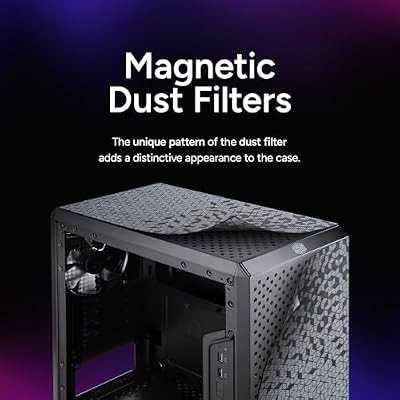
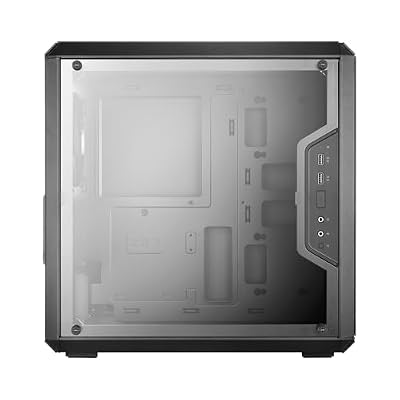
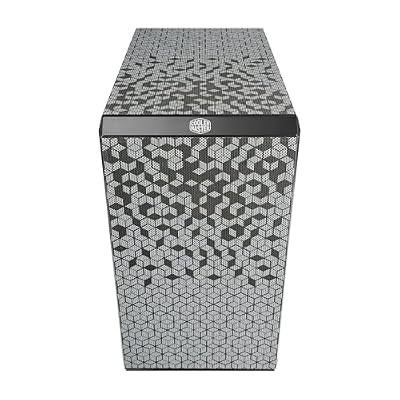
4. Cooler Master MasterBox Q300L Micro-ATX PC Case, Compact mATX with Magnetic Dust Filters

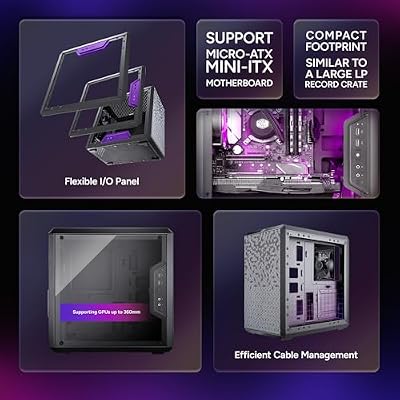
Cooler Master Q300L V1 Micro-ATX PC Case, High Airflow, Transparent Panel | 360mm Graphics Card Support, 240mm AIO Support, Micro-ATX Motherboard, Magnetic Dust Filters, Modular I/O Panel






As an Amazon Associate we earn from qualifying purchases. Product prices and availability are accurate as of the date/time indicated.
The Cooler Master MasterBox Q300L is the compact budget pick, proving a streaming PC does not have to be big or expensive. It is a micro-ATX case with a ventilated, perforated design for airflow and full magnetic dust filters to keep the interior clean — handy when a streaming rig runs for hours. At around $40 it is the most affordable case on this list by a wide margin.
This is the case for the streamer building a small, tidy, cost-conscious setup around a micro-ATX board. The ventilated panels and adjustable I/O let air move through the compact interior to handle a streaming workload, the magnetic dust filters make maintenance easy during long broadcasts, and the small footprint tucks neatly into a streaming desk. It will not house a sprawling dual-system build, but for a focused, affordable single-system streamer the Q300L delivers airflow and practicality at a budget price.

Pros: Very affordable, ventilated airflow design, full magnetic dust filters, compact mATX footprint.
Cons: Micro-ATX size limits expansion; less room for large cooling or capture hardware.
5. Fractal Design Focus G Mid Tower Computer Case, ATX, High Airflow, USB 3.0
The Fractal Design Focus G is the value airflow ATX pick. It is a clean, no-nonsense mid-tower with a front mesh design for airflow, two included case fans, USB 3.0 front I/O and a side window. At around $100 it offers full ATX support and dependable cooling from a respected brand without the price of an RGB or dual-chamber flagship.
This is the case for the streamer who wants straightforward, reliable airflow and full-size ATX expansion at a sensible price. The front mesh and two included fans provide solid intake for a sustained streaming load, the standard ATX layout leaves room for a capture card, extra drives and a mid-range cooler, and Fractal’s reputation for quiet, well-built cases adds confidence. If you want a practical, good-value chassis that prioritises cooling and capacity over flashy looks, the Focus G is a smart middle-ground choice.
Pros: Front-mesh airflow, two included fans, full ATX expansion, trusted Fractal build at fair price.
Cons: Plainer styling and lighting than RGB rivals; airflow good rather than class-leading.
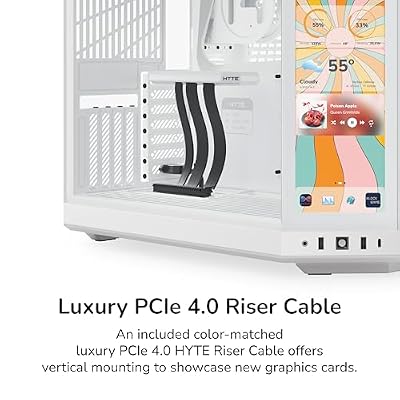
6. HYTE Y70 Touch Infinite Modern Aesthetic Gaming PC Case, Integrated 2.5K LCD Touchscreen

HYTE Y70 Touch Infinite Modern Aesthetic Gaming PC Case - Integrated 2.5K LCD Touchscreen Screen Display - Dual Chamber ATX Desktop Chassis - 10 Fan Capacity - Luxury PCIe 4.0 Riser Cable - Snow White




As an Amazon Associate we earn from qualifying purchases. Product prices and availability are accurate as of the date/time indicated.
Rounding out the list is the HYTE Y70 Touch Infinite, the showpiece pick — and we are honest about why it is here. Its headline feature is an integrated 2.5K touchscreen built into the case, which a streamer can use to display live stats, chat, a clock or system monitoring right on the rig in shot. It is a premium, design-led wraparound-glass case, and at around $350 it is by far the most expensive option on this list.
This is the case for the content creator who treats the PC itself as part of the on-camera scene and wants a built-in display as a streaming flourish. The integrated touchscreen is a genuinely useful and eye-catching way to surface information during a broadcast, the spacious wraparound-glass interior has room for a strong cooling setup and capture hardware, and the modern aesthetic is made for the camera. It is far more about presentation than raw cooling value, so we recommend it specifically to streamers who want a statement centrepiece and have the budget for it.

Pros: Integrated 2.5K touchscreen for live stats, striking wraparound glass, spacious modern design.
Cons: Very expensive; the LCD is a presentation feature, not a cooling upgrade.
How to Choose a PC Case for Streaming
Airflow is the first priority for a streaming case, because a streaming rig runs sustained, heavy loads — encoding video while gaming — that generate more heat than gaming alone. Look for a mesh or perforated front that lets cool air in freely, plenty of fan mounts, and ideally included fans to start. The Fractal Focus G, Corsair iCUE 220T and Cooler Master Q300L all lead with ventilated, airflow-first designs, and good intake keeps both temperatures and fan noise down during long broadcasts, which your microphone will thank you for.
Internal space and expansion come next, because streaming gear adds up. A capture card occupies a PCIe slot, extra drives store recordings and assets, and a hard-working build often wants a larger air cooler or a radiator. Make sure the case has the drive bays, PCIe clearance and radiator support your setup needs — a spacious chassis like the Corsair Crystal 680X has room to spare, while a compact micro-ATX case like the Q300L is tidier but more limited. Match the interior space to how much streaming hardware you plan to fit.
Dual-chamber designs deserve special mention for streaming, because they directly help cooling under load. By separating the motherboard and GPU from the power supply, drives and cabling, cases like the NZXT H6 Flow and Corsair Crystal 680X keep clutter out of the airflow path so cool air reaches the components that heat up most. The result is lower sustained temperatures and a cleaner-looking interior on camera — a strong combination for a visible streaming PC, which is why both rank highly here.
Finally, weigh cable management, on-camera looks and budget together. A streaming PC is often in shot, so tempered-glass panels, RGB and even an integrated screen — as on the HYTE Y70 Touch — can be worth it for presentation, while good cable routing keeps the build clean behind the glass. Decide how much the aesthetics matter versus pure cooling value: the NZXT H6 Flow offers the best balance of airflow and looks for the money, while the HYTE is a splurge for those who want a statement piece. Prioritise airflow and space first, then choose the case on this list that fits your streaming gear, your scene and your budget.
Frequently Asked Questions
What makes a PC case good for streaming specifically?
Two things above all: airflow and space. A streaming rig encodes video while gaming, so it runs hotter than a plain gaming PC and needs strong intake — a mesh front and good fan support keep it cool and quiet during long broadcasts. It also needs room for streaming gear like a capture card, extra drives and larger cooling. Cases like the NZXT H6 Flow and Corsair Crystal 680X balance both well.
Why are dual-chamber cases good for a streaming build?
A dual-chamber case separates the motherboard and GPU from the power supply, drives and cables. That keeps clutter out of the airflow path so cool air reaches the components that heat up most under a streaming load, lowering sustained temperatures and noise. It also looks tidier on camera. The NZXT H6 Flow and Corsair Crystal 680X are both strong dual-chamber options here for exactly that reason.
Do I need a big case to fit a capture card and streaming gear?
Not necessarily, but space helps. A capture card uses a PCIe slot and recordings need storage, so check the chassis has the slots, drive bays and clearance you need. A spacious case like the Corsair Crystal 680X has plenty of room, while a compact one like the Cooler Master Q300L is tidier but more limited. Match the case size to how much streaming hardware you plan to install.
Is a case with a built-in screen worth it for streaming?
It can be, as a presentation flourish rather than a cooling upgrade. The HYTE Y70 Touch Infinite includes a 2.5K touchscreen you can use to show live stats, chat or monitoring on the rig in shot, which is great if your PC is part of your on-camera scene. It is a premium feature at a premium price, so it suits streamers who prioritise looks and have the budget — for pure cooling value, an airflow case like the H6 Flow is smarter.
Related Guides
- Best PC Cases
- Best Mini-ITX Cases
- Best Capture Cards for Streaming
- Best Case Fans for Airflow
- Best Gaming PC Builds
- Best Budget Gaming Setup
Affiliate Disclosure: As an Amazon Associate, we earn from qualifying purchases. If you click a link and make a purchase, we may earn a small commission at no extra cost to you. Prices and availability are accurate as of publication and may change.










