

The Anker 8-in-1 USB-C Hub with Ethernet is the upmarket choice in Anker’s travel-hub line, distinguished by two features that matter to power users: 4K@60Hz HDMI output (not the usual 4K@30Hz of cheaper hubs) and Gigabit Ethernet. It also adds 100W PD passthrough, dual card readers and two USB-A 3.0 ports. This Anker 8-in-1 USB-C Ethernet hub review covers the ports, power, display output, build and value.

Anker USB-C Hub, 8-in-1 Multiport Ethernet Adapter with 4K@60Hz HDMI Port | 85W Max PD, 10Gbps USB-C & 2 USB-A Data Ports, microSD/SD Card Reader, for USB C Laptops, MacBook Pro, XPS, iPad and More



As an Amazon Associate we earn from qualifying purchases. Product prices and availability are accurate as of the date/time indicated.
🛒 Best Price Today on Amazon
Prime members get fast, free shipping on everything above, plus member-only deals. New members get a 30-day free trial — cancel anytime.
As an Amazon Associate we earn from qualifying purchases.


Anker 8-in-1 USB-C Ethernet Hub at a Glance
| Component | Specification |
|---|---|
| Port count | 8 ports total |
| Power Delivery wattage | 100W USB-C PD passthrough (~85W to host) |
| HDMI / DP outputs | 1x HDMI 2.0b |
| Display resolution support | 4K @ 60Hz (single display) |
| USB-A / USB-C ports + speeds | 2x USB-A 3.0 (5Gbps), 1x USB-C 3.0 data, 1x USB-C PD-in |
| Ethernet support | Yes — Gigabit RJ45 |
| Card reader | SD + microSD (UHS-I) |
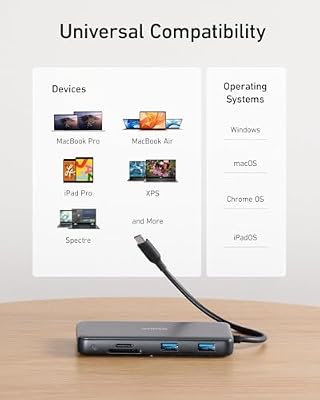
| Compatibility | USB-C laptops with DP Alt Mode HBR2/HBR3, MacBook, iPad Pro, Surface |
| Approx price | around $50 |
Ports & Connectivity
Anker’s 8-in-1 is one of the most port-balanced travel hubs available. The HDMI 2.0b output supports 4K@60Hz, the Gigabit Ethernet jack covers wired networking, 100W PD passthrough charges the laptop, dual SD plus microSD card readers handle camera offloads and two USB-A 3.0 ports plus one USB-C 3.0 data port handle peripherals and SSDs. The USB-C data port is a useful addition — it supports 5Gbps data only (no display, no PD), but for a USB-C portable SSD that is faster and more convenient than a USB-A adapter. The host cable is captive at around 15cm with good strain relief, and the hub is small enough for any laptop bag.
Compared with the unpowered 7-in-1 (B07ZVKTP53), the 8-in-1 adds three meaningful capabilities: 4K@60Hz HDMI output, Gigabit Ethernet and a USB-C data port. Those are the three upgrades that matter most to modern professionals. For travel buyers who already own a 4K@60Hz monitor at home, the 8-in-1 is the no-compromise choice — you do not have to trade desktop-grade refresh for hub portability. The 8-port layout also gives a sensible balance between USB-A legacy and USB-C modernity, and the port count is generous without making the chassis larger than the 7-in-1.
Power Delivery & Charging
100W input, around 85W to the host — the standard PD passthrough budget for a hub of this complexity. The 4K@60Hz output requires more bandwidth than 4K@30Hz on the USB-C alt-mode lane, which consumes a slight amount more of the available power, but the hub still delivers enough to charge any USB-C ultrabook at full speed and maintain a 16-inch MacBook Pro under typical loads. PD negotiation is reliable with first-party chargers from Apple, Dell, HP and Lenovo, and the hub supports USB-PD 3.0 PPS.
Display Output & Multi-Monitor
This is the differentiator. The HDMI 2.0b output runs 4K@60Hz on hosts that support DisplayPort Alt Mode with HBR2 or HBR3 — that includes all modern M-series Macs, the Surface Pro 9 and most modern Windows USB-C laptops sold since 2020. At 4K@60Hz the display feels native rather than laggy, suitable for video editing, gaming and any creative work on the external monitor. The hub also runs 1440p@144Hz on monitors that support it, useful for esports-class displays. On older laptops with only HBR1 DP Alt Mode the output drops to 4K@30Hz — check the laptop’s USB-C specifications if in doubt. Multi-monitor is not supported on this hub; for dual or triple displays see the dock reviews above. For a high-refresh display to pair with this hub, see our best 240Hz gaming laptops guide.
Build Quality & Heat
Anker’s premium build standards apply — aluminium body, well-radiused edges, no rattle. Heat under sustained 4K@60Hz load is higher than on a 4K@30Hz hub, as expected, but never excessive. Anker quotes its usual internal safety chips for over-current, short-circuit, over-voltage and thermal protection. The 18-month Anker warranty plus the brand’s customer-service reputation make the 8-in-1 a low-risk purchase. The cable is thicker than budget alternatives and shows no signs of strain after extended use.
Compatibility & Use Cases
The 8-in-1 is at its best on a modern M-series MacBook Pro driving a 4K monitor at 60Hz — the combination is genuinely desktop-class. Windows ultrabooks with HBR2/HBR3 DP Alt Mode get the same 4K@60Hz benefit. iPad Pro M-series also benefits, since iPadOS supports 4K@60Hz external output. Typical use cases include home-office docking with a 4K external monitor, travel docking with HDMI-out for hotel TVs (which often have 60Hz panels), and creative workflows with Ethernet for cloud asset uploads. For a productivity laptop pairing, our best OLED gaming laptops guide covers OLED screen options worth a 4K@60Hz pairing.
For freelancers and consultants who travel between client sites, the 8-in-1 is a particularly strong fit. The Gigabit Ethernet supports the corporate networks that mandate wired connections; the 4K@60Hz HDMI gives a credible presentation experience in any conference room; the card readers handle camera and microSD content offloads; and the 100W PD passthrough keeps the laptop charged through long working days. One hub covers what most travelling professionals need from their portable kit, and the Anker brand reassurance is genuinely worth the modest premium over no-name rivals.
Verdict
The Anker 8-in-1 is the right travel hub for buyers who specifically need 4K@60Hz on a single external display. That feature alone justifies the premium over a 4K@30Hz hub for users who edit video, play games or work on creative tools. The 8-port count is generous, build is premium, and Anker’s warranty plus support give real peace of mind. If you do not need 4K@60Hz the cheaper 7-in-1 covers similar ground; if you do, the 8-in-1 is the easy pick.
Within Anker’s hub line the 8-in-1 sits at the sweet spot of features and price. Beneath it the 7-in-1 (B07ZVKTP53) drops Ethernet and 4K@60Hz for around $20 less; above it the larger Anker docking stations add a second display and barrel-jack power but cost roughly twice as much. For the buyer who wants a single travel hub that does not compromise on display quality, the 8-in-1 is the right level of the line. The combination of certified HDMI 2.0b, USB-IF-compliant PD, real Gigabit Ethernet and dual card readers is hard to find at this price from any other brand with Anker’s customer-service record.
Frequently Asked Questions
Will it really run 4K@60Hz on my laptop?
On any laptop with USB-C DisplayPort Alt Mode supporting HBR2 or HBR3 (essentially every USB-C laptop sold since 2020), yes. On older HBR1 laptops the output falls back to 4K@30Hz.
How does it differ from the Anker 7-in-1 (B07ZVKTP53)?
The 8-in-1 adds Gigabit Ethernet, a USB-C data port and 4K@60Hz HDMI; the 7-in-1 tops out at 4K@30Hz and has no Ethernet. The 8-in-1 is the choice when wired networking or 60Hz 4K matters.
Does the USB-C data port support display output?
No — it is a data-only USB 3.0 port (5Gbps). The HDMI output is the only display output on this hub.
Will it run 1440p@144Hz?
Yes, on monitors that support 1440p@144Hz over HDMI 2.0b the hub will run that mode on capable hosts. Frame rate at 1440p is excellent for gaming and esports.
More USB Hub Reviews
- BENFEI 11-in-1 USB-C Hub Review: Triple Display HDMI + VGA
- BENFEI 5-in-1 USB-C Hub Review: 4K HDMI, Certified 100W
- Hiearcool 7-in-1 USB-C Hub Review: 4K HDMI, 100W PD
- UGREEN 5-in-1 USB-C Hub Review: 4K HDMI, 100W PD
- Anker 7-in-1 USB-C Hub Review: 4K HDMI, 85W PD
- USB-C Dual HDMI Docking Station Review: Two-Monitor PD Dock
- Selore 14-in-1 USB-C Docking Station Review: Dual Monitor Dock
- Anker 5-in-1 Powered USB-C Hub Review: 4K Splitter, Powered USB
Affiliate Disclosure: As an Amazon Associate, we earn from qualifying purchases. If you click a link and make a purchase, we may earn a small commission at no extra cost to you. Prices and availability are accurate as of publication and may change.
Related Articles
Looking for more on this topic? Browse the hand-picked guides below — each one applies the same scoring rubric used in this review.










