

The Anker 5-in-1 USB-C Hub (powered variant) is the answer to a specific problem: too many bus-powered USB devices on a laptop. With its dedicated barrel-jack power input, the hub can drive multiple external SSDs, bus-powered audio interfaces and high-current peripherals without draining the laptop battery, while still acting as a 4K HDMI display splitter for the host. This Anker 5-in-1 powered USB-C hub review covers the ports, power, display output, build and value.

Anker USB C Hub, 5-in-1 USBC to HDMI Splitter with 4K Display | 85W Max PD, 1 Powered USB-C 5Gbps & 2 Powered USB-A 3.0 5Gbps Data Ports, for MacBook Pro, MacBook Air, Dell and More (Black)



As an Amazon Associate we earn from qualifying purchases. Product prices and availability are accurate as of the date/time indicated.
🛒 Best Price Today on Amazon
Prime members get fast, free shipping on everything above, plus member-only deals. New members get a 30-day free trial — cancel anytime.
As an Amazon Associate we earn from qualifying purchases.




Anker 5-in-1 Powered USB-C Hub at a Glance
| Component | Specification |
|---|---|
| Port count | 5 ports total |
| Power Delivery wattage | External 5V/4A barrel-jack adapter (no host charging) |
| HDMI / DP outputs | 1x HDMI 2.0 |
| Display resolution support | 4K @ 30Hz (single display) |
| USB-A / USB-C ports + speeds | 4x USB-A 3.0 (5Gbps, powered) |
| Ethernet support | No |
| Card reader | No |
| Compatibility | USB-C laptops with DP Alt Mode, MacBook, iPad Pro, Chromebook |
| Approx price | around $40 |
Ports & Connectivity
The five-port layout is a single 4K HDMI output and four powered USB-A 3.0 ports. The hub ships with a 5V/4A wall adapter that feeds the barrel-jack input on the side, providing 20W of dedicated power to the USB ports. That is the key feature: each USB-A port can deliver up to 0.9A even with multiple bus-powered devices attached, where unpowered hubs share the host’s USB-C bus and starve devices when several are plugged in. For users with two external SSDs, a portable audio interface and a USB-C dongle, this is the hub that just works. The HDMI output is straightforward — a single 4K@30Hz display channel from the host USB-C alt-mode lane.
The four-port USB-A array is laid out along the long edge of the hub for easy access. Each port supports USB 3.0 at 5Gbps and can independently negotiate USB-PD BC1.2 fast-charge for phones and tablets, so a phone plugged in for charging will draw the higher current it needs without the hub dropping its other ports. That kind of behaviour is rare on bus-powered hubs and is why the powered design matters for users with mixed peripheral profiles. The HDMI output sits on the short edge alongside the barrel jack and host USB-C connector, separated to reduce cable-bundle congestion on a tidy desk.
Power Delivery & Charging
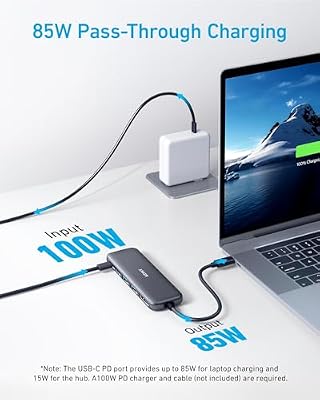
This is the area where the powered 5-in-1 differs most from other Anker hubs. There is no USB-C PD passthrough — the host laptop is not charged by the hub. Instead, the external 20W adapter powers the four USB-A ports independently. That separation is deliberate: bus-powered hubs share the laptop’s USB-C bus between data, display and PD, and adding heavy USB devices reduces the power available for charging. By moving USB power off the laptop entirely, Anker frees the laptop’s USB-C lane for HDMI display and reliable USB data, and saves battery. The trade-off is that you carry two cables to the desk: the USB-C to the laptop and the barrel-jack to the wall.
Display Output & Multi-Monitor
A single HDMI 2.0 output supports 4K@30Hz or 1080p@60Hz, with HDCP 2.2 for streaming protected content. There is no second display output. The 4K@30Hz cap is the usual hub limitation, fine for static productivity work and 1080p displays. For dual-display setups choose the dual-HDMI dock reviewed above. The HDMI output works on every USB-C host with DP Alt Mode and is plug-and-play without drivers.
Build Quality & Heat
The hub is the typical small Anker aluminium body, with the four USB-A ports along one edge and the HDMI plus barrel jack on the other. It runs cool because the powered ports do not need to draw from the laptop’s bus and the HDMI output is the only active component on the host side. Anker quotes the usual safety chips for over-current and short-circuit protection. The bundled 5V/4A wall adapter is compact and uses a standard barrel connector — easy to replace if lost. The hub’s 18-month Anker warranty applies.
Compatibility & Use Cases
The hub works with any USB-C laptop with DP Alt Mode — every modern Windows ultrabook, every USB-C MacBook, the iPad Pro and Surface Pro 7 onward. The killer use case is photographers and creators who pair their laptop with two or three bus-powered SSDs, a card reader and an audio interface — the powered ports remove the bus contention that plagues unpowered hubs in those workflows. Music producers with USB audio interfaces also benefit, because powered USB removes the audio dropouts that bus-power can cause. For a laptop to pair with this setup, see our Intel Core Ultra laptop guide guide for Intel Core Ultra options.
Another worthwhile use case is the consolidated home server or NAS adjunct: a MacBook or laptop running 24/7 as a small home server, with several bus-powered USB drives attached via the powered hub. Without dedicated USB power, multiple drives would compete for the laptop’s USB-C bus and cause periodic dropouts; the Anker’s barrel-jack adapter gives each drive its own current allowance and removes the contention. For Plex, Time Machine and similar workflows the powered hub is the right tool for the job.
Verdict
The Anker 5-in-1 powered hub is a niche but excellent product. For the buyer who specifically needs reliable USB power for several devices alongside a single 4K@30Hz display, it removes the bus-contention problems that affect every unpowered hub. For the buyer who needs PD charging or multi-monitor support, it is the wrong tool — the unpowered Anker 7-in-1 or the dual-HDMI dock reviewed above are better fits. Buy it for the powered USB; do not buy it expecting it to charge the laptop.
The trade-off worth weighing is the two-cable desk: this hub needs both a USB-C cable to the laptop and a barrel-jack cable to the wall, where bus-powered hubs need only the laptop cable. For a permanent home setup that is not a problem — the barrel-jack adapter lives behind the desk. For travel and shared hot-desking it is awkward, and a bus-powered hub like the Anker 7-in-1 or UGREEN 5-in-1 is the better travel pick. Match the hub to the use case, and this powered Anker is excellent at exactly what it is designed to do.
Anker’s after-sales reputation in the hub category is the strongest of any major brand, which matters when something does eventually fail. The 18-month warranty, replacement RMA process and prompt customer support sit at the top of the budget-accessory category. For buyers who plan to keep a hub for years and rely on it daily, those factors matter more than they look on paper.
Frequently Asked Questions
Will this hub charge my laptop?
No. The 5-in-1 powered hub does not have USB-C PD passthrough — the laptop is not charged. Use it alongside your normal laptop charger.
Why use a powered hub instead of an unpowered one?
If you connect several bus-powered devices (external SSDs, audio interfaces, optical drives), an unpowered hub shares the laptop’s USB-C bus among them and can cause dropouts. A powered hub gives each port its own current allowance.
Can I use my own power adapter?
The hub uses a standard 5V/4A barrel-jack input; any quality 5V/4A or 5V/3A barrel adapter with the correct polarity will work. Anker’s included adapter is the easiest option.
Does it support dual displays?
No — a single HDMI output at up to 4K@30Hz. For dual displays choose a dedicated dual-HDMI dock such as the B0BTD871Y3 reviewed above.
More USB Hub Reviews
- 13-in-1 USB-C Triple Display Docking Station Review: 8-Port Dock
- UtechSmart 6-in-1 USB-C Multiport Adapter Review: With Ethernet
- UtechSmart 11-in-1 USB-C Triple Display Dock Review
- Anker 8-in-1 USB-C Ethernet Hub Review: 4K 60Hz Hub
- BENFEI 11-in-1 USB-C Hub Review: Triple Display HDMI + VGA
- BENFEI 5-in-1 USB-C Hub Review: 4K HDMI, Certified 100W
- Hiearcool 7-in-1 USB-C Hub Review: 4K HDMI, 100W PD
- UGREEN 5-in-1 USB-C Hub Review: 4K HDMI, 100W PD
Affiliate Disclosure: As an Amazon Associate, we earn from qualifying purchases. If you click a link and make a purchase, we may earn a small commission at no extra cost to you. Prices and availability are accurate as of publication and may change.
Related Articles
Looking for more on this topic? Browse the hand-picked guides below — each one applies the same scoring rubric used in this review.










