

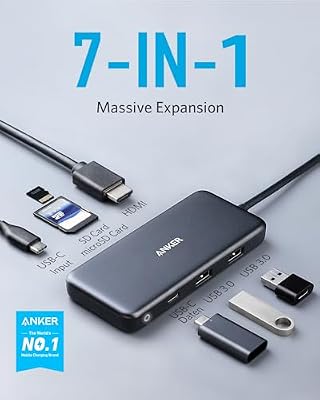
The Anker 7-in-1 USB-C Hub (PowerExpand+ series) is Anker’s compact travel hub aimed at MacBook and Windows laptop owners who want a single-cable solution for external monitor, charging and storage. It pairs an HDMI 2.0 4K output with 85W USB-C Power Delivery, two USB-A 3.0 ports, a USB-A 2.0 port and dual card readers. This Anker 7-in-1 USB-C Hub review covers the ports, power, display output, build and value.

Anker USB C Hub, 7-in-1 Multi-Port USBC Hub, 4K HDMI USB-C Adapter


As an Amazon Associate we earn from qualifying purchases. Product prices and availability are accurate as of the date/time indicated.
🛒 Best Price Today on Amazon
Prime members get fast, free shipping on everything above, plus member-only deals. New members get a 30-day free trial — cancel anytime.
As an Amazon Associate we earn from qualifying purchases.




Anker 7-in-1 USB-C Hub at a Glance
| Component | Specification |
|---|---|
| Port count | 7 ports total |
| Power Delivery wattage | 85W USB-C PD passthrough (100W input) |
| HDMI / DP outputs | 1x HDMI 2.0 |
| Display resolution support | 4K @ 30Hz (single display) |
| USB-A / USB-C ports + speeds | 2x USB-A 3.0 (5Gbps), 1x USB-A 2.0 (480Mbps), 1x USB-C PD-in |
| Ethernet support | No |
| Card reader | SD + microSD (UHS-I) |
| Compatibility | USB-C laptops, MacBook Pro/Air, iPad Pro, Surface, Chromebook |
| Approx price | around $30 |
Ports & Connectivity
Anker’s port selection is well judged for travel. The HDMI 2.0 and PD passthrough cover the docking essentials, two USB-A 3.0 ports handle a mouse and an external SSD, and a USB-A 2.0 port is provided for low-bandwidth devices like keyboards and dongles — that split is sensible because it keeps full 5Gbps bandwidth for storage. Dual SD and microSD card readers round out the package, with simultaneous read support useful for photographers. The host cable is captive at around 15cm, which is enough to position the hub on either side of a clamshell laptop without strain. There is no Ethernet, which is the main port omitted compared with larger Anker hubs — buyers who need a wired connection should look at the 8-in-1 (B087QZVQJX) further down this list.
Anker’s choice to mix USB-A 3.0 with USB-A 2.0 deserves a comment: it is a port-tier decision that keeps the full 5Gbps bandwidth available for storage on the 3.0 ports rather than splitting it across three 3.0 ports as cheaper hubs do. For users plugging in a mouse, keyboard or dongle, the 2.0 port is more than fast enough; for a portable SSD or USB-C drive, the 3.0 ports give the bandwidth they need. The split is a small detail but reflects Anker’s experience with hub design and is the right engineering choice for a 7-port travel hub.
Power Delivery & Charging
The Anker accepts up to 100W input and delivers up to 85W to the host, with the remaining 15W reserved for the hub and its peripherals. That is enough to fully charge an Apple M-series MacBook Pro 14 (which ships with a 96W charger), and enough to keep a 16-inch MacBook Pro topped up under light loads. Anker’s USB-PD implementation is mature and reliably handshakes with chargers from every major brand. The hub also negotiates lower voltages correctly for phones and small accessories. There is no fast-charge slot for phones — the USB-A 2.0 port is a sync-only standard 5V/0.5A output.
Display Output & Multi-Monitor
A single HDMI 2.0 output supports 4K@30Hz or 1080p@60Hz, with HDCP 2.2 for protected content. Anker is consistent and clear in its product page about the 30Hz cap at 4K, which is the right thing to do — many cheaper hubs blur the distinction. For 1440p monitors the hub can run at 60Hz, which is a better fit than a 4K@30Hz panel for general use. Multi-monitor is not supported, which is the trade-off for the compact form factor; for dual-display work choose the dedicated docking station (B0BTD871Y3) reviewed below.
Build Quality & Heat
Anker’s build is the typical premium-budget standard — soft-touch aluminium body, well-radiused edges, no rattle. Heat dissipation is good thanks to the aluminium shell, and Anker quotes a number of internal safety chips for short-circuit, over-voltage and over-current protection. The host cable is thicker than the Hiearcool’s and feels more like a Thunderbolt cable than the thin strands that come on $10 hubs. The hub ships with an 18-month Anker warranty, and the brand has the best customer-service reputation in the accessory category — significant when something does go wrong.
Compatibility & Use Cases
The 7-in-1 works with every USB-C MacBook, iPad Pro, Air, every modern Windows USB-C laptop with DP Alt Mode, the Surface Pro 7 onward, modern Chromebooks and the Galaxy Tab S series. Anker explicitly tests with MacBook Pro 14, MacBook Pro 16, MacBook Air M-series, Dell XPS 13/15, HP Spectre and Surface — broader compatibility validation than most cheap hubs. Typical use cases include travel-docking at hotel desks, classroom presentations with a USB drive and projector, and clean home-office setups for clamshell-docked laptops. For matching laptop pairings, see our Intel Core Ultra laptop guide for Intel Core Ultra options.
The hub is also a popular pick for buyers who carry an iPad as a secondary device — the card readers, USB-A ports and HDMI output work in iPadOS natively and the PD passthrough keeps the iPad topped up while in use. Photographers who shoot on a DSLR or mirrorless camera and edit on an iPad Pro find the dual card readers particularly useful. For Surface owners, the 7-in-1 lets the Surface Pro 7 or later run a single external monitor while charging through the same cable, replicating the function of a Surface dock at a fraction of the cost.
Verdict
At around $30 the Anker 7-in-1 sits a little above the Hiearcool but justifies the premium with better build, better thermal design, broader compatibility testing and Anker’s customer-service reputation. The 85W PD cap (versus the Hiearcool’s 100W spec) is theoretical — both hubs deliver roughly 85W to the host in practice. The Anker is the safer recommendation for buyers who want one hub to last several laptops and several years. If price is the deciding factor the Hiearcool wins; if reliability is, the Anker is the easier choice.
For buyers stepping up the Anker line, the next-up 8-in-1 (B087QZVQJX, reviewed below) adds 4K@60Hz HDMI and Gigabit Ethernet for around $20 more — a meaningful upgrade if your monitor is 4K or you need wired networking. The 7-in-1 remains the right pick for buyers who explicitly want SD plus microSD card readers and are happy with 4K@30Hz output. For a balanced travel hub in the Anker family it is the best-value option, and it slots naturally into a kit-bag alongside a USB-C charger and a portable SSD.
Frequently Asked Questions
Why is the Anker rated at 85W and the Hiearcool at 100W?
Both hubs deliver roughly 85W to the host. The difference is in how each brand rates the spec: Anker lists the host-side figure (the more useful number), and Hiearcool lists the input figure. In real use the laptop sees similar power from each.
Does the Anker 7-in-1 support 4K@60Hz?
No — like most affordable single-HDMI hubs it tops out at 4K@30Hz. For 4K@60Hz choose a hub explicitly labelled HDMI 2.0b or DisplayPort 1.4, or a Thunderbolt dock.
Is there an Ethernet port?
No. For wired Ethernet, Anker’s 8-in-1 hub (B087QZVQJX, reviewed below) is the model to pick.
Will the hub charge a 16-inch MacBook Pro fast enough?
The 85W delivered will trickle-charge a 16-inch MacBook Pro under load and fully charge it during idle or light use. For full-speed charging the 16-inch needs its 140W brick.
More USB Hub Reviews
- USB-C Dual HDMI Docking Station Review: Two-Monitor PD Dock
- Selore 14-in-1 USB-C Docking Station Review: Dual Monitor Dock
- Anker 5-in-1 Powered USB-C Hub Review: 4K Splitter, Powered USB
- 13-in-1 USB-C Triple Display Docking Station Review: 8-Port Dock
- UtechSmart 6-in-1 USB-C Multiport Adapter Review: With Ethernet
- UtechSmart 11-in-1 USB-C Triple Display Dock Review
- Anker 8-in-1 USB-C Ethernet Hub Review: 4K 60Hz Hub
- BENFEI 11-in-1 USB-C Hub Review: Triple Display HDMI + VGA
Affiliate Disclosure: As an Amazon Associate, we earn from qualifying purchases. If you click a link and make a purchase, we may earn a small commission at no extra cost to you. Prices and availability are accurate as of publication and may change.
Related Articles
Looking for more on this topic? Browse the hand-picked guides below — each one applies the same scoring rubric used in this review.
Ready to decide? Our #1 pick for 2026 is the Port count.
Live price & availability on Amazon.


